
ILIAD
A simple and easy ilias downloader written with python. It helps you to download files on ilias to your computer.
Important: The project is now only support Ilias platform of Karlsruhe Institut für Technologie.
Install
$ pip install iliaDownloader

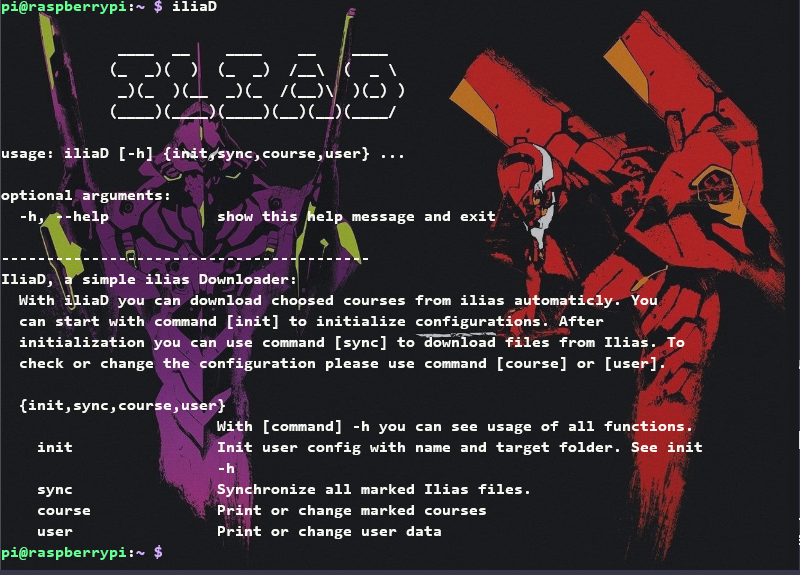
$ iliaD
♦ Requirement if using source code
beautifulsoup4==4.9.0
bs4==0.0.1
requests==2.23.0
urllib3==1.25.9
soupsieve==2.0
texttable==1.6.2
Usage
♦ Initiate
iliaD init
or
iliaD init -name uxxxx -target path/of/target
For the first time to use you should use command init to initiate the user information. Follow the constructions you can set your user name in form "uxxxx", the password and the path of target directory.
iliaD course
After user data initiated, you can use command course to choose courses to be downloaded. Or you can use command sync to choose courses and download the directly.
♦ Synchronize
iliaD sync
Use command sync you can synchronize new files. The exist file will not be changed. Only new file in ilias will be downloaded to the folder.
♦ Check user data and edit
iliaD user
or
iliaD course
Use command user to check and edit the user name, target directory and password. Use command course to check and edit marked courses.
Commands
| Command | Usage |
|---|---|
init |
Init user config with name and target folder |
sync |
Synchronize all marked Ilias files |
user |
Print or change user data |
course |
Print or change marked courses |
Automatic daliy synchronize
If you have a raspberry pi or any Unix computer, you can do the following instructions to synchronize the ilias folder with your cloud storage.
- Download the iliaD .
- Download rclone .
- Bind rclone with your cloud storage.
- Initiate the iliaD, set the target directory (e.g.
/home/pi/Onedrive/SS20/) - Open crontab: with
crontab -ein terminal - Add following instructions:
00 05 * * * iliaD sync >> /path/of/iliaD.log 2>&130 05 * * * rclone -v copy path/of/target/directory/ path_of_cloud >> path/of/rclone.log 2>&1
With the seetings, your raspberry pi will synchronize the ilias folder, download new files at 5:00 am. and upload them in your cloud storage at 5:30 am.
1 maintainer

Metadata
1 maintainer
Release files for iliaDownloader 1.1.5
For a detailed explanation of source distributions (sdists) and built distributions (wheels), please see the package formats documentation.
Source distribution (sdist)
| File | Size | Uploaded | |
|---|---|---|---|
| iliaDownloader-1.1.5.tar.gz | 24.0 kB | Details |
Built distribution (wheel)
| File | Interpreter | ABI | Platform | Reset |
|---|---|---|---|---|
| iliaDownloader-1.1.5-py2.py3-none-any.whl | Python 3, Python 2 | none | any | Details |
Total release size: 46.4 kB
Release files / iliaDownloader-1.1.5.tar.gz
| Download URL | iliaDownloader-1.1.5.tar.gz |
|---|---|
| Size | 24.0 kB |
| Tags | Source |
|
SHA-256 checksum How to use checksums |
1c6fe16a441e8cbcbbbdc2c208c756dfb19bff935fa9b3235a444e93cc3e7432
|
|
BLAKE2b-256 checksum How to use checksums |
4e5a28b1a61507560513ce8eb495d34459d45ef26081131155d40323e6d1b5c5
|
| Upload date | |
|
Uploaded using Trusted Publishing? What is trusted publishing? |
No |
| Uploaded via |
twine/3.4.1 importlib_metadata/4.0.1 pkginfo/1.7.0 requests/2.25.1 requests-toolbelt/0.9.1 tqdm/4.60.0 CPython/3.9.2
|
Release files / iliaDownloader-1.1.5-py2.py3-none-any.whl
| Download URL | iliaDownloader-1.1.5-py2.py3-none-any.whl |
|---|---|
| Size | 22.4 kB |
| Tags | Python 2 Python 3 |
|
SHA-256 checksum How to use checksums |
74e183ef3bc9df883bfeb60f88fa07bcae4098daa386818e5dce659adc0ac197
|
|
BLAKE2b-256 checksum How to use checksums |
f0ae87f701a23fe6f118a97fed78c15cdffacf7ea4c96b6c2d8364521678cd9d
|
| Upload date | |
|
Uploaded using Trusted Publishing? What is trusted publishing? |
No |
| Uploaded via |
twine/3.4.1 importlib_metadata/4.0.1 pkginfo/1.7.0 requests/2.25.1 requests-toolbelt/0.9.1 tqdm/4.60.0 CPython/3.9.2
|














