
Ilias Downloader UniMA
A simple python package to download files from https://ilias.uni-mannheim.de.
- Automatically synchronizes all files for each download. Only new or updated files and videos will be downloaded.
- Uses the BeautifulSoup package for scraping and the multiprocessing package to accelerate the download.
Install
Easy way via pip:
pip3 install iliasDownloaderUniMA
Otherwise you can clone or download this repo and then run
python3 setup.py install
inside the repo directory.
Usage
Starting from version 0.5.0, only your uni_id and your password is required. In general, a simple download script to download all files from the current semester looks like this:
from IliasDownloaderUniMA import IliasDownloaderUniMA

m = IliasDownloaderUniMA()
m.setParam('download_path', '/path/where/you/want/your/files/')
m.login('your_uni_id', 'your_password')
m.addAllSemesterCourses()
m.downloadAllFiles()
The method addAllSemesterCourses() adds all courses from the current semester
by default. But it's possible to modify the search behaviour by passing a regex
pattern for semester_pattern. Here are some examples:
# Add all courses from your ilias main page from year 2020:
m.addAllSemesterCourses(semester_pattern=r"\([A-Z]{2,3} 2020\)")
# Add all FSS/ST courses from your ilias main page:
m.addAllSemesterCourses(semester_pattern=r"\((FSS|ST) \d{4}\)")
# Add all HWS/WT courses from your ilias main page:
m.addAllSemesterCourses(semester_pattern=r"\((HWS|WT) \d{4}\)")
# Add all courses from your ilias main page. Even non-regular semester
# courses like 'License Information (Student University of Mannheim)',
# i.e. courses without a semester inside the course name:
m.addAllSemesterCourses(semester_pattern=r"\(.*\)")
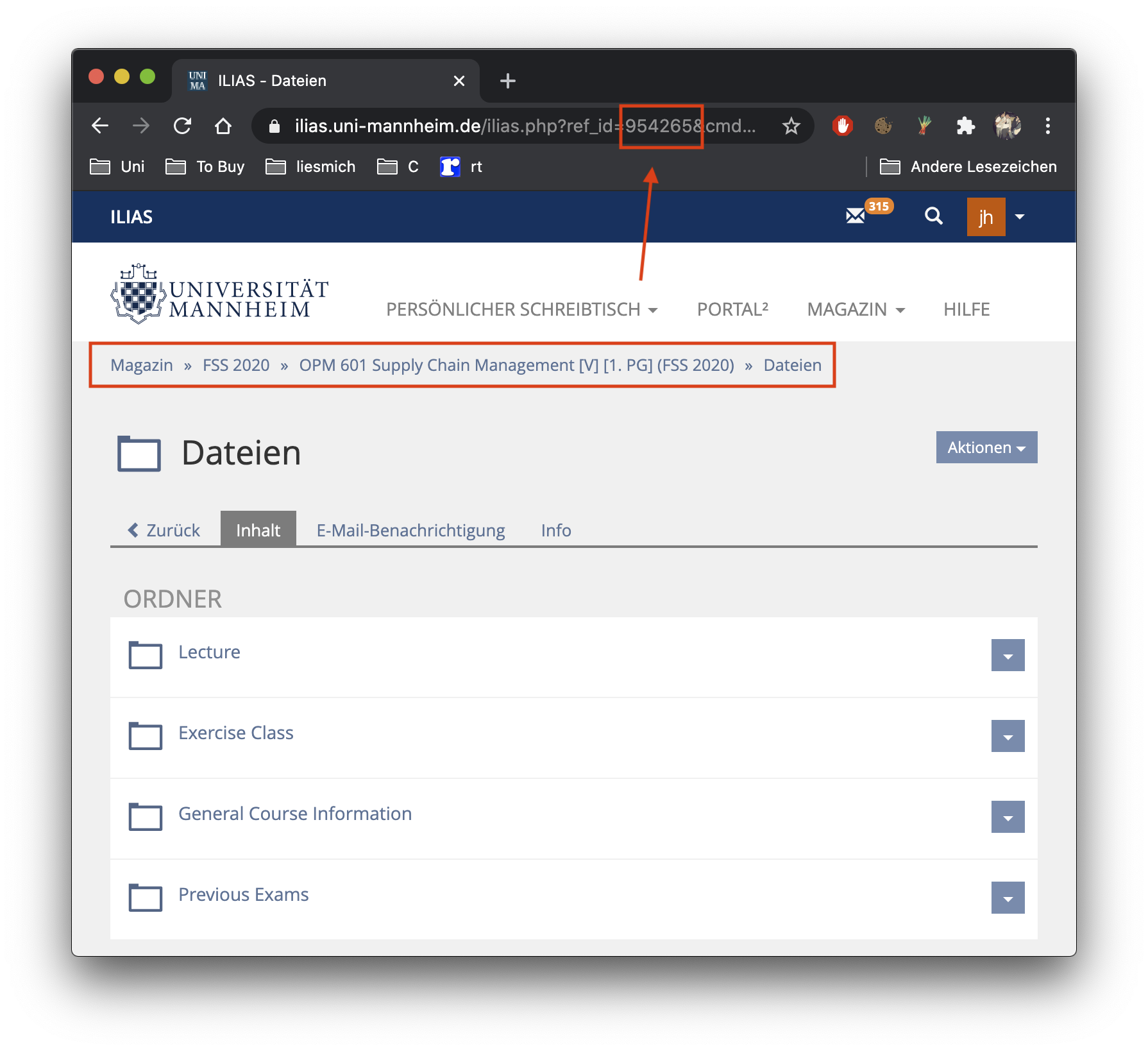
You can also exclude courses by passing a list of the corresponding ilias ref ids you want to exclude:
# Add all courses from your ilias main page. Even non-regular semester
# courses. Except the courses with the ref id 954265 or 965389.
m.addAllSemesterCourses(semester_pattern=r"\(.*\)", exclude_ids=[954265, 965389])
A more specific example:
from IliasDownloaderUniMA import IliasDownloaderUniMA

m = IliasDownloaderUniMA()
m.setParam('download_path', '/Users/jonathan/Desktop/')
m.login('jhelgert', 'my_password')
m.addAllSemesterCourses(exclude_ids=[1020946])
m.downloadAllFiles()
Note that the backslash \ is a special character inside a python string.
So on a windows machine it's necessary to use a raw string for the download_path:
m.setParam('download_path', r'C:\Users\jonathan\Desktop\')
Where do I get the course ref id?
Parameters
The Parameters can be set by the .setParam(param, value) method, where
param is one of the following parameters:
'num_scan_threads'number of threads used for scanning for files inside the folders (default: 5).'num_download_threads'number of threads used for downloading all files (default: 5).'download_path'the path all the files will be downloaded to (default: the current working directory).'tutor_mode'downloads all submissions for each task unit once the deadline has expired (default:False)'verbose'printing information while scanning the courses (default:False)
from IliasDownloaderUniMA import IliasDownloaderUniMA

m = IliasDownloaderUniMA()
m.setParam('download_path', '/Users/jonathan/Desktop/')
m.setParam('num_scan_threads', 20)
m.setParam('num_download_threads', 20)
m.setParam('tutor_mode', True)
m.login('jhelgert', 'my_password')
m.addAllSemesterCourses()
m.downloadAllFiles()
Advanced Usage
Since some lecturers don't use ILIAS, it's possible to use an
external scraper function via the addExternalScraper(fun, *args)
method. Here fun is the external scraper function and *args
are the corresponding variable number of arguments.
Note that's mandatory to use course_name as first function
argument for your scraper. Your external scraper is expected to
return a list of dicts with keys
# 'course': <the course name>
# 'type': 'file'
# 'name': <name of the parsed file>
# 'size': <file size (in mb) as float>
# 'mod-date': <the modification date as datetime object>
# 'url': <file url>
# 'path': <path where you want to download the file>
Here's an example:
from IliasDownloaderUniMA import IliasDownloaderUniMA
from urllib.parse import urljoin
from bs4 import BeautifulSoup
from dateparser import parse
import requests

def myExtScraper(course_name, url):
	"""
	Extracts all file links from the given url.
	"""
	files = []
	file_extensions = (".pdf", ".zip", ".tar.gz", ".cc", ".hh", ".cpp", ".h")
	soup = BeautifulSoup(requests.get(url).content, "lxml")
	for link in [i for i in soup.find_all(href=True) if i['href'].endswith(file_extensions)]:
			file_url = urljoin(url, link['href'])
			resp = requests.head(file_url)
			files.append({
					'course': course_name,
					'type': 'file',
					'name': file_url.split("/")[-1],
					'size': 1e-6 * float(resp.headers['Content-Length']),
					'mod-date': parse(resp.headers['Last-Modified']),
					'url': file_url,
					'path': course_name + '/'
				})
	return files

m = IliasDownloaderUniMA()
m.login("jhelgert", "my_password")
m.addAllSemesterCourses()
m.addExternalScraper(myExtScraper, "OOP for SC", "https://bit.ly/3kWi4tb")
m.downloadAllFiles()
Contribute
Feel free to contribute! :)
1 maintainer

Metadata
1 maintainer
Release files for IliasDownloaderUniMA 0.5.0
For a detailed explanation of source distributions (sdists) and built distributions (wheels), please see the package formats documentation.
Source distribution (sdist)
| File | Size | Uploaded | |
|---|---|---|---|
| IliasDownloaderUniMA-0.5.0.tar.gz | 9.2 kB | Details |
Built distribution (wheel)
| File | Interpreter | ABI | Platform | Reset |
|---|---|---|---|---|
| IliasDownloaderUniMA-0.5.0-py3-none-any.whl | Python 3 | none | any | Details |
Total release size: 19.4 kB
Release files / IliasDownloaderUniMA-0.5.0.tar.gz
| Download URL | IliasDownloaderUniMA-0.5.0.tar.gz |
|---|---|
| Size | 9.2 kB |
| Tags | Source |
|
SHA-256 checksum How to use checksums |
47eff579d78095af6e66ce1e4e7acdbf98aa86ad718a673ef0c5f0506823ff21
|
|
BLAKE2b-256 checksum How to use checksums |
6c85a42d4f27836754aaa16740209fa4039cb3fdab17ef6d1befeee4a9abcd93
|
| Upload date | |
|
Uploaded using Trusted Publishing? What is trusted publishing? |
No |
| Uploaded via |
twine/3.2.0 pkginfo/1.6.1 requests/2.24.0 setuptools/50.3.2 requests-toolbelt/0.9.1 tqdm/4.52.0 CPython/3.9.0
|
Release files / IliasDownloaderUniMA-0.5.0-py3-none-any.whl
| Download URL | IliasDownloaderUniMA-0.5.0-py3-none-any.whl |
|---|---|
| Size | 10.2 kB |
| Tags | Python 3 |
|
SHA-256 checksum How to use checksums |
dffdcb1f2cc7ceb35effbb51f44e9d981cff677f15cfae06a31644b6bc6ea835
|
|
BLAKE2b-256 checksum How to use checksums |
acdbe4e9ddfbbcf407c948dcc37740fbad5e6f3d7c472cf91ae25dde8b03534f
|
| Upload date | |
|
Uploaded using Trusted Publishing? What is trusted publishing? |
No |
| Uploaded via |
twine/3.2.0 pkginfo/1.6.1 requests/2.24.0 setuptools/50.3.2 requests-toolbelt/0.9.1 tqdm/4.52.0 CPython/3.9.0
|














