
IMDB-Trakt-Syncer
This Python script syncs user watchlist, ratings, reviews and watch history for Movies, TV Shows and Episodes both ways between Trakt and IMDB. Existing items will not be overwritten. Ratings, watchlist, comment/review & watch history sync are all optional. The user will be prompted to enter their settings and credentials on first run.
The script is compatible with operating systems that support Python (v3.6 or later) and Chromedriver (Windows, Linux and Mac). If you're interested in syncing ratings between Trakt, Plex, IMDB, and TMDB, I recommend the following projects: PlexTraktSync, IMDB-Trakt-Syncer, and TMDB-Trakt-Syncer. See below for my other recommended projects.
Installation Instructions
- Install Python (v3.6 or later). During Python installation, tick the box for adding Python to your PATH variable. If Python is already installed, you can skip this step.
- Install the script by executing
python -m pip install IMDBTraktSyncerin command line. - Login to Trakt and create a new API application named
IMDBTraktSyncer. In the "Redirect uri" field, enterurn:ietf:wg:oauth:2.0:oob, then save the application. - Run the script by executing
IMDBTraktSyncerin the command line. - Follow the prompts during the first run. You will need to enter your Trakt
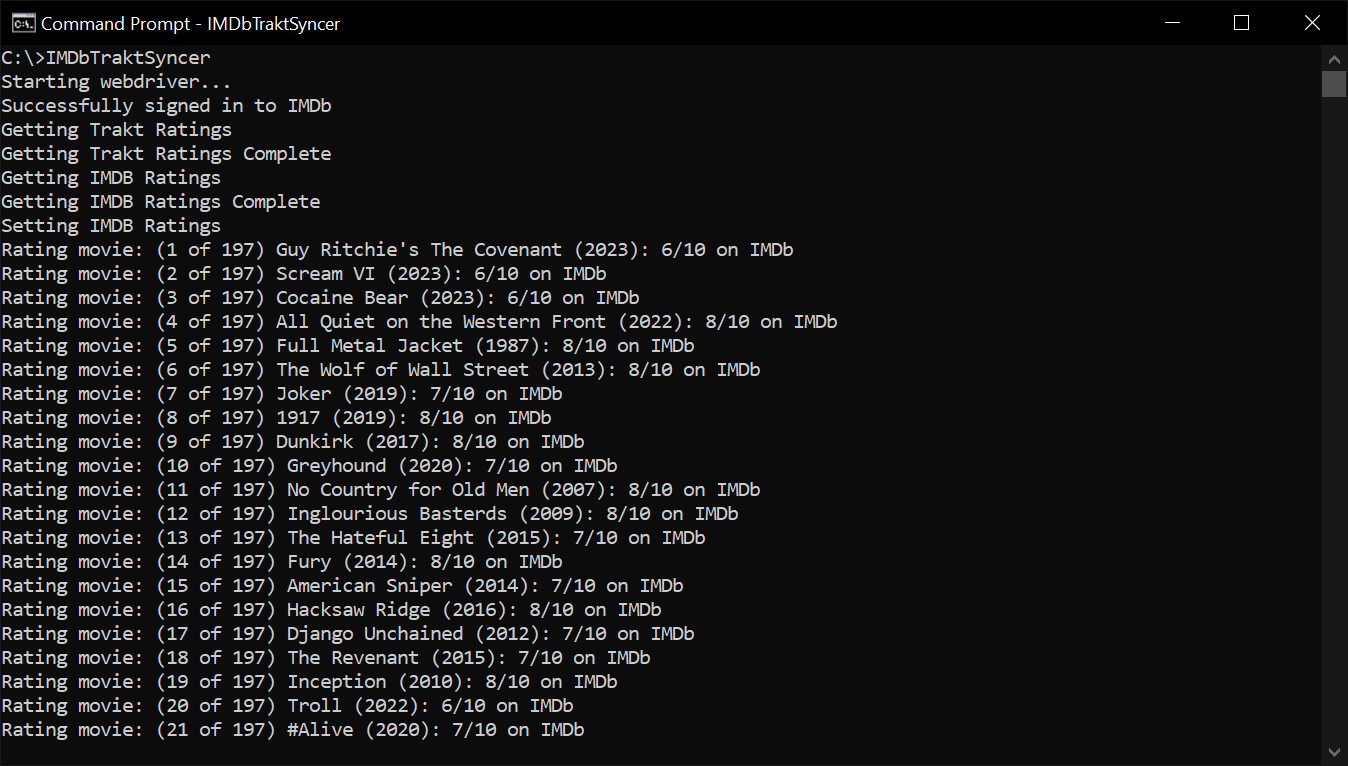
client IDandclient secretfrom step 3, as well as your IMDBusernameandpassword. Please note that these details are saved insecurely ascredentials.txtin the same folder as the script. It is recommended to change your IMDB password to something unique beforehand. - Setup is complete. The script will continue running and syncing your ratings. You can monitor its progress in the command line. See below for setting up automation.
Installing the Script:
python -m pip install IMDBTraktSyncer
Run in your operating system's native command line.
Running the Script:
IMDBTraktSyncer
Run in your operating system's native command line.
Updating the Script:
python -m pip install IMDBTraktSyncer --upgrade
Run in your operating system's native command line.
Uninstalling the Script:
IMDBTraktSyncer --uninstall
Clears cached browsers and drivers before uninstalling. Run in your operating system's native command line.
Installing a Specific Version:
python -m pip install IMDBTraktSyncer==VERSION_NUMBER
Replace VERSION_NUMBER with your desired version (e.g. 3.1.0) and run in your operating system's native command line.
Performing a Clean Uninstall:
IMDBTraktSyncer --clean-uninstall
Clears all cached data, inluding user credentials, cached browsers and drivers before uninstalling. Run in your operating system's native command line.
Uninstall With Native Python Method:
python -m pip uninstall IMDBTraktSyncer
Not recommended unless other uninstall methods failed. This method leaves behind any cached data such as user entered credentials, cached browsers, and drivers which can be deleted manually from your install directory. Run in your operating system's native command line.
Commands for IMDBTraktSyncer
Below is a list of available commands for this package, along with a brief description of their functionality. You can copy and paste them directly into your terminal.
Available Commands
| Command | Description |
|---|---|
--help |
List available commands |
--clear-user-data |
Clears user-entered credentials. |
--clear-cache |
Clears cached browsers, drivers, and error logs. |
--uninstall |
Clears cached browsers and drivers before uninstalling. |
--clean-uninstall |
Clears all cached data, including user credentials, cached browsers, and drivers before uninstalling. |
--directory |
Prints the package install directory. |
Usage Example
Run the following commands as needed:
# List available commands
IMDBTraktSyncer --help

# To clear user data
IMDBTraktSyncer --clear-user-data

# To clear cache
IMDBTraktSyncer --clear-cache

# To uninstall
IMDBTraktSyncer --uninstall

# To perform a clean uninstall
IMDBTraktSyncer --clean-uninstall

# To get the installation directory
IMDBTraktSyncer --directory

# Use multiple commands at once
IMDBTraktSyncer --clear-user-data --clear-cache
Alternative Manual Installation Method (without pip install)
- Install Python (v3.6 or later). During Python installation, tick the box for adding Python to your PATH variable. If Python is already installed, you can skip this step.
- Download the latest .zip from the releases page and extract it to the desired directory.
- Open your operating systems native command line interface, use it to navigate to the extracted folder and run
python -m pip install requirements.txt. - Login to Trakt and create a new API application named
IMDBTraktSyncer. In the "Redirect uri" field, enterurn:ietf:wg:oauth:2.0:oob, then save the application. - Run
IMDBTraktSyncer.pyor open the terminal and navigate to the folder whereIMDBTraktSyncer.pyis located. RunIMDBTraktSyncer.pyin the terminal. - Follow the prompts during the first run. You will need to enter your Trakt
client IDandclient secretfrom step 3, as well as your IMDBusernameandpassword. Please note that these details are saved insecurely ascredentials.txtin the same folder as the script. It is recommended to change your IMDB password to something unique beforehand. - Setup is complete. The script will continue running and syncing your ratings. You can monitor its progress in the command line. See below for setting up automation.
For Setting Up Automation See the Following Wiki Pages:
- Setup Automation for:
- Python Script to Update all Packages with Pip (Windows, Linux, Mac, ChromeOS, etc.) Link #1
Troubleshooting, Known Issues, Workarounds & Future Outlook
- If any of your details change (passwords, logins, API keys, etc.), simply run
IMDBTraktSyncer --clear-user-datato reset your credentials. Alternatively, opencredentials.txt, modify your details, save it and then run the script again. You can also simply deletecredentials.txtto reset the script and it will prompt you to enter your new details on the next run. - If IMDB requires a captcha on login, and you see "Not signed in" appear in the script, the captcha is likely the cause. To fix this, navigate to the IMDB website in your browser (preferably Chrome) from the same computer. If you're already logged in, log out and log back in. It may ask you to fill in a captcha. Complete the captcha and finish logging in. After successfully logging in on your browser, run the script again, and it should work. You may need to repeat this step several times if the issue persists. Adding a captcha solver to the script is being considered but not currently implemented. Issue #2
- Due to IMDB's lack of API and rating import ability, this script uses an unconventional method that mimics using a web browser to set ratings on IMDB. Therefore, there are many points of failure that could arise. The script will be updated as best as possible.
Screenshot
Sponsorships, Donations, and Custom Projects
If you find my scripts helpful, you can become a sponsor and support my projects! If you need help with a project, open an issue, and I'll do my best to assist you. For other inquiries and custom projects, you can contact me on Twitter.
More Donation Options:
Also Posted On

Other Recommended Projects:
| Project Name | Description |
|---|---|
| PlexTraktSync | A script that syncs user watch history and ratings between Trakt and Plex (without needing a PlexPass or Trakt VIP subscription). |
| IMDB-Trakt-Syncer | A script that syncs user watchlist, ratings, reviews and watch history both ways between Trakt and IMDB. |
| TMDB-Trakt-Syncer | A script that syncs user watchlist and ratings both ways between Trakt and TMDB. |
| PlexPreferNonForcedSubs | A script that sets all movies and shows in your local Plex library to English non-forced subtitles by default. |
| Casvt / AudioSubChanger | A script with advanced options for changing audio & subtitle tracks in Plex. |
| Casvt / PlexAutoDelete | A script for automatically deleting watched content from Plex. |
| universal-trakt-scrobbler | An extension that automatically scrobbles TV shows and Movies from several streaming services to Trakt. |
| Netflix-to-Trakt-Import | A tool to import your Netflix viewing history into Trakt. |
| trakt-tv-backup | A command-line tool for backing up your Trakt.tv data. |
| blacktwin / JBOPS | A collection of scripts and tools for enhancing and automating tasks in Plex. |
| Casvt / Plex-scripts | A collection of useful scripts for Plex automation and management. |
| trakt---letterboxd-import | A tool to import your Letterboxd ratings and watchlist into Trakt. |
| TraktRater | A tool to help users transfer user episode, show, and movie user ratings and watchlists from multiple media database sites around the web. |
| TvTimeToTrakt | A tool to sync your TV Time watch history with Trakt.tv. |
| Plex Media Server | A media server software to organize and stream your personal media collection. |
| Radarr | A movie collection manager and downloader for various platforms. |
| Sonarr | A TV show collection manager and downloader for various platforms. |
| Jackett | A proxy server that provides API support for various torrent trackers commonly used with Radarr and Sonarr. |
| qBittorrent | A free and open-source BitTorrent client. |
| AirVPN | A VPN client with port forwarding support. Great VPN for torrents. |
| Overseerr | A request management and media discovery tool for your home media server. |
| FlareSolverr | A reverse proxy solution to bypass Cloudflare protection and access websites commonly used with Jackett. |
| th-ch/youtube-music | A lightweight and feature-rich desktop client for YouTube Music, offering additional features like ad-blocking, sponsorblock and customizable themes. |
| ReVanced | A community-driven project to modify and enhance YouTube and other apps on Android, offering features such as ad-blocking, background playback, and other advanced customization options. |
| uBlock Origin Chrome / Firefox | A powerful, open-source browser extension for blocking ads, trackers, and other unwanted content. |
| SponsorBlock Chrome / Firefox | A browser extension that automatically skips sponsored segments in YouTube videos. |
| Enhancer for YouTube Chrome / Firefox | A browser extension that adds a wide range of customization options and playback enhancements for YouTube, including the ability to force playback resolution. |
| Return YouTube Dislike Chrome / Firefox | A browser extension that restores the dislike count on YouTube videos. |
1 maintainer

Metadata
1 maintainer
Release files for IMDBTraktSyncer 3.5.4
For a detailed explanation of source distributions (sdists) and built distributions (wheels), please see the package formats documentation.
Source distribution (sdist)
| File | Size | Uploaded | Provenance | Actions |
|---|---|---|---|---|
| imdbtraktsyncer-3.5.4.tar.gz | 49.2 kB | Without provenance | Details for imdbtraktsyncer-3.5.4.tar.gz |
Built distribution (wheel)
| File | Interpreter | ABI | Platform | Actions Reset |
|---|---|---|---|---|
| imdbtraktsyncer-3.5.4-py3-none-any.whl | Python 3 | none | any | Details for imdbtraktsyncer-3.5.4-py3-none-any.whl |
Total release size: 99.3 kB
Release files / imdbtraktsyncer-3.5.4.tar.gz
| Download URL | imdbtraktsyncer-3.5.4.tar.gz |
|---|---|
| Size | 49.2 kB |
| Tags | Source |
|
SHA-256 checksum How to use checksums |
877800187e9e34778550b4766840c086a2d46aed5b9df68091191f149bb3360d
|
|
BLAKE2b-256 checksum How to use checksums |
3e32849e57e383b1c143bf951e910aca30fa22db1133e37a6c538b754414b43e
|
| Upload date | |
|
Uploaded using Trusted Publishing? What is trusted publishing? |
No |
| Uploaded via |
twine/6.1.0 CPython/3.12.0
|
Release files / imdbtraktsyncer-3.5.4-py3-none-any.whl
| Download URL | imdbtraktsyncer-3.5.4-py3-none-any.whl |
|---|---|
| Size | 50.1 kB |
| Tags | Python 3 |
|
SHA-256 checksum How to use checksums |
20b9921bd5fa31ed38608a944d2803f7921d16a4f4313fecc4777f8cf4423b20
|
|
BLAKE2b-256 checksum How to use checksums |
615363b5bba93c4fc28e4000f02f4003d6637e2868b62481fd76195e4907402e
|
| Upload date | |
|
Uploaded using Trusted Publishing? What is trusted publishing? |
No |
| Uploaded via |
twine/6.1.0 CPython/3.12.0
|
Security for IMDBTraktSyncer 3.5.4
Provenance
Provenance describes where a file came from. On PyPI, provenance is shared via attestations, which provide a verifiable record of the build or publishing details. View details, limitations and caveats.
No provenance found
None of the files in this release were uploaded with provenance metadata.
A note on package security
PyPI is a repository for distributing packages, not a service for auditing them. While third-party security researchers and our staff do their best to detect and remove malicious packages, PyPI cannot guarantee the quality, security or suitability of any given package.
To learn more about protecting yourself from malicious actors, visit our package security documentation.














