
imshowtools



This library lets you view images in Jupyter notebooks in a much simpler and intuitive way. Ships with a better 'imshow' function with Multi Images, Smart Wrap and BGR support!.
Installation
To install imshowtools, simply do
pip install imshowtools
Quick Plot
Import imshow from imshowtools and use it:
from imshowtools import imshow
import tensorflow as tf
(x_train, y_train), (x_test, y_test) = tf.keras.datasets.mnist.load_data()

imshow(x_train[0])
imshow(x_train[0], x_train[1], x_train[2])
imshow(*x_train[:20], cmap='binary')
imshow(*x_train[:100], cmap='binary', size=(10, 10))
You can use any matplotlib compatible cmap
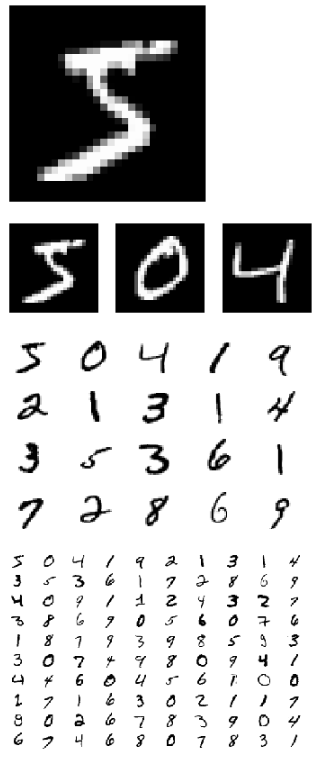
Example ipynb notebook and Python along with test images provided in the example folder.
Get Numpy Image
You can use obtain numpy image in any of ['RGB', 'RGBA', 'ARGB', 'BW', 'L', "BGR", "BGRA", "ABGR"] colorspaces.
image = imshow(*x_train[:100], return_image=True)
image = imshow(*x_train[:100], return_image="RGBA")
image = imshow(*x_train[:100], return_image="RGB")
image = imshow(*x_train[:100], return_image="BW")
print(image.shape)

# cv2.imwrite("saved_sample.png", image)
# do stuff with 'image' or even
# imshow(image)
Output:
(288, 432, 3)
(288, 432, 4)
(288, 432, 3)
(288, 432)
Rows and Columns
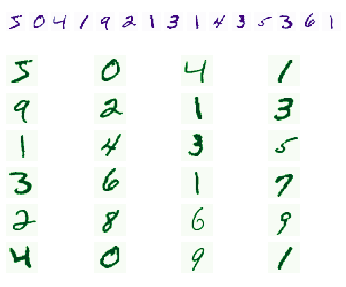
imshow(*x_train[:15], cmap='Purples', rows=1)
imshow(*x_train[:24], cmap='Greens', columns=4)
Open CV Images
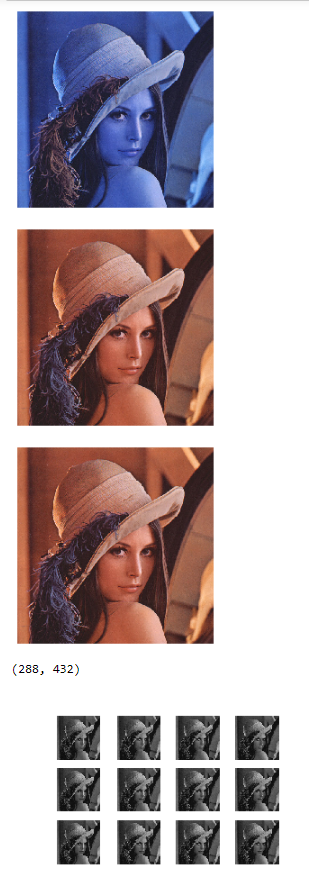
lenna = cv2.imread('example/lenna.png')
imshow(lenna)
cvshow(lenna)
imshow(lenna, mode='BGR')

image = imshow(*[lenna for _ in range(12)], return_image="BW")
print(image.shape)
imshow(image)
Namespaces
If you do not want to use imshow directly in your app (maybe you have another function named imshow), you shall use it like
import imshowtools
imshowtools.imshow(your_image)
or if you like to use a custom namespace
import imshowtools as my_namespace
my_namespace.imshow(your_image)
Contributing
Pull requests are very welcome.
- Fork the repo
- Create new branch with feature name as branch name
- Check if things work with a jupyter notebook
- Raise a pull request
Licence
Please see attached Licence
1 maintainer

Metadata
1 maintainer
Release files for imshowtools 0.6.5
For a detailed explanation of source distributions (sdists) and built distributions (wheels), please see the package formats documentation.
Source distribution (sdist)
| File | Size | Uploaded | |
|---|---|---|---|
| imshowtools-0.6.5.tar.gz | 5.8 kB | Details |
Built distribution (wheel)
| File | Interpreter | ABI | Platform | Reset |
|---|---|---|---|---|
| imshowtools-0.6.5-py3-none-any.whl | Python 3 | none | any | Details |
Total release size: 13.2 kB
Release files / imshowtools-0.6.5.tar.gz
| Download URL | imshowtools-0.6.5.tar.gz |
|---|---|
| Size | 5.8 kB |
| Tags | Source |
|
SHA-256 checksum How to use checksums |
84120ff5c93b74a9740c0a5135ca4e9dfd765021342deedc1f65b50366e6e9d0
|
|
BLAKE2b-256 checksum How to use checksums |
6a6573a495e6598cf0842fda16ff597354e767393698d159677e94650e63ba4b
|
| Upload date | |
|
Uploaded using Trusted Publishing? What is trusted publishing? |
No |
| Uploaded via |
twine/2.0.0 pkginfo/1.5.0.1 requests/2.22.0 setuptools/41.4.0 requests-toolbelt/0.9.1 tqdm/4.36.1 CPython/3.7.4
|
Release files / imshowtools-0.6.5-py3-none-any.whl
| Download URL | imshowtools-0.6.5-py3-none-any.whl |
|---|---|
| Size | 7.4 kB |
| Tags | Python 3 |
|
SHA-256 checksum How to use checksums |
99da2bda708182b0c1a80e41f0647f4a2f2a3f8b28b8c08df3f8a3d96c207060
|
|
BLAKE2b-256 checksum How to use checksums |
7fa06a86b0333ad87fe27aeb00c1432eb45720a07f4e362b0cccad389a4cabe9
|
| Upload date | |
|
Uploaded using Trusted Publishing? What is trusted publishing? |
No |
| Uploaded via |
twine/2.0.0 pkginfo/1.5.0.1 requests/2.22.0 setuptools/41.4.0 requests-toolbelt/0.9.1 tqdm/4.36.1 CPython/3.7.4
|














