
Run any Hugging Face GGUF model on your own GPU — TUI only. Type `inferhost` and you're done.
Verified details
These details have been verified by PyPIProject links
GitHub Statistics
Maintainers

Project description
inferhost
📖 Full documentation: https://amirrouh.github.io/inferhost/
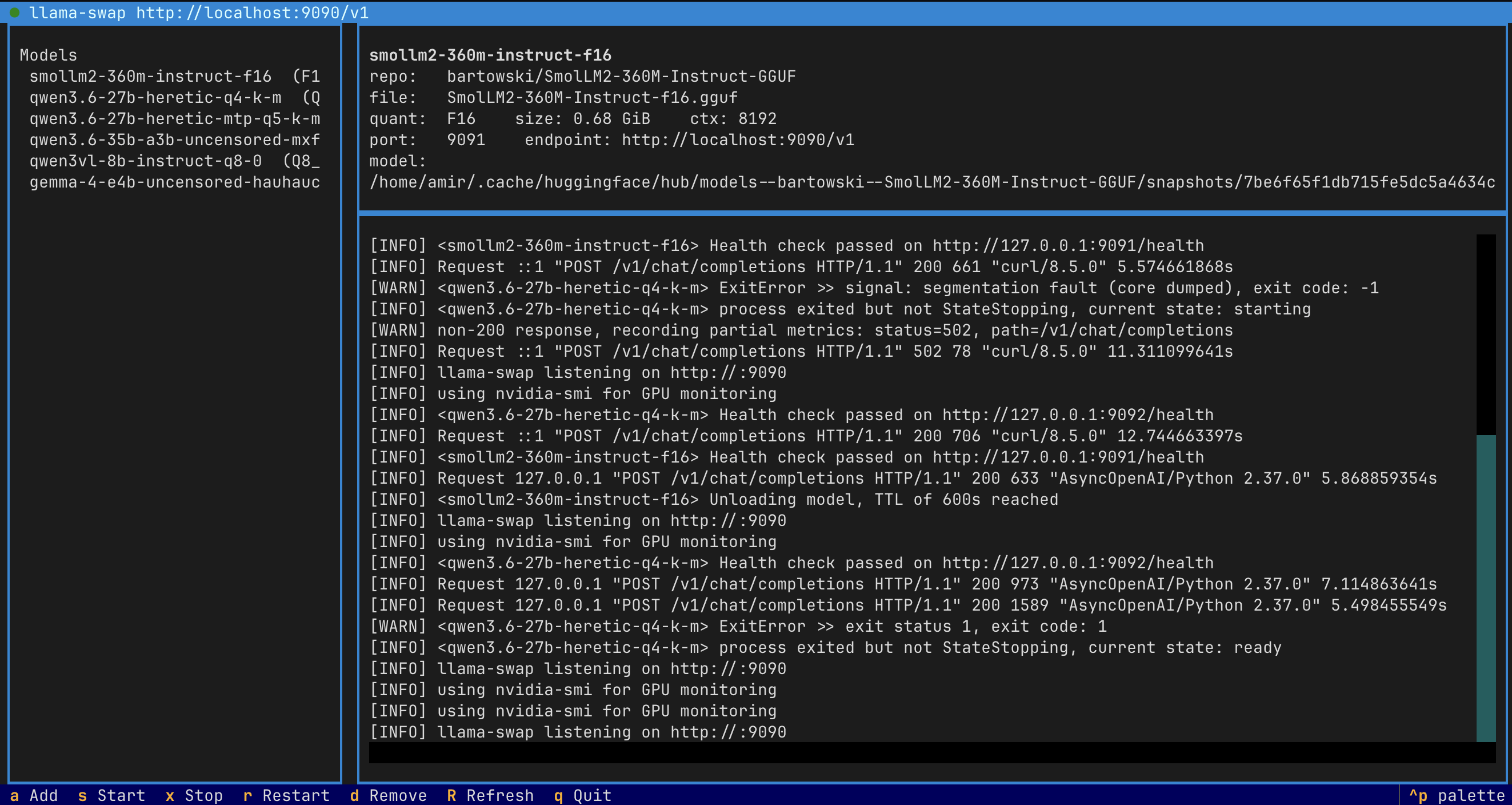
Run any Hugging Face GGUF model on your own machine — TUI only. inferhost is a small Python framework that wraps llama.cpp, llama-swap, and (optionally) LiteLLM behind a single Textual TUI. Point it at a Hugging Face repository and it returns an OpenAI-compatible endpoint.
pip install inferhost
inferhost
That's it. The first launch downloads the runtime binaries (llama-server + llama-swap) for you with a progress bar; then the dashboard opens and you can add, start, stop, and inspect models from the keyboard.
What it does
- One-key serving of any GGUF model published on Hugging Face.
- Automatic quantization selection based on available VRAM (
Q6 → Q5 → Q4 → IQ4fallback). - OpenAI-compatible API out of the box, including tool calling and vision
for any GGUF that ships an
mmproj-*.gguf(auto-downloaded alongside the main file). - Stacked speculative decoding for MTP-capable models — combines llama.cpp's
--spec-type draft-mtpwith--spec-type ngram-modso MTP handles novel tokens while ngram-mod dominates on repeated patterns (code, function names, etc.). - Multi-model support via llama-swap, which lazy-loads model backends on demand.
- Auto-detected hardware: NVIDIA via Vulkan, AMD via ROCm, Intel via SYCL/OpenVINO, or CPU.
- Live download progress for both runtime binaries and Hugging Face model files.
- Full control from the TUI — change ports, edit context size and GPU layers, set a per-model context window, rename a model's public alias, toggle the LiteLLM gateway, watch status of every daemon. No editor, no YAML, no extra commands.
- All defaults still overridable through environment variables or a
.envfile — the TUI just writes another.envfile at~/.config/inferhost/inferhost.envso your changes survive restarts.
Installation
Requirements: Python 3.11+, Linux or macOS. NVIDIA, AMD, Intel, or Apple Silicon GPUs are auto-detected; CPU-only is supported.
# Recommended
uv tool install inferhost

# Or with pip
pip install inferhost

# With the LiteLLM gateway (unified endpoint + routing + aliases)
pip install 'inferhost[gateway]'
Usage
There is exactly one command:
inferhost
This opens the TUI. On first launch it downloads llama-server and llama-swap with a progress bar. Afterward you land on the dashboard.
Keys
| Key | Action |
|---|---|
a |
Add a Hugging Face model (downloads the GGUF + any mmproj-*.gguf for vision) |
n |
Rename the highlighted model's public alias (regenerates llama-swap + LiteLLM configs) |
c |
Configure the highlighted model: per-model context window (-c) and KV cache quant (-ctk/-ctv) |
d / Delete |
Remove the highlighted model from the registry |
s |
Start llama-swap |
x |
Stop llama-swap |
r |
Restart llama-swap |
g |
Toggle the LiteLLM gateway on/off |
p |
Open the Settings panel (ports, context, GPU layers, flash attention) |
R |
Refresh |
q |
Quit |
The top of the dashboard always shows the running state of both the llama-swap
and the (optional) litellm daemon, plus a one-line summary of every setting
currently in effect.
Adding a model
Press a, type a Hugging Face repo id (e.g. Qwen/Qwen2.5-7B-Instruct-GGUF), and press Enter. The TUI lists the available GGUF files, marks the recommended quant for your hardware, and shows a live progress bar while it downloads. The model is registered against llama-swap and ready to serve.
Configuring a model (per-model context + KV cache quant)
The global default_ctx (in Settings) applies to newly added models, but you
can override it per-model. Highlight a model and press c to open the
per-model settings panel, where you can edit:
- Context window (
-c) — tokens per request for this model. - KV cache type K / V (
-ctk/-ctv) — quantization of the KV cache. Leave blank for llama.cpp's default (f16).q8_0is near-lossless and roughly halves KV memory;q4_0cuts it ~4× but starts to bite on long contexts. The smallest near-lossless way to fit a larger ctx into the same VRAM is-ctk q8_0 -ctv q8_0.
inferhost saves the values to the registry, re-renders llama-swap.yaml, and
reloads any running daemon so the new flags take effect immediately.
Renaming a model
The name shown in the model list is also the value clients send as the OpenAI
model field. Press n to change it. inferhost rewrites the llama-swap and
LiteLLM configs in one shot and, if llama-swap is running, restarts it so the new
alias is reachable immediately. No need to edit any YAML by hand.
Changing ports and other settings
Press p to open the Settings panel. You can edit swap_port, gateway_port,
default_ctx, gpu_layers, and flash_attention directly. Saving writes a
managed env file at ~/.config/inferhost/inferhost.env, so your changes persist
across restarts. Press r afterwards to restart llama-swap with the new values.
Endpoint
The dashboard shows the current OpenAI-compatible endpoint, e.g. http://localhost:9090/v1. Use the model name column in any OpenAI client:
curl http://localhost:9090/v1/chat/completions \
  -H "Content-Type: application/json" \
  -d '{
    "model": "qwen2.5-7b-instruct-q4-k-m",
    "messages": [{"role": "user", "content": "Hello"}]
  }'
Configuration
Every setting is overridable through environment variables or a .env file in the working directory. Copy .env.example for the full list.
| Variable | Default | Purpose |
|---|---|---|
INFERHOST_SWAP_PORT |
9090 |
llama-swap listen port (user-facing OpenAI endpoint). |
INFERHOST_GATEWAY_PORT |
9001 |
LiteLLM gateway port when enabled. |
INFERHOST_DATA_DIR |
~/.local/share/inferhost |
Binaries, logs, and PID files. |
INFERHOST_CONFIG_DIR |
~/.config/inferhost |
Model registry and generated YAML. |
INFERHOST_HF_CACHE |
~/.cache/huggingface |
Hugging Face model cache. |
INFERHOST_GPU_LAYERS |
99 |
-ngl value passed to llama-server. |
INFERHOST_DEFAULT_CTX |
8192 |
Default context length for new models. |
INFERHOST_FLASH_ATTENTION |
on |
-fa flag for llama-server. |
INFERHOST_PARALLEL_SLOTS |
1 |
--parallel flag — concurrent request slots per llama-server instance. 1 = serial. |
INFERHOST_LLAMACPP_BACKEND |
auto | Force a backend: vulkan, cuda, rocm, sycl, openvino, or cpu. |
INFERHOST_LLAMACPP_VERSION |
latest |
Pin a specific llama.cpp release tag. |
INFERHOST_LLAMASWAP_VERSION |
latest |
Pin a specific llama-swap release tag. |
INFERHOST_SPEC_DRAFT_N_MAX |
2 |
MTP draft tokens per step (only used on MTP-capable models). Set to 0 to disable the MTP lane. |
INFERHOST_SPEC_NGRAM_MOD_N_MATCH |
24 |
Minimum matching sequence length before ngram-mod drafts. |
INFERHOST_SPEC_NGRAM_MOD_N_MIN |
48 |
Minimum context window ngram-mod searches back through. |
INFERHOST_SPEC_NGRAM_MOD_N_MAX |
64 |
Max draft tokens ngram-mod proposes on a strong match. Set to 0 to disable the ngram-mod lane. |
Architecture
   Client                inferhost                       Inference
   ------                ---------                       ---------
   Your app  --HTTP-->   llama-swap        spawns/kills  llama-server
                         :9090                           (llama.cpp)
                            ^
                            |
                  (optional) LiteLLM
                         :9001
- llama.cpp runs the inference (using a prebuilt Vulkan, CUDA, ROCm, SYCL, OpenVINO, or CPU binary, whichever fits the host).
- llama-swap sits in front of multiple llama-server instances and lazy-loads them on demand.
- LiteLLM (optional) provides a unified gateway with friendly aliases, routing, rate limits, and fallbacks across local and hosted providers.
Development
The repo ships a run.sh wrapper for source-tree work:
git clone git@github.com:amirrouh/inferhost.git
cd inferhost
./run.sh install     # creates venv, installs in editable mode
./run.sh start       # launches the TUI (downloads binaries on first run)
./run.sh status      # headless status print
./run.sh stop        # stop daemons
./run.sh test        # run pytest
Run ./run.sh help for the full list. End users do not need run.sh — they only ever type inferhost.
License
Apache 2.0
Project details
Verified details
These details have been verified by PyPIProject links
GitHub Statistics
Maintainers
Release history Release notifications | RSS feed


Download files
Download the file for your platform. If you're not sure which to choose, learn more about installing packages.
Source Distribution
Built Distribution
Filter files by name, interpreter, ABI, and platform.
If you're not sure about the file name format, learn more about wheel file names.
Copy a direct link to the current filters
File details
Details for the file inferhost-0.4.2.tar.gz.
File metadata
- Download URL: inferhost-0.4.2.tar.gz
- Upload date:
- Size: 488.8 kB
- Tags: Source
- Uploaded using Trusted Publishing? Yes
- Uploaded via: twine/6.1.0 CPython/3.13.12
File hashes
| Algorithm | Hash digest | |
|---|---|---|
| SHA256 |
c4eb8f464adac6f53ced47578a0334b8de77f9e541061b5a22edf601e00c3233
|
|
| MD5 |
a4b7b28e040c19af592b9d50429b1a28
|
|
| BLAKE2b-256 |
1fcd454057053c7e958ee3af2aa8f84dad5e0666ba0218123db3dcb9ef444750
|
Provenance
The following attestation bundles were made for inferhost-0.4.2.tar.gz:
Publisher:
publish.yml on amirrouh/inferhost
-
Statement:
-
Statement type:
https://in-toto.io/Statement/v1 -
Predicate type:
https://docs.pypi.org/attestations/publish/v1 -
Subject name:
inferhost-0.4.2.tar.gz -
Subject digest:
c4eb8f464adac6f53ced47578a0334b8de77f9e541061b5a22edf601e00c3233 - Sigstore transparency entry: 1595917975
- Sigstore integration time:
-
Permalink:
amirrouh/inferhost@351e70c6e41099f806c1ad31707daa0a1b1475fb -
Branch / Tag:
refs/tags/v0.4.2 - Owner: https://github.com/amirrouh
-
Access:
public
-
Token Issuer:
https://token.actions.githubusercontent.com -
Runner Environment:
github-hosted -
Publication workflow:
publish.yml@351e70c6e41099f806c1ad31707daa0a1b1475fb -
Trigger Event:
push
-
Statement type:
File details
Details for the file inferhost-0.4.2-py3-none-any.whl.
File metadata
- Download URL: inferhost-0.4.2-py3-none-any.whl
- Upload date:
- Size: 45.6 kB
- Tags: Python 3
- Uploaded using Trusted Publishing? Yes
- Uploaded via: twine/6.1.0 CPython/3.13.12
File hashes
| Algorithm | Hash digest | |
|---|---|---|
| SHA256 |
82dce95b6526ce0af2f85d0b52e29f4ad22935db4cb1b61f52e2d2bbb55442af
|
|
| MD5 |
8dfd94502f53a36d24bbfeebbd9a39b5
|
|
| BLAKE2b-256 |
14e07dc8a33253f83aa8624a9e69eced8e2d5b65ee0afbe20c1a930ddf226478
|
Provenance
The following attestation bundles were made for inferhost-0.4.2-py3-none-any.whl:
Publisher:
publish.yml on amirrouh/inferhost
-
Statement:
-
Statement type:
https://in-toto.io/Statement/v1 -
Predicate type:
https://docs.pypi.org/attestations/publish/v1 -
Subject name:
inferhost-0.4.2-py3-none-any.whl -
Subject digest:
82dce95b6526ce0af2f85d0b52e29f4ad22935db4cb1b61f52e2d2bbb55442af - Sigstore transparency entry: 1595918044
- Sigstore integration time:
-
Permalink:
amirrouh/inferhost@351e70c6e41099f806c1ad31707daa0a1b1475fb -
Branch / Tag:
refs/tags/v0.4.2 - Owner: https://github.com/amirrouh
-
Access:
public
-
Token Issuer:
https://token.actions.githubusercontent.com -
Runner Environment:
github-hosted -
Publication workflow:
publish.yml@351e70c6e41099f806c1ad31707daa0a1b1475fb -
Trigger Event:
push
-
Statement type:






