


Table of Contents
About the Tool
This is an Open Source AES Standard encrytion tool.
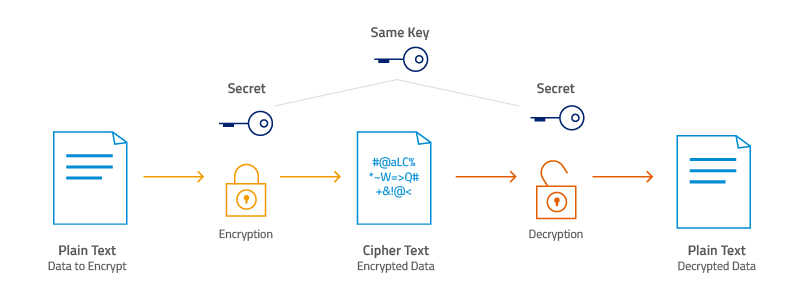
AES stands for Advanced Encrption Standard. It is a symmetric-key algorithm, meaning the same key is used for both encrypting and decrypting the data.
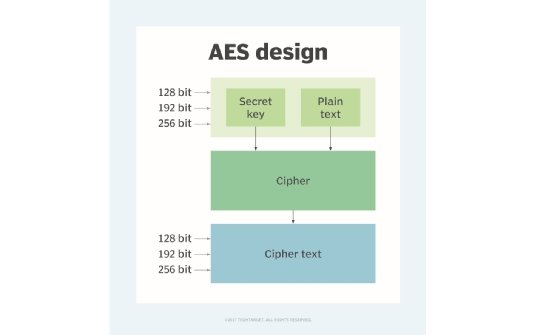
AES encryption has three different block ciphers: AES-128 (128 bit), AES-192 (192 bit) and AES-256 (256 bit). These block ciphers are named after the key length they use for encryption and decryption. All these ciphers encrypt and decrypt the data in 128-bit blocks but they use different sizes of cryptographic keys.
A file (temp_key.txt) for storing the encryption key(s) for file(s)/folder(s) encrypted using the tool is automatically created in the current working directory.
Always make sure to backup the encryption key if not the files cannot be reverted back....!!!
Built With
Getting Started
To run the tool locally,
- Clone the repository. For instructions to clone the repo proceed here.
- Follow these steps on your OS
- On Linux : Open the terminal and make sure that the present working directory(folder) is the same as the directory containg the File_Encryptor.py file. Check this using the following command
pwd
It will display the path of the current working directory. To display the files/folders in the working directory use the command
ls
To execute the program file use the command :
python3 File_Encryptor.py
Expected output

Working of the tool
File encryption


File decryption

Prerequisites
- Python3
It is preinstalled in Ubuntu 20.04. To check the version use command :
python3 --version
If it is not preinstalled for some reason, proceed here and download as per requirement.
- requirements.txt
Run the following command in terminal to download the required packags for running the tool locally :
pip install -r requirements.txt
Contributing
- Fork the Project
- Create your Feature Branch (git checkout -b feature/aesEncryptionCode)
- Commit your Changes (git commit -m 'Add something')
- Push to the Branch (git push origin feature/aesEncryptionCode)
- Open a Pull Request
Follow the given commands or use the amazing GitHub GUI
Happy Contributing 😃
1 maintainer

Metadata
1 maintainer
Release files for InstaEncrypt 1.0
For a detailed explanation of source distributions (sdists) and built distributions (wheels), please see the package formats documentation.
Source distribution (sdist)
| File | Size | Uploaded | |
|---|---|---|---|
| InstaEncrypt-1.0.tar.gz | 5.3 kB | Details |
Built distribution (wheel)
| File | Interpreter | ABI | Platform | Reset |
|---|---|---|---|---|
| InstaEncrypt-1.0-py3-none-any.whl | Python 3 | none | any | Details |
Total release size: 11.5 kB
Release files / InstaEncrypt-1.0.tar.gz
| Download URL | InstaEncrypt-1.0.tar.gz |
|---|---|
| Size | 5.3 kB |
| Tags | Source |
|
SHA-256 checksum How to use checksums |
8d60b1ac164d28be0a45418c3af4c4ec311c7a486436084cd88315c30e168796
|
|
BLAKE2b-256 checksum How to use checksums |
8967b647679ee537ce9b25c7c1349b365290440672b63889b4d45811b2049623
|
| Upload date | |
|
Uploaded using Trusted Publishing? What is trusted publishing? |
No |
| Uploaded via |
twine/3.2.0 pkginfo/1.6.1 requests/2.24.0 setuptools/49.2.1 requests-toolbelt/0.9.1 tqdm/4.51.0 CPython/3.9.0
|
Release files / InstaEncrypt-1.0-py3-none-any.whl
| Download URL | InstaEncrypt-1.0-py3-none-any.whl |
|---|---|
| Size | 6.2 kB |
| Tags | Python 3 |
|
SHA-256 checksum How to use checksums |
09a4122c78f39f20abaf32347b4e9c87044ea34e4e31d229d0c8577a9d98d8da
|
|
BLAKE2b-256 checksum How to use checksums |
06415a1d3421c2b37c56d863317ca230634c19dd6032121216730e7f4fb12bd1
|
| Upload date | |
|
Uploaded using Trusted Publishing? What is trusted publishing? |
No |
| Uploaded via |
twine/3.2.0 pkginfo/1.6.1 requests/2.24.0 setuptools/49.2.1 requests-toolbelt/0.9.1 tqdm/4.51.0 CPython/3.9.0
|













