
Install process
For a better experience, check the docs: https://install-process.readthedocs.io/en/latest/index.html
A library to help you define your installation processes.
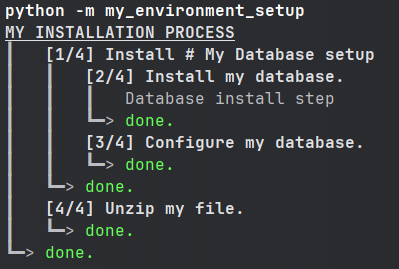
What is install_process ?
This library's goal is to help you create an installation process for any kind of application / environment.
With install_process, you can define your entire installation process as a couple of small "install-steps",
which are then executed one after the other.
When defining your install-steps, install_process also handles what needs to be done when you need to
uninstall/reinstall part or the entirety of your install-process.
This lib can be compared to tools like ANSIBLE, but for much simpler and local scopes (while still being easily callable with ANSIBLE if finally your project grows big enough).
This lib has no dependencies to be easily installed on computers without internet access.
This is an effort to replace old Windows/Linux scripts with Python scripts (check here for more details). It is tested on Linux/Windows (not tested on Mac — though it should probably work just fine).
Install
pip install install_process
Quick-start
Case
Let's suppose you need to set up your environment, and for that you need to:
- install an SQL database
- configure the database
- unzip a file at a certain location
You could use install_process to define:
- The database installation & uninstallation process
- the database install & uninstall
- the database configuration & revert to default config
- Unzip the file & remove the file
The code
Here's how you could do this using install_process:
# file: my_environment_setup.py

from install_process import InstallStep, InstallSteps, InstallProcess, setup_install


class InstallMyDatabase(InstallStep):  # The database installation & uninstallation process
  def install(self) -> None:
    """Install my database."""  # This docstring will actually be displayed during the installation process
    # do what's required to install your database here
    # you can display messages to users if you want
    self.display.msg('Database install step')
    # you can call shell commands such as ``self.shell('install mysql')``

  def uninstall(self) -> None:
    """Uninstall my database."""  # This docstring will actually be displayed during the uninstallation process
    # do what's required to uninstall your database here


class ConfigureMyDatabase(InstallStep):  # The database configuration & revert to default process
  def install(self) -> None:
    """Configure my database."""
    # do what's required to configure your database here

  def uninstall(self) -> None:
    """Revert my database configuration to default."""
    # do what's required to revert configuration here


class Database(InstallSteps):  # Let's regroup database-install & database-config under a same step (optional)
  """My Database setup"""  # This docstring will actually be displayed
  steps = [
    InstallMyDatabase(),
    ConfigureMyDatabase(),
  ]


class UnzipMyFile(InstallStep):  # Unzip the file & remove the file
  def install(self) -> None:
    """Unzip my file."""
    # unzip your file where required here

  def uninstall(self) -> None:
    """Remove my file."""
    # remove your file here


class SetupMyEnvironment(InstallProcess):  # Put everything together
  """MY INSTALLATION PROCESS"""  # This docstring will actually be displayed
  steps = [
    Database(),  # Database install & config
    UnzipMyFile(),  # File unzipping
  ]


if __name__ == '__main__':
  setup_install(SetupMyEnvironment)
Launch install, uninstall, reinstall
Now you can install your entire environment:
python -m my_environment_setup
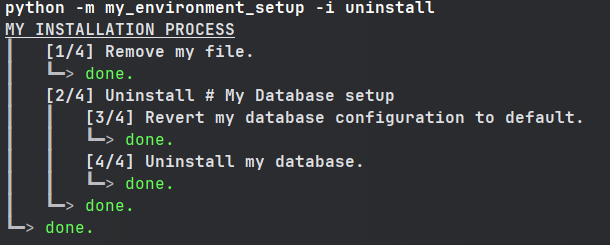
Uninstall your entire environment, using the -i option:
python -m my_environment_setup -i uninstall
Uninstall then install the entire environment:
python -m my_environment_setup -i reinstall
Re-install only a specific part
If you wish to only install/uninstall/reinstall a specific part of your environment, you can do so by providing the name of the step you want to install/uninstall/reinstall.
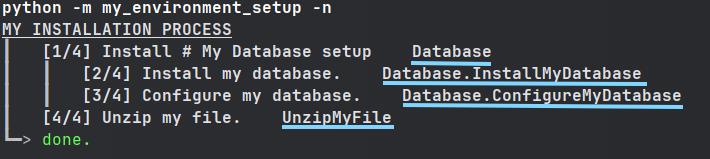
To get the name of all steps (this does not install or uninstall anything):
python -m my_environment_setup -n
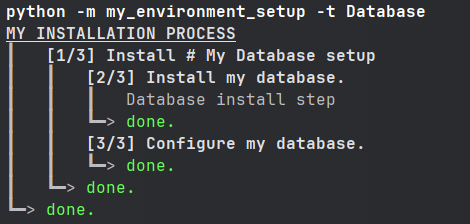
Then you can call only a subset of your installation process:
python -m my_environment_setup -t Database
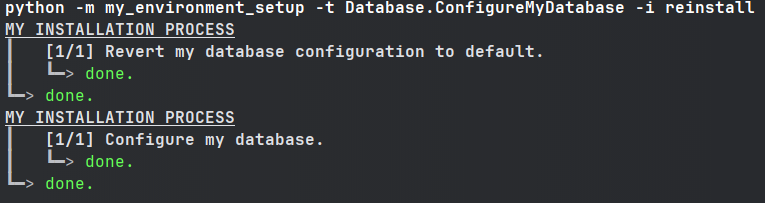
python -m my_environment_setup -t Database.ConfigureMyDatabase -i reinstall
1 maintainer

Metadata
1 maintainer
Release files for install-process 1.0.post0
For a detailed explanation of source distributions (sdists) and built distributions (wheels), please see the package formats documentation.
Source distribution (sdist)
| File | Size | Uploaded | |
|---|---|---|---|
| install_process-1.0.post0.tar.gz | 382.3 kB | Details |
Built distribution (wheel)
| File | Interpreter | ABI | Platform | Reset |
|---|---|---|---|---|
| install_process-1.0.post0-py3-none-any.whl | Python 3 | none | any | Details |
Total release size: 392.1 kB
Release files / install_process-1.0.post0.tar.gz
| Download URL | install_process-1.0.post0.tar.gz |
|---|---|
| Size | 382.3 kB |
| Tags | Source |
|
SHA-256 checksum How to use checksums |
6dde116fa68cc640185412d9cd969b3a15f55accd473d4fac5301a88a0f86eef
|
|
BLAKE2b-256 checksum How to use checksums |
70a70d33baa660ce19d9ff42736cd37a483a4639ed18fc356291e2f055ca6788
|
| Upload date | |
|
Uploaded using Trusted Publishing? What is trusted publishing? |
No |
| Uploaded via |
twine/5.1.1 CPython/3.12.2
|
Release files / install_process-1.0.post0-py3-none-any.whl
| Download URL | install_process-1.0.post0-py3-none-any.whl |
|---|---|
| Size | 9.7 kB |
| Tags | Python 3 |
|
SHA-256 checksum How to use checksums |
d75e2721ea98721efcb4971e7bc4a5f4d2924289c3ee88a67d647c6c2221407b
|
|
BLAKE2b-256 checksum How to use checksums |
a84c114902e0036e168c0bac04bfd172a30aeefd2675da711087ac280f572abe
|
| Upload date | |
|
Uploaded using Trusted Publishing? What is trusted publishing? |
No |
| Uploaded via |
twine/5.1.1 CPython/3.12.2
|














