
Ipyrest









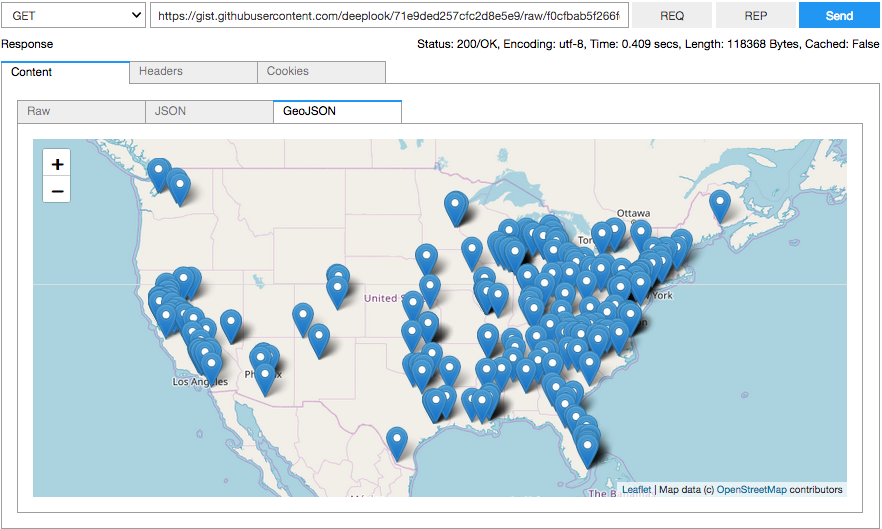
Ipyrest is an emerging Jupyter notebook widget for exploring RESTful APIs. It has two main goals: provide a more convenient interface in the spirit of Postman, and allow for plug-in components, starting with output renderers for various MIME types, e.g. GeoJSON, see below.
About
At its core ipyrest is a wrapper for the excellent requests package based on the equally excellent ipywidgets package. The idea is to provide more interactive exploration capabilities when working with RESTful APIs. It does so by letting you build requests for an API call and understand more quickly the responses you receive. To that end you can use existing views for requests and responses or build your own. It is inspired by Postman, but without the bloat, and goes beyond it to make sure you can extend it the way you want. In essence, it's for data scientists rather than web developers.
Example
from ipyrest import Api

# Fix content-type as it is not set for gists.
def reset_content_type(resp):
    resp.headers['Content-Type'] = 'application/vnd.geo+json'

url = 'https://gist.githubusercontent.com/' \
      'deeplook/71e9ded257cfc2d8e5e9/raw/f0cfbab5f266fcb8056e8aea046f1f222346b76b/2013.geojson'
Api(url, post_process_resp=reset_content_type)
Features
Ipyrest deals with the following concepts, implemented to varying degrees: HTTP Server, Service, Request, Response, Data, MIME-Types, Compression, Logging, Caching, Time-Outs, Errors, Views, Plugins, Testing, and UI.
At the moment the following plugins are available for rendering output from HTTP responses in common formats: Plain Text, CSV, HTML, Bitmaps, SVG, JSON, GeoJSON, GPX, Protobuf, (and some experimental 3D stuff).
The main dependencies are: Python >= 3.6, jupyter, ipywidgets, timeout_decorator, requests, and vcr. Plugin dependencies are: ipyleaflet, ipyvolume, geojson, qgrid, protobuf. Testing dependencies are flask, mypy, and pytest.
Installation
Released versions of ipyrest can be installed from PyPI with:
pip install ipyrest
Development versions of ipyrest can be installed either directly from GitHub or after downloading/cloning and unpacking like this in its top-level directory:
pip install git+https://github.com/deeplook/ipyrest

pip install -e .
Testing
Run pip install -r requirements_test.txt and PYTHONPATH=. pytest -s -v tests in the root directory. Some tests will automatically start a local flask webserver in tests/api_server.py which implements a set of sample API endpoints for local testing. And some of these tests need keys/tokens defined as environment variables for the respective APIs being tested. If not present these tests will be skipped.
Documentation
The docs folder is only a stub for now. At the moment it is recommended to look at examples/meetup.ipynb, mostly a tutorial-like collection of examples given as a presentation at a meetup. Some of these need appropriate API keys.
How to Contribute
- Check for open issues or open a fresh issue to start a discussion around a feature idea or a bug or example for some API (ideally without authentication), e.g. from the extensive collection of Public APIs.
- Fork the repository on GitHub to start making your changes to the master branch (or branch off of it).
- Write a test which shows that the bug was fixed or that the feature works as expected.
- Send a pull request and bug the maintainer until it gets merged and published. :) Make sure to add yourself to AUTHORS.
History
0.1.0 (2018-11-24):
- First release on PyPI.
0.1.1 (2018-11-25):
- Minor test refactoring.
- Minor code/text/formating changes.
- Minor packaging cleanup.
0.1.2 (2018-11-26):
- Finally rendering README.md on PyPI(?).
- Enable classic notebook extension for qgrid.
0.1.3 (2018-11-27):
- Minor text formatting issues.
0.1.4 (2019-01-28):
- Refactored test code partly into tools.py.
- Wrapped execute_request function as method in Api class.
1 maintainer

Metadata
1 maintainer
Release files for ipyrest 0.1.4
For a detailed explanation of source distributions (sdists) and built distributions (wheels), please see the package formats documentation.
Source distribution (sdist)
| File | Size | Uploaded | Provenance | |
|---|---|---|---|---|
| ipyrest-0.1.4.tar.gz | 75.1 kB | Without provenance | Details |
Built distribution (wheel)
| File | Interpreter | ABI | Platform | Reset |
|---|---|---|---|---|
| ipyrest-0.1.4-py2.py3-none-any.whl | Python 3, Python 2 | none | any | Details |
Total release size: 90.5 kB
Release files / ipyrest-0.1.4.tar.gz
| Download URL | ipyrest-0.1.4.tar.gz |
|---|---|
| Size | 75.1 kB |
| Tags | Source |
|
SHA-256 checksum How to use checksums |
30a2e921ffc210f795e4eeb3b39c64a9a35f84d9cfa8a2fbb046f64746e772f2
|
|
BLAKE2b-256 checksum How to use checksums |
2bab370d650ef6bca64fabb40cb2483439ec17a94dceb2e34cfd3164a65db9cf
|
| Upload date | |
|
Uploaded using Trusted Publishing? What is trusted publishing? |
No |
| Uploaded via |
twine/1.12.1 pkginfo/1.4.2 requests/2.21.0 setuptools/40.6.2 requests-toolbelt/0.8.0 tqdm/4.23.2 CPython/3.6.3
|
Release files / ipyrest-0.1.4-py2.py3-none-any.whl
| Download URL | ipyrest-0.1.4-py2.py3-none-any.whl |
|---|---|
| Size | 15.5 kB |
| Tags | Python 2 Python 3 |
|
SHA-256 checksum How to use checksums |
266b3785772a1d897dc76047561f24231179098a66518a9971dd5a7eb17b7b32
|
|
BLAKE2b-256 checksum How to use checksums |
1c6ab267b818d5185dba1245a869c6b9b64113839f32a4c6dbc026609e419f9d
|
| Upload date | |
|
Uploaded using Trusted Publishing? What is trusted publishing? |
No |
| Uploaded via |
twine/1.12.1 pkginfo/1.4.2 requests/2.21.0 setuptools/40.6.2 requests-toolbelt/0.8.0 tqdm/4.23.2 CPython/3.6.3
|
Security for ipyrest 0.1.4
Provenance
Provenance describes where a file came from. On PyPI, provenance is shared via attestations, which provide a verifiable record of the build or publishing details. View details, limitations and caveats.
No provenance found
None of the files in this release were uploaded with provenance metadata.
A note on package security
PyPI is a repository for distributing packages, not a service for auditing them. While third-party security researchers and our staff do their best to detect and remove malicious packages, PyPI cannot guarantee the quality, security or suitability of any given package.
To learn more about protecting yourself from malicious actors, visit our package security documentation.














