


Jedi is an autocompletion tool for Python that can be used in IDEs/editors. Jedi works. Jedi is fast. It understands all of the basic Python syntax elements including many builtin functions.
Additionaly, Jedi suports two different goto functions and has support for renaming as well as Pydoc support and some other IDE features.
Jedi uses a very simple API to connect with IDE’s. There’s a reference implementation as a VIM-Plugin, which uses Jedi’s autocompletion. I encourage you to use Jedi in your IDEs. It’s really easy. If there are any problems (also with licensing), just contact me.
Jedi can be used with the following plugins/software:
Here are some pictures:
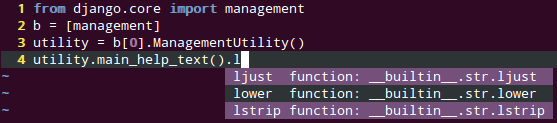
Completion for almost anything (Ctrl+Space).
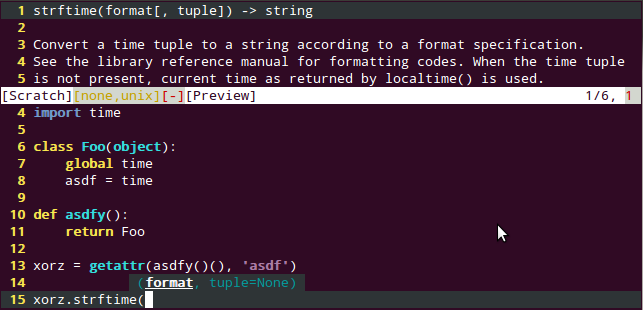
Display of function/class bodies, docstrings.
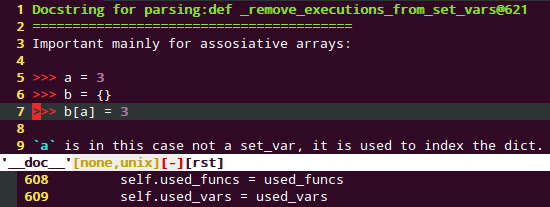
Pydoc support (with highlighting, Shift+k).
There is also support for goto and renaming.
Get the latest version from github (master branch should always be kind of stable/working).
Docs are available at https://jedi.readthedocs.org/. Pull requests with documentation enhancements and/or fixes are awesome and most welcome.
Jedi uses semantic versioning.
Installation
See https://jedi.readthedocs.org/en/latest/docs/installation.html
Note: This just installs the Jedi library, not the editor plugins. For information about how to make it work with your editor, refer to the corresponding documentation.
Feature Support and Caveats
Jedi really understands your Python code. For a comprehensive list what Jedi can do, see: https://jedi.readthedocs.org/en/latest/docs/features.html. A list of caveats can be found on the same page.
You can run Jedi on cPython 2.6, 2.7, 3.2 or 3.3, but it should also understand/parse code older than those versions.
Tips on how to use Jedi efficiently can be found here: https://jedi.readthedocs.org/en/latest/docs/recipes.html
A little history
See https://jedi.readthedocs.org/en/latest/docs/history.html
API for IDEs
It’s very easy to create an editor plugin that uses Jedi. See https://jedi.readthedocs.org/en/latest/docs/plugin-api.html for more information.
Testing
The test suite depends on tox and pytest:
pip install tox pytest
To run the tests for all supported Python versions:
tox
If you want to test only a specific Python version (e.g. Python 2.7), it’s as easy as
tox -e py27
Tests are also run automatically on Travis CI.
1 maintainer

Metadata
1 maintainer
Release files for jedi 0.6.0
For a detailed explanation of source distributions (sdists) and built distributions (wheels), please see the package formats documentation.
Source distribution (sdist)
| File | Size | Uploaded | |
|---|---|---|---|
| jedi-0.6.0.tar.gz | 96.7 kB | Details |
Release files / jedi-0.6.0.tar.gz
| Download URL | jedi-0.6.0.tar.gz |
|---|---|
| Size | 96.7 kB |
| Tags | Source |
|
SHA-256 checksum How to use checksums |
0f16c4249111e375c6c63e2b79243f8764ec6bd085bc1b214ff1fa64a2b2474c
|
|
BLAKE2b-256 checksum How to use checksums |
0edafb440b4dabfcbebde9522213abf1b0a49ca0164ee75b8cb611cfe674dfda
|
| Upload date | |
|
Uploaded using Trusted Publishing? What is trusted publishing? |
No |














