
Generate an html document containing all of the scripts and data to load tradingview and review the results

Project description
Jesse tradingview light reporting library
Generate an html document containing all of the scripts and data to load tradingview and review the results. This can be generated within a strategy at regular intervals to review the results live.
The library is published to pypi: https://pypi.org/project/JesseTradingViewLightReport/
So to install, from a command prompt where you would be running python:
pip install JesseTradingViewLightReport
Upgrade:
pip install JesseTradingViewLightReport --upgrade
To generate just the candlestick, volume, and order report - Add the following to your strategy:
import JesseTradingViewLightReport

	def terminate(self):
		JesseTradingViewLightReport.generateReport()
But you can also add custom data for example:
JesseTradingViewLightReport.generateReport(
	customData={
		"atr":{"data":self.atr, "options":{"pane":1, "colour":'rgba(251, 192, 45, 1)'}},
		'two':{"data":self.candles[:,1]-5, "options":{"pane":2}, "type":"HistogramSeries"},
		'three':{"data":self.candles[:,1]+5, "options":{"pane":2, "color":'purple'}}
	}
)
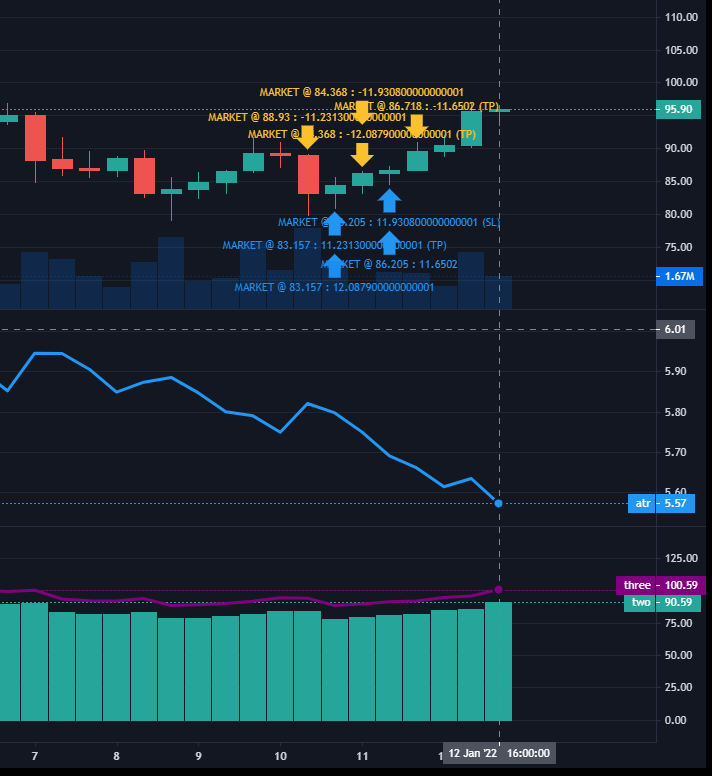
Available types are:
- LineSeries
- HistogramSeries
- AreaSeries
- BaselineSeries
You may be able to use:
- BarSeries
- CandlestickSeries
For more information on plot types and options see:
- https://tradingview.github.io/lightweight-charts/docs/series-types
- https://tradingview.github.io/lightweight-charts/docs/api
- https://www.tradingview.com/lightweight-charts/
For the moment, the data will need to be the same length as the number of candles you would receive from self.candles
The different panes can be resized by dragging them with the cursor.
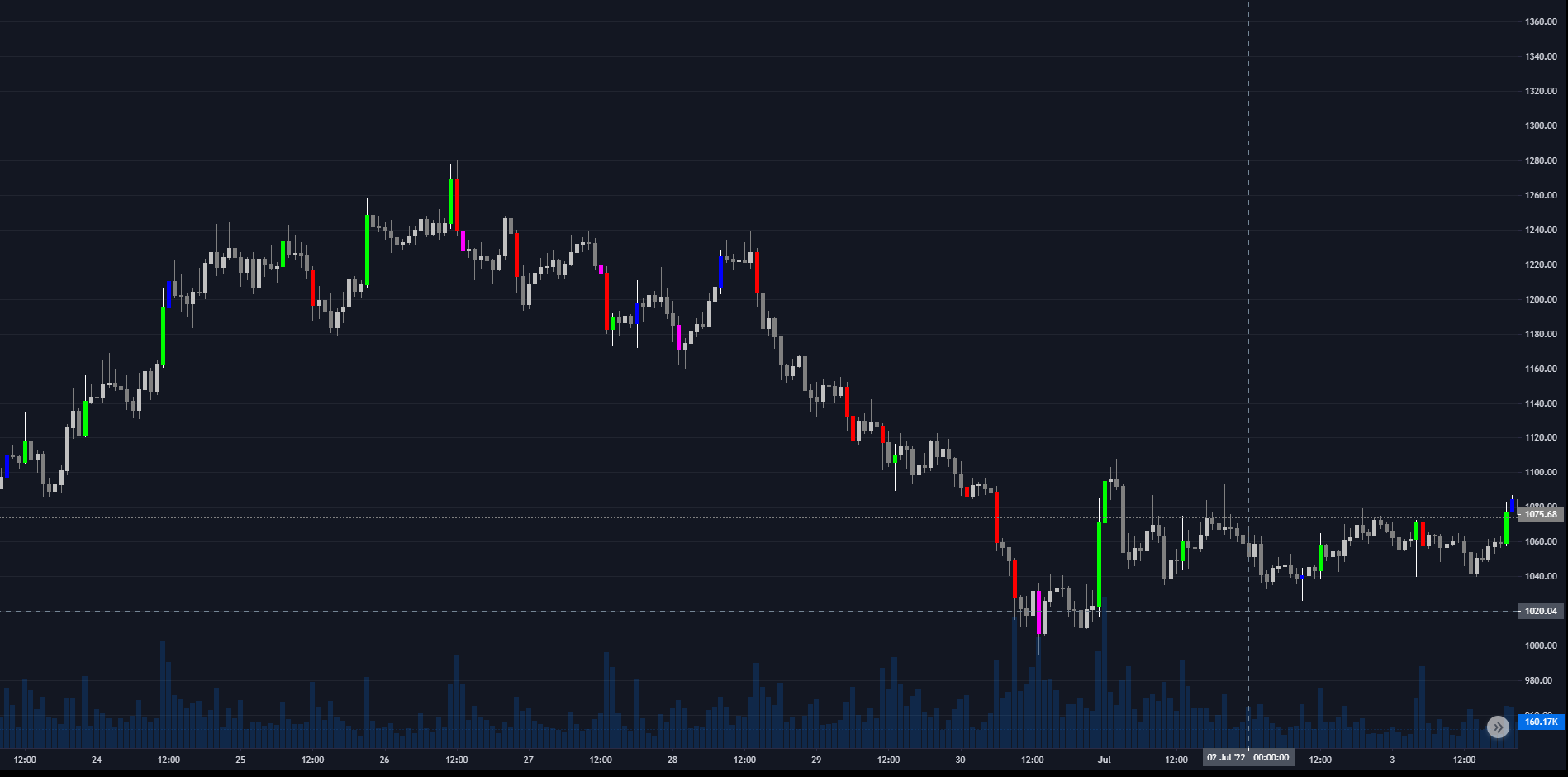
It is also possible to change the candle colors to PVSRA candles with the option:
JesseTradingViewLightReport.generateReport(chartConfig={'isPvsra':True})
However, at the moment it is not possible to use multiple panes with this option. This restiction will be removed in a future release.
It is possible to also plot the profit and loss with for example:
JesseTradingViewLightReport.generateReport(chartConfig={'pnl':True})
The generateReport function returns the relative location of the file. You can also find it inside where you're running the jesse strategy from there will be a folder called storage, inside that this plugin creates a folder called JesseTradingViewLightReport. Then each time you run a strategy with different parameters it will create a unique file called something like 77cbda27-6eec-48b6-90fb-621656d9e9d8.html
So in this example it'll be: c:/whereveryourunjesse/storage/JesseTradingViewLightReport/77cbda27-6eec-48b6-90fb-621656d9e9d8.html
CHANGELOG: 1.1.0 - added support for jesse 0.39.+, and added PNL calculation for all orders. With accumulated PNL plotting. 1.2.0 - Generate charts for live trading. 1.2.1 - Allow missing latest data in custom data. 1.2.2 - added trade ID to order data.
Release history Release notifications | RSS feed


Download files
Download the file for your platform. If you're not sure which to choose, learn more about installing packages.
Source Distribution
Built Distribution
Filter files by name, interpreter, ABI, and platform.
If you're not sure about the file name format, learn more about wheel file names.
Copy a direct link to the current filters
File details
Details for the file JesseTradingViewLightReport-1.2.2.tar.gz.
File metadata
- Download URL: JesseTradingViewLightReport-1.2.2.tar.gz
- Upload date:
- Size: 54.1 kB
- Tags: Source
- Uploaded using Trusted Publishing? No
- Uploaded via: twine/4.0.1 CPython/3.9.13
File hashes
| Algorithm | Hash digest | |
|---|---|---|
| SHA256 |
cb4b85355f4fcea6d458c33378d5467f86e6d6e0a63b31a0d9bd11bfabbad4f9
|
|
| MD5 |
17c4fe2f7ccdcddb9083f3ac5f40a097
|
|
| BLAKE2b-256 |
4e710f67b0ce4b32d65acfe018716d0e27a8d36a8773058ef47540905ff3a73b
|
File details
Details for the file JesseTradingViewLightReport-1.2.2-py3-none-any.whl.
File metadata
- Download URL: JesseTradingViewLightReport-1.2.2-py3-none-any.whl
- Upload date:
- Size: 50.4 kB
- Tags: Python 3
- Uploaded using Trusted Publishing? No
- Uploaded via: twine/4.0.1 CPython/3.9.13
File hashes
| Algorithm | Hash digest | |
|---|---|---|
| SHA256 |
efc1c73c9c5452325092c195ec7d6a84f7f06a085425a80256f39284fece2bc5
|
|
| MD5 |
7a65c8b9ea0d2e9316406a57f965f45c
|
|
| BLAKE2b-256 |
1c68a36b449caed4658731e84c524f94d266df59636b7aac382cab74ce510524
|






