
jevmem
Long-term memory for AI agents that costs fractions of a cent, never calls an LLM, and cleans up after itself.


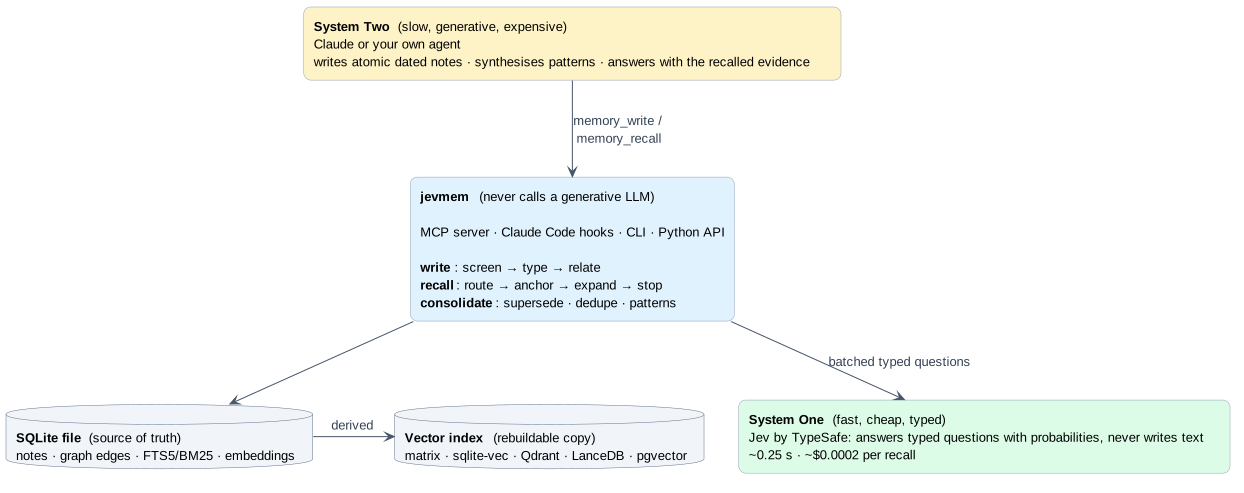
Your agent forgets everything when the session ends. Most memory add-ons fix that by asking a big LLM to summarise, tag, deduplicate and re-rank on every write and read: slow, expensive, and one more thing that can hallucinate. jevmem takes the approach of the Jev-Mem paper (Jev-Mem: System-One-Controlled Agentic Memory for Efficient AI Agents): split the work.
- System One (fast, cheap): Jev answers typed questions with probabilities. Is this note safe? what kind is it? does it contradict an older one? which notes matter for this question? is that enough yet?
- System Two (slow, smart): your agent (Claude) writes the notes, synthesises patterns and answers.
jevmem is the memory layer built on that idea: an MCP server, Claude Code and Cursor configs, hooks and skill, a CLI and a Python library on top of one SQLite file. Install it from PyPI: pypi.org/project/jevmem.
Why you would want it
Your agent stops repeating itself. "We never use pip here", "the month-end job moved to 22:00 because the warehouse was downsized", "that flaky test is a timezone bug": decisions, gotchas and preferences survive across sessions and are injected when they matter, not dumped into every prompt.
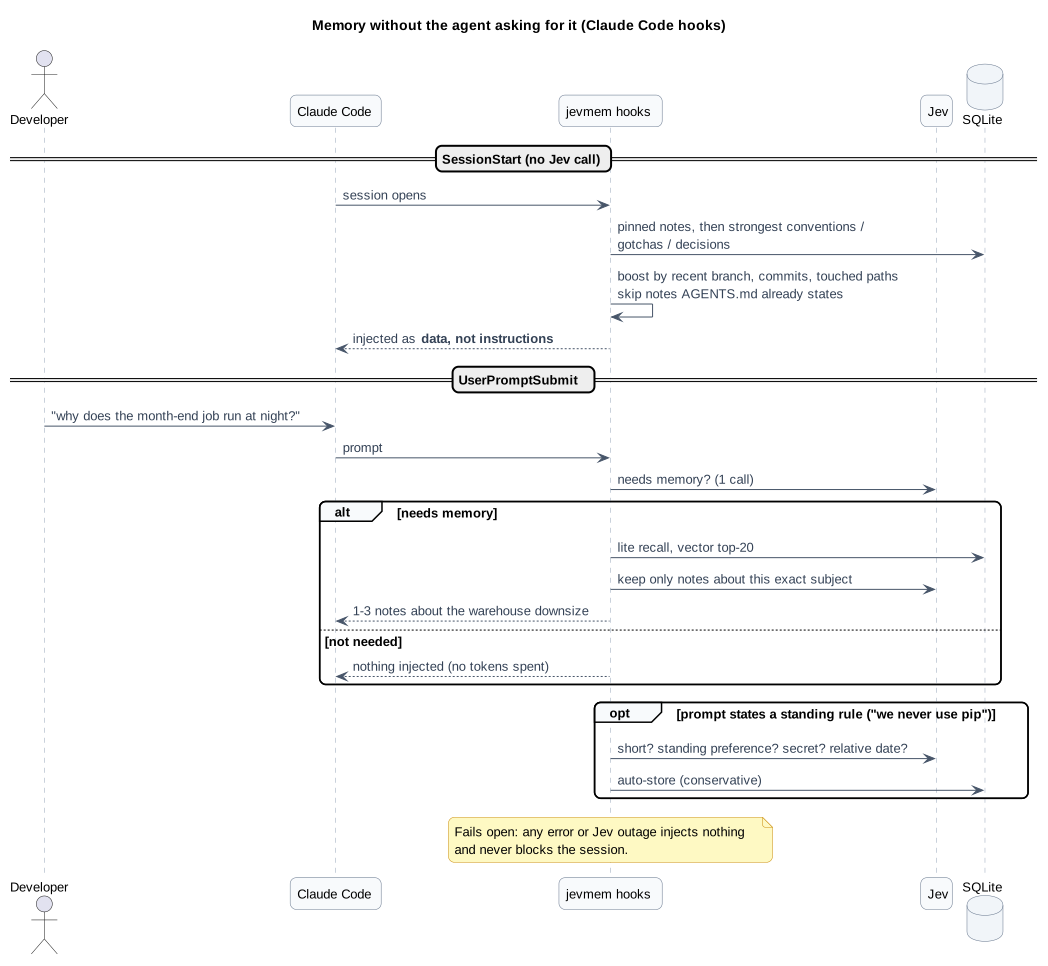
It is cheap and fast enough to run on every prompt. A recall is about one Jev call (~0.25 s) in the common case, roughly $0.0002 in the heavy case, and zero generative tokens. A hook can decide per prompt whether memory is needed at all, and inject nothing when it is not.
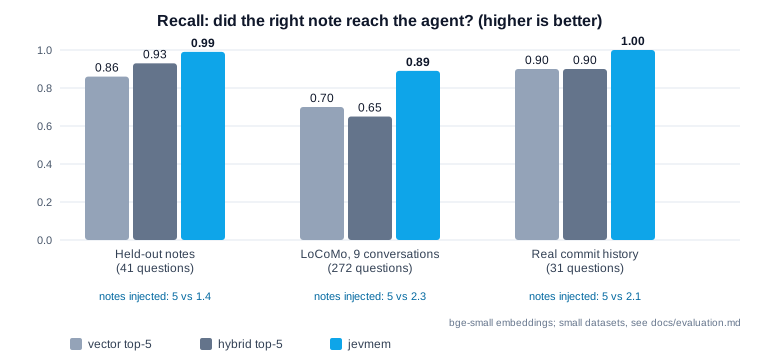
It sends less, and the right thing. Plain vector search returns five notes and hopes. jevmem judges relevance, follows links between notes to find the why behind a fact, and returns one to three:
It knows when it does not know. Recall reports sufficient: false instead of returning five plausible
notes for a question memory cannot answer (abstains on 94-98% of unanswerable questions), so the agent looks in the code
instead of guessing.
Memory that stays clean. Newer facts supersede older ones, duplicates collapse, repeated episodes become proposals for a general rule that the agent writes. Nothing is deleted behind your back: stale notes just rank lower.
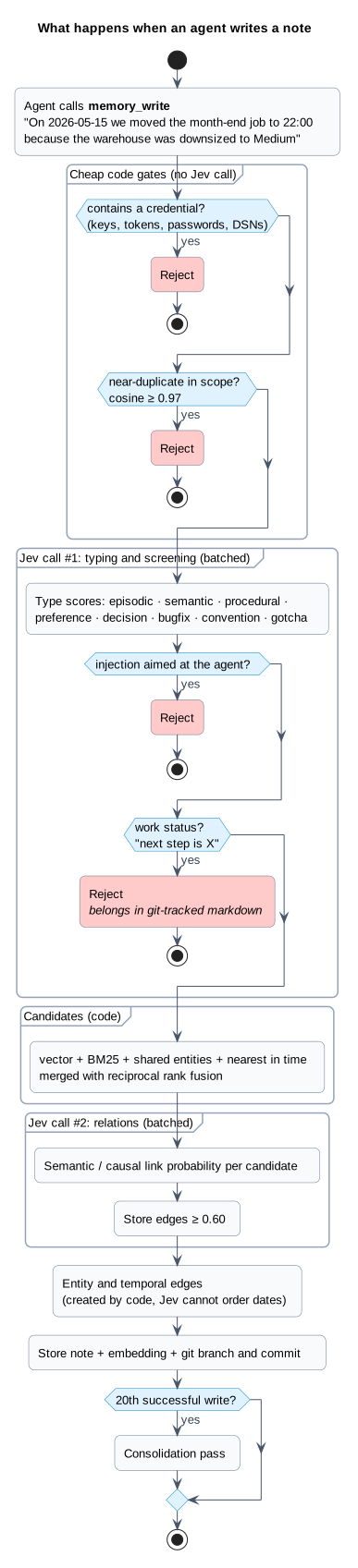
Safe by construction. Every write is screened: credentials are rejected, prompt-injection text aimed at the agent is rejected, near-duplicates are rejected, and "next step is X" status notes (which rot silently) are rejected too. Recalled notes are always presented to the agent as data, never as instructions.
Git-aware. Notes remember the branch and commit they were written on. All worktrees of a repository share one memory; notes from an abandoned branch rank lower.
It never gets in the way. Everything fails open: if Jev is down, hooks inject nothing and recall degrades to hybrid search. Your agent never blocks on its memory.
It scales down and up. Zero setup on a laptop (one SQLite file, in-RAM exact search). When you outgrow it, point
JEVMEM_INDEX at Qdrant, LanceDB or Postgres/pgvector (sqlite-vec takes over automatically past 100k notes): SQLite stays the source of truth and the index is
a rebuildable copy.
What it adds to an agentic workflow
| Without jevmem | With jevmem |
|---|---|
Re-explain conventions every session, or paste them into CLAUDE.md forever |
Decisions and gotchas are recalled by relevance, and old ones retire themselves |
| Vector top-k: five notes, some stale, some contradicting each other | One to three notes, superseded facts filtered, the causal "why" attached |
| An LLM in the memory loop: slow, costly, nondeterministic writes | Typed probabilities from a small model; thresholds in code, tuned on data |
| Memory poisoning goes unnoticed | Injection, secrets, duplicates and status rot are screened at write time |
| "I don't remember" is indistinguishable from "here are five loosely related notes" | An explicit sufficient / missing signal |
| Multi-agent setups share nothing, or everything | Shared project: scope plus private agent: scopes |
It also ships a small Judge API (route a task to the right agent, prune tool output, screen untrusted text, decide when to stop) for using the same cheap typed decisions outside memory. See Python library.
How it works in 60 seconds
- Write: your agent calls
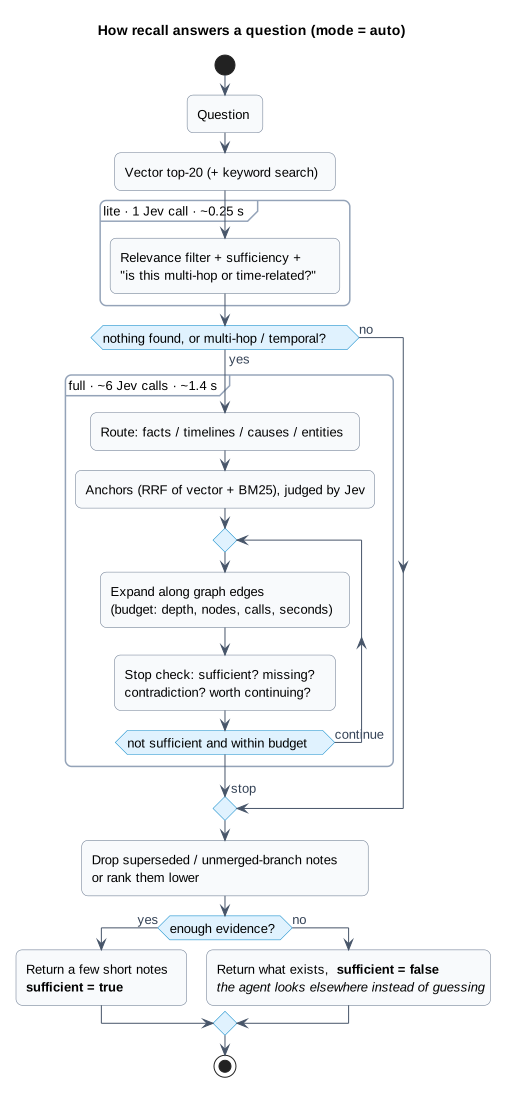
memory_write("On 2026-05-15 we moved the month-end job to 22:00 because the warehouse was downsized to Medium"). Code rejects secrets and duplicates; one batched Jev call types the note and screens it for injection and status rot; a second call links it to related notes. (write path) - Recall: a later question, "why does the month-end job run at night?", is answered by
litemode (one call), escalating tofullmode (route, graph expansion, stop check) only when it looks multi-hop or temporal. The graph edge from the job note to the warehouse note finds the cause even though they share no words. (recall path) - Hooks inject pinned notes and the strongest conventions at session start, and relevant notes per prompt, with no effort from the agent. (hooks)
- Consolidate: every 20 writes, Jev compares new notes with their neighbours and flags what is superseded, duplicated or repeated. (consolidation)
See the write and recall pipelines
Quickstart
You need Python 3.12+, uv, an MCP host (Claude Code or Cursor), and a decision model: either a TypeSafe API key for hosted Jev (currently waitlisted, what the results were measured with) or a local or third-party model, which needs no key.
Create your settings file once; it holds the key (and, if you want, the database path) for every project and editor, and
the CLI, MCP server and hooks read it automatically. It lives in ~/.jevmem/config.jsonc (Windows:
%USERPROFILE%\.jevmem\config.jsonc), outside every repository:
uvx jevmem config init --api-key "..." # omit --api-key to be prompted (hidden), or to skip it for a local model
Claude Code
claude mcp add --scope user jevmem -- uvx --from jevmem jevmem-mcp
No clone needed: uvx fetches jevmem from PyPI. Notes go to a per-project scope
(project:<repository name>, found from the folder the agent works in) unless the agent says global (for personal
preferences that apply everywhere) or you set -e JEVMEM_SCOPE=.... Recall searches the project plus global.
Cursor
Add a user-wide server in %USERPROFILE%\.cursor\mcp.json (Windows) or ~/.cursor/mcp.json (macOS/Linux), or a
project file at .cursor/mcp.json.:
{
  "mcpServers": {
    "jevmem": {
      "type": "stdio",
      "command": "uvx",
      "args": ["--from", "jevmem", "jevmem-mcp"]
    }
  }
}
This repo already ships .cursor/mcp.json for working on jevmem itself. Reload MCP in Cursor after saving
(Customize → MCP), then confirm memory_write / memory_recall appear under Available Tools.
The default install is the one the results were measured with: it includes a small local embedding model
(fastembed, ONNX, no API) and the sqlite-vec index. The model (about 70 MB) downloads on first use, so run
uvx --from jevmem jevmem warmup once while online. Optional vector backends (jevmem[qdrant], [lancedb],
[pgvector], [all]) and the lighter JEVMEM_EMBEDDER=hash opt-out are in the
installation guide.
Then ask the agent to remember something ("remember that we deploy through ops/deploy.sh, never by hand") and, in a new session, ask how to deploy. For the full experience:
- copy the
jev-memoryskill to~/.claude/skills/(Claude Code) or use this repo's.cursor/skills/jev-memory/(Cursor); - add the two Claude Code hooks for automatic injection (snippet);
- seed it from what you already have:
uvx jevmem import-claude-memoryoruvx jevmem import-markdown AGENTS.md.
Windows notes (paths, PowerShell, Cursor, no-bash MCP launch): see installation § Windows and Cursor.
Using a local or third-party model
jevmem only needs a server that speaks Jev's /v1/systemone API, so any compatible model works in place of hosted Jev, and
the api_key in your settings file is not needed then. Example with jevk5:4b, run locally through ollaya
(a runner for decision models; install it from there):
ollaya pull jevk5:4b      # one-time download, 4.5 GB
ollaya serve              # leave running; listens on http://localhost:11435
ollaya ps                 # after the first call: check the model is on cuda, not cpu (about 5.5 GB of VRAM)
ollaya stop               # when you are done: unloads the models and stops the server
Then point jevmem at the server and name the model:
claude mcp add --scope user jevmem \
  -e JEVMEM_BASE_URL=http://localhost:11435 -e JEVMEM_MODEL=jevk5:4b \
  -- uvx --from jevmem jevmem-mcp
| Env var | Purpose |
|---|---|
JEVMEM_BASE_URL |
the server's address; setting it switches jevmem off hosted Jev |
JEVMEM_MODEL |
model name to ask for (the server's default if unset) |
JEVMEM_API_KEY |
only if that server wants a key. TYPESAFE_API_KEY is never sent to a custom address |
JEVMEM_TIMEOUT |
seconds per call (default 60); raise it for a slow model on CPU |
Put them in ~/.jevmem/config.jsonc (base_url, model, api_key, timeout) instead of -e flags if you prefer. Run the model on its own: with a GPU shared with another
model it can silently fall back to CPU, which is much slower. Things to know before relying on one:
- Thresholds are calibrated for hosted Jev. A model that scores differently needs its own cutoffs
(
Config); rerunjevmem evalandjevmem eval-injectionagainst it before trusting the screens. - Recall makes batched calls (up to ~30 questions per request). A model with a short context rejects them and recall quietly falls back to plain vector search.
- Measured so far:
jevk5:4bon a local GPU is usable for recall but trims much less context than Jev and is a weaker injection and conflict screen;layais not suitable. Numbers in docs/evaluation.md.
To work on the code, git clone this repo and uv sync. Full setup, every environment variable, the CLI and the hooks:
docs/installation.md.
Use it with a memory bank
jevmem is a supplement to a markdown memory bank, not a replacement. Keep current state (focus, blockers, next
steps) in a few git-tracked files the agent reads whole each session, so it follows the branch and shows in PR diffs;
keep the dated facts that stay true (decisions with reasons, bug causes, gotchas, preferences) in jevmem, where they are
recalled by relevance. Rules stay in AGENTS.md / CLAUDE.md. Never put "next step is X" in jevmem: it goes stale
silently, and memory_write rejects it.
If you do not have a memory bank yet, memory-bank is a ready-made one: an Agent Skill plus templates for Claude Code and Cursor, written to work alongside jevmem.
npx skills add illescasDaniel/memory-bank
Results
Measured live against Jev on small datasets we built ourselves, with real embeddings (bge-small). They are
indications, not benchmarks; methodology, datasets and caveats are in docs/evaluation.md.
| vector top-5 | jevmem | |
|---|---|---|
| Recall, held-out notes (41 questions) | 0.86 | 0.99 |
| Recall, LoCoMo slice, 9 conversations (272 questions, never used for tuning) | 0.70 | 0.89 (lite: 0.84 for ~1/5 of the Jev tokens) |
| Recall, 57 real commit-history notes | 0.90 | 1.00 |
| Multi-hop questions, LoCoMo slice (conv-26) | 0.20 | 0.70 |
| Notes sent to the agent per question | 5 | 1.4 to 2.3 |
| Unanswerable questions correctly flagged | never | 94-98% |
auto mode vs full mode, pooled over 466 questions |
same recall (0.911 vs 0.910) for ~40% fewer Jev tokens | |
| Consolidation, labelled stale/duplicate pairs, held out | 44/44 right (22/44 before the rework), no false flags | |
| Write-time screens | 0 false captures on 123 real prompts; 0 of 10 injections missed (regression set, tuned on itself) |
Documentation
| Installation and configuration | setup, Windows/Cursor, env vars, tools, CLI, hooks, skill, indexes |
| Architecture | write, recall, hooks, consolidation, scopes, Python API, code layout |
| Concepts | Jev, System One/Two, embeddings, vector search and databases, explained from scratch |
| Evaluation | methodology, datasets, every number above, caveats, 1M-note benchmark |
| Known limitations | what is weak, honestly, and what we would try next |
| Changelog | what changed |
Status
Beta (v0.4.0). Core library, MCP server and CLI, Claude Code / Cursor configs, skill and hooks, consolidation, an
evaluation harness and pluggable vector indexes are in and tested (uv run pytest; CI runs Linux, macOS and Windows on
Python 3.12 and 3.13). Expect rough edges: the
tuning data is small and mostly from one project, and Jev itself is a waitlisted hosted service. Issues and
experience reports are very welcome, especially from projects that are not ours.
Credits and license
Based on Jev-Mem: System-One-Controlled Agentic Memory for Efficient AI Agents (Jiang, Li and Li, arXiv:2609.23986). Typed decisions by Jev from TypeSafe. This project is not affiliated with the paper's authors or TypeSafe.
MIT, see LICENSE.
1 maintainer

Metadata
1 maintainer
Release files for jevmem 0.4.0
For a detailed explanation of source distributions (sdists) and built distributions (wheels), please see the package formats documentation.
Source distribution (sdist)
| File | Size | Uploaded | |
|---|---|---|---|
| jevmem-0.4.0.tar.gz | 62.4 kB | Details |
Built distribution (wheel)
| File | Interpreter | ABI | Platform | Reset |
|---|---|---|---|---|
| jevmem-0.4.0-py3-none-any.whl | Python 3 | none | any | Details |
Total release size: 132.7 kB
Release files / jevmem-0.4.0.tar.gz
| Download URL | jevmem-0.4.0.tar.gz |
|---|---|
| Size | 62.4 kB |
| Tags | Source |
|
SHA-256 checksum How to use checksums |
946272f9fe469b4d708801213e1837c920ee7be33f5eb3df6559b0c6603baa9b
|
|
BLAKE2b-256 checksum How to use checksums |
7fc73ca00956c7469380c968ea5f6de73ba82a4be654075635bde922453459c5
|
| Upload date | |
|
Uploaded using Trusted Publishing? What is trusted publishing? |
Yes |
| Uploaded via |
twine/7.0.0 CPython/3.13.14
|
Provenance
Provenance describes where a file came from. On PyPI, provenance is shared via attestations, which provide a verifiable record of the build or publishing details. View details, limitations and caveats.


PyPI Publish Attestation
PyPI verified that this artifact, at this checksum, originated from the publisher listed below.
Signed by GitHub Actions, verified by PyPI on Oct 6, 2026.
Transparency logRelease files / jevmem-0.4.0-py3-none-any.whl
| Download URL | jevmem-0.4.0-py3-none-any.whl |
|---|---|
| Size | 70.3 kB |
| Tags | Python 3 |
|
SHA-256 checksum How to use checksums |
81cc8b44a323dc7a23768ba4309c9931fbffe550a0fa599b4edc121158043720
|
|
BLAKE2b-256 checksum How to use checksums |
8096e2d6b50c346bee5e28c2b8d209f89d4c25b2cc3c25bfa829d20aeaf44dbc
|
| Upload date | |
|
Uploaded using Trusted Publishing? What is trusted publishing? |
Yes |
| Uploaded via |
twine/7.0.0 CPython/3.13.14
|
Provenance
Provenance describes where a file came from. On PyPI, provenance is shared via attestations, which provide a verifiable record of the build or publishing details. View details, limitations and caveats.
PyPI Publish Attestation
PyPI verified that this artifact, at this checksum, originated from the publisher listed below.
Signed by GitHub Actions, verified by PyPI on Oct 6, 2026.
Transparency log













