

Jira export
Small program for exporting issues from Jira to pdf or html.
Prerequisites
wkhtmltopdf - https://wkhtmltopdf.org/ #Required to export issues to pdf. Without that you can still export issues to html.
pandoc - https://pandoc.org/ #Required to run the program
JIRA API key - https://support.atlassian.com/atlassian-account/docs/manage-api-tokens-for-your-atlassian-account/
Usage
On the first run program will create settings.ini file where you can input all JIRA credentials (url, username, api token) and project you want to export.
[JIRA_ACCESS]
jira_base_url = https://your_jira_instance/  #Here you should put url from your JIRA
jira_username = your_jira@username  #JIRA username
jira_api_token = your_jira_api_token #Jira API token -> look into https://support.atlassian.com/atlassian-account/docs/manage-api-tokens-for-your-atlassian-account/ on how to obtain API token.

[EXPORT_OPTIONS]
export_path = EXPORT/ #Folder to export files. Relative to path executing program.
save_to_html = True #Exports html files from JIRA issues
save_to_pdf = True #Exports pdf files from JIRA issue

[ISSUE_FILTER]
jira_project = TEST #Jira project from all issues will be imported
After correctly setting up your data, run program and it will export issues into provided folder (EXPORT as default).
Depending on the options selected program will:
- Always download all attachments from issues with filename changed to 'Issue-number'-'filename'
- If save_to_html=True will generate html file for each issue with filename being 'Issue-number'
- If save_to_pdf=True will generate pdf file for each issue with filename being 'Issue-number'
Issue format
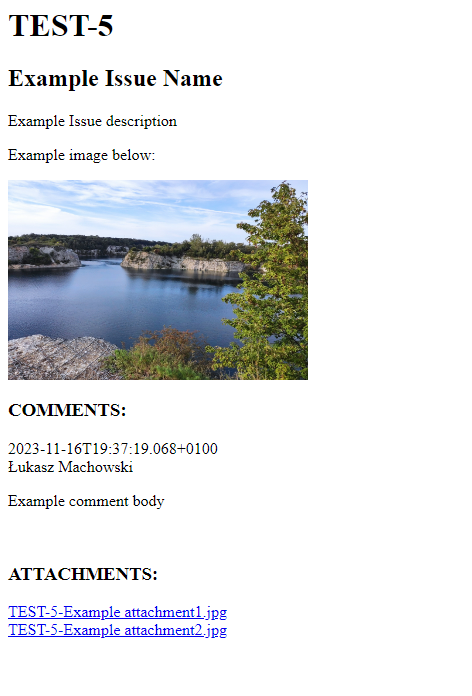
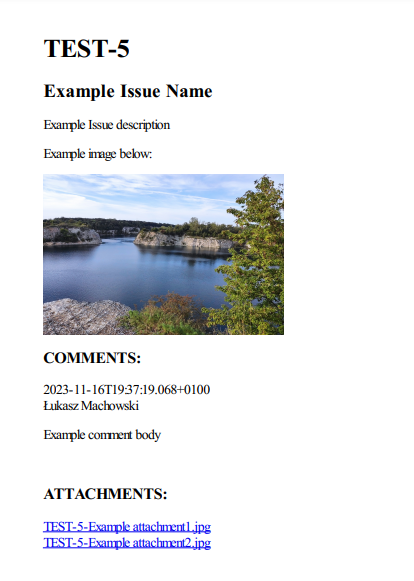
For both html and pdf all issues are imported with following format
- {Issue_Number}
- {Issue_Name}
- {Issue_Description}
- {Comments}
- {Comment_date}
- {Comment_author}
- {Comment_body}
- {Attachments}
- Links to attachments locally downloaded.
html example of exported issue:
pdf example of exported issue:
Limitations
Please be aware that some JIRA Api limitations may occur https://developer.atlassian.com/server/hipchat/hipchat-rest-api-rate-limits/
Roadmap
- Download attachments
- Export issues to html
- Export issues to pdf
- Add linked issues
- Add more flexibility into settings(image size, fields to be shown in exported issue)
- Folder Tree download (for example Epic -> User story -> Task)
- GUI/ Dynamic Exported issue format creator with custom fields
1 maintainer

Metadata
1 maintainer
Release files for jira-export 0.0.3
For a detailed explanation of source distributions (sdists) and built distributions (wheels), please see the package formats documentation.
Source distribution (sdist)
| File | Size | Uploaded | |
|---|---|---|---|
| jira_export-0.0.3.tar.gz | 11.1 kB | Details |
Release files / jira_export-0.0.3.tar.gz
| Download URL | jira_export-0.0.3.tar.gz |
|---|---|
| Size | 11.1 kB |
| Tags | Source |
|
SHA-256 checksum How to use checksums |
03a13432ed4fe0f7cfba710a1bacb86230784980a20465f5af06185011ab9575
|
|
BLAKE2b-256 checksum How to use checksums |
9b8fd494f7383c26d1bc3f66aac6b57420f6ade8a7e4c661c2d76c039949d06c
|
| Upload date | |
|
Uploaded using Trusted Publishing? What is trusted publishing? |
No |
| Uploaded via |
twine/5.1.1 CPython/3.11.9
|














