
Introduces a %sql (or %%sql) magic.
Connect to a database, using SQLAlchemy URL connect strings, then issue SQL commands within IPython or IPython Notebook.
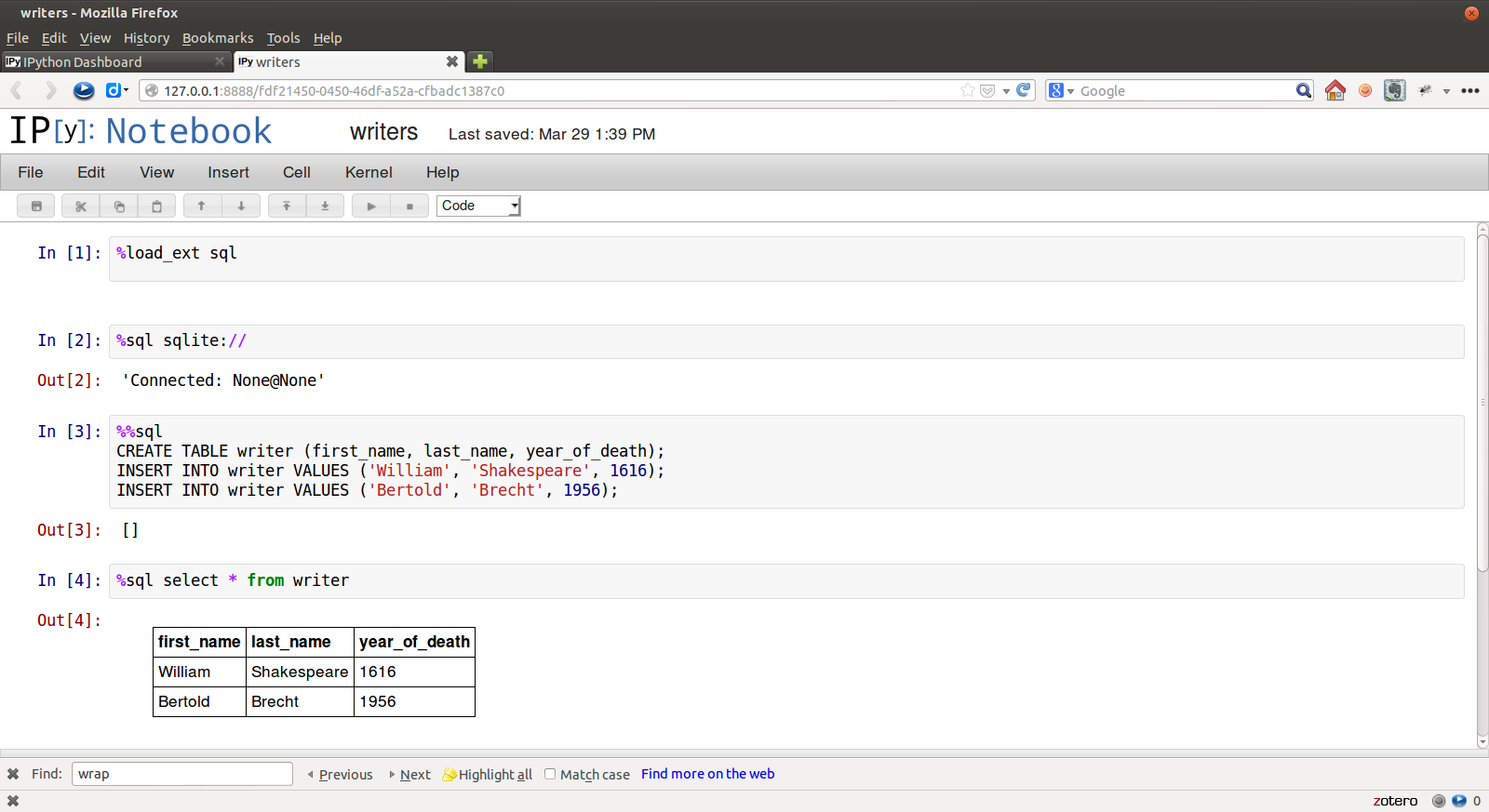
Examples
In [1]: %load_ext sql

In [2]: %%sql postgresql://will:longliveliz@localhost/shakes
   ...: select * from character
   ...: where abbrev = 'ALICE'
   ...:
Out[2]: [(u'Alice', u'Alice', u'ALICE', u'a lady attending on Princess Katherine', 22)]

In [3]: result = _

In [4]: print(result)
charid   charname   abbrev                description                 speechcount
=================================================================================
Alice    Alice      ALICE    a lady attending on Princess Katherine   22

In [4]: result.keys
Out[5]: [u'charid', u'charname', u'abbrev', u'description', u'speechcount']

In [6]: result[0][0]
Out[6]: u'Alice'

In [7]: result[0].description
Out[7]: u'a lady attending on Princess Katherine'
After the first connection, connect info can be omitted:
In [8]: %sql select count(*) from work
Out[8]: [(43L,)]
Connections to multiple databases can be maintained. You can refer to an existing connection by username@database
In [9]: %%sql will@shakes
   ...: select charname, speechcount from character
   ...: where  speechcount = (select max(speechcount)
   ...:                       from character);
   ...:
Out[9]: [(u'Poet', 733)]

In [10]: print(_)
charname   speechcount
======================
Poet       733
If no connect string is supplied, %sql will provide a list of existing connections; however, if no connections have yet been made and the environment variable DATABASE_URL is available, that will be used.
For secure access, you may dynamically access your credentials (e.g. from your system environment or getpass.getpass) to avoid storing your password in the notebook itself. Use the $ before any variable to access it in your %sql command.
In [11]: user = os.getenv('SOME_USER')
   ....: password = os.getenv('SOME_PASSWORD')
   ....: connection_string = "postgresql://{user}:{password}@localhost/some_database".format(user=user, password=password)
   ....: %sql $connection_string
Out[11]: u'Connected: some_user@some_database'
You may use multiple SQL statements inside a single cell, but you will only see any query results from the last of them, so this really only makes sense for statements with no output
In [11]: %%sql sqlite://
   ....: CREATE TABLE writer (first_name, last_name, year_of_death);
   ....: INSERT INTO writer VALUES ('William', 'Shakespeare', 1616);
   ....: INSERT INTO writer VALUES ('Bertold', 'Brecht', 1956);
   ....:
Out[11]: []
As a convenience, dict-style access for result sets is supported, with the leftmost column serving as key, for unique values.
In [12]: result = %sql select * from work
43 rows affected.

In [13]: result['richard2']
Out[14]: (u'richard2', u'Richard II', u'History of Richard II', 1595, u'h', None, u'Moby', 22411, 628)
Results can also be retrieved as an iterator of dictionaries (result.dicts()) or a single dictionary with a tuple of scalar values per key (result.dict())
Variable substitution
Bind variables (bind parameters) can be used in the “named” (:x) style. The variable names used should be defined in the local namespace.
In [15]: name = 'Countess'

In [16]: %sql select description from character where charname = :name
Out[16]: [(u'mother to Bertram',)]

In [17]: %sql select description from character where charname = '{name}'
Out[17]: [(u'mother to Bertram',)]
Alternately, $variable_name or {variable_name} can be used to inject variables from the local namespace into the SQL statement before it is formed and passed to the SQL engine. (Using $ and {} together, as in ${variable_name}, is not supported.)
Bind variables are passed through to the SQL engine and can only be used to replace strings passed to SQL. $ and {} are substituted before passing to SQL and can be used to form SQL statements dynamically.
Assignment
Ordinary IPython assignment works for single-line %sql queries:
In [18]: works = %sql SELECT title, year FROM work
43 rows affected.
The << operator captures query results in a local variable, and can be used in multi-line %%sql:
In [19]: %%sql works << SELECT title, year
    ...: FROM work
    ...:
43 rows affected.
Returning data to local variable works
Connecting
Connection strings are SQLAlchemy URL standard.
Some example connection strings:
mysql+pymysql://scott:tiger@localhost/foo
oracle://scott:tiger@127.0.0.1:1521/sidname
sqlite://
sqlite:///foo.db
mssql+pyodbc://username:password@host/database?driver=SQL+Server+Native+Client+11.0
Note that mysql and mysql+pymysql connections (and perhaps others) don’t read your client character set information from .my.cnf. You need to specify it in the connection string:
mysql+pymysql://scott:tiger@localhost/foo?charset=utf8
Note that an impala connection with impyla for HiveServer2 requires disabling autocommit:
%config SqlMagic.autocommit=False
%sql impala://hserverhost:port/default?kerberos_service_name=hive&auth_mechanism=GSSAPI
Connection arguments not whitelisted by SQLALchemy can be provided as a flag with (-a|–connection_arguments)the connection string as a JSON string. See SQLAlchemy Args.
%sql –connection_arguments {“timeout”:10,”mode”:”ro”} sqlite:// SELECT * FROM work;%sql -a ‘{“timeout”:10, “mode”:”ro”}’ sqlite:// SELECT * from work;
DSN connections
Alternately, you can store connection info in a configuration file, under a section name chosen to refer to your database.
For example, if dsn.ini contains
[DB_CONFIG_1]drivername=postgreshost=my.remote.hostport=5433database=mydatabaseusername=myuserpassword=1234
then you can
%config SqlMagic.dsn_filename=’./dsn.ini’%sql –section DB_CONFIG_1
Configuration
Query results are loaded as lists, so very large result sets may use up your system’s memory and/or hang your browser. There is no autolimit by default. However, autolimit (if set) limits the size of the result set (usually with a LIMIT clause in the SQL). displaylimit is similar, but the entire result set is still pulled into memory (for later analysis); only the screen display is truncated.
In [2]: %config SqlMagic
SqlMagic options
--------------
SqlMagic.autocommit=<Bool>
    Current: True
    Set autocommit mode
SqlMagic.autolimit=<Int>
    Current: 0
    Automatically limit the size of the returned result sets
SqlMagic.autopandas=<Bool>
    Current: False
    Return Pandas DataFrames instead of regular result sets
SqlMagic.column_local_vars=<Bool>
    Current: False
    Return data into local variables from column names
SqlMagic.displaycon=<Bool>
    Current: False
    Show connection string after execute
SqlMagic.displaylimit=<Int>
    Current: None
    Automatically limit the number of rows displayed (full result set is still
    stored)
SqlMagic.dsn_filename=<Unicode>
    Current: 'odbc.ini'
    Path to DSN file. When the first argument is of the form [section], a
    sqlalchemy connection string is formed from the matching section in the DSN
    file.
SqlMagic.feedback=<Bool>
    Current: False
    Print number of rows affected by DML
SqlMagic.short_errors=<Bool>
    Current: True
    Don't display the full traceback on SQL Programming Error
SqlMagic.style=<Unicode>
    Current: 'DEFAULT'
    Set the table printing style to any of prettytable's defined styles
    (currently DEFAULT, MSWORD_FRIENDLY, PLAIN_COLUMNS, RANDOM)

In[3]: %config SqlMagic.feedback = False
Please note: if you have autopandas set to true, the displaylimit option will not apply. You can set the pandas display limit by using the pandas max_rows option as described in the pandas documentation.
Pandas
If you have installed pandas, you can use a result set’s .DataFrame() method
In [3]: result = %sql SELECT * FROM character WHERE speechcount > 25

In [4]: dataframe = result.DataFrame()
The --persist argument, with the name of a DataFrame object in memory, will create a table name in the database from the named DataFrame. Or use --append to add rows to an existing table by that name.
In [5]: %sql --persist dataframe

In [6]: %sql SELECT * FROM dataframe;
Graphing
If you have installed matplotlib, you can use a result set’s .plot(), .pie(), and .bar() methods for quick plotting
In[5]: result = %sql SELECT title, totalwords FROM work WHERE genretype = 'c'

In[6]: %matplotlib inline

In[7]: result.pie()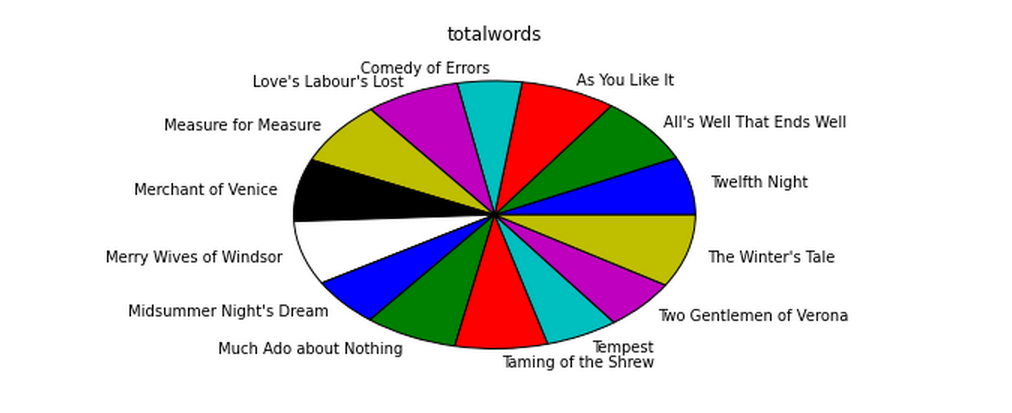
Dumping
Result sets come with a .csv(filename=None) method. This generates comma-separated text either as a return value (if filename is not specified) or in a file of the given name.
In[8]: result = %sql SELECT title, totalwords FROM work WHERE genretype = 'c'

In[9]: result.csv(filename='work.csv')
PostgreSQL features
psql-style “backslash” meta-commands commands (\d, \dt, etc.) are provided by PGSpecial. Example:
In[9]: %sql \dOptions
- -l / --connections
List all active connections
- -x / --close <session-name>
Close named connection
- -c / --creator <creator-function>
Specify creator function for new connection
- -s / --section <section-name>
Section of dsn_file to be used for generating a connection string
- -p / --persist
Create a table name in the database from the named DataFrame
- --append
Like --persist, but appends to the table if it already exists
- -a / --connection_arguments <"{connection arguments}">
Specify dictionary of connection arguments to pass to SQL driver
- -f / --file <path>
Run SQL from file at this path
Caution
Comments
Because jupysql accepts ---delimited options like --persist, but -- is also the syntax to denote a SQL comment, the parser needs to make some assumptions.
If you try to pass an unsupported argument, like --lutefisk, it will be interpreted as a SQL comment and will not throw an unsupported argument exception.
If the SQL statement begins with a first-line comment that looks like one of the accepted arguments - like %sql --persist is great! - it will be parsed like an argument, not a comment. Moving the comment to the second line or later will avoid this.
Installing
Install the latest release with:
pip install jupysql
Credits
Catherine Devlin (original author of ipython-sql)
Matthias Bussonnier for help with configuration
Olivier Le Thanh Duong for %config fixes and improvements
Mike Wilson for bind variable code
Thomas Kluyver and Steve Holden for debugging help
Berton Earnshaw for DSN connection syntax
Bruno Harbulot for DSN example
Andrés Celis for SQL Server bugfix
Michael Erasmus for DataFrame truth bugfix
Noam Finkelstein for README clarification
Xiaochuan Yu for << operator, syntax colorization
Amjith Ramanujam for PGSpecial and incorporating it here
Alexander Maznev for better arg parsing, connections accepting specified creator
Jonathan Larkin for configurable displaycon
Jared Moore for connection-arguments support
Gilbert Brault for --append
Lucas Zeer for multi-line bugfixes for var substitution, <<
vkk800 for --file
Jens Albrecht for MySQL DatabaseError bugfix
meihkv for connection-closing bugfix
2 maintainers


Release files for jupysql 0.4.2
For a detailed explanation of source distributions (sdists) and built distributions (wheels), please see the package formats documentation.
Source distribution (sdist)
| File | Size | Uploaded | |
|---|---|---|---|
| jupysql-0.4.2.tar.gz | 18.2 kB | Details |
Built distribution (wheel)
| File | Interpreter | ABI | Platform | Reset |
|---|---|---|---|---|
| jupysql-0.4.2-py3-none-any.whl | Python 3 | none | any | Details |
Total release size: 37.3 kB
Release files / jupysql-0.4.2.tar.gz
| Download URL | jupysql-0.4.2.tar.gz |
|---|---|
| Size | 18.2 kB |
| Tags | Source |
|
SHA-256 checksum How to use checksums |
66f0dc3d254b4542a078a5680ae015369362cf2b73951372e15de2c8ad14fe22
|
|
BLAKE2b-256 checksum How to use checksums |
7fec4b7282f10034a64240bfb5451b7858a55f084f057b7d8769253ef7e1e203
|
| Upload date | |
|
Uploaded using Trusted Publishing? What is trusted publishing? |
No |
| Uploaded via |
twine/4.0.1 CPython/3.9.13
|
Release files / jupysql-0.4.2-py3-none-any.whl
| Download URL | jupysql-0.4.2-py3-none-any.whl |
|---|---|
| Size | 19.0 kB |
| Tags | Python 3 |
|
SHA-256 checksum How to use checksums |
fe9adf71cac965fc77991bbbe2d09f8943cf8f6e907c5e11b33eeb2f42760de4
|
|
BLAKE2b-256 checksum How to use checksums |
8c121f0d0eebc203b6ff499e94aa7650edbea03f61c81d68d7832c6f5fd1f9e3
|
| Upload date | |
|
Uploaded using Trusted Publishing? What is trusted publishing? |
No |
| Uploaded via |
twine/4.0.1 CPython/3.9.13
|














