
Jupyter compare_view
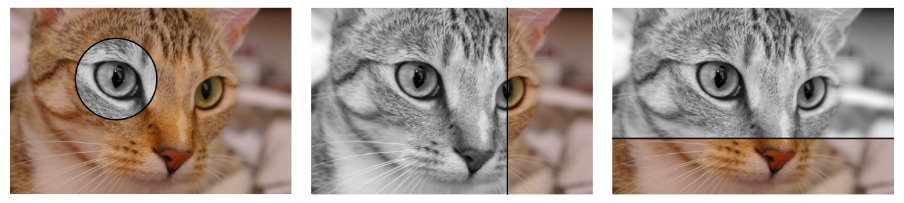





Blend between multiple images using a cell magic in JupyterLab using compare_view.
This project was called jupyter-splitview before.
Installation
pip install jupyter_compare_view
Example
import jupyter_compare_view
%%compare
from skimage import data
from skimage.color import rgb2gray
import matplotlib.pyplot as plt

img = data.chelsea()
grayscale_img = rgb2gray(img)

plt.imshow(img)
plt.axis("off")
plt.show()

plt.imshow(grayscale_img, cmap="gray")
plt.axis("off")
plt.show()
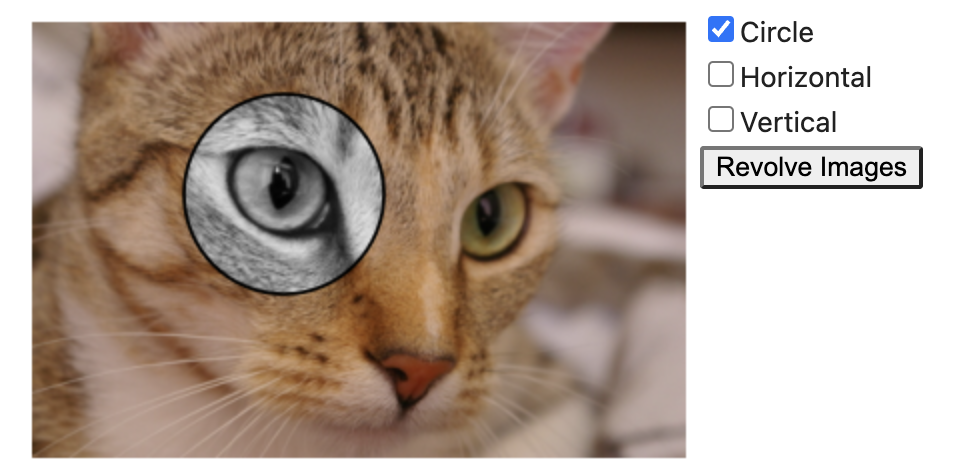
Another example:
from jupyter_compare_view import compare

compare(img, grayscale_img, cmap="gray", start_mode="horizontal", start_slider_pos=0.73)
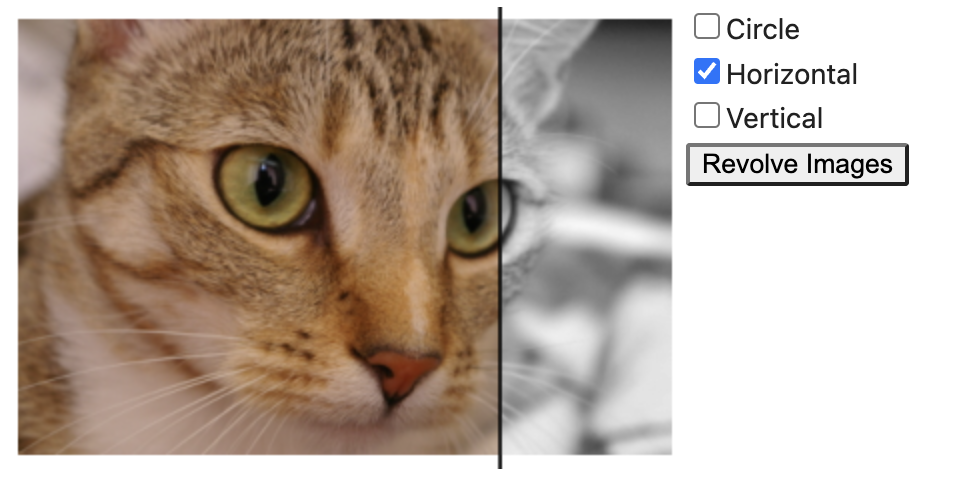
The split view widget is still responsive after closing and reopening the notebook without running the cell again.
Notebook arguments
(Might still change in future)
-
--config '{"start_mode": "horizontal"}'will init the compare-view in horizontal slider mode. -
--config '{"circle_size": 30}'the circle size is now 30 pixel in circle mode. -
--config '{"show_slider": false}'will hide the slider bar. -
--config '{"start_slider_pos": 0.73}'will set the slider start position to 73%.- Removed in 0.1.1:
--position 73%will no longer the slider start position to 73%.
- Removed in 0.1.1:
-
--config '{"start_mode": "horizontal","start_slider_pos": 0.73}'will both set the start mode to horizontal and set the slider position -
--height 220will set the height to 220 pixel. -
When
--heightis not provided, the default height of the widget is 300 pixel. -
--height autowill set the height by the value of the first image's resolution in vertical direction. -
The widget's width will always be adjusted automatically.
Notebook formatting
Formatting with black can be done this way:
pip install 'black[jupyter]'black --python-cell-magics compare compare_view_magic.ipynb
Interactive Export
jupyter_compare_view fully supports offline interactive HTML exports. The web library compare_view is inlined into the exported HTML document. Therefore, the export is viewable without an internet connection.

Developer Installation
git clone --recurse https://github.com/Octoframes/jupyter_compare_view(Note: In case that the repo was already cloned e.g. with the GitHub Desktop client, the GitHub submodule has to be loaded viagit submodule update --init --recursive)poetry install
Note: The IPython extension autoreload reloads modules before every cell execution. Very useful when debugging the %%capture cell magic!
Just add these lines into the first jupyter cell.
%load_ext autoreload
%autoreload 2
import jupyter_compare_view
Changelog
0.2.4
CHange to importlib #48
0.2.3
Remove setuptools dependency
0.2.2
- Remove python3.7 support #46
- fix jupyterlite example
0.2.1
- Support python 3.11
0.2.0
- Implemented
captureto display the compare view frame without calling the cell magic. This is not an ipywidget as mentioned here. - Update version requirements #42
0.1.5
- BugFix: Remove black import that was added by accident.
0.1.4
%%compareis now%%splity.%%splityis deprecated.- Update examples
0.1.3
- octoframes github actions setup
0.1.2
- Move the repo from kolibril13/jupyter-spitview to octoframes/jupyter_compare_view
- Rename all references
0.1.1
- Drop the github.com/NUKnightLab/juxtapose backend and replace it with github.com/Octoframes/compare_view.
- Implement horizontal slider
- Implement Round Mask
0.1.0
- Update dependencies
- Update JupyterLite version
- Fix: in JupyterLite, a figure has to be explicitly called by plt.show()
- Better installation workflow
0.0.8
- Fixing problem with cell id and notebook reloading
- Experimentally lowering the dependencies to
ipython = ">=6.0.0"andipykernel = ">=5.0.0"so that jupyterlite will work hopefully.
0.0.7
- Rewrite of the import of JavaScript and CSS to make it more robust when closing and opening the notebook
- First attempt to add a JupyterLite example.
0.0.6
Fix poetry workflow
0.0.5
- Ship the javascript directly with the package, so no internet connection is required
- use jinja2 to save HTML in separate file
- load stylesheet and javascript only once in the beginning, and not in every cell that contains the splitview widget.
0.0.4
- New
--heightparameter
0.0.3
- default slider position
- updated minimal example
- internal code restructuring and formatting
- Handle import in non jupyter context
0.0.2
- save images in base64 strings and don't load images to disk (increases package security).
0.0.1
- First release
1 maintainer

Metadata
1 maintainer
Release files for jupyter_compare_view 0.3.1
For a detailed explanation of source distributions (sdists) and built distributions (wheels), please see the package formats documentation.
Source distribution (sdist)
| File | Size | Uploaded | |
|---|---|---|---|
| jupyter_compare_view-0.3.1.tar.gz | 10.1 kB | Details |
Built distribution (wheel)
| File | Interpreter | ABI | Platform | Reset |
|---|---|---|---|---|
| jupyter_compare_view-0.3.1-py3-none-any.whl | Python 3 | none | any | Details |
Total release size: 22.0 kB
Release files / jupyter_compare_view-0.3.1.tar.gz
| Download URL | jupyter_compare_view-0.3.1.tar.gz |
|---|---|
| Size | 10.1 kB |
| Tags | Source |
|
SHA-256 checksum How to use checksums |
28bd58c070463936bb8ad9aa160e77d0b74a5cba8771d2b90855bdb8b4c75ca4
|
|
BLAKE2b-256 checksum How to use checksums |
9cbeb87d9c951cf6d8cff3013c2347e55e07542a2b33b6f412a92b0f2be4604d
|
| Upload date | |
|
Uploaded using Trusted Publishing? What is trusted publishing? |
No |
| Uploaded via |
poetry/2.4.1 CPython/3.13.14 Linux/6.17.0-1020-azure
|
Release files / jupyter_compare_view-0.3.1-py3-none-any.whl
| Download URL | jupyter_compare_view-0.3.1-py3-none-any.whl |
|---|---|
| Size | 11.8 kB |
| Tags | Python 3 |
|
SHA-256 checksum How to use checksums |
b0c51466f9a14485d63eadca644f001fec977d50b88957cc874427bdc38d6e78
|
|
BLAKE2b-256 checksum How to use checksums |
ba54938b45ca628de84a43ebd73dea13e41e989bb63bd3e4d689f6bb77964808
|
| Upload date | |
|
Uploaded using Trusted Publishing? What is trusted publishing? |
No |
| Uploaded via |
poetry/2.4.1 CPython/3.13.14 Linux/6.17.0-1020-azure
|














