
Multiselection

This nbextension allows to select occurences of the selected text in the currently active cell.
Installation
First, install jupyter_multiselection using pip:
pip install jupyter-multiselection
Next, install the nbextension using jupyter:
jupyter nbextension install --py jupyter_multiselection
Finally, enable the nbextension:
jupyter nbextension enable multiselection/multiselection
Usage
Select a word or section of text in edit mode and other occurences of the selection will be highlighted.
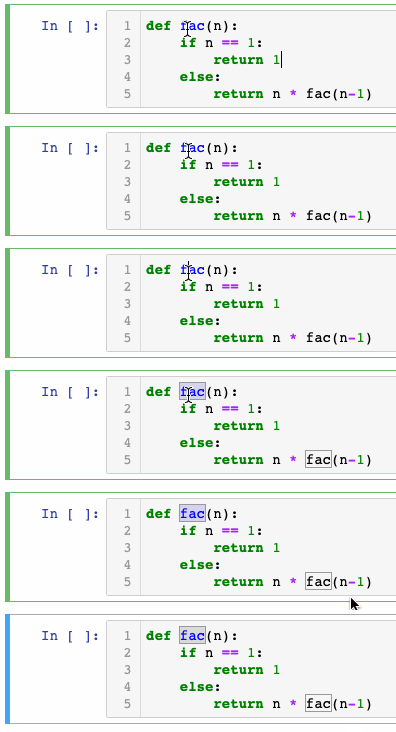
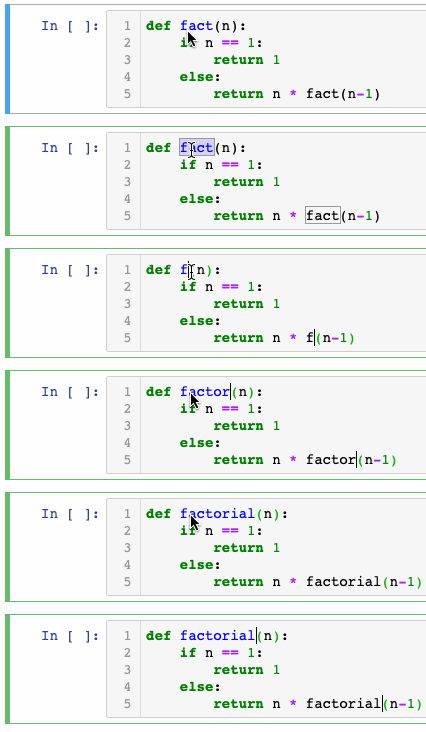
Use the select next hotkey (default Ctrl+m) to select the next occurence of the selection. To select all occurences use the select all hotkey (default: 'Ctrl+Alt+m').
Options
highlight- Iftrue, all occurences of the selected word will be highlighted (default:true).wrapcell- Iftrue, after the last occurence in the cell the next selection will start from the beginning (default:true).nextHotkey- Hotkey to select the next occurence (default:Ctrl+m).allHotkey- Hotkey to select all occurences (default:Ctrl+Alt+m).
TODO
- Multiselection across all cells
- Split multi-line selection into multiple selections
History
- @chdudek (Feb 29 2020): Inital release
1 maintainer

Release files for jupyter-multiselection 0.1.1
For a detailed explanation of source distributions (sdists) and built distributions (wheels), please see the package formats documentation.
Source distribution (sdist)
| File | Size | Uploaded | |
|---|---|---|---|
| jupyter_multiselection-0.1.1.tar.gz | 64.6 kB | Details |
Built distribution (wheel)
| File | Interpreter | ABI | Platform | Reset |
|---|---|---|---|---|
| jupyter_multiselection-0.1.1-py2.py3-none-any.whl | Python 2, Python 3 | none | any | Details |
Total release size: 130.4 kB
Release files / jupyter_multiselection-0.1.1.tar.gz
| Download URL | jupyter_multiselection-0.1.1.tar.gz |
|---|---|
| Size | 64.6 kB |
| Tags | Source |
|
SHA-256 checksum How to use checksums |
c90efcb19bcc010d3a9e7c283285c2b2339cc261ed342faedbab49aad42f25f3
|
|
BLAKE2b-256 checksum How to use checksums |
95afd8b7b81a4696853f480214aa8142bcad59962e97f5f706762906bd3dbd39
|
| Upload date | |
|
Uploaded using Trusted Publishing? What is trusted publishing? |
No |
| Uploaded via |
twine/3.1.1 pkginfo/1.5.0.1 requests/2.23.0 setuptools/45.2.0 requests-toolbelt/0.9.1 tqdm/4.32.1 CPython/3.7.1
|
Release files / jupyter_multiselection-0.1.1-py2.py3-none-any.whl
| Download URL | jupyter_multiselection-0.1.1-py2.py3-none-any.whl |
|---|---|
| Size | 65.7 kB |
| Tags | Python 2 Python 3 |
|
SHA-256 checksum How to use checksums |
3bfc31c9535ac62e3f7f7cb58f2bca266f9c26e834402cc8920d3361ead973a6
|
|
BLAKE2b-256 checksum How to use checksums |
053f673ce7af6edb2e8472f12ae860368cc96e97be03826b797aa5e24f6fc6f2
|
| Upload date | |
|
Uploaded using Trusted Publishing? What is trusted publishing? |
No |
| Uploaded via |
twine/3.1.1 pkginfo/1.5.0.1 requests/2.23.0 setuptools/45.2.0 requests-toolbelt/0.9.1 tqdm/4.32.1 CPython/3.7.1
|














