
This package contains different types of tasks which can be used to create tests in Jupyter Notebooks. The task review is always initiated by the learner by pushing a button.
Examples:
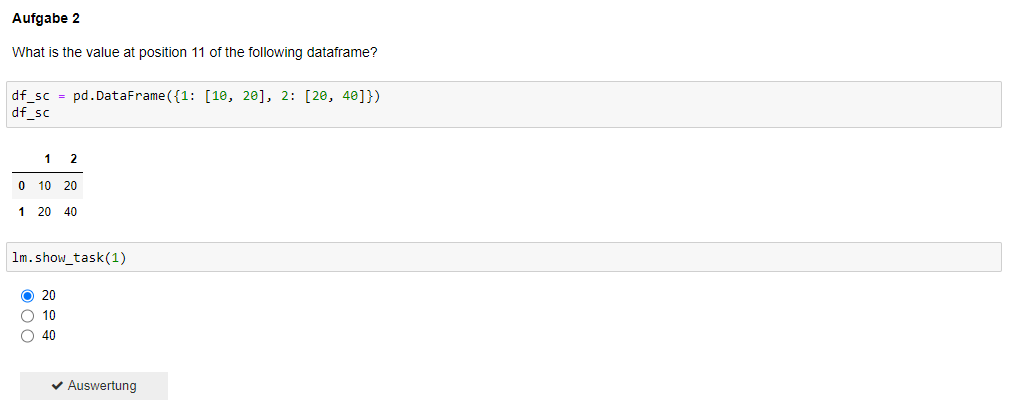
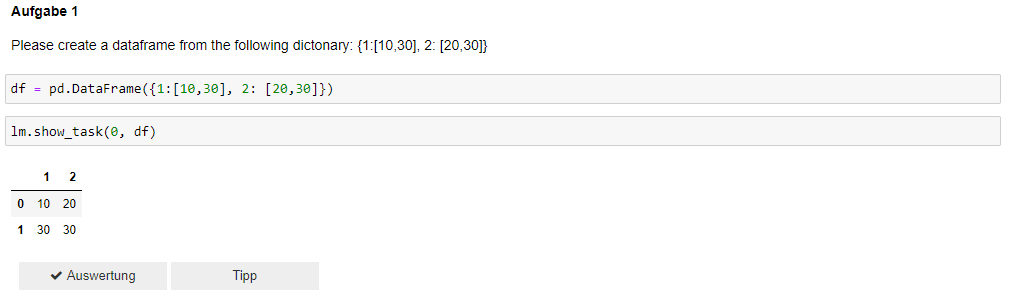
Buttons and task review
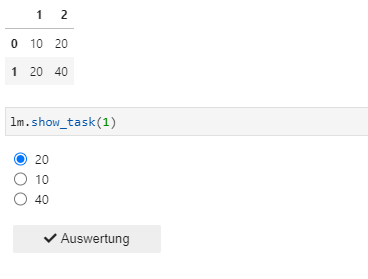
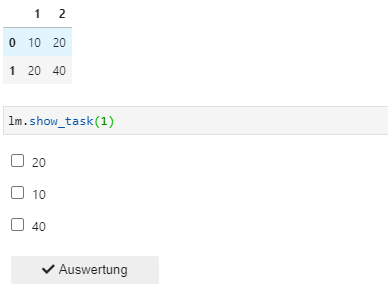
Every task uses buttons for interaction. There is always an evaluation button ("Auswertung") and also a solution button ("Lösung") that becomes just visible after three false answers. Depending on the task type there may also be a hint button ("Tipp") which was left off when creating single and multiple choice tasks. The Package also contains functionality to calculate a score out of all the tasks in a notebook. After the solution has been submitted correctly, the buttons are deactivated and a green check mark appears.


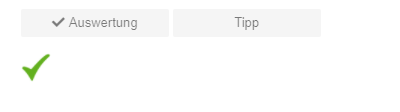
At the end a total score can be determined. To start calculating the score the submit button ("Auswertung") has to be displayed. The calculation counts all the points the user got while solving the tasks and maps it to 100%. How this is done is described below.
For dataframe tasks the user can achieve a maximum of 3 points and a minimum of 0 points.
| points | correctly solved? | solution not viewed? | less than 3 tries? |
|---|---|---|---|
| 0 | - | - | - |
| 1 | X | - | - |
| 2 | X | X | - |
| 3 | X | X | X |
For single and multiple chocie tasks a user can achieve a maximum of 2 points and a minimum of 0 points.
| points | correctly solved? | less than 3 tries? |
|---|---|---|
| 0 | - | - |
| 1 | X | - |
| 2 | X | X |
After the respective task has been evaluated and the points have been calculated, this point value is normalized to a range from 0 to 1. Because of that all tasks can be treated the same when calculating the overall score.
Tasks Types
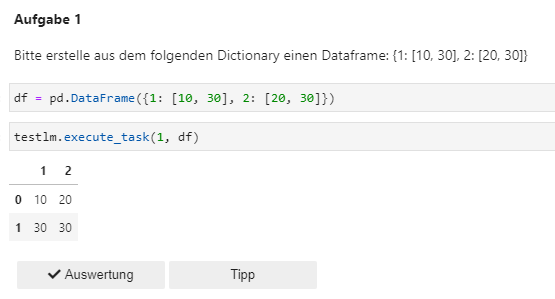
There are four types of tasks that can be created with the modules inside this package: single choice, multiple choice and Pandas and Spark dataframe tasks. DataFrame tasks are tasks where the user/ learner creates a dataframe depending on a specific task and this dataframe is hand over to the task, where it is checked in comparison with a desposited dataframe. When the dataframe does not correspond to the solution it is also checked what is wrong with the dataframe (number of columns, number of rows, sorting of columns, content of cell, labeling of rows).
Examples for tasks:
DataFrame Pandas:
Single Choice:
Multiple Choice:
How to implement and add tasks?
To create tasks for a jupyter notebook you just have to create a sqllite database that contains all the information necessary to automatically create the tasks. The task database table has to contain 5 columns:
- taskID(Integer, not null, unique): uniquely identifies a task, with this id the task can be called directly from inside the notebook
- taskType(Text, not null): SC, MC, DFP, DFS; assigns the task to predefined task types, ensures that the correct task review functionality is selected in the background
- tipp(Text): can be added optionally to provide guidance when solving a task (can be formatted by using HTML Tags)
- solutionForReview(Integer, not null): sulotion that is used when checking the task
- additionalInformation(Text, not null): SC/MC: this field saves the options that the user can choose from, PDF/SDF: to deposit a solution that can be shown when the solution button is pushed (can be formatted using HTML tags)
SQL statement to create a task:
INSERT INTO "table" VALUES (taskID, 'taskType', 'tipp', 'solutionForReview', 'additionalInformation)
To review a dataframe task the solution dataframe has to be saved as a database table. To create this table you can use the library sqlite3 inside the notebook:
import sqlite3 con = sqlite3.connect('data/database.db') data.to_sql('table', con, index=False, if_exists="replace")
How to import and use the package?
To install the package you just have to use pip install jupyternb_task_review. Afterwards you have to import the package to your Jupyter Notebook and then create an instance of the class LearningModule. When creating this instance you must handover the filename of your task database. To create and show a specific task you can use the method show_task(task_id) that is called by the LarningModule instance. The task_id identifies which information should be taken from the task database.
To install the package you just have to use pip install jupyternb-task-review. Afterwards you have to import the package to your Jupyter Notebook and then create an instance of the class LearningModule. When creating this instance you must handover the filename of your task database. To create and show a specific task you can use the method show_task(task_id) that is called by the LarningModule instance. The task_id identifies which information should be taken from the task database.
Methods used inside the notebook (called by the learning module instance):
- show_task(taskID): creates and displays the single choice or multiple choice task with the given id
- show_task(taskID, dataframe): creates and displays the dataframe task with the given id; dataframe is the users solution
- display_submit_button(): initiates the score calculation
2 maintainers


Metadata
2 maintainers
Release files for jupyternb-task-review 1.2.4
For a detailed explanation of source distributions (sdists) and built distributions (wheels), please see the package formats documentation.
Source distribution (sdist)
| File | Size | Uploaded | Provenance | |
|---|---|---|---|---|
| jupyternb-task-review-1.2.4.tar.gz | 67.0 kB | Without provenance | Details |
Built distribution (wheel)
| File | Interpreter | ABI | Platform | Reset |
|---|---|---|---|---|
| jupyternb_task_review-1.2.4-py3-none-any.whl | Python 3 | none | any | Details |
Total release size: 138.4 kB
Release files / jupyternb-task-review-1.2.4.tar.gz
| Download URL | jupyternb-task-review-1.2.4.tar.gz |
|---|---|
| Size | 67.0 kB |
| Tags | Source |
|
SHA-256 checksum How to use checksums |
23d4247c3169d7d279cdfe0451026bd57f8e8c63c10981eb11562242eddfdd8f
|
|
BLAKE2b-256 checksum How to use checksums |
2640e88b3cd8ef9c7ccd02e0df679a085edd8c0f8195991a5219651b3aa31ecb
|
| Upload date | |
|
Uploaded using Trusted Publishing? What is trusted publishing? |
No |
| Uploaded via |
twine/3.3.0 pkginfo/1.6.1 requests/2.25.1 setuptools/50.3.2 requests-toolbelt/0.9.1 tqdm/4.56.0 CPython/3.7.2
|
Release files / jupyternb_task_review-1.2.4-py3-none-any.whl
| Download URL | jupyternb_task_review-1.2.4-py3-none-any.whl |
|---|---|
| Size | 71.5 kB |
| Tags | Python 3 |
|
SHA-256 checksum How to use checksums |
f2c1cd81d0c3b09662045513b73adc6ba71ed5e9fdb71ee6aa900f1e7b410c9d
|
|
BLAKE2b-256 checksum How to use checksums |
ab2dd8c535b5e4a5ab394638f2cb8fef0ab7cfdbcea6811928c3fd663c997004
|
| Upload date | |
|
Uploaded using Trusted Publishing? What is trusted publishing? |
No |
| Uploaded via |
twine/3.3.0 pkginfo/1.6.1 requests/2.25.1 setuptools/50.3.2 requests-toolbelt/0.9.1 tqdm/4.56.0 CPython/3.7.2
|
Security for jupyternb-task-review 1.2.4
Provenance
Provenance describes where a file came from. On PyPI, provenance is shared via attestations, which provide a verifiable record of the build or publishing details. View details, limitations and caveats.
No provenance found
None of the files in this release were uploaded with provenance metadata.
A note on package security
PyPI is a repository for distributing packages, not a service for auditing them. While third-party security researchers and our staff do their best to detect and remove malicious packages, PyPI cannot guarantee the quality, security or suitability of any given package.
To learn more about protecting yourself from malicious actors, visit our package security documentation.














