


Kaval.AI is an opinionated Python library for building well-defined, testable and robust agentic workflows, chatbots and tools.
- Any model, one interface — OpenAI, Google, Anthropic, Ollama and in-browser WebLLM (LLM clients, running in the browser).
- Typed end to end — inputs, outputs and tool calls are Pydantic models (typed inputs and outputs).
- Retrieval built in — RAG over SQLite or PostgreSQL/pgvector, with local or hosted embeddings (RAG).
- Workflows as graphs — conditional routing, parallel fan-out, agents and tool calls, in Python or YAML (workflows).
- Tools your way — Python functions, REST endpoints and MCP servers (tools).
- Streaming from a single model call to a whole workflow (streaming).
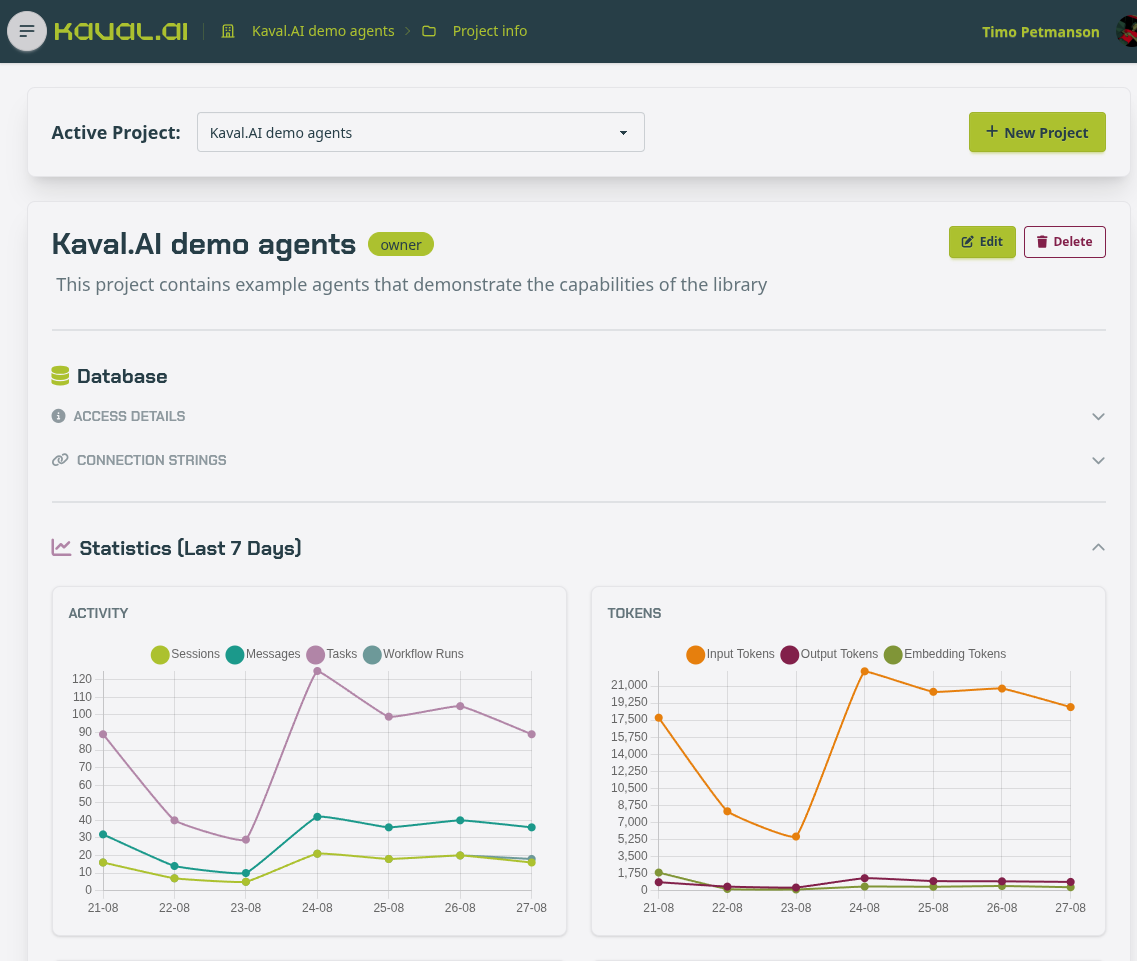
- Full observability — every session, run, node and model call is recorded and browsable in the backoffice UI (data model).
Check out docs.kaval.ai for examples and in-depth tutorials.
Install
pip install "kavalai[common]"
common brings the provider SDKs, RAG, MCP and the servers.
See
Installation for more details.
Getting started
Call a model
Name a model as provider/model and make_client does the rest.
from kavalai import make_client

client = make_client("openai/gpt-5.6-luna")
answer = await client.prompt("What is the capital of Estonia?")
print (answer)
Response:
The capital of Estonia is **Tallinn**.
Use structured responses by passing a Pydantic model:
from pydantic import BaseModel


class City(BaseModel):
    name: str
    country: str
    fun_fact: str

city = await client.prompt("Describe Tallinn.", response_model=City)
print(city)
Response:
name='Tallinn' country='Estonia'
fun_fact='Tallinn’s remarkably well-preserved medieval Old Town is a UNESCO
          World Heritage Site, and the city is widely regarded as one of the
          world’s most digitally advanced capitals.'
Tools and agents
Kaval.AI has built-in agent loop that supports tool calling:
from datetime import date

from pydantic import BaseModel

from kavalai import Agent, FunctionKernel, make_client, pythontool
from kavalai.tools.webtools.crawl4ai import web_search


@pythontool
def today() -> str:
    """Return today's date in ISO format."""
    return date.today().isoformat()


class Answer(BaseModel):
    answer: str
    sources: list[str]


kernel = FunctionKernel()
kernel.register_python_tool("today", today)
kernel.register_python_tool("web_search", web_search)

agent = Agent(llm_client=make_client("openai/gpt-5.6-luna"), kernel=kernel)
result = await agent.prompt(
    "When is the next Tallinn Marathon, and how many days away is it?",
    response_model=Answer,
    max_steps=5,
)
print(result.answer)
for url in result.sources:
    print(url)
Response:
The next Tallinn Marathon is scheduled for **Sunday, September 13, 2026**.
From today, **August 28, 2026**, it is **16 days away**.

Sources:
- https://marathonscout.com/races/swedbank-tallinn-marathon
- https://www.jooks.ee/en/tallinn-marathon/
https://marathonscout.com/races/swedbank-tallinn-marathon
https://www.jooks.ee/en/tallinn-marathon/
See using Agents & tools for more.
Using retrieval-augmented generation (RAG)
Retrieval-agumented generation allows the model to operate with data it was not trained with:
FACTS = """\
Green Village has 104 residents.
Green Village was founded on 03.09.1887 by shepherd Elias Thornbury.
President of Green Village is Thomas Cook (born 12.04.1994).
Green Village's oldest resident is Agnes Whitlow (born 02.06.1929).
The annual Turnip Festival takes place every year on the third Saturday of October.
The village bakery, run by Greta Lindqvist (born 27.11.1968), sells exactly 340 loaves every week.
Green Village's football team, FC Green Rovers, has won the regional cup twice (1997 and 2013).
Green Village's only pub, The Rusty Anchor, has been operating since 1923.
""".splitlines()
Index the data the way you want
from kavalai.rag import SqliteRagService

rag = SqliteRagService(":memory:", model="fastembed/BAAI/bge-small-en-v1.5")
await rag.index_batch(
    texts=FACTS,
    metadata_list=[{"village": "Green Village"}] * len(FACTS),
    source_ids=[f"fact-{i}" for i in range(len(FACTS))],
)
Query the dataset
question = "How old was the Green Village's oldest resident on 2025 Turnip Festival?"

hits = await rag.query(question, top_k=5)
for hit in hits:
    print(f"{hit.similarity:.2f}  {hit.content}")
0.79  Green Village's oldest resident is Agnes Whitlow (born 02.06.1929).
0.70  Green Village has 104 residents.
0.68  President of Green Village is Thomas Cook (born 12.04.1994).
0.67  Green Village was founded on 03.09.1887 by shepherd Elias Thornbury.
0.62  The annual Turnip Festival takes place every year on the third Saturday of October.
Check out the RAG tutorial.
Building a workflow
Turn the Green Village index above into a chatbot: a rag_query node
fetches the closest facts for the user's message, and an llm node answers
from them.
from pydantic import BaseModel

from kavalai.workflow import WorkflowBuilder


class Message(BaseModel):
    user_message: str


class Reply(BaseModel):
    agent_response: str


engine = (
    WorkflowBuilder("Green Village support", llm_model="openai/gpt-5.6-luna")
    .data_model("input", Message)
    .data_model("output", Reply)
    .start("get_related_facts")
    .rag_query(
        "get_related_facts",
        query="{{ context.input.user_message }}",
        output="facts",
        top_k=5,
        store="content",
        next="reply",
    )
    .llm(
        "reply",
        prompt=(
            "You are the assistant of the Green Village tourist "
            "information centre. Answer using only these facts:\n"
            "{{ context.facts }}"
        ),
        inputs={"input": "input", "facts": "facts"},
        output="output",
        next="end",
    )
    .end()
    .build_engine(rag_services=rag)
)

state = await engine.run({"user_message": question})
print(state.output_data)
print(state.status, state.token_usage)
Response:
{'agent_response': 'Agnes Whitlow was 96 years old at the 2025 Turnip '
                   'Festival, held on 18 October 2025.'}
completed {'model_calls': 1, 'prompt_tokens': 239,
           'completion_tokens': 109, 'total_tokens': 348}
See Workflows tutorial for more info.
The backoffice UI
Use the Backoffice UI. to observe and debug chat sessions, workflow runs and inspect RAG.
License
1 maintainer

Download files
Download the file for your platform. If you're not sure which to choose, learn more about installing packages.
Source Distribution
Built Distribution
Filter files by name, interpreter, ABI, and platform.
If you're not sure about the file name format, learn more about wheel file names.
Copy a direct link to the current filters
File details
Details for the file kavalai-1.0.4.tar.gz.
File metadata
- Download URL: kavalai-1.0.4.tar.gz
- Upload date:
- Size: 349.6 kB
- Tags: Source
- Uploaded using Trusted Publishing? Yes
- Uploaded via:
twine/7.0.0 CPython/3.13.14
File hashes
| Algorithm | Hash digest | |
|---|---|---|
| SHA256 |
2bdc7e899f418b273c2763dfc3fb358cb7ae3f4ccc00decf7d67be5d4eba4c46
|
|
| MD5 |
a8183b2c4b2e4b08c2ad431eb4f48b45
|
|
| BLAKE2b-256 |
2cdc79db67846283eea4b651ee3736dbd63013421fa54f5069a8609c6441fdfc
|
Provenance
The following attestation bundles were made for kavalai-1.0.4.tar.gz:
Publisher:
pypi-publish.yml on Kaval-AI/kavalai
-
Statement:
-
Statement type:
https://in-toto.io/Statement/v1 -
Predicate type:
https://docs.pypi.org/attestations/publish/v1 -
Subject name:
kavalai-1.0.4.tar.gz -
Subject digest:
2bdc7e899f418b273c2763dfc3fb358cb7ae3f4ccc00decf7d67be5d4eba4c46 - Sigstore transparency entry: 2809592938
- Sigstore integration time:
-
Permalink:
Kaval-AI/kavalai@f209162342a222b5a5943cd2551eb31514728afc -
Branch / Tag:
refs/tags/v1.0.4 - Owner: https://github.com/Kaval-AI
-
Access:
public
-
Token Issuer:
https://token.actions.githubusercontent.com -
Runner Environment:
github-hosted -
Publication workflow:
pypi-publish.yml@f209162342a222b5a5943cd2551eb31514728afc -
Trigger Event:
release
-
Statement type:
File details
Details for the file kavalai-1.0.4-py3-none-any.whl.
File metadata
- Download URL: kavalai-1.0.4-py3-none-any.whl
- Upload date:
- Size: 339.5 kB
- Tags: Python 3
- Uploaded using Trusted Publishing? Yes
- Uploaded via:
twine/7.0.0 CPython/3.13.14
File hashes
| Algorithm | Hash digest | |
|---|---|---|
| SHA256 |
99eb7585527022bfa2a023ea8d0b561f9dba5d82022e742c9e34becceab53fdf
|
|
| MD5 |
e7d69caef2320c7f315879a5c3220056
|
|
| BLAKE2b-256 |
7138613c50915f30542d2f1350f73d38307785d20419ef3612430858bba029c4
|
Provenance
The following attestation bundles were made for kavalai-1.0.4-py3-none-any.whl:
Publisher:
pypi-publish.yml on Kaval-AI/kavalai
-
Statement:
-
Statement type:
https://in-toto.io/Statement/v1 -
Predicate type:
https://docs.pypi.org/attestations/publish/v1 -
Subject name:
kavalai-1.0.4-py3-none-any.whl -
Subject digest:
99eb7585527022bfa2a023ea8d0b561f9dba5d82022e742c9e34becceab53fdf - Sigstore transparency entry: 2809592988
- Sigstore integration time:
-
Permalink:
Kaval-AI/kavalai@f209162342a222b5a5943cd2551eb31514728afc -
Branch / Tag:
refs/tags/v1.0.4 - Owner: https://github.com/Kaval-AI
-
Access:
public
-
Token Issuer:
https://token.actions.githubusercontent.com -
Runner Environment:
github-hosted -
Publication workflow:
pypi-publish.yml@f209162342a222b5a5943cd2551eb31514728afc -
Trigger Event:
release
-
Statement type:














