
Python keepa Client Library




This Python library allows you to interface with the API at Keepa to query for Amazon product information and history. It also contains a plotting module to allow for plotting of a product.
Sign up for Keepa Data Access.
Documentation can be found at Keepa Documentation.
Requirements
This library is compatible with Python >= 3.10 and requires:
numpy
aiohttp >= 3.14.0
pandas
pydantic >= 2
requests >= 2.32.5
urllib3[zstd] >= 2.7.0
tqdm
Both clients request and automatically decode Zstandard (zstd) responses, while continuing to accept gzip, deflate, and uncompressed responses. Zstandard support is required and installed automatically: Python 3.10–3.13 use backports.zstd through urllib3[zstd], and Python 3.14 and later use the standard library’s compression.zstd. No extra installation option is needed.
Product history can be plotted from the raw data when matplotlib is installed.
Interfacing with keepa requires an access key and a monthly subscription from Keepa Pricing.
Installation
Module can be installed from PyPi with:
pip install keepaSource code can also be downloaded from GitHub and installed using:
cd keepa
pip install .
Brief Example
import keepa
accesskey = 'XXXXXXXXXXXXXXXX' # enter real access key here from https://get.keepa.com/d7vrq
api = keepa.Keepa(accesskey)

# Single ASIN query
products = api.query('B0088PUEPK')  # returns list of product data

# Plot result (requires matplotlib)
keepa.plot_product(products[0])
Typed responses are available with typed=True for users who prefer Pydantic models while keeping the default dictionary output unchanged.
products = api.query('B0088PUEPK', typed=True)
product = products[0]
print(product.asin)
print(product.title)
product_dict = product.model_dump(exclude_none=True, by_alias=True)
See the typed response documentation Typed Responses page for supported methods, complete return shapes, serialization, and async usage.
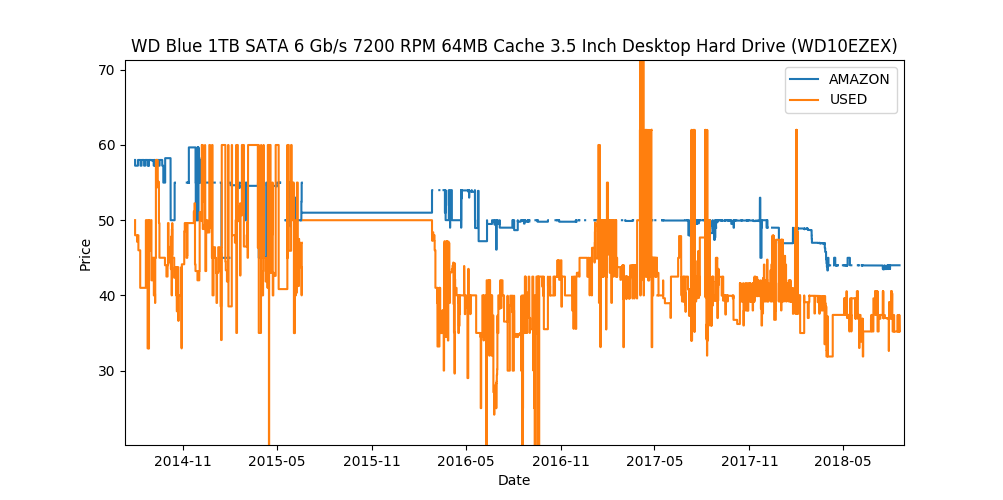
Product Price Plot
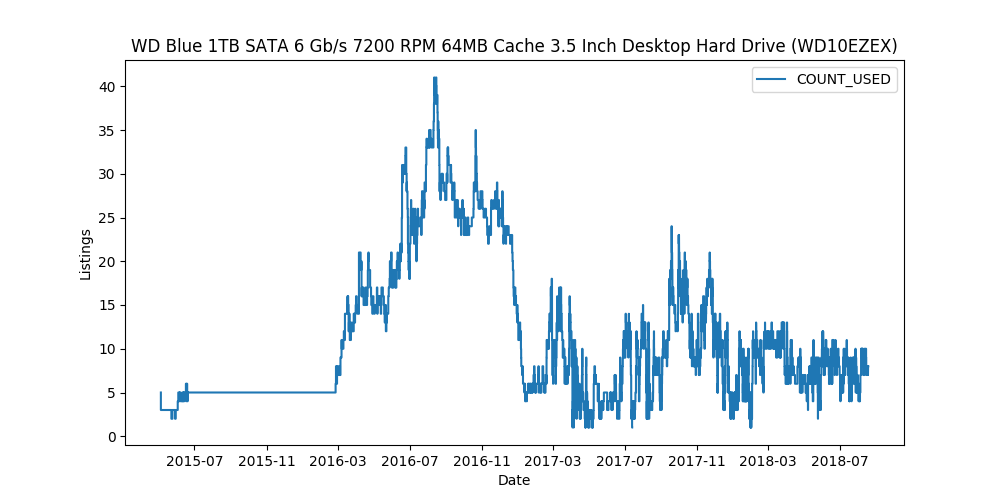
Product Offers Plot
Brief Example Using Async
Here’s an example of finding product ASINs using the keepa.AsyncKeepa class:
>>> import asyncio
>>> import keepa
>>> product_parms = {'author': 'jim butcher'}
>>> async def main():
...     key = '<REAL_KEEPA_KEY>'
...     api = await keepa.AsyncKeepa.create(key)
...     return await api.product_finder(product_parms)
>>> asins = asyncio.run(main())
>>> asins
['B000HRMAR2',
 '0578799790',
 'B07PW1SVHM',
...
 'B003MXM744',
 '0133235750',
 'B01MXXLJPZ']
Query for product with ASIN 'B0088PUEPK' using the asynchronous keepa interface.
>>> import asyncio
>>> import keepa
>>> async def main():
...     key = '<REAL_KEEPA_KEY>'
...     api = await keepa.AsyncKeepa.create(key)
...     return await api.query('B0088PUEPK')
>>> response = asyncio.run(main())
>>> response[0]['title']
'Western Digital 1TB WD Blue PC Internal Hard Drive HDD - 7200 RPM,
SATA 6 Gb/s, 64 MB Cache, 3.5" - WD10EZEX'
Detailed Examples
Import interface and establish connection to server
import keepa
accesskey = 'XXXXXXXXXXXXXXXX' # enter real access key here
api = keepa.Keepa(accesskey)
Single ASIN query
products = api.query('059035342X')

# See help(api.query) for available options when querying the API
The asynchronous client uses the same query interface:
import asyncio
import keepa

async def main():
    accesskey = 'XXXXXXXXXXXXXXXX' # enter real access key here
    api = await keepa.AsyncKeepa.create(accesskey)
    return await api.query('059035342X')

products = asyncio.run(main())
Multiple ASIN query from List
asins = ['0022841350', '0022841369', '0022841369', '0022841369']
products = api.query(asins)
Multiple ASIN query from numpy array
import numpy as np

asins = np.asarray(['0022841350', '0022841369', '0022841369', '0022841369'])
products = api.query(asins)
products is a list with one entry per successful result from the Keepa server. By default, each entry is a dictionary containing the available Amazon product data.
# Available keys
print(products[0].keys())

# Print ASIN and title
print('ASIN is ' + products[0]['asin'])
print('Title is ' + products[0]['title'])

# Index batch results by ASIN when random access is more convenient
products_by_asin = {product['asin']: product for product in products}
When Keepa has history for a product, data contains arrays paired with corresponding *_time arrays. Individual history types may be absent.
# Access new price history and associated time data
history = products[0].get('data', {})
newprice = history.get('NEW', [])
newpricetime = history.get('NEW_time', [])

# Can be plotted with matplotlib using:
import matplotlib.pyplot as plt
plt.step(newpricetime, newprice, where='pre')

# Keys can be listed by
print(history.keys())
The product history can also be plotted from the module if matplotlib is installed
keepa.plot_product(products[0])You can obtain the offers history for an ASIN (or multiple ASINs) using the offers parameter. See the documentation at Request Products for further details.
products = api.query(asins, offers=20)
product = products[0]
offers = product['offers']

# each offer contains the price history of each offer
offer = offers[0]
csv = offer['offerCSV']

# convert these values to numpy arrays
times, prices = keepa.convert_offer_history(csv)

# for a list of active offers, see
indices = product['liveOffersOrder']

# with this you can loop through active offers:
indices = product['liveOffersOrder']
offer_times = []
offer_prices = []
for index in indices:
    csv = offers[index]['offerCSV']
    times, prices = keepa.convert_offer_history(csv)
    offer_times.append(times)
    offer_prices.append(prices)

# you can aggregate these using np.hstack or plot at the history individually
import matplotlib.pyplot as plt
for i in range(len(offer_prices)):
    plt.step(offer_times[i], offer_prices[i])
plt.show()
By default, the client waits for Keepa tokens when necessary. Use wait=False only when your application manages token availability itself; it does not make the API response faster and may produce a token error.
products = api.query('059035342X', wait=False)Buy Box Statistics
To load used buy box statistics, you have to enable offers. This example loads in product offers and converts the buy box data into a pandas.DataFrame.
>>> import keepa
>>> key = '<REAL_KEEPA_KEY>'
>>> api = keepa.Keepa(key)
>>> response = api.query('B0088PUEPK', offers=20)
>>> product = response[0]
>>> buybox_info = product['buyBoxUsedHistory']
>>> df = keepa.process_used_buybox(buybox_info)
               datetime         user_id         condition  isFBA
0   2022-11-02 16:46:00  A1QUAC68EAM09F   Used - Like New   True
1   2022-11-13 10:36:00  A18WXU4I7YR6UA  Used - Very Good  False
2   2022-11-15 23:50:00   AYUGEV9WZ4X5O   Used - Like New  False
3   2022-11-17 06:16:00  A18WXU4I7YR6UA  Used - Very Good  False
4   2022-11-17 10:56:00   AYUGEV9WZ4X5O   Used - Like New  False
..                  ...             ...               ...    ...
115 2023-10-23 10:00:00   AYUGEV9WZ4X5O   Used - Like New  False
116 2023-10-25 21:14:00  A1U9HDFCZO1A84   Used - Like New  False
117 2023-10-26 04:08:00   AYUGEV9WZ4X5O   Used - Like New  False
118 2023-10-27 08:14:00  A1U9HDFCZO1A84   Used - Like New  False
119 2023-10-27 12:34:00   AYUGEV9WZ4X5O   Used - Like New  False
Contributing
Contribute to this repository by forking this repository and installing in development mode with:
git clone https://github.com/<USERNAME>/keepa
pip install -e .[test]
You can then add your feature or commit your bug fix and then run your unit testing with:
pytest
Unit testing will automatically enforce minimum code coverage standards.
Next, to ensure your code meets minimum code styling standards, run:
pre-commit run --all-files
Finally, create a pull request from your fork and I’ll be sure to review it.
Credits
This Python module, written by Alex Kaszynski and several contributors, is based on Java code written by Marius Johann, CEO of Keepa. Java source can be found at keepacom/api_backend.
License
Apache License, please see license file. Work is credited to both Alex Kaszynski and Marius Johann.
1 maintainer

Metadata
1 maintainer
Release files for keepa 1.6.0
For a detailed explanation of source distributions (sdists) and built distributions (wheels), please see the package formats documentation.
Source distribution (sdist)
| File | Size | Uploaded | Provenance | |
|---|---|---|---|---|
| keepa-1.6.0.tar.gz | 437.5 kB | With provenance | Details |
Built distribution (wheel)
| File | Interpreter | ABI | Platform | Reset |
|---|---|---|---|---|
| keepa-1.6.0-py3-none-any.whl | Python 3 | none | any | Details |
Total release size: 517.7 kB
Release files / keepa-1.6.0.tar.gz
| Download URL | keepa-1.6.0.tar.gz |
|---|---|
| Size | 437.5 kB |
| Tags | Source |
|
SHA-256 checksum How to use checksums |
7f4d21d4490e618b0ac978a04a44108dacd18010d3b7fa6516426da4d319b4bc
|
|
BLAKE2b-256 checksum How to use checksums |
3294b63b6d1d4f5c4bb3daf9debd75632cb53be3959708e59d6312161c37c740
|
| Upload date | |
|
Uploaded using Trusted Publishing? What is trusted publishing? |
Yes |
| Uploaded via |
twine/7.0.0 CPython/3.13.14
|
Provenance
Provenance describes where a file came from. On PyPI, provenance is shared via attestations, which provide a verifiable record of the build or publishing details. View details, limitations and caveats.


PyPI Publish Attestation
PyPI verified that this artifact, at this checksum, originated from the publisher listed below.
Signed by GitHub Actions, verified by PyPI on Oct 5, 2026.
Transparency logRelease files / keepa-1.6.0-py3-none-any.whl
| Download URL | keepa-1.6.0-py3-none-any.whl |
|---|---|
| Size | 80.2 kB |
| Tags | Python 3 |
|
SHA-256 checksum How to use checksums |
cbee42555ca2cb32c9bc55fafb564d241dc0018157b0ccba72ebde24aad35680
|
|
BLAKE2b-256 checksum How to use checksums |
7b276622cad89e48c3aad2ad1a8e6184086c510c69c6f7013b0e21de4e1cd6a5
|
| Upload date | |
|
Uploaded using Trusted Publishing? What is trusted publishing? |
Yes |
| Uploaded via |
twine/7.0.0 CPython/3.13.14
|
Provenance
Provenance describes where a file came from. On PyPI, provenance is shared via attestations, which provide a verifiable record of the build or publishing details. View details, limitations and caveats.
PyPI Publish Attestation
PyPI verified that this artifact, at this checksum, originated from the publisher listed below.
Signed by GitHub Actions, verified by PyPI on Oct 5, 2026.
Transparency logSecurity for keepa 1.6.0
Provenance
Provenance describes where a file came from. On PyPI, provenance is shared via attestations, which provide a verifiable record of the build or publishing details. View details, limitations and caveats.
Full provenance
All 2 files in this release have been uploaded with provenance metadata.
Attestation for keepa-1.6.0.tar.gz
PyPI Publish Attestation
PyPI verified that this artifact, at this checksum, originated from the publisher listed below.
Signed by GitHub Actions, verified by PyPI on Oct 5, 2026.
Transparency logA note on package security
PyPI is a repository for distributing packages, not a service for auditing them. While third-party security researchers and our staff do their best to detect and remove malicious packages, PyPI cannot guarantee the quality, security or suitability of any given package.














