
Kepler
Wish you could see stuff like this about your program?
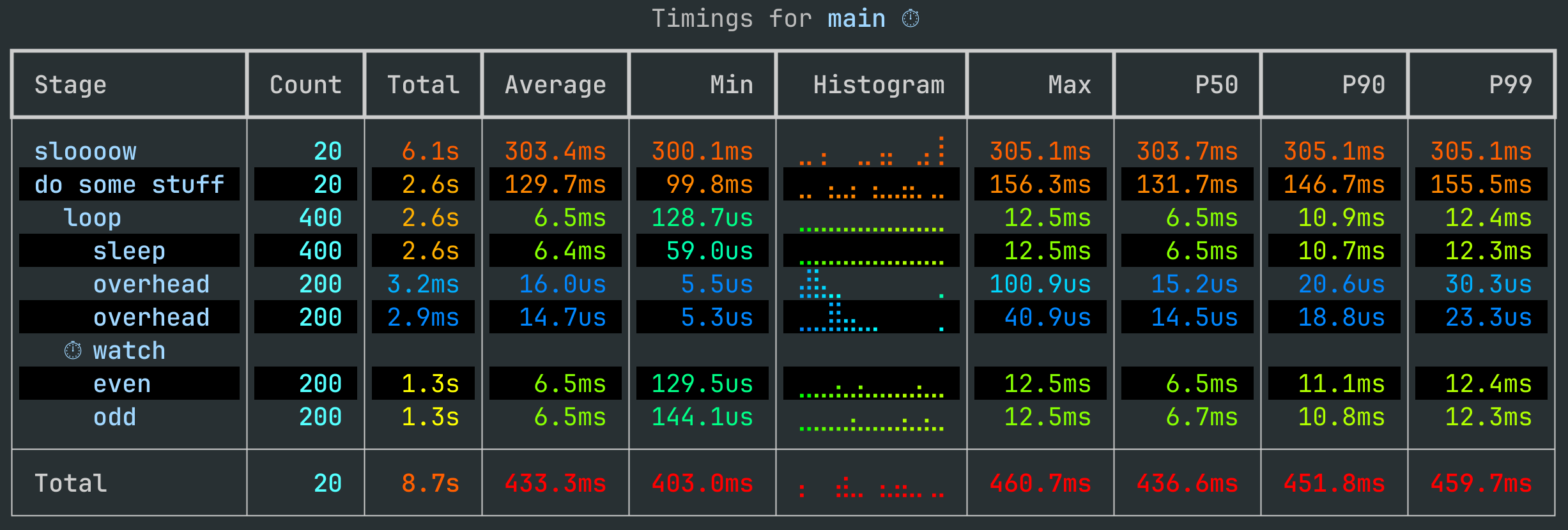
Kepler meticulously tracks your program, and creates simply and easily readable reports to help you understand what they're doing.
Kepler is not a replacement for a good profiling tool, nor is it necessarily a great production implementation tool. Kepler is designed to be that go-to tool in your toolbelt for quick and dirty measurements of your programs.
Installing Kepler
pip install kepler
Kepler in action
The first thing you should do with Kepler is annotate a function or two you want to time with @kepler.time, and then add a kepler.report() call to your amin function.
Here's the script that produced the screenshot above:
import kepler, random, time

@kepler.time("do some stuff")
def do_some_stuff():
    split = kepler.stopwatch("watch")
    for i in kepler.time("loop", range(20)):
        with kepler.time("sleep"):
            time.sleep(random.random() / 100)
        if i % 2 == 1:
            with kepler.time("overhead"):
                split("odd")
        else:
            with kepler.time("overhead"):
                split("even")

@kepler.time
def main():
    with kepler.time("sloooow"):
        time.sleep(0.3)
    do_some_stuff()

main()
kepler.report()
Adding custom timers
Custom timers may be implemented with the measurement decorator.
This works similarly to Python's contextlib.contextmanager decorator:
- The decorated function should be a generator
- It should do any setup it needs to do, and then
yieldexactly once yieldcall corresponds exactly to the code to be measured- It should return an
Eventto be added to kepler's log
import time
import kepler
import torch

@kepler.measurement
def time_gpu():
    start_time = time.time_ns()
    start, end = torch.cuda.Event(True), torch.cuda.Event(True)
    start.record()
    yield
    end.record()
    torch.cuda.synchronize()
    return kepler.TimingEvent(start_time, start.elapsed_time(end) * 1e6)


with time_gpu("matmul"):
    _ = torch.rand([2, 2]) @ torch.rand([2, 2])

kepler.report()
Roadmap
✅ Changelog
- Custom timing measurements
- Import and export reports as json
- Report directly from json -- try
python -m kepler.report < tests/data/simple_log.json - Testing for units, json import and export
🔜 Up next
- Track system metrics
🌈 Before 1.0
- Export traces to pandas
- Flamegraphs
- Integrate with open-telemetry
- Track and report other metrics besidings timings
- Thorough unit testing
- Docs
- Examples
- Logo
1 maintainer

Metadata
1 maintainer
Release files for kepler 0.3.0
For a detailed explanation of source distributions (sdists) and built distributions (wheels), please see the package formats documentation.
Source distribution (sdist)
| File | Size | Uploaded | Provenance | Actions |
|---|---|---|---|---|
| kepler-0.3.0.tar.gz | 141.7 kB | Without provenance | Details for kepler-0.3.0.tar.gz |
Built distribution (wheel)
| File | Interpreter | ABI | Platform | Actions Reset |
|---|---|---|---|---|
| kepler-0.3.0-py3-none-any.whl | Python 3 | none | any | Details for kepler-0.3.0-py3-none-any.whl |
Total release size: 157.0 kB
Release files / kepler-0.3.0.tar.gz
| Download URL | kepler-0.3.0.tar.gz |
|---|---|
| Size | 141.7 kB |
| Tags | Source |
|
SHA-256 checksum How to use checksums |
88927fb03e3354e21d7e75f05842a1d3b0a73a9a0ec003dd3bc204ae0c3f06b1
|
|
BLAKE2b-256 checksum How to use checksums |
c60de26f806e86c64fdb36ad3c8031aa6ae62b2f9c6ff8ca74cb17eb086715cc
|
| Upload date | |
|
Uploaded using Trusted Publishing? What is trusted publishing? |
No |
| Uploaded via |
twine/6.2.0 CPython/3.13.3
|
Release files / kepler-0.3.0-py3-none-any.whl
| Download URL | kepler-0.3.0-py3-none-any.whl |
|---|---|
| Size | 15.2 kB |
| Tags | Python 3 |
|
SHA-256 checksum How to use checksums |
de31972a21e7b2626d7e92d7ab27ab90e2aba396eef7997d99cb3cc9967cca81
|
|
BLAKE2b-256 checksum How to use checksums |
60ab90d3da48a0e92c20180d2b884f8ca79b763c60e2db8540deb020f1655834
|
| Upload date | |
|
Uploaded using Trusted Publishing? What is trusted publishing? |
No |
| Uploaded via |
twine/6.2.0 CPython/3.13.3
|
Security for kepler 0.3.0
Provenance
Provenance describes where a file came from. On PyPI, provenance is shared via attestations, which provide a verifiable record of the build or publishing details. View details, limitations and caveats.
No provenance found
None of the files in this release were uploaded with provenance metadata.
A note on package security
PyPI is a repository for distributing packages, not a service for auditing them. While third-party security researchers and our staff do their best to detect and remove malicious packages, PyPI cannot guarantee the quality, security or suitability of any given package.
To learn more about protecting yourself from malicious actors, visit our package security documentation.














