
KISS Gait Analysis Tool
보행 분석 도구 - 비디오 또는 TRC 파일에서 보행 패턴을 분석하는 웹 기반 애플리케이션
📦 설치 방법
방법 1: 패키지 파일로 설치 (권장) ⭐
.whl파일을 받은 경우 이 방법을 사용하세요.
Step 1: Python 설치 확인
먼저 Python이 설치되어 있는지 확인합니다.
Windows: Win + R → cmd 입력 → Enter → 아래 명령어 입력
Mac: 터미널 앱 실행 → 아래 명령어 입력
python --version
결과 예시:
Python 3.11.5
⚠️ Python이 없다면? → Step 1-1로 이동
⚠️ 버전이 3.9 미만이거나 3.13 이상이면? → Python 3.11 설치 권장
Step 1-1: Python 설치 (Python이 없는 경우)
Windows 사용자 (클릭해서 펼치기)
-
Download Python 3.11.x 버튼 클릭
-
다운로드된 설치 파일 실행
-
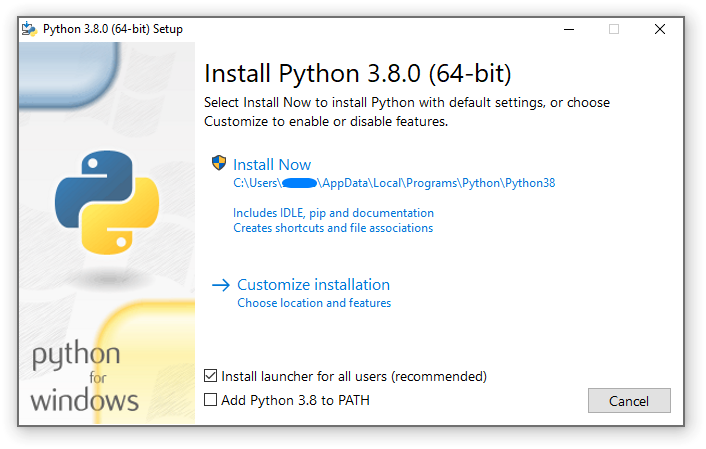
⚠️ 중요: "Add Python to PATH" 체크박스 반드시 체크!
-
"Install Now" 클릭
-
설치 완료 후 컴퓨터 재시작 또는 새 터미널 열기
Mac 사용자 (클릭해서 펼치기)
Homebrew 사용 (권장):
# Homebrew 설치 (없는 경우)
/bin/bash -c "$(curl -fsSL https://raw.githubusercontent.com/Homebrew/install/HEAD/install.sh)"

# Python 설치
brew install python@3.11
또는 공식 설치 파일:
- Python 공식 사이트 접속
- macOS용 설치 파일 다운로드
- 설치 진행
Step 2: 패키지 설치
.whl 파일이 있는 폴더에서 다음 명령어를 실행합니다.
Windows:
# 1. 파일 탐색기에서 .whl 파일이 있는 폴더 열기
# 2. 주소창에 "cmd" 입력 후 Enter (해당 폴더에서 명령 프롬프트 열림)
# 3. 아래 명령어 실행

pip install kiss_gait_analysis-0.1.0-py3-none-any.whl
Mac/Linux:
# 터미널에서 .whl 파일이 있는 폴더로 이동 후 실행
pip install kiss_gait_analysis-0.1.0-py3-none-any.whl
설치 성공 메시지 예시:
Successfully installed kiss-gait-analysis-0.1.0 fastapi-0.x.x uvicorn-0.x.x ...
💡 처음 설치 시 의존성 패키지들이 자동으로 함께 설치되므로 시간이 조금 걸릴 수 있습니다.
Step 2-1: FFmpeg 설치 (비디오 분석 시 필요)
⚠️ 비디오 파일로 포즈 추정을 사용하려면 FFmpeg가 필요합니다.
TRC 파일만 사용하는 경우에는 건너뛰어도 됩니다.
Windows에서 FFmpeg 설치 (클릭해서 펼치기)
1. 압축 해제 프로그램 준비
2. ffmpeg.7z 다운로드 및 압축 해제
- 프로젝트에서 제공하는
ffmpeg.7z파일을 받아서 원하는 위치에 압축 해제 - 예:
C:\ffmpeg폴더에 압축 해제 (내부에bin,doc,presets폴더 등)
3. PATH 환경 변수 설정
GUI로 설정 (권장):
Win + R→sysdm.cpl입력 → Enter- "고급" 탭 → "환경 변수" 버튼 클릭
- "사용자 변수"에서
Path선택 → "편집" 클릭 - "새로 만들기" 클릭 → ffmpeg\bin 폴더 경로 붙여넣기
- 예:
C:\ffmpeg\bin
- 예:
- "확인" 버튼으로 모든 창 닫기
- 새 터미널을 열어서 설정 적용 확인
또는 PowerShell로 설정:
# PowerShell (관리자 권한)
$ffmpegPath = "C:\ffmpeg\bin"
[System.Environment]::SetEnvironmentVariable("Path", $env:Path + ";$ffmpegPath", [System.EnvironmentVariableTarget]::User)
4. 설치 확인
ffmpeg -version
버전 정보가 출력되면 설치 완료!
Mac에서 FFmpeg 설치 (클릭해서 펼치기)
# Homebrew로 설치
brew install ffmpeg
Step 3: 프로그램 실행
설치가 완료되면 어디서든 다음 명령어로 실행할 수 있습니다:
KISS_GaitAnalysis
또는:
kiss-gait-analysis
실행 결과:
[INFO] Starting KISS Gait Analysis...
[INFO] Backend server: http://localhost:8000
[INFO] Frontend: http://localhost:8000
[INFO] Opening browser...
브라우저가 자동으로 열리면서 프로그램이 시작됩니다!
Step 4: 프로그램 종료
터미널에서 Ctrl + C를 누르면 프로그램이 종료됩니다.
방법 2: 소스 코드에서 개발 모드로 실행
개발자이거나 소스 코드를 수정해야 하는 경우 이 방법을 사용하세요.
개발 모드 설치 가이드 (클릭해서 펼치기)
사전 요구사항
- Python 3.10 이상, 3.13 미만
- Node.js 18 이상 (npm 포함)
- Git (선택)
- FFmpeg (선택, 비디오 변환용) - 위의 Step 2-1 참조
# 버전 확인
python --version  # Python 3.10 이상
node --version    # Node.js 18 이상
npm --version     # npm 9 이상
Windows (winget 사용)
winget install --id Git.Git -e
winget install --id Python.Python.3.11 -e
winget install --id OpenJS.NodeJS.LTS -e
macOS (Homebrew 사용)
brew install git python@3.11 node
소스 코드 받기
git clone https://github.com/hunminkim98/KISS_GaitAnalysis.git
cd KISS_GaitAnalysis
백엔드 설치
# 가상환경 생성 및 활성화 (Windows)
python -m venv .venv
.\.venv\Scripts\Activate.ps1

# 가상환경 생성 및 활성화 (Mac/Linux)
python3 -m venv .venv
source .venv/bin/activate

# 의존성 설치
pip install --upgrade pip
pip install -r requirements.txt
프론트엔드 설치
cd frontend
npm install --legacy-peer-deps
cd ..
개발 모드 실행
# 백엔드 + 프론트엔드 동시 실행 (개발 모드)
python start_fullstack.py

# 또는 패키지 설치 후 개발 모드
pip install -e .
KISS_GaitAnalysis --dev
접속 주소:
- 프론트엔드: http://localhost:5173
- 백엔드 API: http://localhost:8000
- API 문서: http://localhost:8000/docs
사용 방법
1. 프로그램 실행
KISS_GaitAnalysis
2. 브라우저에서 분석 시작
- 브라우저가 자동으로 열립니다 (또는 http://localhost:8000 접속)
- "분석 시작하기" 버튼 클릭
- TRC 파일 업로드 (또는 비디오 파일로 포즈 추정)
- 분석 실행
- 결과 확인 및 다운로드
3. 지원 파일 형식
| 파일 유형 | 확장자 | 설명 |
|---|---|---|
| 모션 캡처 | .trc |
3D 마커 위치 데이터 |
| 관절각 | .mot |
OpenSim 관절각 데이터 (선택) |
| 비디오 | .mp4, .avi, .mov |
포즈 추정용 비디오 (선택) |
문제 해결
"python을 찾을 수 없습니다" 오류
원인: Python이 PATH에 등록되지 않음
해결:
- Python 재설치 시 "Add Python to PATH" 체크
- 또는 컴퓨터 재시작
"pip install" 시 권한 오류
해결:
# Windows (관리자 권한 명령 프롬프트)
pip install --user kiss_gait_analysis-0.1.0-py3-none-any.whl

# Mac/Linux
pip install --user kiss_gait_analysis-0.1.0-py3-none-any.whl
포트 8000이 이미 사용 중
해결:
# 다른 포트로 실행 (예: 8080)
KISS_GaitAnalysis --port 8080
Sports2D 관련 오류
원인: GPU 드라이버 또는 CUDA 문제
해결:
- 최신 그래픽 드라이버 설치
- CPU 모드로 실행 (자동 감지됨)
기술 스택
Frontend
- React 18 + TypeScript
- Vite
- Tailwind CSS
- Framer Motion
- Chart.js, Recharts, Plotly.js
- Zustand (상태 관리)
Backend
- FastAPI
- Python 3.10+
- Sports2D (포즈 추정)
- GaitEvents.py (보행 이벤트 탐지)
- gait_phase_analysis.py (보행 페이즈 분석)
API 엔드포인트
| 엔드포인트 | 메서드 | 설명 |
|---|---|---|
/api/gait-analysis/upload |
POST | 파일 업로드 |
/api/gait-analysis/analyze |
POST | 분석 실행 |
/api/gait-analysis/results/{job_id} |
GET | 결과 조회 |
API 문서: http://localhost:8000/docs (프로그램 실행 중 접속)
업데이트 방법
새 버전의 .whl 파일을 받은 경우:
pip install kiss_gait_analysis-X.X.X-py3-none-any.whl --upgrade
삭제 방법
pip uninstall kiss-gait-analysis
지원
문제가 발생하면 GitHub Issues에 문의해 주세요.
라이선스
MIT License - 자세한 내용은 LICENSE 파일 참조
1 maintainer

Metadata
1 maintainer
Release files for kiss-gait-analysis 0.1.11
For a detailed explanation of source distributions (sdists) and built distributions (wheels), please see the package formats documentation.
Source distribution (sdist)
| File | Size | Uploaded | Provenance | Actions |
|---|---|---|---|---|
| kiss_gait_analysis-0.1.11.tar.gz | 326.2 kB | Without provenance | Details for kiss_gait_analysis-0.1.11.tar.gz |
Built distribution (wheel)
| File | Interpreter | ABI | Platform | Actions Reset |
|---|---|---|---|---|
| kiss_gait_analysis-0.1.11-py3-none-any.whl | Python 3 | none | any | Details for kiss_gait_analysis-0.1.11-py3-none-any.whl |
Total release size: 655.3 kB
Release files / kiss_gait_analysis-0.1.11.tar.gz
| Download URL | kiss_gait_analysis-0.1.11.tar.gz |
|---|---|
| Size | 326.2 kB |
| Tags | Source |
|
SHA-256 checksum How to use checksums |
fab7c9cb26274200d09cfb9d62ac56348d5f4497e30f9267841b7d7b74d9d80b
|
|
BLAKE2b-256 checksum How to use checksums |
bf8708e08410d0b28f6280b9fce0af184c7dfe71faae690bc5bddaa757bc2a41
|
| Upload date | |
|
Uploaded using Trusted Publishing? What is trusted publishing? |
No |
| Uploaded via |
twine/6.2.0 CPython/3.10.19
|
Release files / kiss_gait_analysis-0.1.11-py3-none-any.whl
| Download URL | kiss_gait_analysis-0.1.11-py3-none-any.whl |
|---|---|
| Size | 329.1 kB |
| Tags | Python 3 |
|
SHA-256 checksum How to use checksums |
ede72204c76701cff03cab0828bb1ed2272ec3056db09c0fb9a49bc6a4308033
|
|
BLAKE2b-256 checksum How to use checksums |
362ab4164da180577e7424607e21250cdd8669026eb3a724ffea0130d35a9e48
|
| Upload date | |
|
Uploaded using Trusted Publishing? What is trusted publishing? |
No |
| Uploaded via |
twine/6.2.0 CPython/3.10.19
|
Security for kiss-gait-analysis 0.1.11
Provenance
Provenance describes where a file came from. On PyPI, provenance is shared via attestations, which provide a verifiable record of the build or publishing details. View details, limitations and caveats.
No provenance found
None of the files in this release were uploaded with provenance metadata.
A note on package security
PyPI is a repository for distributing packages, not a service for auditing them. While third-party security researchers and our staff do their best to detect and remove malicious packages, PyPI cannot guarantee the quality, security or suitability of any given package.
To learn more about protecting yourself from malicious actors, visit our package security documentation.














