
This release is a pre-release and may not be stable for production use.
Keyword Manager for Plone
kitconcept.keywordmanager








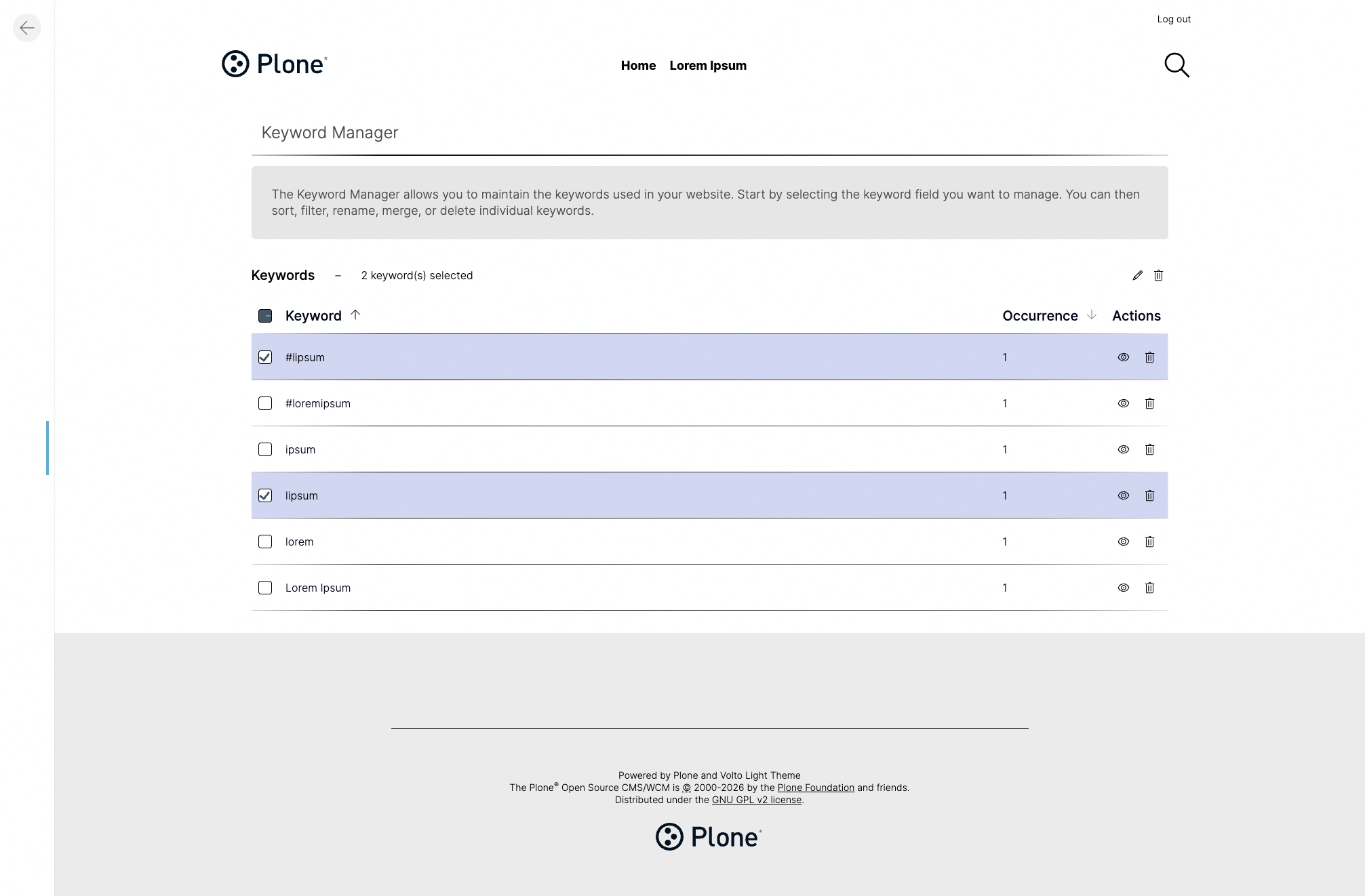
The backend package for Keyword Manager for Plone — a Plone 6 add-on that lets content editors rename, merge, and delete keywords (subjects/tags) across a site, with all content updated automatically. See also the frontend package @kitconcept/volto-keywordmanager.
Features 🔥
- Browse all keywords currently in use, sorted by name or by number of occurrences.
- Filter keywords to quickly find a specific term in a long list.
- Rename a keyword — the new name is applied to every content item that uses it automatically.
- Merge keywords — combine synonyms, fix typos, or resolve ambiguities by merging multiple keywords into one canonical term; all affected content is updated in one step.
- Delete keywords — remove terms that are no longer needed.
- Manage multiple keyword fields — works with the standard
Subjectfield and any other keyword-type index in the catalog.
Requirements
- Plone 6.1 or 6.2
- Python 3.11, 3.12, or 3.13
Installation 🔧
Install kitconcept.keywordmanager with uv.
uv add kitconcept.keywordmanager
Create the Plone site.
make create-site
Configuration
This package allows for some configuration.
To configure one of the following options, import the config module like so:
from kitconcept.keywordmanager import config
Options
The keywords permission allows you to set a custom permission who should be able to manage keywords.
config.MANAGE_KEYWORDS_PERMISSION = "kitconcept.keywordmanager: Manage Keywords"
The meta type of the keyword indexes can be set. This is only useful if you're one of those crazy people that use custom indexes.
config.META_TYPE = "KeywordIndex"
There are indexes of META_TYPE we know we don't want to manage because bad things will happen. You can exclude those using:
config.IGNORE_INDEXES = [
    "object_provides",
    "allowedRolesAndUsers",
    "getRawRelatedItems",
    "getEventType",
    "block_types",
]
You can set a list of indexes that should always be reindex when merging or deleting keywords on objects. Most people won't need this.
config.ALWAYS_REINDEX = ("SearchableText",)
REST API
GET /@keywords (or /path/to/page/@keywords)
| Parameter | Source | Type / Values | Required | Default | Description |
|---|---|---|---|---|---|
idx |
form | string | no | "Subject" | The keyword index to query. |
sort_order |
form | "ascending" or "descending" | no | — | The sort order of results. |
sort_on |
form | "keyword" or "occurrence" | no | — | The field to sort on. |
PATCH /@keywords (or /path/to/page/@keywords)
| Parameter | Source | Type / Values | Required | Default | Description |
|---|---|---|---|---|---|
idx |
form | string | no | "Subject" | The keyword index to query. |
new_keyword |
body | string | yes | — | The name of the keyword to be created. |
old_keywords |
body | list[string] | yes | — | The old keywords to be deleted. |
DELETE /@keywords (or /path/to/page/@keywords)
| Parameter | Source | Type / Values | Required | Default | Description |
|---|---|---|---|---|---|
idx |
form | string | no | "Subject" | The keyword index to query. |
items |
body | list | yes | — | The name of the keywords to be deleted. |
GET /@keywordIndex
No parameters.
Utility
Getting the utility.
from kitconcept.keywordmanager.interfaces import IKeywordManager
from zope.component import getUtility

km = getUtility(IKeywordManager)
Contributing 🐛
Prerequisites ✅
- An operating system that runs all the requirements mentioned.
- uv
- Make
- Git
- Docker (optional)
Installation 🔧
-
Clone this repository.
git clone git@github.com:kitconcept/kitconcept-keywordmanager.git
cd kitconcept-keywordmanager/backend
-
Install this code base.
make install
License
The project is licensed under GPLv2.
Credits and acknowledgements 🙏
Generated using Cookieplone (2.0.0a3) and cookieplone-templates (cda10db) on 2026-05-29 11:44:37.855709. A special thanks to all contributors and supporters!


Release files for kitconcept.keywordmanager 1.0.0a4
For a detailed explanation of source distributions (sdists) and built distributions (wheels), please see the package formats documentation.
Source distribution (sdist)
| File | Size | Uploaded | Provenance | Actions |
|---|---|---|---|---|
| kitconcept_keywordmanager-1.0.0a4.tar.gz | 82.6 kB | Without provenance | Details for kitconcept_keywordmanager-1.0.0a4.tar.gz |
Built distribution (wheel)
| File | Interpreter | ABI | Platform | Actions Reset |
|---|---|---|---|---|
| kitconcept_keywordmanager-1.0.0a4-py3-none-any.whl | Python 3 | none | any | Details for kitconcept_keywordmanager-1.0.0a4-py3-none-any.whl |
Total release size: 176.6 kB
Release files / kitconcept_keywordmanager-1.0.0a4.tar.gz
| Download URL | kitconcept_keywordmanager-1.0.0a4.tar.gz |
|---|---|
| Size | 82.6 kB |
| Tags | Source |
|
SHA-256 checksum How to use checksums |
7fc844d1e60bf681c9e528a98beee2b37b31153748643e970d1c482dbc83fbf3
|
|
BLAKE2b-256 checksum How to use checksums |
e49892ede07ca8014ea15e4b1f991ad966da56bee13e94a8579cab984e4caaa2
|
| Upload date | |
|
Uploaded using Trusted Publishing? What is trusted publishing? |
No |
| Uploaded via |
uv/0.13.5 {"installer":{"name":"uv","version":"0.13.5","subcommand":["publish"]},"python":null,"implementation":{"name":null,"version":null},"distro":{"name":"macOS","version":null,"id":null,"libc":null},"system":{"name":null,"release":null},"cpu":null,"openssl_version":null,"setuptools_version":null,"rustc_version":null,"ci":null}
|
Release files / kitconcept_keywordmanager-1.0.0a4-py3-none-any.whl
| Download URL | kitconcept_keywordmanager-1.0.0a4-py3-none-any.whl |
|---|---|
| Size | 94.1 kB |
| Tags | Python 3 |
|
SHA-256 checksum How to use checksums |
6514cf1bf5a195e1e254094898e7566b1b6c8b2a5c672aaca9f1609db8afcb4e
|
|
BLAKE2b-256 checksum How to use checksums |
162f1238d3730e419d46a4e84483aab6a8963676d328238051ebd75b63010556
|
| Upload date | |
|
Uploaded using Trusted Publishing? What is trusted publishing? |
No |
| Uploaded via |
uv/0.13.5 {"installer":{"name":"uv","version":"0.13.5","subcommand":["publish"]},"python":null,"implementation":{"name":null,"version":null},"distro":{"name":"macOS","version":null,"id":null,"libc":null},"system":{"name":null,"release":null},"cpu":null,"openssl_version":null,"setuptools_version":null,"rustc_version":null,"ci":null}
|
Security for kitconcept.keywordmanager 1.0.0a4
Provenance
Provenance describes where a file came from. On PyPI, provenance is shared via attestations, which provide a verifiable record of the build or publishing details. View details, limitations and caveats.
No provenance found
None of the files in this release were uploaded with provenance metadata.
A note on package security
PyPI is a repository for distributing packages, not a service for auditing them. While third-party security researchers and our staff do their best to detect and remove malicious packages, PyPI cannot guarantee the quality, security or suitability of any given package.
To learn more about protecting yourself from malicious actors, visit our package security documentation.














