
KMeansImage
Pip package(Python >= 3.6)
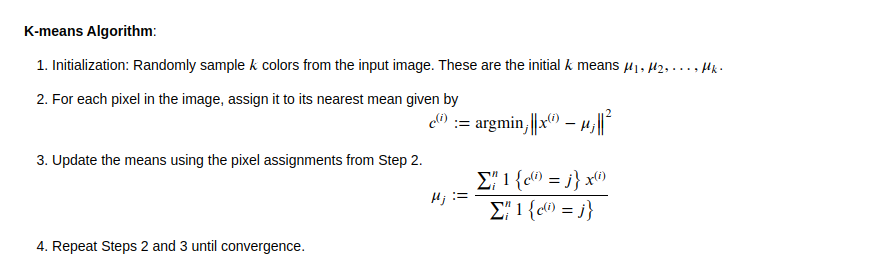
This is a python package to compress images in python using KMeans-Clustering technique.

pip3 install KMeansImage
How to use:
from KMeansImage import kmeans_image
k_img = kmeans_image( $image_path_with_image_name ,  $output_colors )
k_img.save( $save_path_with_file_name )
In case you are using Jupyter notebook, you can also use:
from KMeansImage import kmeans_image_ui
k_img = kmeans_image_ui( $image_directory_path )
k_img.save( $save_path_with_file_name )
Example: Pdf
Import Library
from KMeansImage import kmeans_image
First parameter = path
Second parameter = No. of colors i.e. Clusters
k_img = kmeans_image('/home/sahil/Downloads/KMeansImage/res/batman.jpg', 20)
Original Image size: 419.291KB
Compressed Image: 253.235KB

See the difference between size of both pics
For saving the file use -
k_img.save()
Image saved: /home/sahil/Downloads/KMeansImage/res/batman_KMeans_.jpg
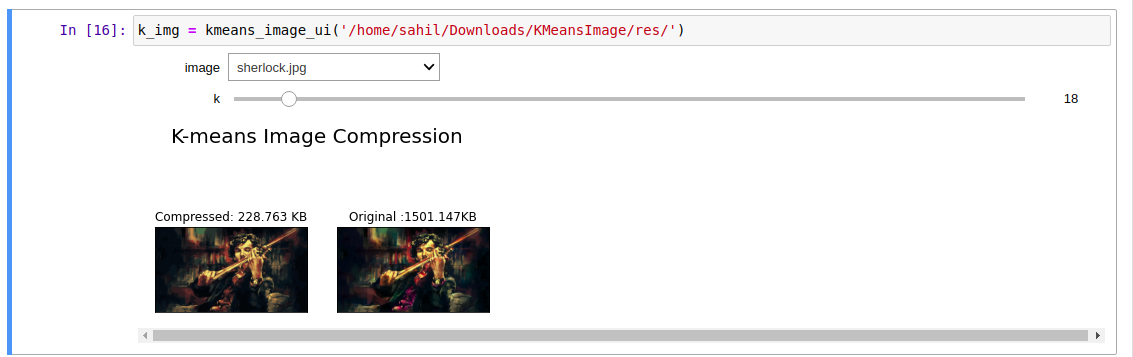
Interactive For Jupyter Notebook
from KMeansImage import kmeans_image_ui
Parameter = Image directory path
k_img = kmeans_image_ui('/home/sahil/Downloads/KMeansImage/res/')
k_img.save()
Image saved: /home/sahil/Downloads/KMeansImage/res/sherlock_KMeans_.jpg
Jupyter Notebook Dependency:
pip install ipywidgets
jupyter nbextension enable --py widgetsnbextension
jupyter labextension install @jupyter-widgets/jupyterlab-manager
You can also download using Github:
- Download and extract this repo
- Move the terminal to the directory of setup.py
pip install .
Packages Required:
- numpy
- scikit-learn
- matplotlib
- ipywidgets
Contact Me:
Todos
- Add a button for saving images instead of save() in interactive notebook
- Add some boundary conditions
- Add Test cases
License
MIT
Free Software, Hell Yeah!
1 maintainer

Metadata
1 maintainer
Release files for KMeansImage 1.0
For a detailed explanation of source distributions (sdists) and built distributions (wheels), please see the package formats documentation.
Source distribution (sdist)
| File | Size | Uploaded | |
|---|---|---|---|
| KMeansImage-1.0.tar.gz | 4.0 kB | Details |
Built distribution (wheel)
| File | Interpreter | ABI | Platform | Reset |
|---|---|---|---|---|
| KMeansImage-1.0-py3-none-any.whl | Python 3 | none | any | Details |
Total release size: 9.7 kB
Release files / KMeansImage-1.0.tar.gz
| Download URL | KMeansImage-1.0.tar.gz |
|---|---|
| Size | 4.0 kB |
| Tags | Source |
|
SHA-256 checksum How to use checksums |
3ff4bd453ccb6467c53a2994da0c05c85137babdaa1ce76814c46c2fe67df5f3
|
|
BLAKE2b-256 checksum How to use checksums |
6dd2a85d9059f815bd764f833486ece1f14a0976b1af7a62d71db557886e7d7c
|
| Upload date | |
|
Uploaded using Trusted Publishing? What is trusted publishing? |
No |
| Uploaded via |
twine/3.2.0 pkginfo/1.5.0.1 requests/2.22.0 setuptools/49.1.0 requests-toolbelt/0.9.1 tqdm/4.47.0 CPython/3.8.2
|
Release files / KMeansImage-1.0-py3-none-any.whl
| Download URL | KMeansImage-1.0-py3-none-any.whl |
|---|---|
| Size | 5.8 kB |
| Tags | Python 3 |
|
SHA-256 checksum How to use checksums |
a5ed346865a3a4db6dfc3301bd0b4332f7d140759881db4e9654ca442938e38f
|
|
BLAKE2b-256 checksum How to use checksums |
1e9112f2c032a4605d848f22db4291de285575d09ab9d025652500ee6766b56c
|
| Upload date | |
|
Uploaded using Trusted Publishing? What is trusted publishing? |
No |
| Uploaded via |
twine/3.2.0 pkginfo/1.5.0.1 requests/2.22.0 setuptools/49.1.0 requests-toolbelt/0.9.1 tqdm/4.47.0 CPython/3.8.2
|













