
Konsave (Save Linux Customization)
A CLI program that will let you save and apply your Linux customizations with just one command! Konsave also lets you share your dot files to your friends in an instant! It officially supports KDE Plasma but it can be used on all other desktop environments too!
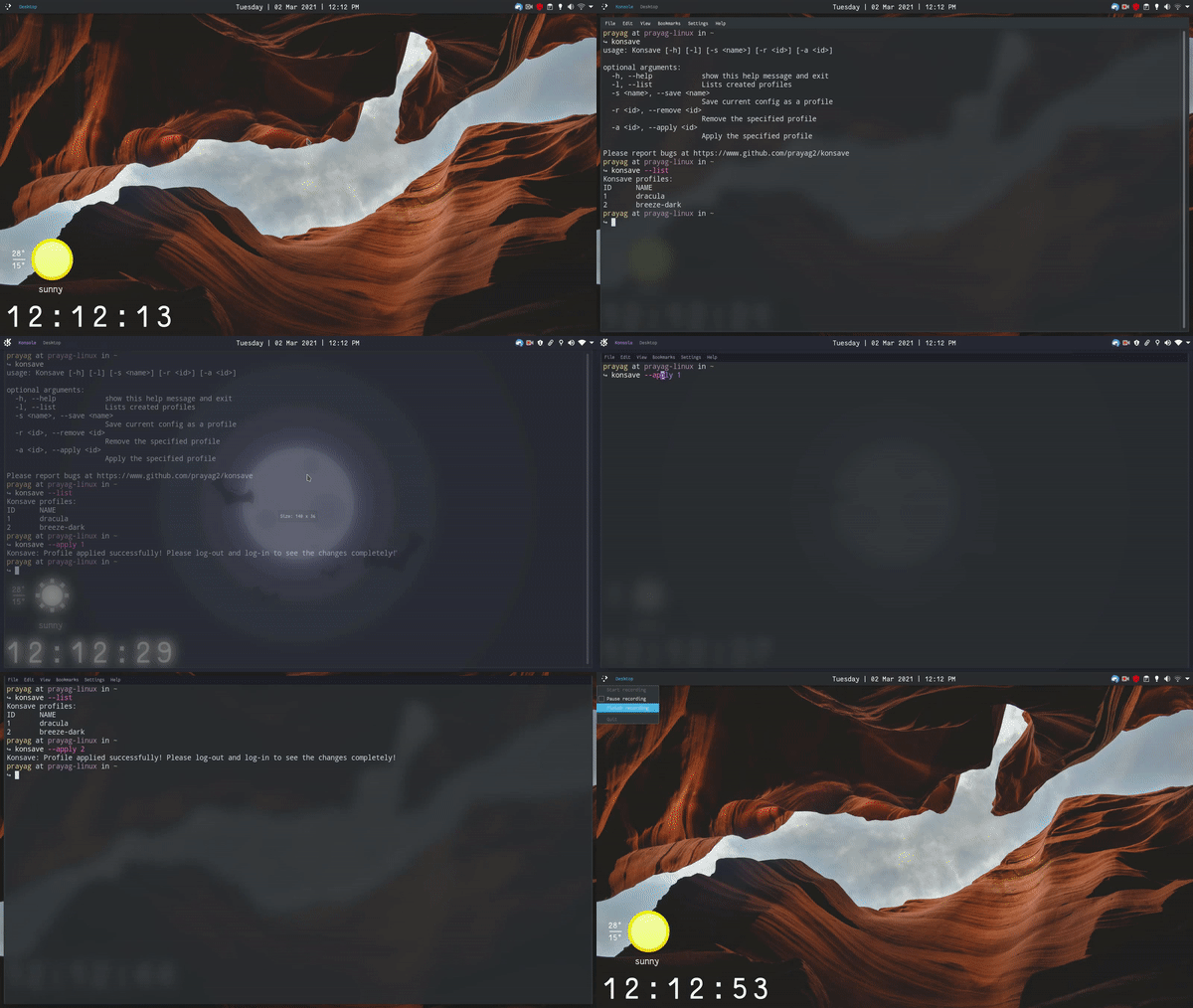
Installation
Install from PyPI using pip
python -m pip install konsave
Install from PyPI using pipx
pipx install konsave
Usage
Get Help
konsave -h or konsave --help
Save current configuration as a profile
konsave -s <profile name> or konsave --save <profile name>
Overwrite an already saved profile
konsave -s <profile name> -f or konsave -s <profile name> --force
List all profiles
konsave -l or konsave --list
Remove a profile
konsave -r <profile name> or konsave --remove <profile name>
Apply a profile
konsave -a <profile name> or konsave --apply <profile name>
You may need to log out and log in to see all the changes.
Export a profile as a ".knsv" file to share it with your friends!
konsave -e <profile name> or konsave --export-profile <profile name>
Export a profile, setting the output dir and archive name
konsave -e <profile name> -d <archive directory> -n <archive name>
or
konsave --export-profile <profile name> --archive-directory <archive directory> --export-name <export name>
Export a profile, overwrite files if they already exist
konsave -e <profile name> -f or konsave --export-profile <profile name> --force
*note: without --force, the export will be appended with the date and time to ensure unique naming and no data is overwritten
Import a ".knsv" file
konsave -i <path to the file> or konsave --import-profile <path to the file>
Show current version
konsave -v or konsave --version
Wipe all profiles
konsave -w or konsave --wipe
Editing the configuration file
You can make changes to Konsave's configuration file according to your needs. The configuration file is located in ~/.config/konsave/conf.yaml.
When using Konsave for the first time, you'll be prompted to enter your desktop environment.
For KDE Plasma users, the configuration file will be pre-configured.
Format
The configuration file should be formatted in the following way:
---
save:
    name:
        location: "path/to/parent/directory"
        entries:
        # These are files to be backed up.
        # They should be present in the specified location.
            - file1
            - file2
export:
    # This includes files which will be exported with your profile.
    # They will not be saved but only be exported and imported.
    # These may include files like complete icon packs and themes..
    name:
        location: "path/to/parent/directory"
        entries:
            - file1
            - file2
...
Adding more files/folders to backup
You can add more files/folders in the configuration file like this:
save:
    name:
        location: "path/to/parent/directory"
        entries:
            - file1
            - file2
            - folder1
            - folder2
export:
    anotherName:
            location: "another/path/to/parent/directory"
            entries:
                - file1
                - file2
                - folder1
                - folder2
Using placeholders
You can use a few placeholders in the location of each entry in the configuration file. These are:
$HOME: the home directory
$CONFIG_DIR: refers to "$HOME/.config/"
$SHARE_DIR: refers to "$HOME/.local/share"
$BIN_DIR: refers to "$HOME/.local/bin"
${ENDS_WITH="text"}: for folders with different names on different computers whose names end with the same thing.
The best example for this is the ".default-release" folder of firefox.
${BEGINS_WITH="text"}: for folders with different names on different computers whose names start with the same thing.
save:
    firefox:
        location: "$HOME/.mozilla/firefox/${ENDS_WITH='.default-release'}"
        entries:
            - chrome
Contributing
Please read CONTRIBUTION.md for info about contributing.
License
This project uses GNU General Public License 3.0
1 maintainer

Metadata
1 maintainer
Release files for Konsave 2.3.0
For a detailed explanation of source distributions (sdists) and built distributions (wheels), please see the package formats documentation.
Source distribution (sdist)
| File | Size | Uploaded | |
|---|---|---|---|
| konsave-2.3.0.tar.gz | 32.6 kB | Details |
Built distribution (wheel)
| File | Interpreter | ABI | Platform | Reset |
|---|---|---|---|---|
| konsave-2.3.0-py3-none-any.whl | Python 3 | none | any | Details |
Total release size: 57.3 kB
Release files / konsave-2.3.0.tar.gz
| Download URL | konsave-2.3.0.tar.gz |
|---|---|
| Size | 32.6 kB |
| Tags | Source |
|
SHA-256 checksum How to use checksums |
41ef91648b206eabc5a9685491f0026d8bc7b5741ca7ac8af97aefaa05e79537
|
|
BLAKE2b-256 checksum How to use checksums |
b3adccd3386c50ace4f91c89f41037b05347a9d0cbba0eed38f74725b5f4b2bb
|
| Upload date | |
|
Uploaded using Trusted Publishing? What is trusted publishing? |
No |
| Uploaded via |
twine/6.1.0 CPython/3.13.7
|
Release files / konsave-2.3.0-py3-none-any.whl
| Download URL | konsave-2.3.0-py3-none-any.whl |
|---|---|
| Size | 24.7 kB |
| Tags | Python 3 |
|
SHA-256 checksum How to use checksums |
3cd71880766a609e0d0cfecdd31fb8762b43a878f52626d39ef21fcb8d4482fd
|
|
BLAKE2b-256 checksum How to use checksums |
869c3e877be8ffaa119ee983adf546e799f67ad3d19abc8f0ce7039f9d66cfcb
|
| Upload date | |
|
Uploaded using Trusted Publishing? What is trusted publishing? |
No |
| Uploaded via |
twine/6.1.0 CPython/3.13.7
|














