
labella.py

Labella.py is a Python 3 clone of labella.js that supports all the features of labella.js and addionally can generate TikZ PDF images for use in LaTeX.
Note: This package is for the most part a direct translation of the original labella.js code to Python 3. All the credit for the labella code goes to Krist Wongsuphasawat (@kristw), I only added the code that generates PDF output. Labella.py also includes code from d3 for axis scaling, and WebCola for the VPSC code (label placement optimization).
Why?
I wrote this for multiple reasons, the most important of which is that I wanted to incorporate label graphs like the ones generated by labella.js in PDF documents, but wasn’t satisfied with the PDF output generated by SVG-to-PDF converters. Additionally, it seemed like a fun way to learn some more Javascript, and learn about how labella.js works.
Screenshots
These screenshots show the PDF output generated by labella.py (converted to .png)
Time scale:
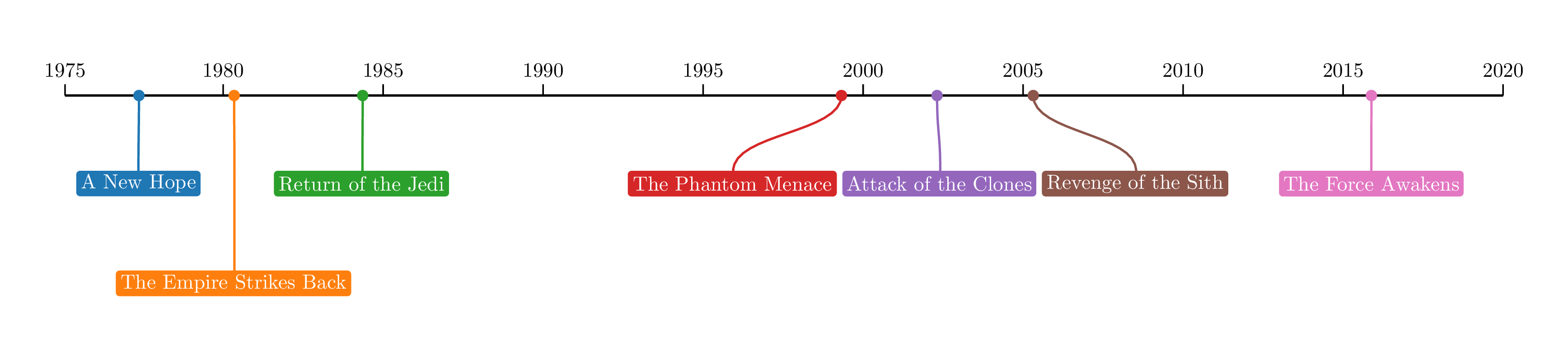
Linear scale:

Usage
Using labella.py is extremely similar to using labella.js. See the examples directory for examples of how to use labella.py. These examples are translations of the examples included in labella.js and in d3kit-timeline.
For ease of use only the Timeline interface is implemented, which works similar to d3kit-timeline. Here is a minimal working example for exporting to PDF:
>>> from labella.scale import LinearScale
>>> from labella.timeline import TimelineTex
>>> tl = TimelineTex([
  {'time': 1, 'text': 'Minimal'},
  {'time': 2, 'text': 'Working'},
  {'time': 3, 'text': 'Example'}
  ], options={'scale': LinearScale()})
>>> tl.export('minimal.tex')
See also the documentation here.
Installation
Labella.py is available through PyPi, so you can do:
pip install labella
to install it.
Note: Labella.py requires a working LaTeX distribution for both SVG and PDF output (see also the documentation), and has only been tested on Linux. If you run into problems, please open an issue on GitHub.
1 maintainer

Metadata
1 maintainer
Release files for labella 0.9.8
For a detailed explanation of source distributions (sdists) and built distributions (wheels), please see the package formats documentation.
Source distribution (sdist)
| File | Size | Uploaded | Provenance | Actions |
|---|---|---|---|---|
| labella-0.9.8.tar.gz | 35.0 kB | Without provenance | Details for labella-0.9.8.tar.gz |
Built distribution (wheel)
| File | Interpreter | ABI | Platform | Actions Reset |
|---|---|---|---|---|
| labella-0.9.8-py3-none-any.whl | Python 3 | none | any | Details for labella-0.9.8-py3-none-any.whl |
Total release size: 64.7 kB
Release files / labella-0.9.8.tar.gz
| Download URL | labella-0.9.8.tar.gz |
|---|---|
| Size | 35.0 kB |
| Tags | Source |
|
SHA-256 checksum How to use checksums |
7267dbfc202cb284d2c62f35836b014886c32ce58a388df0135634e87611ed67
|
|
BLAKE2b-256 checksum How to use checksums |
b637a0d80f57276cb17776648e728c51f33e23476bbdf5c1918501dee8dc54ba
|
| Upload date | |
|
Uploaded using Trusted Publishing? What is trusted publishing? |
No |
| Uploaded via |
twine/3.3.0 pkginfo/1.6.1 requests/2.25.1 setuptools/53.0.0 requests-toolbelt/0.9.1 tqdm/4.54.1 CPython/3.9.1
|
Release files / labella-0.9.8-py3-none-any.whl
| Download URL | labella-0.9.8-py3-none-any.whl |
|---|---|
| Size | 29.7 kB |
| Tags | Python 3 |
|
SHA-256 checksum How to use checksums |
b8c55795bcb8d7a9969a8d21516b2f1d6f05e7cb588437ca686eca39b83351b8
|
|
BLAKE2b-256 checksum How to use checksums |
41bc2127e570282581b8be3d11bf253f8c0373bfed5a773381e3f6bfc01170be
|
| Upload date | |
|
Uploaded using Trusted Publishing? What is trusted publishing? |
No |
| Uploaded via |
twine/3.3.0 pkginfo/1.6.1 requests/2.25.1 setuptools/53.0.0 requests-toolbelt/0.9.1 tqdm/4.54.1 CPython/3.9.1
|
Security for labella 0.9.8
Provenance
Provenance describes where a file came from. On PyPI, provenance is shared via attestations, which provide a verifiable record of the build or publishing details. View details, limitations and caveats.
No provenance found
None of the files in this release were uploaded with provenance metadata.
A note on package security
PyPI is a repository for distributing packages, not a service for auditing them. While third-party security researchers and our staff do their best to detect and remove malicious packages, PyPI cannot guarantee the quality, security or suitability of any given package.
To learn more about protecting yourself from malicious actors, visit our package security documentation.














