
Lenslet
A lightweight image gallery server for fast visual triage. Point it at a directory or a Parquet table and browse instantly in your browser. Lenslet keeps the source images read-only and stores workspace state separately.
Introduction
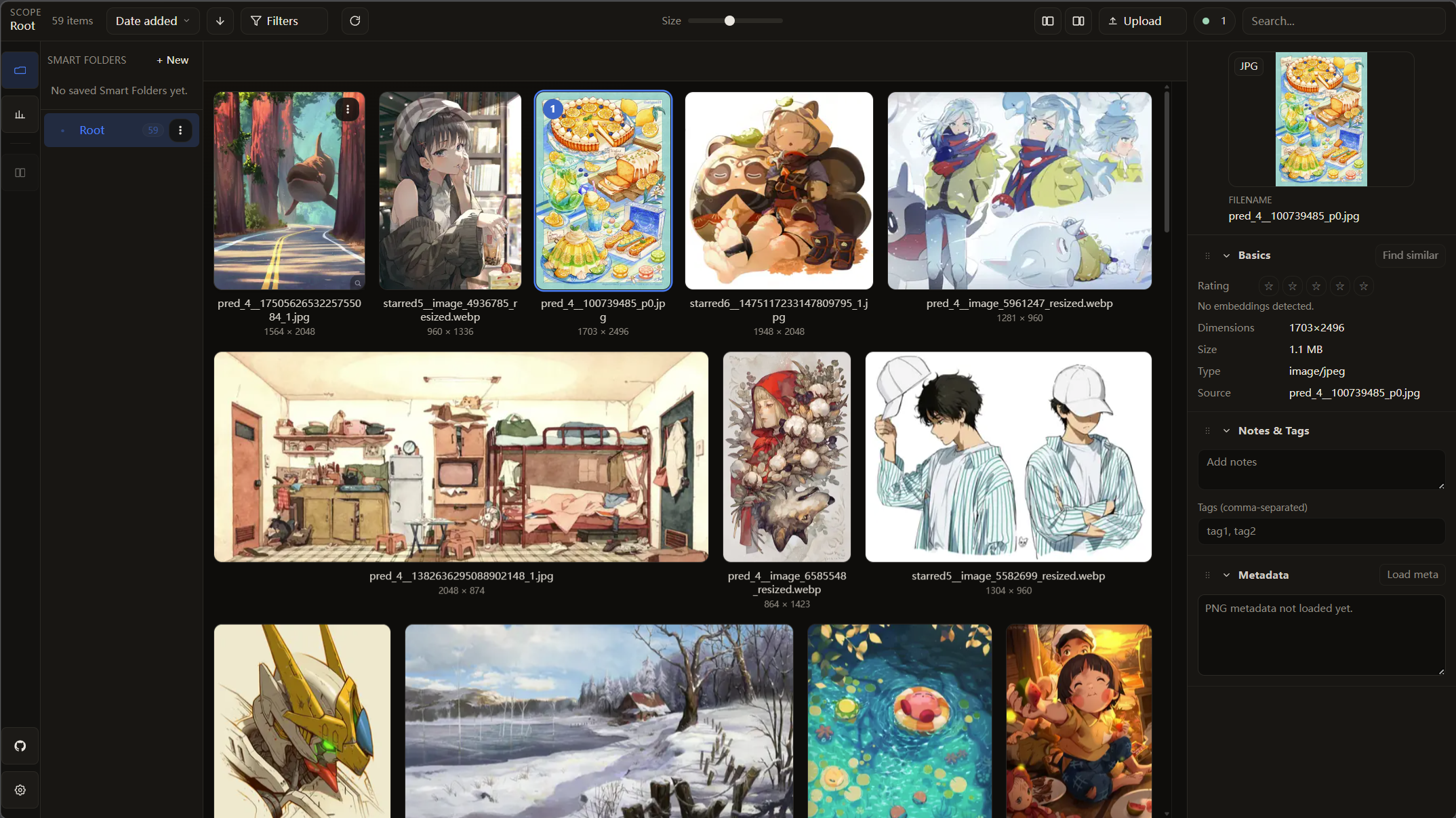
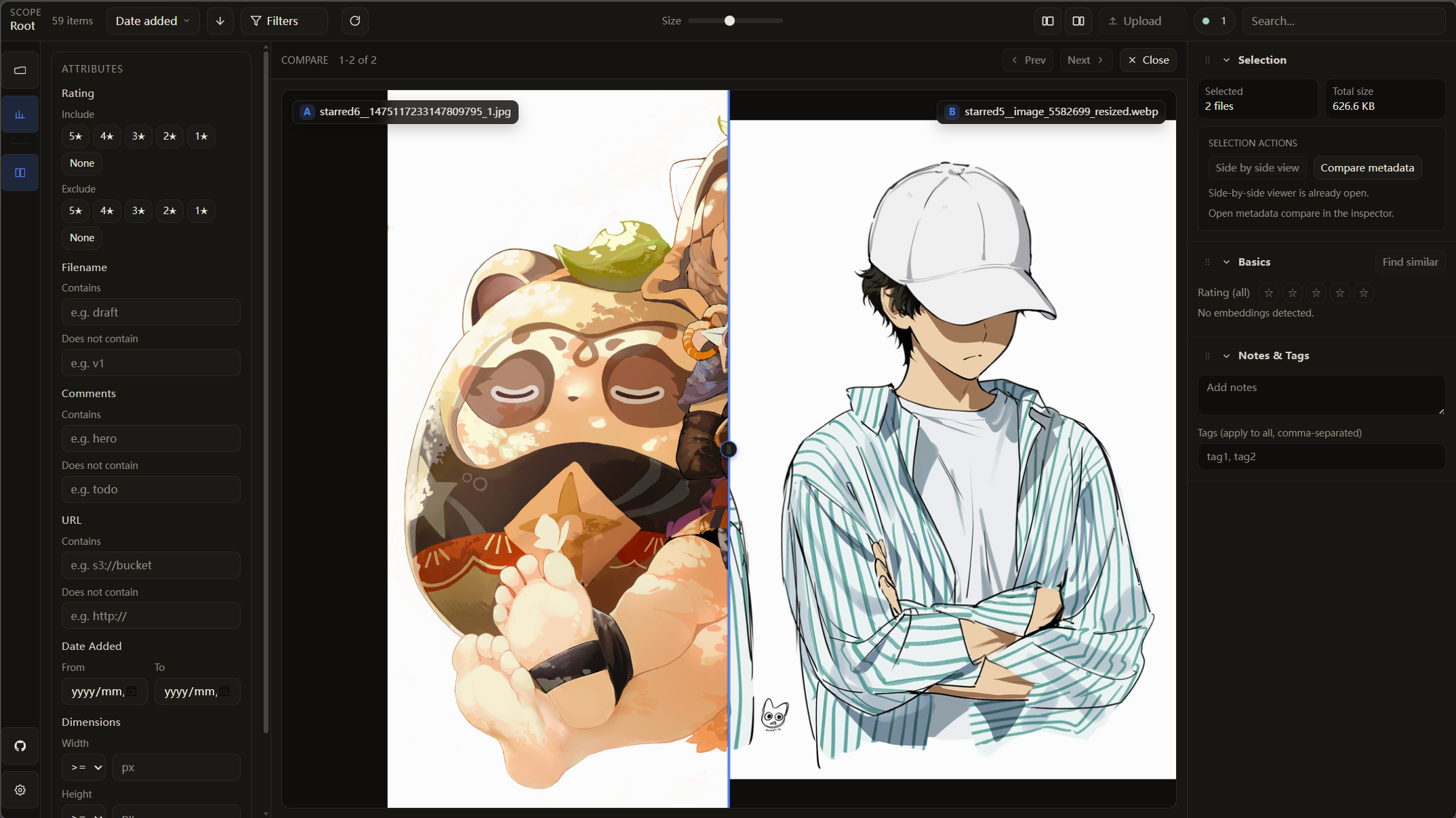
Lenslet is a self-contained image gallery server designed for simplicity and speed. It indexes directories on-the-fly, generates thumbnails on demand, and serves everything through a clean web interface. Perfect for quickly browsing local image collections or large Parquet-backed datasets without modifying the source images.
Features
- Workspace-aware: Persists UI state (Smart Folders/views) and optional thumbnail cache under
.lenslet/(or<parquet>.lenslet.json) - Workspace themes: Browse mode supports
Original,Teal, andCharcoalpresets persisted per workspace, with matching dynamic tab favicon accents - Read-only sources: Never writes into your image directories or S3 buckets
- Local + S3 + HTTP: Mix local files,
s3://URIs, and URLs with smart source parsing - Metrics & filtering: Sort/filter by numeric metrics from Parquet (histograms + range brushing)
- Embedding similarity: Find similar images from fixed-size list embeddings (cosine; optional FAISS acceleration)
- Labels & export: Tag, rate, and annotate items, then export metadata as JSON or CSV
- Ranking mode (MVP): Launch
lenslet rank <dataset.json>for per-instance ranking with autosave/resume - Single command: Just point to a directory or Parquet file and go
Touch + Mobile Controls
- Tap-first browse flow: on touch devices, tap once to select and tap the selected item again to open the viewer.
- Explicit actions on touch: grid and folder action buttons are visible on coarse pointers; right-click still works on desktop.
- Mobile select mode: use the
Select/Donetoggle in the narrow-screen toolbar drawer to multi-select without Shift/Ctrl keys. - Viewer navigation at phone widths: next/previous controls remain available on narrow screens (including in-viewer controls at very small widths).
Installation
pip install lenslet
Tested source install for the pinned Python 3.13 runtime stack used in this repo:
python -m pip install -c constraints/runtime-py313.txt -e .
python -m pip install -c constraints/runtime-py313.txt -e ".[dev]"
Fresh development checkout, including frontend packages and Playwright Chromium:
python scripts/setup_dev.py
On Linux, this also asks Playwright to install Chromium system packages so browser smokes work in fresh containers. Use --skip-browser-system-deps if your OS packages are managed separately.
Optional extras:
# Remote parquet/Hugging Face table loading
pip install "lenslet[remote]"

# NumPy-only similarity search
pip install "lenslet[embeddings]"

# FAISS-accelerated similarity search (CPU)
pip install "lenslet[embeddings-faiss]"

# CPU embedding inference for --embed
pip install "lenslet[embed]"
Usage
Command Line Interface
lenslet /path/to/images
Then open the URL printed in the terminal (default http://127.0.0.1:7070, or the next available port).
Options:
lenslet <directory|table.parquet|org/dataset|s3://.../table.parquet> [options]

Options:
  -p, --port PORT              Port to listen on (default: 7070; auto-increment if in use)
  -H, --host HOST              Host to bind to (default: 127.0.0.1)
  --thumb-size SIZE            Thumbnail short edge in pixels (default: 256)
  --thumb-quality QUALITY      Thumbnail WebP quality 1-100 (default: 70)
  --source-column NAME         Column to load image paths from in table mode
  --path-column NAME           Column to use as Lenslet logical paths in table mode
  --base-dir PATH              Base directory for resolving relative paths in table mode
  --dimension-cache MODE       Cache dimensions in workspace, source, or none
  --write-source-dimensions    Opt in to writing dimensions back into source Parquet
  --no-cache-dimensions        Disable workspace and source dimension cache writes
  --probe-dimensions           Probe missing image dimensions during table load
  --no-thumb-cache             Disable thumbnail cache when a workspace is available
  --no-og-preview              Disable dataset-based social preview image
  --no-write                   Use a temp workspace under /tmp/lenslet (keeps source read-only)
  --trust-remote-paths         Allow remote parquet/HF tables to read local filesystem paths
  --embedding-column NAME      Embedding column name (repeatable, comma-separated allowed)
  --embedding-metric NAME:METRIC
                               Embedding metric override (repeatable)
  --embedding-preload          Preload embedding indexes on startup
  --no-embedding-cache         Disable embedding cache
  --embedding-cache-dir PATH   Override embedding cache directory
  --embed                      Run CPU embedding inference on a parquet file before launch
  --batch-size SIZE            Embedding inference batch size (used with --embed)
  --parquet-batch-size SIZE    Rows per parquet batch (used with --embed)
  --num-workers N              Parallel image loading workers (used with --embed)
  --reload                     Enable auto-reload for development
  --share                      Create a public share URL via cloudflared
  --verbose                    Show detailed server logs
  -v, --version                Show version and exit
Examples:
# Serve images from your Pictures folder
lenslet ~/Pictures

# Use a custom port
lenslet ~/Photos --port 8080

# Make accessible on local network
lenslet ~/Images --host 0.0.0.0 --port 7070

# Create a public share URL (prints a trycloudflare.com link)
lenslet ~/Images --share

# Start from a Parquet workspace (paths can be local, s3://, or https://)
lenslet /data/items.parquet --source-column image_path --base-dir /data

# Use separate physical source and logical display path columns
lenslet /data/items.parquet --source-column image_uri --path-column display_path

# Start from a folder containing items.parquet
lenslet /data/dataset --source-column image_path

# Start from a Hugging Face dataset repo (org/dataset)
lenslet incantor/dit03-twitter-niji7-5k-filtering-metrics --share

# Start from a remote Parquet file
# Requires: pip install "lenslet[remote]"
lenslet s3://my-bucket/items.parquet --source-column image_path

# Allow a trusted remote Parquet/HF table to reference local files on this machine
# Security-sensitive: only use with datasets you trust; add --base-dir to bound local reads.
lenslet incantor/my-dataset --source-column image_path --trust-remote-paths --base-dir /data/images

# Add embeddings to a local Parquet file before launching
# Requires: pip install "lenslet[embed]"
lenslet /data/items.parquet --source-column image_path --embed
Ranking Mode (MVP)
Run ranking mode with a dataset JSON:
lenslet rank /path/to/ranking_dataset.json --port 7071
rank options:
lenslet rank <dataset.json> [options]

Options:
  -p, --port PORT              Port to listen on (default: 7070; auto-increment if in use)
  -H, --host HOST              Host to bind to (default: 127.0.0.1)
  --reload                     Enable auto-reload for development
  --results-path PATH          Optional JSONL results path (relative to dataset JSON directory)
Dataset JSON shape:
[
  {
    "instance_id": "example-1",
    "images": ["images/a.jpg", "images/b.jpg", "images/c.jpg"]
  },
  {
    "instance_id": "example-2",
    "images": ["/abs/path/x.jpg", "/abs/path/y.jpg"]
  }
]
Ranking mode constraints and semantics:
- Image paths are local filesystem paths only (absolute or relative to dataset JSON location).
- Each instance must have a unique non-empty
instance_idand a non-emptyimagesarray. - Saves are append-only JSONL entries. Default results path is
<dataset_dir>/.lenslet/ranking/<dataset_stem>.results.jsonl. - Results path must not point inside a served image directory; override with
--results-pathif needed. - Resume index is deterministic:
last_completed_instance_index + 1, wrapping to0when all are complete. GET /rank/exportcollapses to latest-per-instance entries;completed_only=truefilters to completed items only.
Ranking mode interaction (current):
- Layout is split into a larger top
Unrankedworkspace and bottom rank buckets (1,2,3, ...). - Desktop mouse pointers can drag a splitter between top and bottom sections; narrow/coarse-pointer layouts use a fixed stacked layout.
- Board hotkeys:
1-9assign focused image to rank and auto-advance to next unranked image in initial dataset order,ArrowLeft/ArrowRightmove selection,q/enavigate previous/next instance, andEnteropens fullscreen. - Fullscreen hotkeys:
a/dnavigate previous/next image in initial order,1-9assign rank for current fullscreen image, andEscapecloses fullscreen while restoring board focus to that image. Backspaceno longer performs instance navigation.
Embedding Similarity Search
Lenslet auto-detects fixed-size list embedding columns in items.parquet (or you can force them with --embedding-column). The UI exposes a "Find similar" action, and the API supports path-based or base64 vector queries.
# Search by selected image path
curl -X POST http://127.0.0.1:7070/embeddings/search \
  -H "Content-Type: application/json" \
  -d '{"embedding":"clip","query":{"kind":"path","path":"/images/cat.jpg"},"top_k":50,"min_score":0.2}'
# Encode a float32 vector (little-endian) for query.vector_b64
import base64
import numpy as np

vec = np.asarray([0.1, 0.2, 0.3], dtype="<f4")
payload = base64.b64encode(vec.tobytes()).decode("ascii")
request = {"embedding": "clip", "query": {"kind": "vector", "vector_b64": payload}}
Embedding caches live under .lenslet/embeddings_cache/ (or <parquet>.cache/embeddings_cache/) unless you override with --embedding-cache-dir.
For a one-shot embedding write without launching Lenslet, run:
python scripts/embed_parquet_embeddings.py /data/items.parquet --image-column image_path
Programmatic API (Python/Jupyter)
Launch Lenslet directly from Python code or notebooks.
Use lenslet.launch(...) for named dataset maps:
import lenslet

datasets = {
    "my_images": ["/path/to/img1.jpg", "/path/to/img2.jpg"],
    "more_images": [
        "s3://bucket/img3.jpg",           # S3 URIs
        "https://example.com/img4.jpg",   # HTTP/HTTPS URLs
    ],
}

# Launch in non-blocking mode (returns immediately)
lenslet.launch(datasets, lenslet.LaunchOptions(blocking=False, port=7070))
Use lenslet.launch_table(...) for a single table-like payload:
import lenslet

rows = [
    {"path": "gallery/a.jpg", "source": "/data/gallery/a.jpg"},
    {"path": "gallery/b.jpg", "source": "/data/gallery/b.jpg"},
]

lenslet.launch_table(
    rows,
    lenslet.TableLaunchOptions(blocking=False, port=7070, base_dir="/data"),
)
Table inputs use the same TableInput contract as server table mode: a
pyarrow.Table-like object with to_pydict(), a pandas DataFrame-like
object with columns/to_dict(), or a list of dict rows.
Key Features:
- 🚀 Jupyter-friendly: Non-blocking mode for notebooks
- ☁️ S3 support: Automatically handles S3 URIs via presigned URLs
- 📁 Multiple datasets: Organize images into named collections
- 🔗 Mixed sources: Combine local files, S3 URIs, and HTTP URLs
The dataset and table launch paths are explicit. Shared settings live in LaunchOptions; table-only settings such as source_column and base_dir live in TableLaunchOptions.
Module Map (Post-Refactor Baseline)
The current architecture keeps a small public entry surface and pushes mode-specific behavior into server, storage, and ranking subdomains.
Backend entrypoints and runtime assembly:
src/lenslet/server.py- public import facade for app builders and a few compatibility helpers.src/lenslet/web/app/factory.py- browse-mode app construction for directory, table, dataset, and pre-built storage launches.src/lenslet/web/app/builder.pyandsrc/lenslet/web/app/base.py- shared FastAPI assembly and app defaults.src/lenslet/web/runtime.py- runtime collaborator assembly (AppRuntime, caches, broker, snapshotter).src/lenslet/web/lifecycle.py- FastAPI startup/shutdown callback registry.src/lenslet/web/context.py- request/app context wiring.src/lenslet/web/browse.py- browse payload building, folder traversal, recursive cache warming, and search helpers.src/lenslet/web/media.py- file and thumbnail response helpers.src/lenslet/web/metadata.py- PNG/JPEG/WebP metadata parsing for API responses.src/lenslet/web/thumbs.py- thumbnail worker scheduling.src/lenslet/web/export/response.pyandsrc/lenslet/web/export/rendering.py- comparison export request handling and image serialization.src/lenslet/web/og/data.py,src/lenslet/web/og/style.py, andsrc/lenslet/web/og/rendering.py- OG preview sampling, import-safe style constants, and image rendering helpers.src/lenslet/web/sync/labels.py- label-state persistence and snapshot writing.src/lenslet/web/sync/events.py- SSE event broker and replay helpers.src/lenslet/web/sync/presence.py- presence leases, scope counts, and replay state.src/lenslet/web/presence_runtime.py- presence metrics, diagnostics payloads, and prune-loop runtime ownership.src/lenslet/web/paths.py,src/lenslet/web/sidecars.py,src/lenslet/web/request_headers.py, andsrc/lenslet/web/time.py- shared web path, sidecar payload, request header, and time helpers.src/lenslet/web/auth.pyandsrc/lenslet/web/permissions.py- mutation policy and trusted-origin checks.src/lenslet/web/frontend.py- frontend asset mounting.src/lenslet/degraded.py- shared reporting for optional feature degradation.
Route modules:
src/lenslet/web/routes/common.py- folders, search, metadata, export, file, thumb, and event routes.src/lenslet/web/routes/presence.py- presence join/move/leave lifecycle and diagnostics.src/lenslet/web/routes/views.py- workspace view persistence routes.src/lenslet/web/routes/embeddings.py- embedding discovery and similarity search routes.src/lenslet/web/routes/index.py- frontend shell and OG tag injection.src/lenslet/web/routes/og.py- OG image generation and cache wiring.
Web cache modules:
src/lenslet/web/cache/signals.py- best-effort cache failure reporting.src/lenslet/web/cache/browse.py- recursive browse cache memory/disk persistence.src/lenslet/web/cache/thumbs.py- thumbnail cache disk persistence.src/lenslet/web/cache/og.py- OG image cache disk persistence.
Storage backends and collaborators:
src/lenslet/storage/base.py- shared browse/storage protocols and contract helpers.src/lenslet/storage/local/__init__.py- filesystem-backed read-only primitives.src/lenslet/storage/memory/__init__.py- local browse storage with in-memory indexes, thumbs, and metadata.src/lenslet/storage/source/backed.py- shared dataset/table behavior for source-backed media.src/lenslet/storage/source/state.py- source catalog and row-index state models.src/lenslet/storage/source/catalog.py- source/path lookup and scoped item traversal.src/lenslet/storage/source/media.py- local, HTTP, and S3 media reads plus remote error mapping.src/lenslet/storage/table/__init__.py- public table storage package facade.src/lenslet/storage/table/storage.py-TableStorageand table-backed browse storage implementation.src/lenslet/storage/dataset/__init__.py- in-memory dataset-map browse storage for the programmatic API.src/lenslet/storage/table/schema.py- source-column detection and schema coercion.src/lenslet/storage/source/paths.py- source URI/path normalization and local-path safety checks.src/lenslet/storage/image_media.py- media sniffing, thumbnail building, and dimension extraction.src/lenslet/storage/index_assembly.py- shared folder-index assembly primitives.src/lenslet/storage/table/index.pyandsrc/lenslet/storage/table/row_scan.py- table index assembly and row scan orchestration.src/lenslet/storage/table/launch.py,src/lenslet/storage/table/launch_sources.py, andsrc/lenslet/storage/table/pyarrow_runtime.py- parquet launch preparation, source detection, root inference, lazy pyarrow loading, and width/height cache writes.src/lenslet/storage/source/probe.pyandsrc/lenslet/storage/source/probe_headers.py- remote header and dimension probing.
Other backend domains:
src/lenslet/cli/main.py- thin argv dispatcher.src/lenslet/cli/browse.pyandsrc/lenslet/cli/rank.py- focused browse and ranking command implementations.src/lenslet/workspace.py- workspace paths, persisted views, snapshots, and labels log helpers.src/lenslet/indexing_status.pyandsrc/lenslet/storage/local/preindex.py- indexing lifecycle and local preindex support.src/lenslet/embeddings/dependencies.py- lazy numpy/faiss/pyarrow loaders for embedding search.src/lenslet/ranking/- ranking-mode backend, persistence, validation, and CLI helpers.
Frontend decomposition seams:
frontend/src/app/- top-level shell, routing mode, presence sync, and layout state.frontend/src/api/- browser API client, SSE wiring, and request-budget helpers.frontend/src/features/browse/- grid, filters, folder navigation, and browse-state model.frontend/src/features/inspector/- inspector sections, compare/export actions, and metadata diffing.frontend/src/features/ranking/- ranking-mode board and session state.frontend/src/shared/andfrontend/src/theme/- shared UI primitives, hooks, and theme persistence.
Maintainer Workflows
Run the fixed acceptance matrix from repo root:
python scripts/lint_repo.py
pytest -q tests/web/sync/test_presence_lifecycle.py tests/web/hotpath/test_hotpath_sprint_s2.py tests/web/hotpath/test_hotpath_sprint_s3.py tests/web/hotpath/test_hotpath_sprint_s4.py tests/web/app/test_refresh.py tests/web/routes/test_folder_recursive.py tests/web/sync/test_collaboration_sync.py tests/web/export/test_compare_export_endpoint.py tests/web/metadata/test_metadata_endpoint.py tests/embeddings/test_embeddings_search.py tests/embeddings/test_embeddings_cache.py tests/storage/table/test_table_security.py tests/storage/source/test_remote_worker_scaling.py tests/storage/table/test_parquet_ingestion.py
pytest -q tests/ranking/test_ranking_backend.py tests/cli/test_ranking_cli.py
python - <<'PY'
import lenslet.server as server
import lenslet.storage.table as table
import lenslet.web.media as media
assert hasattr(server, 'create_app')
assert hasattr(server, 'create_app_from_datasets')
assert hasattr(server, 'create_app_from_table')
assert hasattr(server, 'create_app_from_storage')
assert hasattr(server, 'HotpathTelemetry')
assert hasattr(server, 'LocalAppOptions')
assert hasattr(server, 'DatasetAppOptions')
assert hasattr(server, 'TableAppOptions')
assert hasattr(server, 'StorageAppOptions')
assert hasattr(server, 'og')
assert hasattr(media, 'file_response')
assert hasattr(media, 'thumb_response_async')
assert hasattr(table, 'TableStorage')
assert hasattr(table, 'load_parquet_table')
assert hasattr(table, 'load_parquet_schema')
print('import-contract-ok')
PY
cd frontend
npm run test -- src/app/__tests__/appShellHelpers.test.ts src/app/__tests__/presenceActivity.test.ts src/app/__tests__/presenceUi.test.ts src/features/inspector/__tests__/exportComparison.test.tsx src/features/browse/model/__tests__/filters.test.ts src/features/browse/model/__tests__/prefetchPolicy.test.ts src/api/__tests__/client.events.test.ts src/api/__tests__/client.presence.test.ts src/api/__tests__/client.exportComparison.test.ts
npm run test -- src/app/model/__tests__/appMode.test.ts src/features/ranking/model/__tests__/board.test.ts src/features/ranking/model/__tests__/session.test.ts
npx tsc --noEmit
cd ..
python -m scripts.browser.gui_smoke.acceptance
python -m build
For browser-level large-tree performance checks (40k images across 10k folders), install Chromium once and run:
python -m playwright install chromium
python -m scripts.browser.large_tree.smoke \
  --dataset-dir data/fixtures/large_tree_40k \
  --output-json data/fixtures/large_tree_40k_smoke_result.json
After frontend changes, ship deterministic packaged assets:
cd frontend && npm run build && cd ..
rsync -a --delete frontend/dist/ src/lenslet/frontend/
Hotpath API Notes (2026-02)
GET /folders?recursive=1returns the full recursive list in a single response.path,recursive, andcount_onlyare the active folder query contract.GET /filenow streams local file-backed sources and falls back to byte responses for non-local/remote sources.- Full-file prefetch is restricted to viewer/compare contexts and sends
x-lenslet-prefetch: viewer|compare. GET /healthexposes hotpath runtime counters/timers underhotpath.countersandhotpath.timers_ms.
Deferred Performance Backlog
The following items are intentionally deferred from the hotpath sprint:
- Indexed search path to replace O(N) in-memory scans.
- Folder tree virtualization/flattening for very large trees.
- Configurable or batched label persistence writes.
Notes
- Workspace files:
.lenslet/views.jsonstores Smart Folders; optional thumbnail cache lives under.lenslet/thumbs/- For Parquet, views live at
<table>.lenslet.jsonand thumbs at<table>.cache/thumbs/ - With
--no-write, workspace files go under/tmp/lenslet/<dataset-hash>/instead
- For Parquet, views live at
- Embedding cache:
.lenslet/embeddings_cache/(or<table>.cache/embeddings_cache/) stores cached embedding indexes - Read-only sources: The server never writes into your image directories or S3 buckets
- Labels: Tags/notes/ratings are editable in the UI (session-only) and exportable as JSON/CSV
- No-write mode: Pass
--no-writeto keep the dataset read-only; caches and views are stored under/tmp/lenslet/<dataset-hash>/(thumbnail cache capped at 200 MB) - Formats: Supports JPEG, PNG, and WebP
- Hidden files: Files/folders starting with
.are ignored
License
MIT License
1 maintainer

Metadata
1 maintainer
Release files for lenslet 0.4
For a detailed explanation of source distributions (sdists) and built distributions (wheels), please see the package formats documentation.
Source distribution (sdist)
| File | Size | Uploaded | |
|---|---|---|---|
| lenslet-0.4.tar.gz | 804.1 kB | Details |
Release files / lenslet-0.4.tar.gz
| Download URL | lenslet-0.4.tar.gz |
|---|---|
| Size | 804.1 kB |
| Tags | Source |
|
SHA-256 checksum How to use checksums |
2e8e81bcd3a6fd12a8fb1b9849d50380e108d8c65a49f13323b22239f8196eb4
|
|
BLAKE2b-256 checksum How to use checksums |
aaa1e4e451461d50680ff9b782fe86c41476bfecf5f916a96a2aa3d84d069f63
|
| Upload date | |
|
Uploaded using Trusted Publishing? What is trusted publishing? |
No |
| Uploaded via |
twine/6.2.0 CPython/3.10.16
|














