
Linewatch
AI code review that runs in your git hooks and puts its findings on the lines in your IDE.
Status: 0.1.0, the first release. Feedback and bug reports are welcome in the issues.
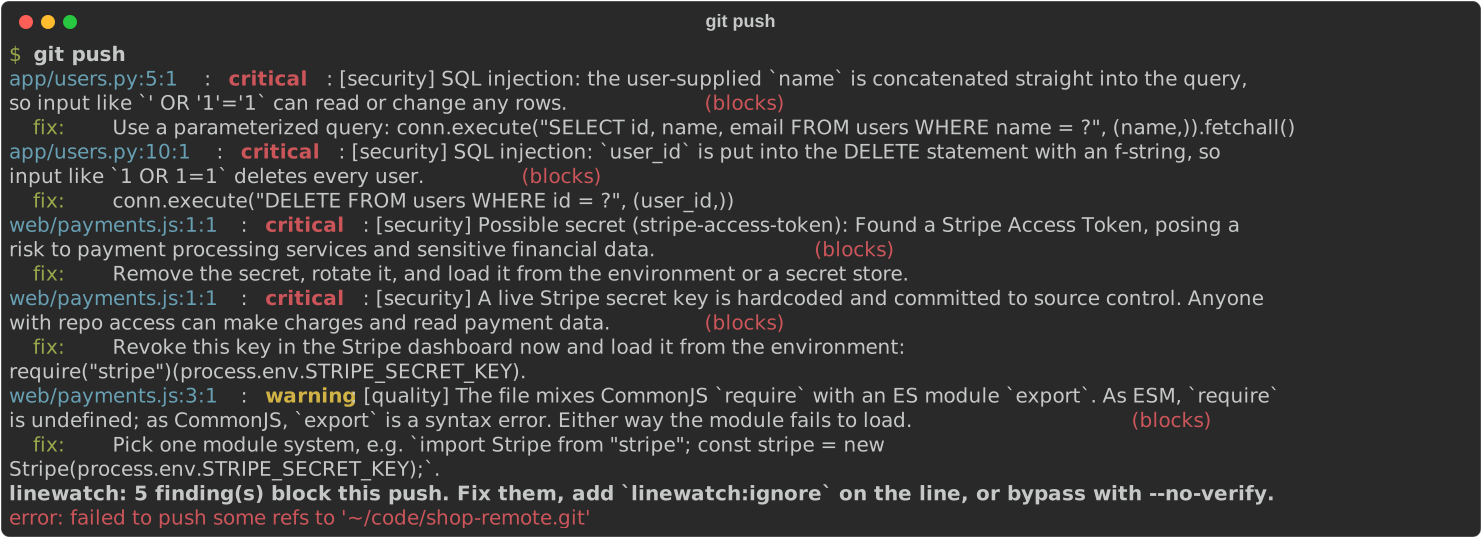
What it does
- Uses the model you already have.
linewatch initfinds the coding CLIs (Claude Code, Codex, Antigravity) and local models (Bionic/LM Studio) on your machine and lets you pick one. No API key needed. - Runs in your hooks, on push, on commit or both, with native git hooks, Husky or the pre-commit framework.
- Catches secrets first with gitleaks, before anything is sent to a model.
- Reviews only the lines you changed, for security and quality, and blocks at the severity your team sets.
- Never blocks because the model is down. A timeout or a bad answer lets the commit through; gitleaks findings still count.
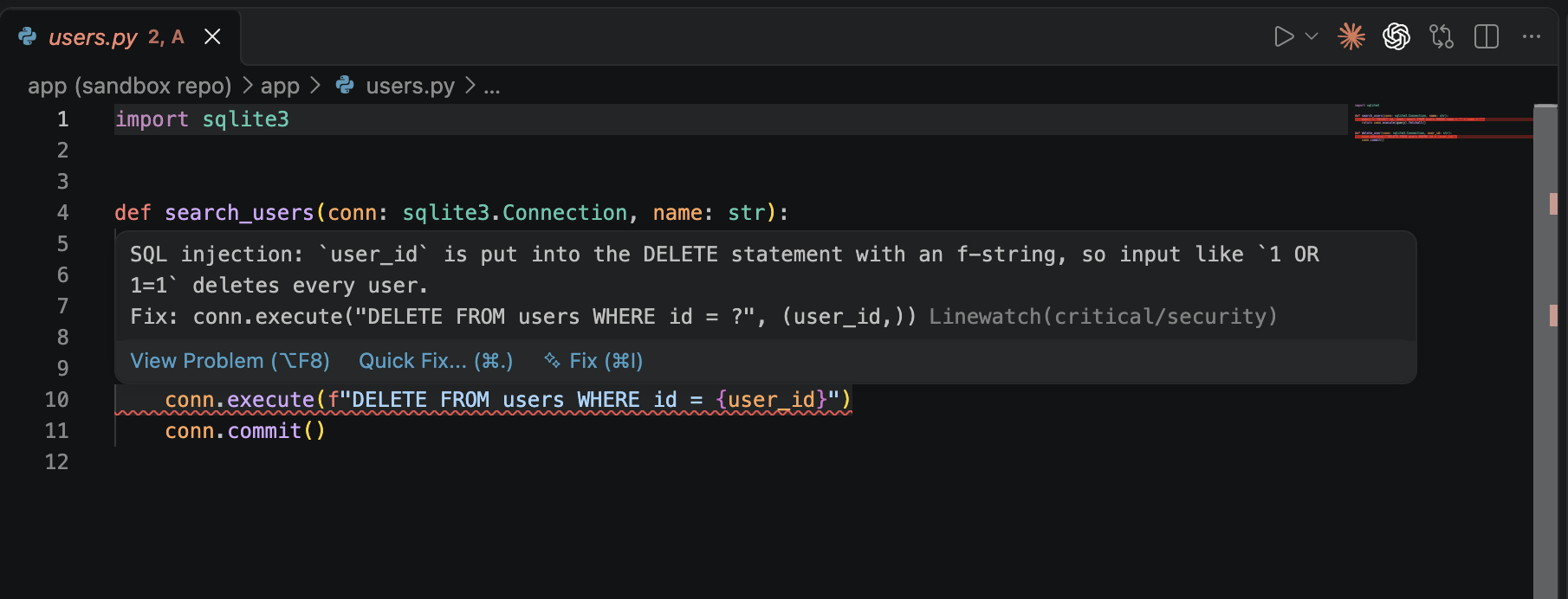
- Shows findings in VS Code as markers on the lines, from
.linewatch/last.sarif.
Quick start
Requires Python 3.10 or later. Install gitleaks too, for secret scanning.
pipx install linewatch-cli     # or: uv tool install linewatch-cli
cd your-repo
linewatch init
JavaScript teams can also run npx linewatch init: the npm package runs the Python CLI and offers to install it. For findings on the lines, install the Linewatch extension for VS Code.
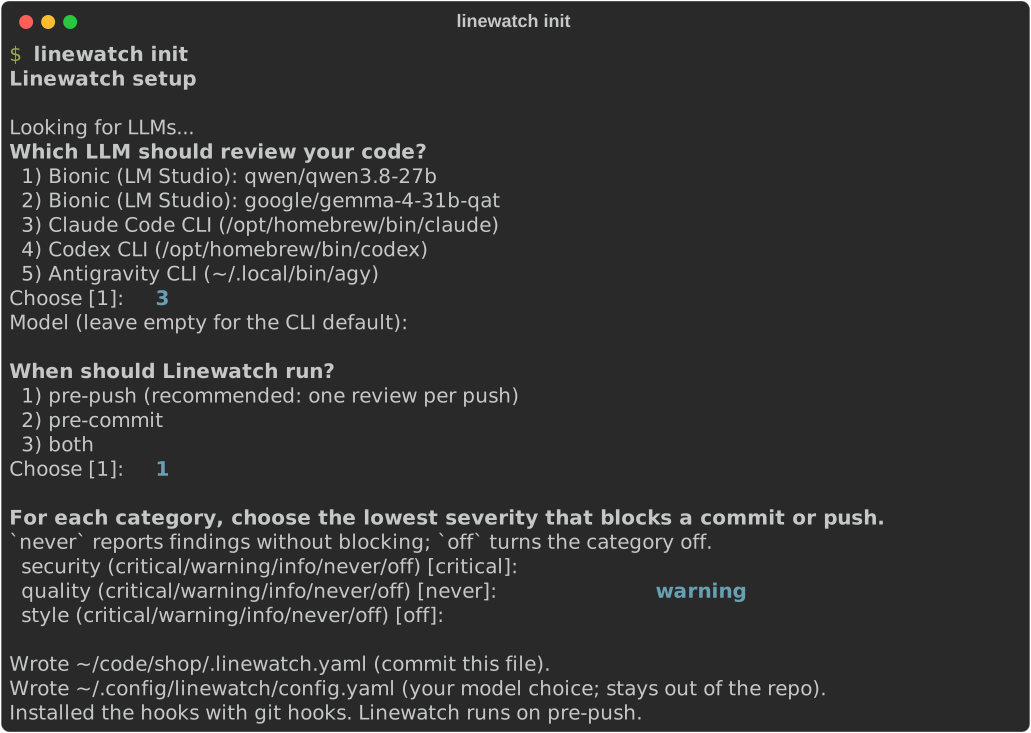
Commit the .linewatch.yaml it writes. Teammates then run linewatch init --yes.
Models
| Model | Status | One review |
|---|---|---|
| Claude Code CLI | Tested | about 7 s |
| Codex CLI | Tested | about 6 s |
| Antigravity CLI | Tested | about 30–60 s |
| Bionic (LM Studio): Qwen 3.8 27B, Gemma 4 31B | Tested | about 8 s / 22–40 s |
| No model: gitleaks only | Tested | under 1 s |
| Anthropic, OpenAI, Gemini, Azure OpenAI APIs, Ollama | Untested |
Each tested model blocked all 12 problem cases in our test suite (leaked secrets, SQL injection, command injection, path traversal, XSS, unsafe deserialization, SSRF, JWT auth bypass) on commit and on push. See Models.
Commands
| Command | What it does |
|---|---|
linewatch init |
Setup wizard: model, hook, blocking levels |
linewatch init --yes |
Setup without questions, for joining a repo that is already configured |
linewatch model |
Switch to another model |
linewatch review |
Review the uncommitted changes by hand; --range A..B reviews commits |
Bypass a hook once with git commit --no-verify or git push --no-verify. Silence a single finding with a linewatch:ignore comment on its line.
Docs
- Getting started: install, set up a repo, what happens on a push
- Models: the models Linewatch can use and how to set each up
- Configuration:
.linewatch.yaml, your user config, hooks - VS Code extension: markers, the Problems panel, commits from the Source Control view
Repository layout
| Path | Package |
|---|---|
src/linewatch/ |
Core CLI (PyPI linewatch-cli) |
npm/ |
Thin wrapper for JS teams (npm linewatch) |
vscode/ |
VS Code extension that shows findings on the lines |
docs/ |
Documentation |
Licence
MIT
1 maintainer

Metadata
1 maintainer
Release files for linewatch-cli 0.1.0
For a detailed explanation of source distributions (sdists) and built distributions (wheels), please see the package formats documentation.
Source distribution (sdist)
| File | Size | Uploaded | |
|---|---|---|---|
| linewatch_cli-0.1.0.tar.gz | 42.8 kB | Details |
Built distribution (wheel)
| File | Interpreter | ABI | Platform | Reset |
|---|---|---|---|---|
| linewatch_cli-0.1.0-py3-none-any.whl | Python 3 | none | any | Details |
Total release size: 77.4 kB
Release files / linewatch_cli-0.1.0.tar.gz
| Download URL | linewatch_cli-0.1.0.tar.gz |
|---|---|
| Size | 42.8 kB |
| Tags | Source |
|
SHA-256 checksum How to use checksums |
59fde5d28ca19581020494e1ae966a274234f1730273c1a8af6ebd05b15a25d6
|
|
BLAKE2b-256 checksum How to use checksums |
10670b9ce18413b29ef46b5e4c01bb9168298024ccc63323bd4d49f83893511b
|
| Upload date | |
|
Uploaded using Trusted Publishing? What is trusted publishing? |
Yes |
| Uploaded via |
twine/7.0.0 CPython/3.13.14
|
Provenance
Provenance describes where a file came from. On PyPI, provenance is shared via attestations, which provide a verifiable record of the build or publishing details. View details, limitations and caveats.


PyPI Publish Attestation
PyPI verified that this artifact, at this checksum, originated from the publisher listed below.
Signed by GitHub Actions, verified by PyPI on Oct 8, 2026.
Transparency logRelease files / linewatch_cli-0.1.0-py3-none-any.whl
| Download URL | linewatch_cli-0.1.0-py3-none-any.whl |
|---|---|
| Size | 34.6 kB |
| Tags | Python 3 |
|
SHA-256 checksum How to use checksums |
fc5c507c5845b0080eb0be147845f6003062131b0ad03d7d72e9c87fda4ce7a6
|
|
BLAKE2b-256 checksum How to use checksums |
b076766f9826275155b5f82d07167389cdfb66e6448136ed50d4117407d92bd1
|
| Upload date | |
|
Uploaded using Trusted Publishing? What is trusted publishing? |
Yes |
| Uploaded via |
twine/7.0.0 CPython/3.13.14
|
Provenance
Provenance describes where a file came from. On PyPI, provenance is shared via attestations, which provide a verifiable record of the build or publishing details. View details, limitations and caveats.
PyPI Publish Attestation
PyPI verified that this artifact, at this checksum, originated from the publisher listed below.
Signed by GitHub Actions, verified by PyPI on Oct 8, 2026.
Transparency log













