
linkedin-cli
Linkedin command line interface (cli) is a python 3 console application to handle authentication and communication with LinkedIn API v2.
Linkedin-cli requires a linkedin application client id and client secret to authenticate a user on the linkedin api v2. Create a linkedin application on linkedin developer site if you don't have already.
Follow tigillo on linkedin for the latest updates.
Supporters
Tigillo - Software Development Company
Requirements
python 3
Installation
python3 -m pip install linkedin-cli
Running
python3 -m linkedin
Usage
usage: linkedin <command> [<args?]

These are common linkedin commands used in various situations:

    config       Get and set linkedin-cli options
    login        Login with a user for api access
    me           Display logged in user details
    post         Share a post

Other commands

    help         Print help (this message)
    version      Print the version information
Configure Linkedin Application
Run below command and provide your client id and secret of your linkedin application. Configuration will be saved to ~/.linkedin/config.json file.
linkedin configure set application
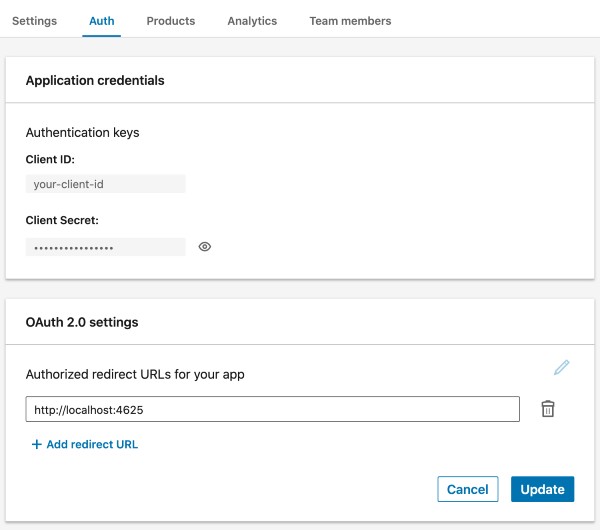
Linkedin Application Configuration
Go to auth page of your linkedin application and add http://localhost:4625 address as the Authorized redirect URLs for your app on the OAuth 2.0 settings section.
Login
Run below command and authenticate your linkedin application for your user on the opened web dialog. Once approved your api token will be stored to ~/.linkedin/config.json file.
linkedin login
Share a Post
Put content between double quotes, new lines supported. Only text content supported currently.
linkedin post "Hello connections!

Sent from my terminal via linkedin-cli"
Post Visibility
Default visibility option for post command is connections. Visibility option can be set as connections or public.
linkedin post -v public "Hello world!

Sent from my terminal via linkedin-cli"
Build
python3 setup.py build
1 maintainer

Metadata
1 maintainer
Release files for linkedin-cli 0.1.4
For a detailed explanation of source distributions (sdists) and built distributions (wheels), please see the package formats documentation.
Source distribution (sdist)
| File | Size | Uploaded | Provenance | |
|---|---|---|---|---|
| linkedin-cli-0.1.4.tar.gz | 7.1 kB | Without provenance | Details |
Release files / linkedin-cli-0.1.4.tar.gz
| Download URL | linkedin-cli-0.1.4.tar.gz |
|---|---|
| Size | 7.1 kB |
| Tags | Source |
|
SHA-256 checksum How to use checksums |
47796fbd4f2fcd5ca27d9833d48087a83fd1312d972bfe4776570bda384447be
|
|
BLAKE2b-256 checksum How to use checksums |
ae4a5fa7f9015d3005fd0126030c54d21a41867597a9690f7feef76f181d8aab
|
| Upload date | |
|
Uploaded using Trusted Publishing? What is trusted publishing? |
No |
| Uploaded via |
twine/3.4.2 importlib_metadata/4.8.1 pkginfo/1.7.1 requests/2.25.1 requests-toolbelt/0.9.1 tqdm/4.62.3 CPython/3.9.1
|
Security for linkedin-cli 0.1.4
Provenance
Provenance describes where a file came from. On PyPI, provenance is shared via attestations, which provide a verifiable record of the build or publishing details. View details, limitations and caveats.
No provenance found
None of the files in this release were uploaded with provenance metadata.
A note on package security
PyPI is a repository for distributing packages, not a service for auditing them. While third-party security researchers and our staff do their best to detect and remove malicious packages, PyPI cannot guarantee the quality, security or suitability of any given package.
To learn more about protecting yourself from malicious actors, visit our package security documentation.














