
🔗 LinkIt
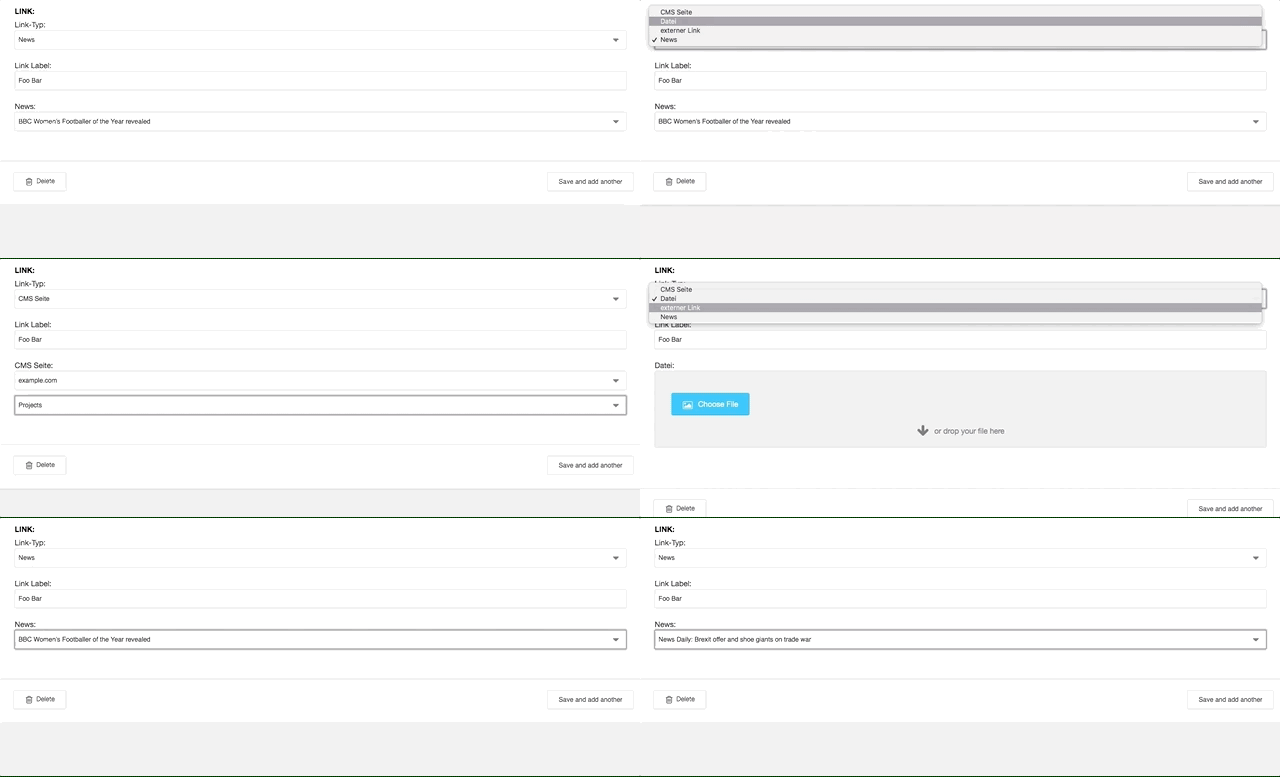
LinkIt gives you a new field type LinkField to use on your models which allows you to effortlessly link to different models on your site. This could be a django-cms Page model,
a filer File or anything custom like a News model.
Installation
Install the latest version with pip and add linkit to your INSTALLED_APPS - and you're good to go.
$ pip install LinkIt
Usage
You're now able to use the new LinkField on any of your models:
from django.db.models import Model, CharField
from linkit.model_fields import LinkField

class Foo(Model):
    title = CharField(max_length=255)
    link = LinkField(types=['page', 'file', 'input'])  # <-- Yay!
If you register this model in django admin you'll get a dropdown field where yru can choose between cms pages, filer files or just a plain input field. Your model is now able to link to any of these entities with one single field.
In a template you could use this link field like this:
<a href="{{ instance.link.href }}" target="{{ instance.link.target }}">{{ instance.link.label }}</a>
Configuration
The LinkField takes some options which will define how the rendered widget looks and what options the content editor has:
types: list = NoneDefines which link types are allowed (see more bellow in the section «Types»)allow_target: bool = FalseIf set to true, the widget renders a checkbox so the editor can choose the_targetof the linkallow_label: bool = TrueRenders an additonal input field so a custom label can be setallow_no_follow: bool = FalseIf set to true, the widget renders a checkbox so the editor can choose therel="nofollow"for the link
Types
Out of the Box LinkIt ships with three types: input, file, page. The LinkType base class makes it easy to implement your own link type, whatever
it may be. If you want to link to another existing model in your app, e.g. News, all you need to do is register a new link type.
- Create a file
link_types.pyin any of your apps:
from linkit.types.model import ModelLinkType


class NewsLinkType(ModelLinkType):
    identifier = 'news'
    type_label = 'News'
    model = News
- Register the new type, preferably in a
AppConfigreadymethod:
from django.apps import AppConfig
from django.utils.translation import ugettext_lazy as _


class ContentConfig(AppConfig):
    name = 'contents'

    def ready(self):
        from contents.link_types import NewsLinkType
        from linkit.types import type_manager as linkit_manager


        linkit_manager.register(NewsLinkType)
- Profit! You can now create a field like this on any of your models:
link = LinkField(types=['news', 'page])and link to any of your news or cms pages.
Check linkit/types to see how the core types are implemented.
EmailType example
Say we have a totally different new type we want to implement and can't just extend from the ModelLinkType. See the example bellow
of a link type used to link to e-mail addresses with a optional subject field.
class EmailTypeForm(TypeForm):
    address = EmailField(label='E-Mail', required=True)
    subject = CharField(label='Subject', required=False, max_length=20)


class EmailType(LinkType):
    identifier = 'email'
    type_label = 'E-Mail'
    form_class = EmailTypeForm

    def real_value(self):
        return self.link.data('value')

    @property
    def href(self) -> Optional[str]:
        mail = self.real_value().get('address')
        subject = self.real_value().get('subject', '')

        return f'mailto:{mail}?subject={subject}'

    @property
    def label(self) -> Optional[str]:
        return self.real_value().get('address')
1 maintainer

Metadata
1 maintainer
Release files for linkit 0.1.5
For a detailed explanation of source distributions (sdists) and built distributions (wheels), please see the package formats documentation.
Source distribution (sdist)
| File | Size | Uploaded | |
|---|---|---|---|
| LinkIt-0.1.5.tar.gz | 11.4 kB | Details |
Built distribution (wheel)
| File | Interpreter | ABI | Platform | Reset |
|---|---|---|---|---|
| LinkIt-0.1.5-py2.py3-none-any.whl | Python 2, Python 3 | none | any | Details |
Total release size: 26.9 kB
Release files / LinkIt-0.1.5.tar.gz
| Download URL | LinkIt-0.1.5.tar.gz |
|---|---|
| Size | 11.4 kB |
| Tags | Source |
|
SHA-256 checksum How to use checksums |
a67b292745990092ea727882cf4a1f31d04fa9847e1db61278342615008cc9ea
|
|
BLAKE2b-256 checksum How to use checksums |
4a611f279303be66804931a440efeb3fb69dfa59946646bc306494018efddc30
|
| Upload date | |
|
Uploaded using Trusted Publishing? What is trusted publishing? |
No |
| Uploaded via |
twine/1.14.0 pkginfo/1.5.0.1 requests/2.22.0 setuptools/41.0.1 requests-toolbelt/0.9.1 tqdm/4.35.0 CPython/2.7.16
|
Release files / LinkIt-0.1.5-py2.py3-none-any.whl
| Download URL | LinkIt-0.1.5-py2.py3-none-any.whl |
|---|---|
| Size | 15.5 kB |
| Tags | Python 2 Python 3 |
|
SHA-256 checksum How to use checksums |
4cebb859d5ae8a8e10957e9519b092f70dca7571fa33930e009607f33201a390
|
|
BLAKE2b-256 checksum How to use checksums |
c226666b4c86186ed0e4d7e37dd4247cd6e8ffef269e9d449b001936f62bcda5
|
| Upload date | |
|
Uploaded using Trusted Publishing? What is trusted publishing? |
No |
| Uploaded via |
twine/1.14.0 pkginfo/1.5.0.1 requests/2.22.0 setuptools/41.0.1 requests-toolbelt/0.9.1 tqdm/4.35.0 CPython/2.7.16
|














