
[](#contributors)
[](https://pypi.org/project/Grank/) [](https://pypi.org/project/Grank/) [](https://github.com/lctt/grank/) [](https://github.com/lctt/grank/) [](https://github.com/lctt/grank/)
[](https://travis-ci.com/LCTT/Grank)
[](https://github.com/lctt/grank/)
[](https://github.com/lctt/grank/)
## 特性
- 读取 Commit 信息分析
- 支持抓取特定时间段的 commit 数据
- 使用 GraphQL 进行数据的抓取
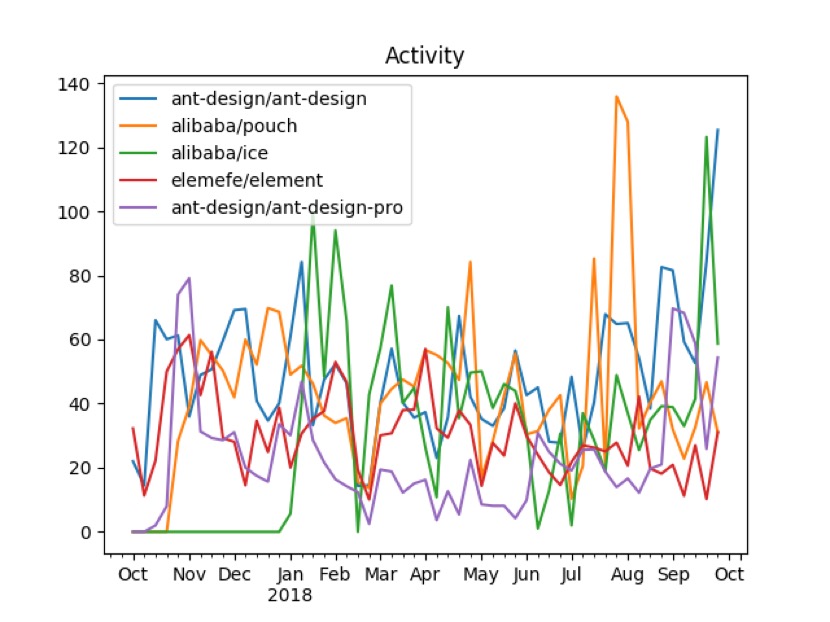
- 分析结果自动排行,并生成活跃度折线图
- 提供所有项目的活跃度、社区化排行
- 提供单个项目的活跃度、社区化整合图像
## 样例图片展示
**多项目活跃度**
**多项目社区化**

**单项目社区化及活跃度**

## 安装需求
**Python 3.4 +**
## 使用方法
1. 使用 pip 安装项目 `pip install grank`
2. 获取 Github 的 [Personal Access Token](https://github.com/settings/tokens)
3. 使用 `grank login` 设置 Token
4. 使用 `grank config` 设置社区化企业关键词
5. 使用 `grank analy [mode] <owner> [<repository>]` 来分析特定用户/组织和项目,比如 `grank analy lctt grank`,分析结果可以在执行命令目录的 result 目录中找到。
6. 使用命令行模式操作,如 `grank --token=XXXX --start=2018-01-01 --stop=2018-05-21 --askrule=0 --rule=inc analy <owner> <repository>` 其中 token 必须指定,其他可以使用缺省设置
## 命令列表
1. `grank checklogin` 显示当前 Token 的登录用户
2. `grank login` 设置用户 Token
3. `grank config` 设置关键词,用于社区化分析
4. `grank analy [mode]` 分析组织名下或用户名下项目的活跃度或社区化程度,mode 的默认值为`all`,可设定为`social`或`activity`。调用方法 `grank analy lctt` / `grank analy --social lctt grank`。
5. `grank clean` 清空当前目录下的临时文件和结果,调用方法 `grank clean`
## 配置文件说明
```
[login]
token = xxx #personal access token
[social]
askrule = 1 # 设置为1时将提醒用户设置规则
rule = corp|inc # 进行社区化分析时的正则表达式规则
[time]
start_time = 2017-01-01 # 分析的开始时间
end_time = 2018-10-01 # 分析的结束时间
[rank]
top = 3 # 绘图时绘制折线的项目数量
```
## 贡献项目
在您进行项目贡献前,请查看 [CONTRIBUTING.md](CONTRIBUTING.md)
## 开源协议
[GPL-3.0](LICENSE)
## Contributors
Thanks goes to these wonderful people ([emoji key](https://github.com/kentcdodds/all-contributors#emoji-key)):
<!-- ALL-CONTRIBUTORS-LIST:START - Do not remove or modify this section -->
<!-- prettier-ignore -->
| [<img src="https://avatars1.githubusercontent.com/u/13283837?v=4" width="100px;"/><br /><sub><b>Bestony</b></sub>](https://www.ixiqin.com/)<br />[💻](https://github.com/LCTT/Grank/commits?author=bestony "Code") [📖](https://github.com/LCTT/Grank/commits?author=bestony "Documentation") [💡](#example-bestony "Examples") [📦](#platform-bestony "Packaging/porting to new platform") [👀](#review-bestony "Reviewed Pull Requests") [⚠️](https://github.com/LCTT/Grank/commits?author=bestony "Tests") [🔧](#tool-bestony "Tools") | [<img src="https://avatars0.githubusercontent.com/u/128338?v=4" width="100px;"/><br /><sub><b>Xingyu.Wang</b></sub>](http://wxy.github.io/)<br />[💬](#question-wxy "Answering Questions") [🐛](https://github.com/LCTT/Grank/issues?q=author%3Awxy "Bug reports") [💻](https://github.com/LCTT/Grank/commits?author=wxy "Code") [👀](#review-wxy "Reviewed Pull Requests") [📢](#talk-wxy "Talks") | [<img src="https://avatars1.githubusercontent.com/u/23754818?v=4" width="100px;"/><br /><sub><b>LuMing</b></sub>](http://LuuMing.github.io)<br />[💻](https://github.com/LCTT/Grank/commits?author=LuuMing "Code") [📖](https://github.com/LCTT/Grank/commits?author=LuuMing "Documentation") [⚠️](https://github.com/LCTT/Grank/commits?author=LuuMing "Tests") |
| :---: | :---: | :---: |
<!-- ALL-CONTRIBUTORS-LIST:END -->
This project follows the [all-contributors](https://github.com/kentcdodds/all-contributors) specification. Contributions of any kind welcome!
1 maintainer

Metadata
1 maintainer
Release files for ljjGrank 1.0.4
For a detailed explanation of source distributions (sdists) and built distributions (wheels), please see the package formats documentation.
Source distribution (sdist)
| File | Size | Uploaded | Provenance | Actions |
|---|---|---|---|---|
| ljjGrank-1.0.4.tar.gz | 12.9 kB | Without provenance | Details for ljjGrank-1.0.4.tar.gz |
Built distribution (wheel)
| File | Interpreter | ABI | Platform | Actions Reset |
|---|---|---|---|---|
| ljjGrank-1.0.4-py3-none-any.whl | Python 3 | none | any | Details for ljjGrank-1.0.4-py3-none-any.whl |
Total release size: 42.2 kB
Release files / ljjGrank-1.0.4.tar.gz
| Download URL | ljjGrank-1.0.4.tar.gz |
|---|---|
| Size | 12.9 kB |
| Tags | Source |
|
SHA-256 checksum How to use checksums |
6b6ef10d5092d052589fc7bd66ec9d43d4f0519b25baae86a1d71bf5a25f192a
|
|
BLAKE2b-256 checksum How to use checksums |
9c898c582ff714777e66e2f2049b3bb8f007da568866988382ecfcb37a43655f
|
| Upload date | |
|
Uploaded using Trusted Publishing? What is trusted publishing? |
No |
| Uploaded via |
twine/1.12.1 pkginfo/1.5.0.1 requests/2.21.0 setuptools/33.1.1 requests-toolbelt/0.9.1 tqdm/4.30.0 CPython/3.4.9
|
Release files / ljjGrank-1.0.4-py3-none-any.whl
| Download URL | ljjGrank-1.0.4-py3-none-any.whl |
|---|---|
| Size | 29.4 kB |
| Tags | Python 3 |
|
SHA-256 checksum How to use checksums |
6a036aab1eda2e625903da32944de4a7a6d893fee330447f5bb203fa61f5d0f5
|
|
BLAKE2b-256 checksum How to use checksums |
a997f5c76770e75650c537a4e46d34e197d0dc04ba8a894d1174e64c33f2cbf8
|
| Upload date | |
|
Uploaded using Trusted Publishing? What is trusted publishing? |
No |
| Uploaded via |
twine/1.12.1 pkginfo/1.5.0.1 requests/2.21.0 setuptools/33.1.1 requests-toolbelt/0.9.1 tqdm/4.30.0 CPython/3.4.9
|
Security for ljjGrank 1.0.4
Provenance
Provenance describes where a file came from. On PyPI, provenance is shared via attestations, which provide a verifiable record of the build or publishing details. View details, limitations and caveats.
No provenance found
None of the files in this release were uploaded with provenance metadata.
A note on package security
PyPI is a repository for distributing packages, not a service for auditing them. While third-party security researchers and our staff do their best to detect and remove malicious packages, PyPI cannot guarantee the quality, security or suitability of any given package.
To learn more about protecting yourself from malicious actors, visit our package security documentation.













