

LMQL
A programming language for large language models.
Documentation »
Explore Examples
·
Playground IDE
·
Report Bug


LMQL is a programming language for large language models (LLMs) based on a superset of Python. LMQL offers a novel way of interweaving traditional programming with the ability to call LLMs in your code. It goes beyond traditional templating languages by integrating LLM interaction natively at the level of your program code.
Explore LMQL
An LMQL program reads like standard Python, but top-level strings are interpreted as query strings: They are passed to an LLM, where template variables like [GREETINGS] are automatically completed by the model:
"Greet LMQL:[GREETINGS]\n" where stops_at(GREETINGS, ".") and not "\n" in GREETINGS

if "Hi there" in GREETINGS:
    "Can you reformulate your greeting in the speech of \
     victorian-era English: [VIC_GREETINGS]\n" where stops_at(VIC_GREETINGS, ".")

"Analyse what part of this response makes it typically victorian:\n"

for i in range(4):
    "-[THOUGHT]\n" where stops_at(THOUGHT, ".")

"To summarize:[SUMMARY]"
Program Output:
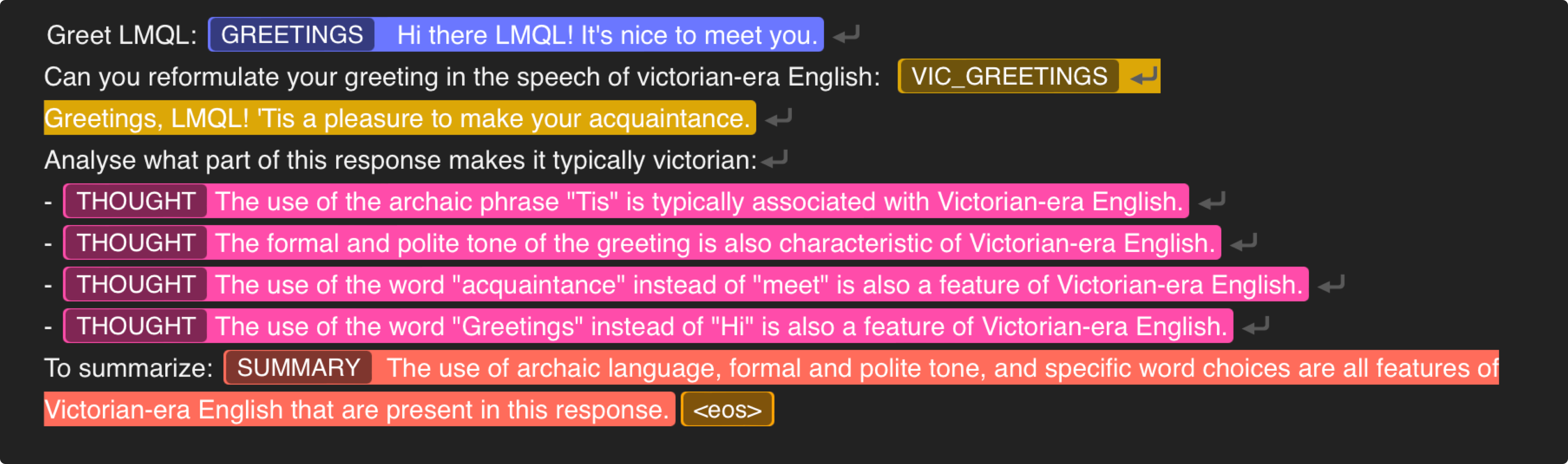
LMQL allows you to express programs that contain both, traditional algorithmic logic, and LLM calls. At any point during execution, you can prompt an LLM on program variables in combination with standard natural language prompting, to leverage model reasoning capabilities in the context of your program.
To better control LLM behavior, you can use the where keyword to specify constraints and data types of the generated text. This enables guidance of the model's reasoning process, and constraining of intermediate outputs using an expressive constraint language.
Beyond this linear form of scripting, LMQL also supports a number of decoding algorithms to execute your program, such as argmax, sample or even advanced branching decoders like beam search and best_k.
Learn more about LMQL by exploring thne Example Showcase, by running your own programs in our browser-based Playground IDE or by reading the documentation.
Feature Overview
LMQL is designed to make working with language models like OpenAI and 🤗 Transformers more efficient and powerful through its advanced functionality, including multi-variable templates, conditional distributions, constraints, datatypes and control flow.
- Python Syntax: Write your queries using familiar Python syntax, fully integrated with your Python environment (classes, variable captures, etc.)
- Rich Control-Flow: LMQL offers full Python support, enabling powerful control flow and logic in your prompting logic.
- Advanced Decoding: Take advantage of advanced decoding techniques like beam search, best_k, and more.
- Powerful Constraints Via Logit Masking: Apply constraints to model output, e.g. to specify token length, character-level constraints, datatype and stopping phrases to get more control of model behavior.
- Optimizing Runtime: LMQL leverages speculative execution to enable faster inference, constraint short-circuiting, more efficient token use and tree-based caching.
- Sync and Async API: Execute hundreds of queries in parallel with LMQL's asynchronous API, which enables cross-query batching.
- Multi-Model Support: Seamlessly use LMQL with OpenAI API, Azure OpenAI, and 🤗 Transformers models.
- Extensive Applications: Use LMQL to implement advanced applications like schema-safe JSON decoding, algorithmic prompting, interactive chat interfaces, and inline tool use.
- Library Integration: Easily employ LMQL in your existing stack leveraging LangChain or LlamaIndex.
- Flexible Tooling: Enjoy an interactive development experience with LMQL's Interactive Playground IDE, and Visual Studio Code Extension.
- Output Streaming: Stream model output easily via WebSocket, REST endpoint, or Server-Sent Event streaming.
Getting Started
To install the latest version of LMQL run the following command with Python ==3.10 installed.
pip install lmql
Local GPU Support: If you want to run models on a local GPU, make sure to install LMQL in an environment with a GPU-enabled installation of PyTorch >= 1.11 (cf. https://pytorch.org/get-started/locally/) and install via pip install lmql[hf].
Running LMQL Programs
After installation, you can launch the LMQL playground IDE with the following command:
lmql playground
Using the LMQL playground requires an installation of Node.js. If you are in a conda-managed environment you can install node.js via
conda install nodejs=14.20 -c conda-forge. Otherwise, please see the official Node.js website https://nodejs.org/en/download/ for instructions how to install it on your system.
This launches a browser-based playground IDE, including a showcase of many exemplary LMQL programs. If the IDE does not launch automatically, go to http://localhost:3000.
Alternatively, lmql run can be used to execute local .lmql files. Note that when using local HuggingFace Transformers models in the Playground IDE or via lmql run, you have to first launch an instance of the LMQL Inference API for the corresponding model via the command lmql serve-model.
Configuring OpenAI API Credentials
If you want to use OpenAI models, you have to configure your API credentials. To do so you can either define the OPENAI_API_KEY environment variable or create a file api.env in the active working directory, with the following contents:
openai-org: <org identifier>
openai-secret: <api secret>
For system-wide configuration, you can also create an api.env file at $HOME/.lmql/api.env or at the project root of your LMQL distribution (e.g. src/ in a development copy).
Alternatively, you can use LMQL-specific env variables LMQL_OPENAI_SECRET and LMQL_OPENAI_ORG.
Installing the Latest Development Version
To install the latest (bleeding-edge) version of LMQL, you can also run the following command:
pip install git+https://github.com/eth-sri/lmql
This will install the lmql package directly from the main branch of this repository. We do not continously test the main version, so it may be less stable than the latest PyPI release.
Contributing
LMQL is a community-centric project. If you are interested in contributing to LMQL, please see the contributing guidelines for more information, and reach out to us via Discord. We are looking forward to your contributions!
Setting Up a Development Environment
To setup a conda environment for local LMQL development with GPU support, run the following commands:
# prepare conda environment
conda env create -f scripts/conda/requirements.yml -n lmql
conda activate lmql

# registers the `lmql` command in the current shell
source scripts/activate-dev.sh
Operating System: The GPU-enabled version of LMQL was tested to work on Ubuntu 22.04 with CUDA 12.0 and Windows 10 via WSL2 and CUDA 11.7. The no-GPU version (see below) was tested to work on Ubuntu 22.04 and macOS 13.2 Ventura or Windows 10 via WSL2.
Development without GPU
This section outlines how to setup an LMQL development environment without local GPU support. Note that LMQL without local GPU support only supports the use of API-integrated models like openai/text-davinci-003. Please see the OpenAI API documentation (https://platform.openai.com/docs/models/gpt-3-5) to learn more about the set of available models.
To setup a conda environment for LMQL with no GPU support, run the following commands:
# prepare conda environment
conda env create -f scripts/conda/requirements-no-gpu.yml -n lmql-no-gpu
conda activate lmql-no-gpu

# registers the `lmql` command in the current shell
source scripts/activate-dev.sh
1 maintainer

Metadata
1 maintainer
Release files for lmql 0.7.3
For a detailed explanation of source distributions (sdists) and built distributions (wheels), please see the package formats documentation.
Source distribution (sdist)
| File | Size | Uploaded | Provenance | Actions |
|---|---|---|---|---|
| lmql-0.7.3.tar.gz | 799.2 kB | Without provenance | Details for lmql-0.7.3.tar.gz |
Built distribution (wheel)
| File | Interpreter | ABI | Platform | Actions Reset |
|---|---|---|---|---|
| lmql-0.7.3-py3-none-any.whl | Python 3 | none | any | Details for lmql-0.7.3-py3-none-any.whl |
Total release size: 1.7 MB
Release files / lmql-0.7.3.tar.gz
| Download URL | lmql-0.7.3.tar.gz |
|---|---|
| Size | 799.2 kB |
| Tags | Source |
|
SHA-256 checksum How to use checksums |
3c0c4693435838863d58a36524ff70995068b67edf2e9da4aad89e8641698675
|
|
BLAKE2b-256 checksum How to use checksums |
d02e700b452c945a920f7b55dd298fff0109ad5115cb7fdd6dfc98cd1b556168
|
| Upload date | |
|
Uploaded using Trusted Publishing? What is trusted publishing? |
No |
| Uploaded via |
twine/4.0.2 CPython/3.10.10
|
Release files / lmql-0.7.3-py3-none-any.whl
| Download URL | lmql-0.7.3-py3-none-any.whl |
|---|---|
| Size | 856.9 kB |
| Tags | Python 3 |
|
SHA-256 checksum How to use checksums |
010efc4816fd811e55efd5cef4acc6c0956cd1bc2101f051a371881ebee19fc8
|
|
BLAKE2b-256 checksum How to use checksums |
ac76b422dad562cfff5ddb5782ab75a196125cbb13cf7861a3699e1d5949c97e
|
| Upload date | |
|
Uploaded using Trusted Publishing? What is trusted publishing? |
No |
| Uploaded via |
twine/4.0.2 CPython/3.10.10
|
Security for lmql 0.7.3
Provenance
Provenance describes where a file came from. On PyPI, provenance is shared via attestations, which provide a verifiable record of the build or publishing details. View details, limitations and caveats.
No provenance found
None of the files in this release were uploaded with provenance metadata.
A note on package security
PyPI is a repository for distributing packages, not a service for auditing them. While third-party security researchers and our staff do their best to detect and remove malicious packages, PyPI cannot guarantee the quality, security or suitability of any given package.
To learn more about protecting yourself from malicious actors, visit our package security documentation.














