
LogColor





When making command line interfaces, it's often useful to colorize the output to emphasize salient pieces of information or otherwise enhance the user experience. Unfortunately it's quite cumbersome to add colorized outputs to Python log messages.
ColorFormatter
The ColorFormatter is a logging formatter that parses your log messages and adds color codes to the log messages.
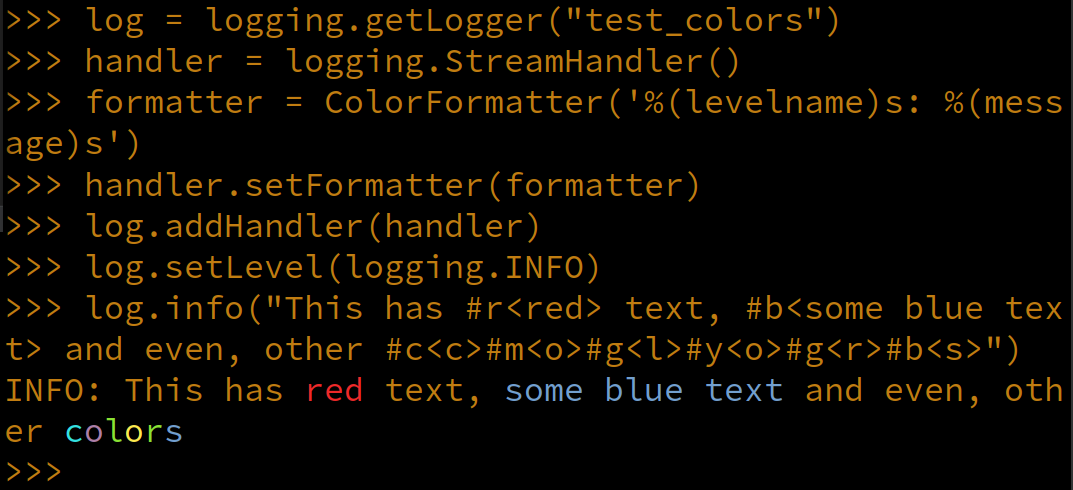
ColorStripper
The ColorStripper formatter is the inverse of the ColorFormatter. It strips the color information from your messages so that you can log to a file without it being full of color codes.
Installation
I'm on pypi!
$ pip install log_color
Features
- Simple to use
- No external dependencies
- Compatibility with Python 3.7+, PyPy
- Fast! Compiled binaries are available for some systems!
http://no-color.org/
LogColor honors the NO_COLOR environment variable.
Developer Setup
This project uses uv for dependency management, command running, etc... install it:
$ curl -LsSf https://astral.sh/uv/install.sh | sh
Makefile
If you're on Linux or OSX, there is a Makefile with a number of helpful targets:
make check-typesRunmypystatic code analysis toolsmake format-codeRuns the ruff code formattermake check-codeValidates no code formatting errors or import sorting errors (check only, makes no changes)make wheelBuild Python.whlfile for distributionmake testRun the unittestsmake docsBuild the documentationmake freezeList all packages (and their version number) installed in the virtual environmentmake shellLaunch an interactive Python shell in the virtual environment contextmake cleanRemove any files that aren't part of the repo (build artifacts, test reports, etc...)make git-cleanRuns the gitfscktool, prunes the reflog, etc...
TIP: If you want to force a target to be re-evaluated (i.e. make env) run make with the -B flag to force
it to evaluate.
1 maintainer

Metadata
1 maintainer
Release files for log_color 2.2.2
For a detailed explanation of source distributions (sdists) and built distributions (wheels), please see the package formats documentation.
Source distribution (sdist)
| File | Size | Uploaded | Provenance | |
|---|---|---|---|---|
| log_color-2.2.2.tar.gz | 195.0 kB | Without provenance | Details |
Built distribution (wheel)
| File | Interpreter | ABI | Platform | Reset |
|---|---|---|---|---|
| log_color-2.2.2-py3-none-any.whl | Python 3 | none | any | Details |
Total release size: 202.4 kB
Release files / log_color-2.2.2.tar.gz
| Download URL | log_color-2.2.2.tar.gz |
|---|---|
| Size | 195.0 kB |
| Tags | Source |
|
SHA-256 checksum How to use checksums |
b4bde2aac7ceabfb8a9f093603a181d537abea103d7ed975945444def8a38c26
|
|
BLAKE2b-256 checksum How to use checksums |
2f36f81d0843e3c5f01fa93830aac9038ba7ca57fdd827484ca41dbddcaa7cc8
|
| Upload date | |
|
Uploaded using Trusted Publishing? What is trusted publishing? |
No |
| Uploaded via |
uv/0.6.17
|
Release files / log_color-2.2.2-py3-none-any.whl
| Download URL | log_color-2.2.2-py3-none-any.whl |
|---|---|
| Size | 7.4 kB |
| Tags | Python 3 |
|
SHA-256 checksum How to use checksums |
ec5726fb5dea73eb681685a10b8ccca7f048ed97766c8b4465c9dbfae4061655
|
|
BLAKE2b-256 checksum How to use checksums |
ae51f1da5a3504a31f0bae0f9c2b08c08fee537e0f443d1c2b55047b6394291c
|
| Upload date | |
|
Uploaded using Trusted Publishing? What is trusted publishing? |
No |
| Uploaded via |
uv/0.6.17
|
Security for log_color 2.2.2
Provenance
Provenance describes where a file came from. On PyPI, provenance is shared via attestations, which provide a verifiable record of the build or publishing details. View details, limitations and caveats.
No provenance found
None of the files in this release were uploaded with provenance metadata.
A note on package security
PyPI is a repository for distributing packages, not a service for auditing them. While third-party security researchers and our staff do their best to detect and remove malicious packages, PyPI cannot guarantee the quality, security or suitability of any given package.
To learn more about protecting yourself from malicious actors, visit our package security documentation.














