















Welcome to loggerFactory Documentation
Construct Stream Handler and File Handler is so boring. loggerFactory include some commonly used logger out-of-the-box. You can create a super easy to use logger in minimal code.
Example:
import loggerFactory

# log to console
logger = loggerFactory.StreamOnlyLogger(rand_name=True)
logger.warning("Some thing wrong!")

# log to file
# if name is not specified, a random name will be assigned
logger = loggerFactory.SingleFileLogger(path="log.txt")
logger.error("Fatal Error!")

# file rotating
logger = loggerFactory.FileRotatingLogger(path="log.txt")

# time rotating
logger = loggerFactory.TimeRotatingLogger(path="log.txt")
Use color and indent to format your print:
import loggerFactory

logger = loggerFactory.BaseLogger()
logger.show_in_red("Hello", indent=0)
logger.show_in_blue("Hello", indent=1)
logger.show_in_yellow("Hello", indent=2)
logger.show_in_green("Hello", indent=3)
logger.show_in_cyan("Hello", indent=4)
logger.show_in_meganta("Hello", indent=5)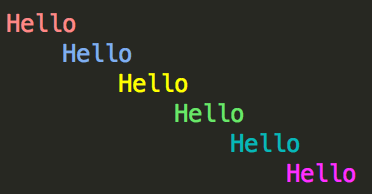
If you are using default log format %(asctime)s; %(levelname)-8s; %(message)s, a logfilter can help you search log info.
Example:
from loggerFactory import find

result = find("log.txt",
    level="debug", message="ValueError",
    time_lower=None, time_upper=None,
    case_sensitive=False,
)
result.dump("result.txt")
print(result)
Install
loggerFactory is released on PyPI, so all you need is:
$ pip install loggerFactoryTo upgrade to latest version:
$ pip install --upgrade loggerFactory1 maintainer

Metadata
1 maintainer
Release files for loggerFactory 0.0.6
For a detailed explanation of source distributions (sdists) and built distributions (wheels), please see the package formats documentation.
Source distribution (sdist)
| File | Size | Uploaded | |
|---|---|---|---|
| loggerFactory-0.0.6.tar.gz | 16.2 kB | Details |
Built distribution (wheel)
| File | Interpreter | ABI | Platform | Reset |
|---|---|---|---|---|
| loggerFactory-0.0.6-py2.py3-none-any.whl | Python 2, Python 3 | none | any | Details |
Total release size: 33.0 kB
Release files / loggerFactory-0.0.6.tar.gz
| Download URL | loggerFactory-0.0.6.tar.gz |
|---|---|
| Size | 16.2 kB |
| Tags | Source |
|
SHA-256 checksum How to use checksums |
fc66e1ce6da12c476655ad4e4f8bdb5b7f25c43a11fe30b4f43bfe050f9bf2dd
|
|
BLAKE2b-256 checksum How to use checksums |
520a77f0cdf82b0df5cbade504400d1ffdebdf3921f03bc97dda8fb036cfdb46
|
| Upload date | |
|
Uploaded using Trusted Publishing? What is trusted publishing? |
No |
| Uploaded via |
twine/4.0.0 CPython/3.8.11
|
Release files / loggerFactory-0.0.6-py2.py3-none-any.whl
| Download URL | loggerFactory-0.0.6-py2.py3-none-any.whl |
|---|---|
| Size | 16.7 kB |
| Tags | Python 2 Python 3 |
|
SHA-256 checksum How to use checksums |
58da3977a3c1d41125bbc3b85cdd16c28f111c21e4ba0e494de200d917977dfa
|
|
BLAKE2b-256 checksum How to use checksums |
07bef0189ad8e7466f439c5e0415f9c5cf7653e11571c127304b10f82aa13a9d
|
| Upload date | |
|
Uploaded using Trusted Publishing? What is trusted publishing? |
No |
| Uploaded via |
twine/4.0.0 CPython/3.8.11
|














