
LogMagix
Beautiful & Simple Python Logger
🚀 Quick Start
from logmagix import Logger, LogLevel

# Choose your logging style (1 = ColorLogger, 2 = SimpleLogger)
log = Logger(
    style=1,  # Default colorful style
    prefix="MyApp",
    github_repository="https://github.com/sexfrance/logmagix",
    level=LogLevel.DEBUG,
    log_file="logs/app.log"  # Optional log file
)

# Basic logging
log.info("Hello World!")
log.success("Operation completed!")
log.warning("Something might be wrong")
log.error("An error occurred")
log.critical("Fatal error", exit_code=1)
🔥 Features
- Log messages for various levels: success, warning, failure, debug, critical, info, and more.
- Color customization using ANSI escape sequences.
- Time-stamped log messages for better tracking.
- Built-in animated loader for visually appealing loading spinners.
- Log saving to file with optional log file paths.
- Customizable log and loader prefixes.
- ASCII art display for personalized greetings, system info, and branding.
- Simple and flexible API with multiple ways to use the
Loaderclass. - Customizable text alignment for the
HomeASCII art display.
⚙️ Installation
To install the package locally, clone the repository and run:
pip install .
You can also install it via pip from PyPI:
pip install logmagix
🔧 Usage
Importing the Package
from logmagix import Logger, Loader, Home
Logging
Initialize the Logger class to log messages with different levels:
log = Logger()

# Success message
log.success("Operation completed successfully!")

# Failure message
log.failure("Something went wrong!")

# Warning message
log.warning("This is a warning!")

# Informational message
log.info("Informational log message")

# Debug message
log.debug("Debugging log message")

# Critical message (also terminates the program with optional exit code)
log.critical("Critical failure encountered", exit_code=1)
Log Levels
LogMagix provides several logging levels to help categorize the severity and type of log messages. You can configure the minimum log level to display based on your requirements:
DEBUG: For detailed debug messages.INFO: For informational messages.WARNING: For warning messages.SUCCESS: For successful operations.FAILURE: For non-critical errors.CRITICAL: For critical errors; may terminate the program.
You can set the minimum logging level on initialization by passing a LogLevel value to the Logger constructor. For example:
from logmagix import Logger, LogLevel

log = Logger(level=LogLevel.WARNING)
With this setting, only WARNING, SUCCESS, FAILURE, and CRITICAL messages will display.
🎨 Logging Styles
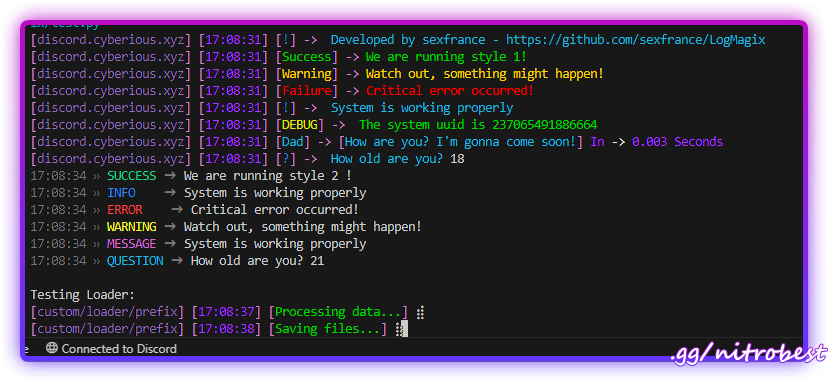
LogMagix offers two distinct logging styles:
Style 1: ColorLogger (Default)
log = Logger(style=1) # or just Logger()
Features colorful, detailed output with customizable prefixes and ANSI color formatting.
Style 2: SimpleLogger
log = Logger(style=2)
Provides a minimalist, clean output format with basic color coding.
Style Comparison
# Style 1 (ColorLogger)
log1 = Logger(prefix="ColorLogger")
log1.success("Operation successful!")
# Output: [ColorLogger] [12:34:56] [Success] -> Operation successful!

# Style 2 (SimpleLogger)
log2 = Logger(style=2, prefix="SimpleLogger")
log2.success("Operation successful!")
# Output: 12:34:56 » SUCCESS ➔ Operation successful!
Log File Saving
You can specify a log file path to save logs to a file for further review or debugging. The logger will automatically strip ANSI color codes from messages saved to the log file for readability. Log files are appended with each new logging session.
log = Logger(log_file="logs/app.log")
log.success("This message will also be saved to app.log")
To view logs saved to the file, open the specified path and review the recorded entries, which include timestamped log messages for tracking system state over time.
🔄 Loading Animation
The Loader class now supports custom prefixes and can be used in two ways:
from logmagix import Loader
import time

# Method 1: Context Manager
with Loader(
    prefix="MyApp",
    desc="Processing...",
    end="Completed!",
    timeout=0.1
):
    time.sleep(2)  # Your task here

# Method 2: Manual Control
loader = Loader(
    prefix="MyApp",
    desc="Loading...",
    end="Done!",
    timeout=0.05
).start()
time.sleep(2)  # Your task here
loader.stop()
Custom Log and Loader Prefix
Both the Logger and Loader classes allow for customizing the prefix shown before each message:
Logger Prefix:
log = Logger(prefix=".myapp/logs")
log.success("This message has a custom log prefix!")
Loader Prefix:
loader = Loader(prefix=".myapp/loader", desc="Loading with a custom loader prefix...")
loader.start()
time.sleep(5)  # Simulate a task
loader.stop()
ASCII Art and Greeting (New Home Class)
The Home class lets you display customized ASCII art text along with system information, such as a welcome message, username, or credits.
Using the Home Class:
home_screen = Home(
    text="LogMagix",
    align="center",
    adinfo1="discord.cyberious.xyz",
    adinfo2="v1.0",
    credits="Developed by sexfrance",
    clear = False, # To clear the console, default is True
)

home_screen.display()
This will display the ASCII art version of "LogMagix" in the center of the terminal, along with optional adinfo1 and adinfo2 texts at the bottom. The terminal width is automatically detected to align the text properly.
Full Example
Here’s an example showing both logging, loader, and the new Home class functionality:
from logmagix import Logger, Home, Loader, LogLevel
import time
import uuid

# Test ColorLogger (Style 1 - Default)
log1 = Logger(
    prefix="ColorLogger",
    github_repository="https://github.com/sexfrance/LogMagix",
    level=LogLevel.DEBUG,
    log_file="logs/color.log"
)

start_time = time.time()
log1.success("We are running style 1!")
log1.warning("Watch out, something might happen!")
log1.failure("Critical error occurred!")
log1.info("System is working properly")
log1.debug(f"The system uuid is {uuid.getnode()}")
log1.message("Dad", f"How are you? I'm gonna come soon!", start=start_time, end=time.time())
log1.question("How old are you? ")

# Test SimpleLogger (Style 2)
log2 = Logger(
    style=2,
    prefix="SimpleLogger",
    level=LogLevel.INFO,
    log_file="logs/simple.log"
)

start_time = time.time()
log2.success("We are running style 2 !")
log2.info("System is working properly")
log2.error("Critical error occurred!")
log2.warning("Watch out, something might happen!")
log2.message("System is working properly")
log2.debug(f"The system uuid is {uuid.getnode()}")
log2.question("How old are you? ")

# Test loader with custom prefix and context manager
print("\nTesting Loader:")
with Loader(prefix="custom/loader/prefix", desc="Processing data..."):
    time.sleep(2)  # Simulate task

# Use loader with custom prefix and start/stop methods
loader = Loader(prefix="custom/loader/prefix", desc="Saving files...", end="Done !", timeout=0.05).start()
time.sleep(2)  # Simulate task
loader.stop()


# Display home screen
home_screen = Home(
    text="LogMagix",
    align="center",
    adinfo1="Test Suite",
    adinfo2="v1.0.0",
    credits="Testing Framework",
    clear=True
)
home_screen.display()

# Test critical error (commented out as it exits the program)
log1.critical("Critical error occurred!")
Customization in Home Class
- text: The text to be displayed in ASCII art.
- align: Align the ASCII art text to "left", "center", or "right" in the terminal.
- adinfo1 and adinfo2: Additional information displayed below the ASCII art.
- credits: Optional credits or user information.
📹 Preview
❗ Requirements
LogMagix requires:
coloramafor cross-platform color support in the terminal.pystylefor creating the colored text effects.
To install dependencies, run:
pip install colorama pystyle
©️ License
LogMagix is licensed under the MIT License. See the LICENSE file for more details.
🖥️ Contributing
Contributions are welcome! Feel free to fork the repository, make changes, and submit a pull request.
👤 Author
LogMagix is developed and maintained by sexfrance.




1 maintainer

Metadata
1 maintainer
Release files for logmagix 2.1.3.1
For a detailed explanation of source distributions (sdists) and built distributions (wheels), please see the package formats documentation.
Source distribution (sdist)
| File | Size | Uploaded | Provenance | |
|---|---|---|---|---|
| logmagix-2.1.3.1.tar.gz | 14.9 kB | Without provenance | Details |
Built distribution (wheel)
| File | Interpreter | ABI | Platform | Reset |
|---|---|---|---|---|
| logmagix-2.1.3.1-py3-none-any.whl | Python 3 | none | any | Details |
Total release size: 26.9 kB
Release files / logmagix-2.1.3.1.tar.gz
| Download URL | logmagix-2.1.3.1.tar.gz |
|---|---|
| Size | 14.9 kB |
| Tags | Source |
|
SHA-256 checksum How to use checksums |
e77a6b433614ec83fa312b32947cdda47f978510649d2d2729bbb2b392b3c8ce
|
|
BLAKE2b-256 checksum How to use checksums |
974016ef9f4a53233bd4c554d4d69c4adf52fb88330e0402221452ed3f5ef09e
|
| Upload date | |
|
Uploaded using Trusted Publishing? What is trusted publishing? |
No |
| Uploaded via |
twine/6.1.0 CPython/3.12.6
|
Release files / logmagix-2.1.3.1-py3-none-any.whl
| Download URL | logmagix-2.1.3.1-py3-none-any.whl |
|---|---|
| Size | 12.1 kB |
| Tags | Python 3 |
|
SHA-256 checksum How to use checksums |
4ed129359e6e21b7ca865f3a360a5c4643423402ca0a96486efd74eaecf44c3d
|
|
BLAKE2b-256 checksum How to use checksums |
acc64db1d00cc8ce6d6c172e6739125a8378547db6118d623d10a62618570f5f
|
| Upload date | |
|
Uploaded using Trusted Publishing? What is trusted publishing? |
No |
| Uploaded via |
twine/6.1.0 CPython/3.12.6
|
Security for logmagix 2.1.3.1
Provenance
Provenance describes where a file came from. On PyPI, provenance is shared via attestations, which provide a verifiable record of the build or publishing details. View details, limitations and caveats.
No provenance found
None of the files in this release were uploaded with provenance metadata.
A note on package security
PyPI is a repository for distributing packages, not a service for auditing them. While third-party security researchers and our staff do their best to detect and remove malicious packages, PyPI cannot guarantee the quality, security or suitability of any given package.
To learn more about protecting yourself from malicious actors, visit our package security documentation.














