
Loman
Manage complex calculation flow via robust DAG-based dependency logic in Python











Smart computation management - Only recalculate what's necessary
Loman tracks the state of your computations and their dependencies, enabling intelligent partial recalculations that save time and computational resources. Perfect for data pipelines, real-time systems, and complex analytical workflows.
Table of Contents
- ✨ Features
- 📥 Installation
- 🛠️ Development
- 🚀 Quick Start
- 📖 Documentation
- ☁️ Codespaces
- 👥 Contributing
✨ Features
Build smarter computation graphs with automatic dependency tracking
- 🔄 Smart Recalculation: Only compute what's changed - save time and resources
- 📊 Dependency Tracking: Automatic graph-based dependency management
- 🎯 Selective Updates: Control which outputs to compute and when
- 💾 State Persistence: Serialize computation graphs for inspection and recovery
- 🔍 Visual Debugging: Built-in GraphViz integration for computation visualization
- ⚡ Real-time Ready: Perfect for systems with inputs that tick at different rates
- 🧪 Research Friendly: Iterate quickly by updating methods and re-running only necessary computations
- 🔗 Framework Agnostic: Works with NumPy, Pandas, and your favorite Python libraries
🚀 Quick Start
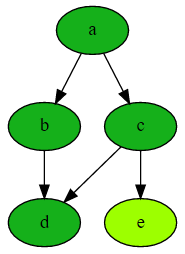
The above computation graph was generated with this simple Loman code:
from loman import Computation

# Create a computation graph
comp = Computation()
comp.add_node('a', value=1)                    # Input node
comp.add_node('b', lambda a: a + 1)            # b depends on a
comp.add_node('c', lambda a, b: 2 * a)         # c depends on a and b
comp.add_node('d', lambda b, c: b + c)         # d depends on b and c
comp.add_node('e', lambda c: c + 1)            # e depends on c

# Smart computation - only calculates what's needed
comp.compute('d')  # Will not compute 'e' unnecessarily!

# Inspect intermediate values
comp.to_dict()
# {'a': 1, 'b': 2, 'c': 2, 'd': 4, 'e': None}

# Visualize the computation graph
comp.draw()  # Creates the graph shown above
📚 Explore More: Check out our Interactive Examples including:
- 💰 Interest Rate Swap Pricing
- 📈 Portfolio Valuation
- 🏦 CDO Modeling
Why Loman?
Loman transforms how you build and maintain complex data processing pipelines by making computational dependencies explicit and manageable. Instead of manually tracking what needs to be recalculated when data changes, Loman handles this automatically.
Perfect for:
-
🔴 Real-time Systems: Handle inputs that tick at different rates efficiently
- Only recalculate affected downstream computations
- Control which outputs are computed and when
- Monitor status of all components in your pipeline
-
📦 Batch Processing: Build robust daily/periodic processes
- Serialize computation state for easy inspection and debugging
- Replace inputs or override intermediate values without full recomputation
- Recover from failures efficiently by resuming from last good state
-
🔬 Research & Analytics: Accelerate iterative development
- Modify calculation methods and re-run only what's needed
- Track complex dependencies in evolving analysis pipelines
- Reuse expensive intermediate computations across experiments
📖 Learn More: The Introduction explains in detail how Loman can transform your workflow.
📥 Installation
Using pip (recommended)
pip install loman
From source (development)
git clone https://github.com/janusassetallocation/loman.git
cd loman
pip install -e .
Note: Use -e flag for editable installation during development
🛠️ Development
For contributors and advanced users
Loman uses modern Python development tools for a smooth developer experience:
# 📦 Install development dependencies
make install

# 🧪 Run tests with coverage
make test

# ✨ Format and lint code
make check
Development Tools
- Testing: pytest with coverage reporting
- Formatting: ruff for code formatting and linting
- Task Management: Taskfile for build automation
- Quality: Pre-commit hooks for code quality
📖 Documentation
- 📚 Complete Documentation: Comprehensive guides and API reference
- 🚀 Quickstart Guide: Get up and running in minutes
- 💡 User Guide: In-depth concepts and strategies
- 📊 Interactive Examples: Real-world financial modeling examples
- 🔧 API Reference: Complete function and class documentation
☁️ Try Loman in Codespaces
Instant development environment in your browser Click the button to launch a fully configured development environment in your browser.
What's Included
- 🐍 Python 3.13 - Latest Python with all dependencies pre-installed
- 🛠️ Development Tools - pytest, ruff, mypy, pre-commit hooks ready to go
- 📓 Interactive Notebooks - Marimo notebooks for exploring examples
- ⚡ Zero Setup - Everything configured ready to go
- 🎯 VS Code Extensions - Python, testing, and productivity extensions pre-installed
👥 Contributing
We welcome contributions! 🎉
Whether you're fixing bugs, adding features, or improving documentation, your help makes Loman better for everyone.
Quick Start for Contributors
- 🍴 Fork the repository
- 🌿 Create your feature branch:
git checkout -b feature/amazing-feature - ✨ Make your changes and add tests
- 🧪 Test your changes:
make test - 📝 Commit your changes:
git commit -m 'Add amazing feature' - 🚀 Push to your branch:
git push origin feature/amazing-feature - 🎯 Open a Pull Request
Resources
Acknowledgments 🙏
- Jebel-Quant/rhiza for standardised CI/CD templates and project tooling
⭐ If you find Loman useful, please consider giving it a star! ⭐
3 maintainers


Metadata
3 maintainers
Release files for loman 0.7.0
For a detailed explanation of source distributions (sdists) and built distributions (wheels), please see the package formats documentation.
Source distribution (sdist)
| File | Size | Uploaded | |
|---|---|---|---|
| loman-0.7.0.tar.gz | 684.9 kB | Details |
Built distribution (wheel)
| File | Interpreter | ABI | Platform | Reset |
|---|---|---|---|---|
| loman-0.7.0-py3-none-any.whl | Python 3 | none | any | Details |
Total release size: 836.4 kB
Release files / loman-0.7.0.tar.gz
| Download URL | loman-0.7.0.tar.gz |
|---|---|
| Size | 684.9 kB |
| Tags | Source |
|
SHA-256 checksum How to use checksums |
b1b68b2c2cb6d08267451e26e873fc3c372016e5a5db6e0d98aece8ba7cb653e
|
|
BLAKE2b-256 checksum How to use checksums |
5521a0f1d5e4c3b184d76cfdddcb442e396720ac1f14c70b358b1416ce6894be
|
| Upload date | |
|
Uploaded using Trusted Publishing? What is trusted publishing? |
Yes |
| Uploaded via |
twine/7.0.0 CPython/3.13.14
|
Provenance
Provenance describes where a file came from. On PyPI, provenance is shared via attestations, which provide a verifiable record of the build or publishing details. View details, limitations and caveats.


PyPI Publish Attestation
PyPI verified that this artifact, at this checksum, originated from the publisher listed below.
Signed by GitHub Actions, verified by PyPI on Aug 16, 2026.
Transparency logRelease files / loman-0.7.0-py3-none-any.whl
| Download URL | loman-0.7.0-py3-none-any.whl |
|---|---|
| Size | 151.5 kB |
| Tags | Python 3 |
|
SHA-256 checksum How to use checksums |
6ef40a4623391c09a327f40d654a8a77e7dae6d380c18cac102a4f98149b4048
|
|
BLAKE2b-256 checksum How to use checksums |
7bb0dd39cb93b42c0c4eb7d1701b6c2ab18d7df2bef17a38ce568cf7a6e9a7da
|
| Upload date | |
|
Uploaded using Trusted Publishing? What is trusted publishing? |
Yes |
| Uploaded via |
twine/7.0.0 CPython/3.13.14
|
Provenance
Provenance describes where a file came from. On PyPI, provenance is shared via attestations, which provide a verifiable record of the build or publishing details. View details, limitations and caveats.
PyPI Publish Attestation
PyPI verified that this artifact, at this checksum, originated from the publisher listed below.
Signed by GitHub Actions, verified by PyPI on Aug 16, 2026.
Transparency log













