





Mapeathor
Mapeathor translates your mapping rules specified in spreadsheets to a mapping language.
Mapeathor is a simple spreadsheet parser able to generate mapping rules in three mapping languages: R2RML, RML (with extension to functions from FnO) and YARRRML. It takes the mapping rules expressed in a spreadsheet and transforms them into the desired language. The spreadsheet template is designed to facilitate the mapping rules' writting, with the aim of being language independent, and thus, lowering the barrier of generating mappings for non-expert users.
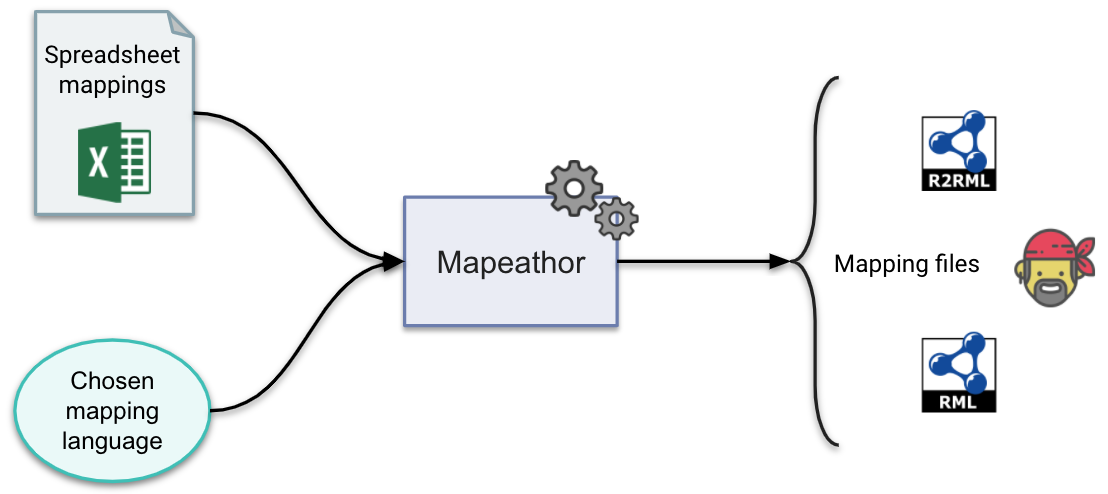
Example:
First Step: Fill the xlsx template with your own information.
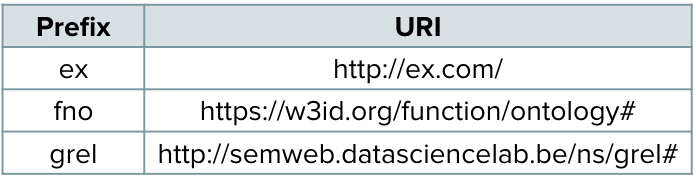
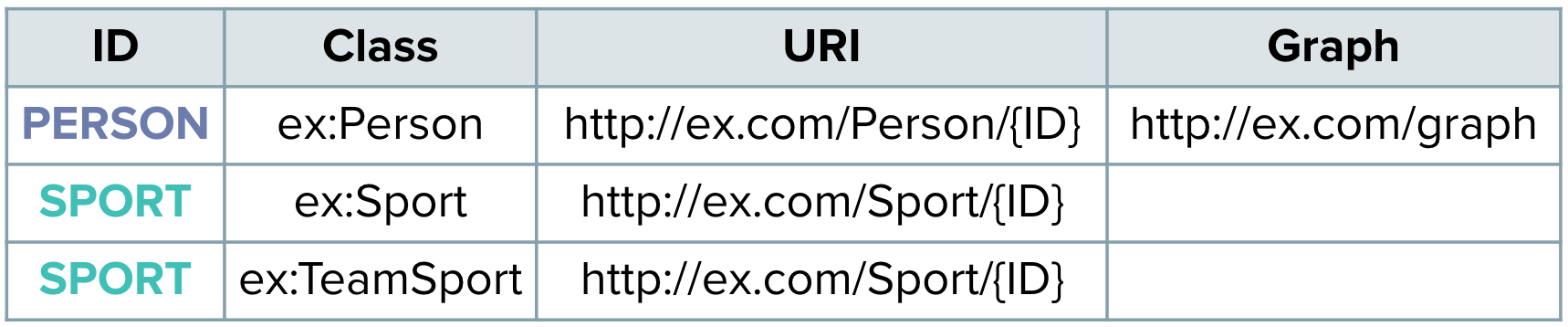
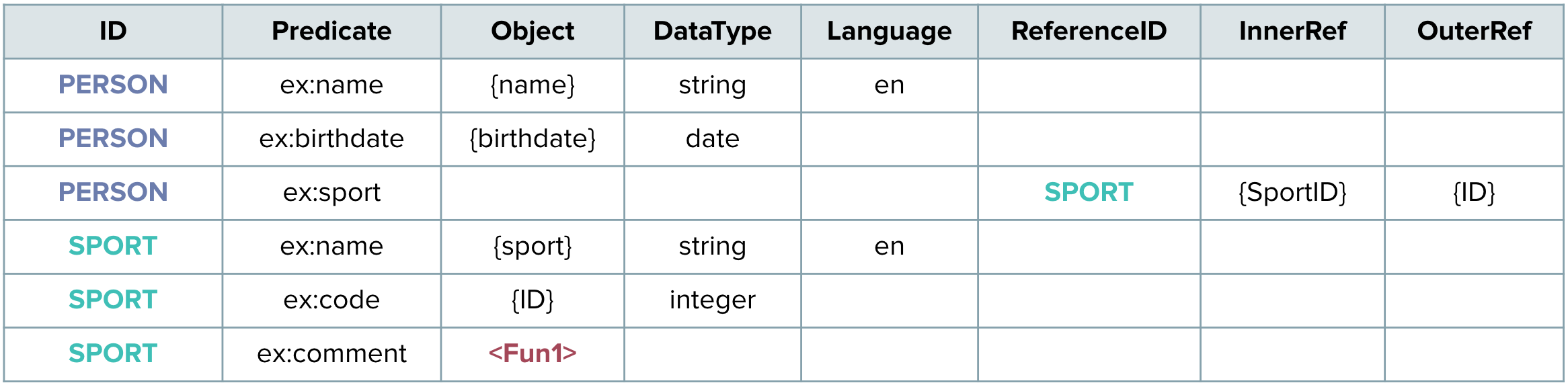
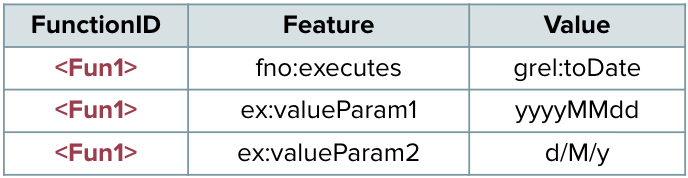
The template has five mandatory sheets, Prefixes, Source, Subject PredicateObjectMap and Functions. The last one can be left blank in case there are no functions. The spreadsheet can be in XLSX format or a Google Spreadsheet.
Prefixes:
Source:

Subject:
PredicateObjectMaps:
Functions:
Second Step: Choose the output language that you prefer.
Here you can see the Available Languages.
Third Step: Run Mapeathor:
Local XLSX file
With python:
# Clone the repository
$ git clone https://github.com/oeg-upm/Mapeathor

# Install the needed packages
$ cd Mapeathor/code/
$ pip3 install -r requirements.txt

# How to execute it
$ python3 main.py -i path/to/YOURFILE -l [RML | R2RML | YARRRML]

# Help Menu
$ python3 main.py -h

# Example
$ python3 main.py -i ../data/default.xlsx -l rml
With docker:
# Clone the repository
$ git clone https://github.com/oeg-upm/Mapeathor

# Install the docker image with docker-compose
$ docker-compose up -d

# Copy the XLSX files to data repository
$ cp yourfiles ./data/

# Execute it
$ docker exec -it mapeathor ./run.sh /Mapeathor/data/YOURFILE [RML | R2RML | YARRRML]

# Results will appear in result folder
Google Spreadsheet
Before using this option, you have need to have a Google account and configure the Google Drive API. First, you need to habilitate the Drive API as described here. Once enabled, you need to create a OAuth 2.0 client credential in the left sidebar, in Credentials; and download the credentials.json file.
Then, you need to create a config.ini file as it is shown below, where credentials_path is the path to the credentials.json file, and spreadsheet_id the unique id of the google spreadsheet. The last one can be extracted from the URI of the spreadsheet, the long id between '/' '/'.
[drive_config]
credentials_path = path/to/credentials/file.json
spreadsheet_id = unique id of google spreadsheet
Then, you can run Mapeathor:
$ python3 main.py -i path/to/YOURCONFIGFILE -l [RML | R2RML | YARRRML]

# Example
$ python3 main.py -i driveAPI/config.ini -l rml
And with Docker:
$ docker exec -it mapeathor ./run.sh /Mapeathor/code/driveAPI/YOURCONFIGFILE [RML | R2RML | YARRRML]
Publications
Iglesias-Molina, A., Chaves-Fraga, D., Priyatna, F., & Corcho, O. (2019). Towards the Definition of a Language-Independent Mapping Template for Knowledge Graph Creation. In Proceedings of the Third International Workshop on Capturing Scientific Knowledge co-located with the 10th International Conference on Knowledge Capture (K-CAP 2019) (pp. 33-36). Online version
Authors and contact
3 maintainers


Metadata
3 maintainers
Release files for mapeathor 1.0.0.1593901489
For a detailed explanation of source distributions (sdists) and built distributions (wheels), please see the package formats documentation.
Source distribution (sdist)
| File | Size | Uploaded | Provenance | Actions |
|---|---|---|---|---|
| mapeathor-1.0.0.1593901489.tar.gz | 13.3 kB | Without provenance | Details for mapeathor-1.0.0.1593901489.tar.gz |
Built distribution (wheel)
| File | Interpreter | ABI | Platform | Actions Reset |
|---|---|---|---|---|
| mapeathor-1.0.0.1593901489-py3-none-any.whl | Python 3 | none | any | Details for mapeathor-1.0.0.1593901489-py3-none-any.whl |
Total release size: 39.7 kB
Release files / mapeathor-1.0.0.1593901489.tar.gz
| Download URL | mapeathor-1.0.0.1593901489.tar.gz |
|---|---|
| Size | 13.3 kB |
| Tags | Source |
|
SHA-256 checksum How to use checksums |
5d57c7d7d12abb122c8dbec7458f93c2d4b9970eb9ea1c01f21218713db98c7a
|
|
BLAKE2b-256 checksum How to use checksums |
962bf89e7b76fadb398ee41b6cc938910f541e07f1b345ac63ccb90e22be900c
|
| Upload date | |
|
Uploaded using Trusted Publishing? What is trusted publishing? |
No |
| Uploaded via |
twine/3.2.0 pkginfo/1.5.0.1 requests/2.24.0 setuptools/49.1.0 requests-toolbelt/0.9.1 tqdm/4.46.1 CPython/3.6.9
|
Release files / mapeathor-1.0.0.1593901489-py3-none-any.whl
| Download URL | mapeathor-1.0.0.1593901489-py3-none-any.whl |
|---|---|
| Size | 26.4 kB |
| Tags | Python 3 |
|
SHA-256 checksum How to use checksums |
5d203582fc1f18e3d951c4d41c8a7a3620dac1323babcd3dee0bb43d87d05ae3
|
|
BLAKE2b-256 checksum How to use checksums |
d461c05901532646fcc88bfe9330f938dab4591798f37fb01d1ffddada3548a9
|
| Upload date | |
|
Uploaded using Trusted Publishing? What is trusted publishing? |
No |
| Uploaded via |
twine/3.2.0 pkginfo/1.5.0.1 requests/2.24.0 setuptools/49.1.0 requests-toolbelt/0.9.1 tqdm/4.46.1 CPython/3.6.9
|
Security for mapeathor 1.0.0.1593901489
Provenance
Provenance describes where a file came from. On PyPI, provenance is shared via attestations, which provide a verifiable record of the build or publishing details. View details, limitations and caveats.
No provenance found
None of the files in this release were uploaded with provenance metadata.
A note on package security
PyPI is a repository for distributing packages, not a service for auditing them. While third-party security researchers and our staff do their best to detect and remove malicious packages, PyPI cannot guarantee the quality, security or suitability of any given package.
To learn more about protecting yourself from malicious actors, visit our package security documentation.














