
MatSense

A toolkit that supports both real-time and off-line matrix sensor data processing and 3D visualization.

A typical real-time data flow would be in a client-server manner:
- Matrix sensor data: collected (e.g. by Arduino) and transmitted via a serial port to the computer.
- Data processing: the series of matrix data frames are processed and served by the server.
- Applications: clients connect to server to get processed data and do further work.
Data can also be recorded to and processed from files.
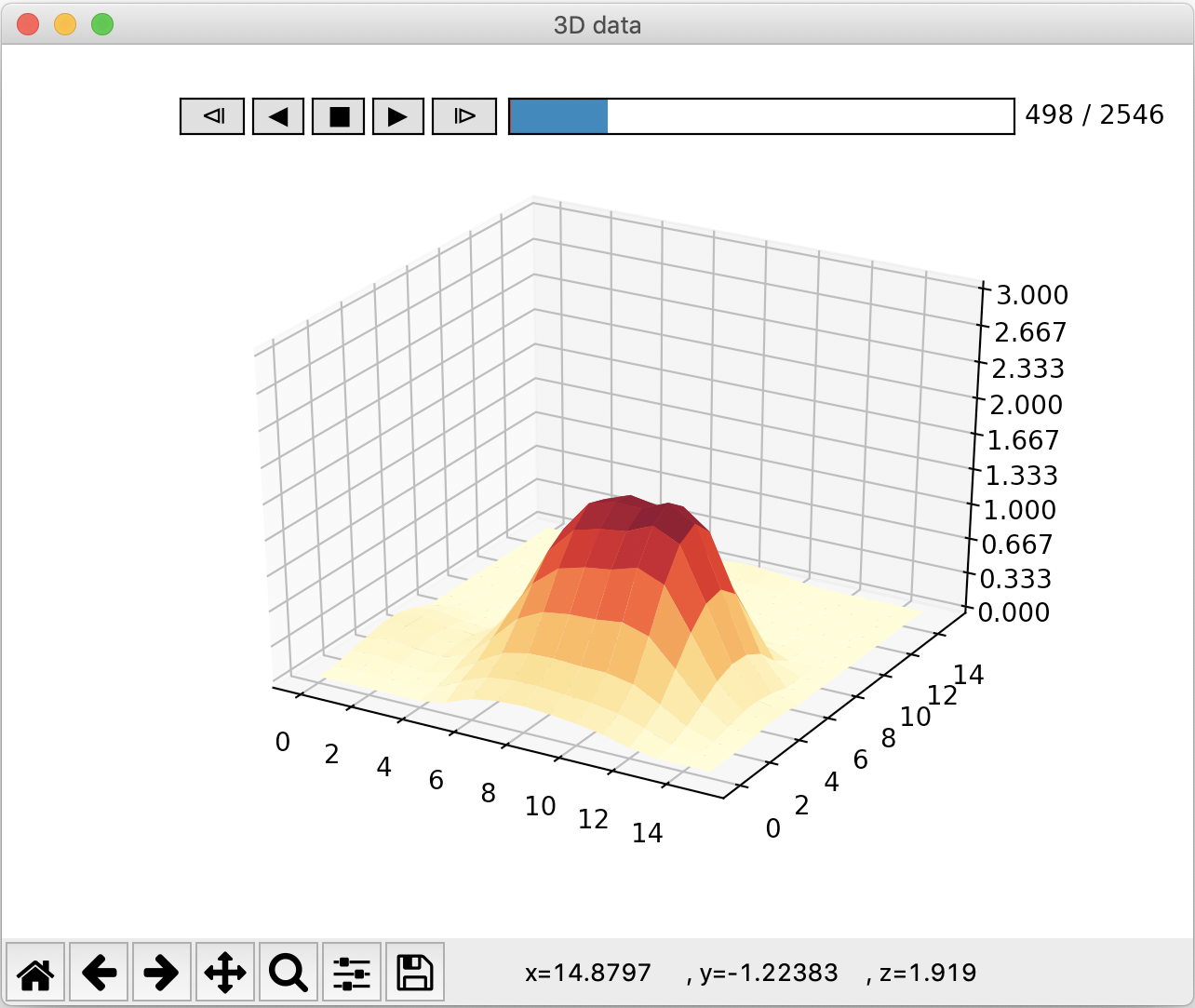
3D visualization tools are provided to play real-time stream or recorded data.
Installation
From PyPI:
pip install MatSense
This will install Matplotlib to implement 3D visualization tools.
If you want to further try PyQtGraph as visualization method:
pip install MatSense[pyqtgraph]
Usage
Off-the-shelf tools
3 handy tools are provided. Pass -h to get detailed information.
matserver/python -m matsense.server- functions:
- receive data from serial port, process and serve
- process data from file(s) and output to file
- other helpful functions
- supported processing methods:
- voltage-pressure conversion (optional for pressure data)
- spatial filter (in-frame denoising): none, ideal, butterworth, gaussian
- temporal filter (pixel-wise between-frame denoising): none, moving average, rectangular window
- calibration: static or dynamic
- functions:
matclient/python -m matsense.client: receive server data, process and visualize; or control server via interactive commands- supported processing methods:
- interpolation
- blob parsing
- supported processing methods:
matdata/python -m matsense.data: visualize file data, or process off-line data
Configuration
All 3 tools can be totally configured by a YAML configuration file:
## server console
matserver --config your_config.yaml

## client console
matclient --config your_config.yaml

## off-line data processing
matdata --config your_config.yaml
Priority: commandline arguments > config file > program defaults.
A template YAML configuration (unused options can be set to ~ or removed):
## template configurations
## ~ for defaults

## configurations for matserver mode
server_mode:
  ## enable backend service
  service: ~
  ## enable visualization or not (suppress service)
  visualize: ~
  ## enumerate all serial ports
  enumerate: ~

  ## (suppress serial) simulated data source without actual serial connection
  ## debug mode: true, false
  debug: ~

  ## (suppress serial) use file as data source or not: true, false
  use_file: ~

## configurations for matclient mode
client_mode:
  ## make client present raw data
  raw: ~
  ## interactive command line mode
  interactive: ~

## configurations for matdata mode
data_mode:
  ## process file data instead of visualization
  process: ~

## configurations for file data
data:
  ## input filename(s), filename or a list of filenames: [a.csv, b.csv, ...]
  in_filenames: ~
  ## output filename, default filename is used when not provided
  out_filename: ~

## configurations for matrix sensor
sensor:
  ## sensor shape: [16, 16], [8, 8], [6, 24]
  shape: ~
  ## total points, can be set to ~
  total: ~
  ## 0/1 mask to exclude non-existent points
  ## |- for multiline without a newline in the end
  mask: ~

## configurations for serial port
serial:
  ## baudrate: 9600, 250000, 500000, 1000000
  baudrate: ~
  ## serial port timeout, in seconds
  timeout: ~
  ## serial port
  port: ~
  ## data transmission protocol: simple, secure
  protocol: ~
  ## support IMU data
  imu: ~

## configurations for client-server connections
connection:
  ## use UDP or UNIX domain socket
  udp: ~
  ## udp address format: 127.0.0.1:20503
  ## UNIX deomain socket address format: /var/tmp/unix.socket.server
  server_address: ~
  client_address: ~

## configurations for data processing
process:
  ### voltage to the reciprocal of resistance
  ## reference voltage: 255, 255/3.6*3.3
  V0: ~
  ## constant factor: 1
  R0_RECI: ~
  ## convert voltage to resistance: true
  convert: ~

  ### server data processing
  ## no filtering and calibration
  raw: ~
  ## time of warming up in seconds: 1
  warm_up: ~
  ## spatial filter: none, ideal, butterworth, gaussian
  filter_spatial: ~
  ## spatial filter cut-off freq: 3.5
  filter_spatial_cutoff: ~
  ## Butterworth filter order: 2
  butterworth_order: ~
  ## temporal filter: none, moving average, rectangular window
  filter_temporal: ~
  ## temporal filter size: 15
  filter_temporal_size: ~
  ## rectangular window filter cut-off frequency: 0.04
  rw_cutoff: ~
  ## calibrative frames, 0 for no calibration: 0, 200
  cali_frames: ~
  ## calibration frame window size, 0 for static and >0 for dynamic: 0, 10000
  cali_win_size: ~
  ## intermediate result: 0, 1, 2
    ## 0: convert voltage to reciprocal resistance
    ## 1: convert & spatial filter
    ## 2: convert & spatial filter & temporal filter
  intermediate: ~

  ### (optional) client data processing
  ## interpolation shape, default to sensor.shape
  interp: ~
  ## interpolation order: 3
  interp_order: ~
  ## filter out blobs: true
  blob: ~
  ## total blob number: 3
  blob_num: ~
  ## blob filter threshole: 0.1, 0.15
  threshold: ~
  ## special check for certain hardwares: false
  special_check: ~

pointing:
  ## value bound for checking cursor moving state: 0
  bound: ~
  ## directly map coordinates or relatively (suppress trackpoint)
  direct_map: ~
  ## use ThinkPad's TrackPoint (red dot) control style
  trackpoint: ~
  ## smoothing
  alpha: ~

## configurations for visualization
visual:
  ## using pyqtgraph or matplotlib
  pyqtgraph: ~
  ## z-axis limit: 3, 5
  zlim: ~
  ## frame rate: 100
  fps: ~
  ## scatter plot: false
  scatter: ~
  ## show text value: false
  show_value: ~
Useful modules
-
matsense.uclientUclient: interface to receive data from server
-
matsense.process: data processing toolsDataHandlerPressure: process pressure data (conversion & filtering & calibration)BlobParserInterpolatorPointSmootherCursorControllerPressureSelector
-
matsense.datasetter: data setter, using serial port or file dataDataSetterSerialDataSetterFile
-
matense.tools: configuration and other helpful tools -
matsense.filemanager: file I/O tools -
matsense.visual: visualization toolsfrom matsense.visual.player_matplot import Player3DMatplot: 3D player using Matplotlibfrom matsense.visual.player_pyqtgraph import Player3DPyqtgraph: 3D player using PyQtGraph
Server-Client Protocol
Use matclient -i to control server.
The underlying server-client communication protocol is:
| Name | meaning | Value | Format | Return | Return format |
|---|---|---|---|---|---|
| CLOSE | close server | 0 | 1byte | status | 1byte |
| DATA | get a data frame | 1 | 1byte | frame+index | 256double+1int |
| RAW | get a raw data frame | 2 | 1byte | frame+index | 256double+1int |
| REC_DATA | ask server to record data to file | 3(+filename) | 1byte+string | status+filename | 1byte+string |
| REC_RAW | ask server to record raw data to file | 4(+filename) | 1byte+string | status+filename | 1byte+string |
| REC_STOP | ask server to stop recording | 5 | 1byte | status | 1byte |
| RESTART | restart server with config string | 6(+config_str) | 1byte+string | status+config_string | 1byte+string |
| RESTART_FILE | restart server with config filename | 10+config_filename | 1byte+string | status+config_string | 1byte+string |
| CONFIG | get server config | 7 | 1byte | status+config_string | 1byte+string |
| DATA_IMU | get IMU data | 9 | 1byte | IMU_frame+index | 6double+1int |
status(1 byte): 0 for success and 255 for failure
Author
Atomie CHEN: atomic_cwh@163.com
1 maintainer

Metadata
1 maintainer
Release files for MatSense 0.4.1
For a detailed explanation of source distributions (sdists) and built distributions (wheels), please see the package formats documentation.
Source distribution (sdist)
| File | Size | Uploaded | |
|---|---|---|---|
| matsense-0.4.1.tar.gz | 43.5 kB | Details |
Built distribution (wheel)
| File | Interpreter | ABI | Platform | Reset |
|---|---|---|---|---|
| MatSense-0.4.1-py3-none-any.whl | Python 3 | none | any | Details |
Total release size: 96.1 kB
Release files / matsense-0.4.1.tar.gz
| Download URL | matsense-0.4.1.tar.gz |
|---|---|
| Size | 43.5 kB |
| Tags | Source |
|
SHA-256 checksum How to use checksums |
f91efc8b1efe4d3f3ea7acd7ad21a52fdadf60f2127ffa474404344a4bd5fc99
|
|
BLAKE2b-256 checksum How to use checksums |
365dadf25a1b4abea9c524981965a12e7d2d5ff68546a87434cb155ae9c49ea0
|
| Upload date | |
|
Uploaded using Trusted Publishing? What is trusted publishing? |
No |
| Uploaded via |
twine/5.0.0 CPython/3.12.3
|
Release files / MatSense-0.4.1-py3-none-any.whl
| Download URL | MatSense-0.4.1-py3-none-any.whl |
|---|---|
| Size | 52.6 kB |
| Tags | Python 3 |
|
SHA-256 checksum How to use checksums |
6bc4396c884f8a94896e3697c493608e97ec8109f1b3365ee7638fc6fd31b3fe
|
|
BLAKE2b-256 checksum How to use checksums |
17b259b2358e5d2f7be0c6630ac8c8c1aabbfcfc08a02ccd5bdc0054b5252dd5
|
| Upload date | |
|
Uploaded using Trusted Publishing? What is trusted publishing? |
No |
| Uploaded via |
twine/5.0.0 CPython/3.12.3
|














