
This release is a pre-release and may not be stable for production use.
Monitoring automation project for Prometheus and ecosystem (in-progress)
One of the main problem that we face with microservices deployment is how to configure monitoring. With deployment being so dynamic its hard to make changes.
In this project we are trying to offload the management of monitoring. When a new project is added,
user adds user_input.yaml and it will be picked up by CICD (in our case Jenkins).
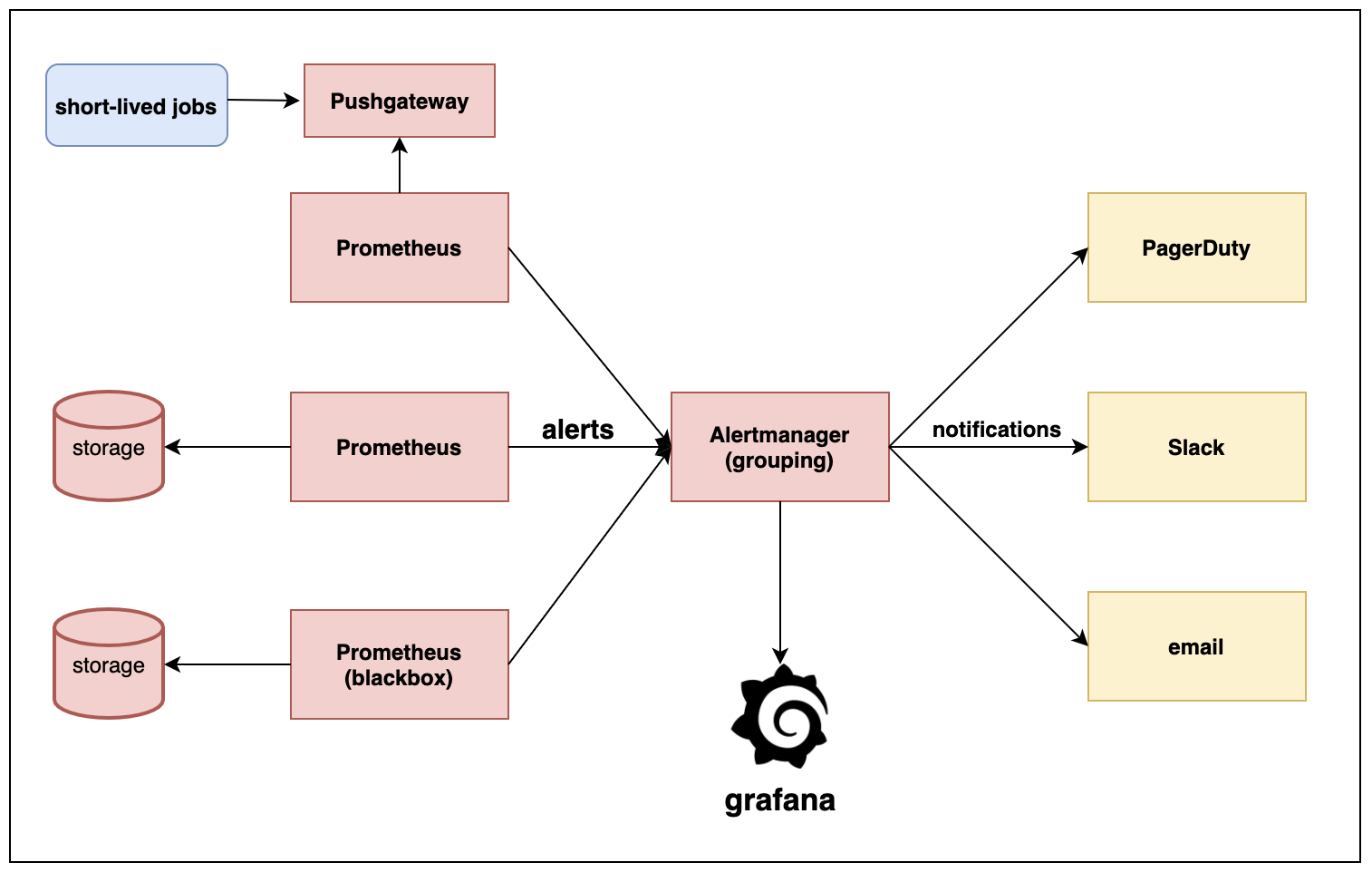
Where will the monitoring be configured:
- Prometheus
- Blackbox
- Elastalert
- Pushgateway
- Pagerduty
- Slack
Pre-reqs:
- Running Elastalert
- Running Alertmanager
- Running Prometheus Monitoring
- Running Pushgateway
- Pagerduty account
- Slack account
- Kafka/Zookeper (when we wrote this project, we had a requirement to cleanup Kafka/Zookeeper)
Note:
- Docker image should have ssh keys to connect to git.
How to begin:
To create dummy data for testing:
verify if static-files directory exists:
DIR_NAME=demo1
BASE_PATH='/Users/varun.tomar/Documents/personal_github'

mkdir -p $BASE_PATH/mauto/$DIR_NAME/demo-data/monitoring/static-files
verify if alertmanager config file exists:
mkdir -p $BASE_PATH/mauto/$DIR_NAME/demo-data/alertmanager
cp $BASE_PATH/mauto/data/demo-data/alertmanager/config.yaml $BASE_PATH/mauto/$DIR_NAME/demo-data/alertmanager/config.yaml
verify if prometheus config file exists:
mkdir -p $BASE_PATH/mauto/junk/demo-data/monitoring/
cp $BASE_PATH/mauto/data/demo-data/monitoring/config.yaml $BASE_PATH/mauto/junk/demo-data/monitoring/
verify .env file exists:
Copy the example.env and create a .env file
Update src/automation/config.yaml
How to use?
- run
pip install mauto - run
muatofor available options
Note:
-
Trying to make it modular or plug and play type so new components can be added easily.
-
I am using
clickto create python cli. -
Python 3.6 and above is required
1 maintainer

Metadata
1 maintainer
Release files for mauto 0.0.1.dev14
For a detailed explanation of source distributions (sdists) and built distributions (wheels), please see the package formats documentation.
Source distribution (sdist)
| File | Size | Uploaded | Provenance | Actions |
|---|---|---|---|---|
| mauto-0.0.1.dev14.tar.gz | 10.8 kB | Without provenance | Details for mauto-0.0.1.dev14.tar.gz |
Built distribution (wheel)
| File | Interpreter | ABI | Platform | Actions Reset |
|---|---|---|---|---|
| mauto-0.0.1.dev14-py3-none-any.whl | Python 3 | none | any | Details for mauto-0.0.1.dev14-py3-none-any.whl |
Total release size: 22.3 kB
Release files / mauto-0.0.1.dev14.tar.gz
| Download URL | mauto-0.0.1.dev14.tar.gz |
|---|---|
| Size | 10.8 kB |
| Tags | Source |
|
SHA-256 checksum How to use checksums |
3f39b2f1231de8e43412c80fdd9947277c64903489422921df2cb42eef7388fb
|
|
BLAKE2b-256 checksum How to use checksums |
2663d32039f479a8d9030095f1ede4b20e64573a08cafb8d7828f784542a972e
|
| Upload date | |
|
Uploaded using Trusted Publishing? What is trusted publishing? |
No |
| Uploaded via |
twine/3.1.1 pkginfo/1.5.0.1 requests/2.23.0 setuptools/41.2.0 requests-toolbelt/0.9.1 tqdm/4.46.0 CPython/3.8.2
|
Release files / mauto-0.0.1.dev14-py3-none-any.whl
| Download URL | mauto-0.0.1.dev14-py3-none-any.whl |
|---|---|
| Size | 11.5 kB |
| Tags | Python 3 |
|
SHA-256 checksum How to use checksums |
b34fbd2cc3133e08958d11b1af23dfcee6ceba4ea250ada7b942a3fbaa944a9d
|
|
BLAKE2b-256 checksum How to use checksums |
1acc0dc106d9d59a74e630f5cae31bd6f3807cbe222607f4eface17ae2cb866e
|
| Upload date | |
|
Uploaded using Trusted Publishing? What is trusted publishing? |
No |
| Uploaded via |
twine/3.1.1 pkginfo/1.5.0.1 requests/2.23.0 setuptools/41.2.0 requests-toolbelt/0.9.1 tqdm/4.46.0 CPython/3.8.2
|
Security for mauto 0.0.1.dev14
Provenance
Provenance describes where a file came from. On PyPI, provenance is shared via attestations, which provide a verifiable record of the build or publishing details. View details, limitations and caveats.
No provenance found
None of the files in this release were uploaded with provenance metadata.
A note on package security
PyPI is a repository for distributing packages, not a service for auditing them. While third-party security researchers and our staff do their best to detect and remove malicious packages, PyPI cannot guarantee the quality, security or suitability of any given package.
To learn more about protecting yourself from malicious actors, visit our package security documentation.














