
MBTiles_Segmentation
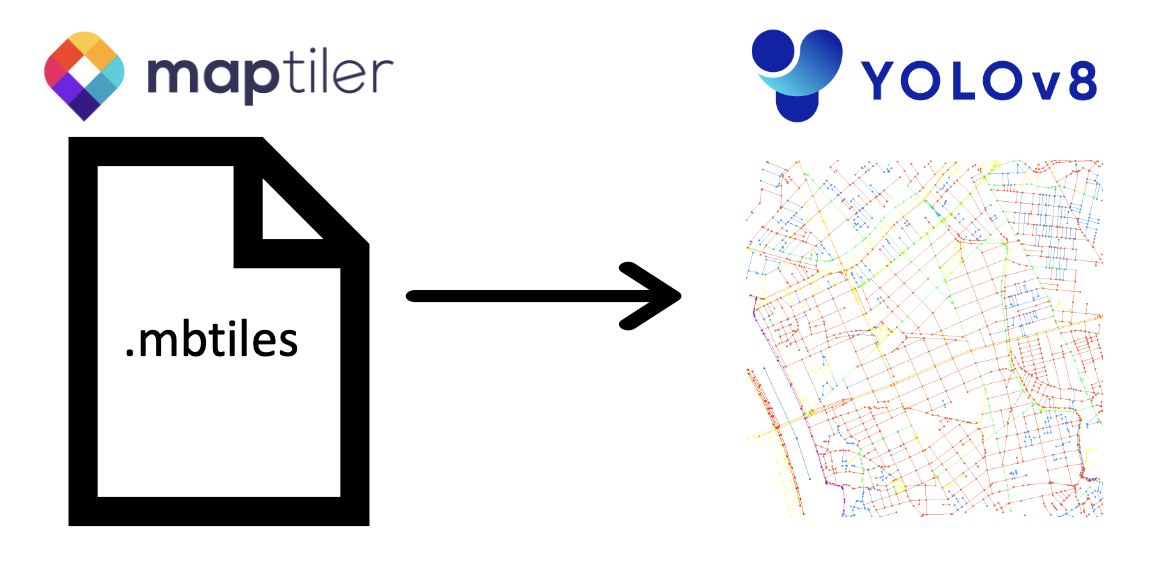
MBTiles_Segmentation is OSS Library to make YOLO segmentation datasets from MBTiles files. This project provides tools to generate image and label data for training and evaluating segmentation models.
Table of Contents
Introduction
MBTiles_Segmentation provides features the extraction of vector data from MBTiles files and the creation of image-label pairs, primarily designed for training and evaluating YOLO (You Only Look Once) models.
You can download map data in the MBTiles format from various sources, including MapTiler's dataset collection (https://data.maptiler.com/downloads/planet/).
The project consists of two main components: src/mbtiles_handler.py, which enables the handling of MBTiles files, and src/seg_dataset_creator.py, which generates image and label data suitable for YOLO-based object detection tasks.
Getting Started
The notebook that actually ran is example/getting_started.ipynb
Follow these steps to get started with the MBTiles_Segmentation project:
-
Install MBTiles_Segmentation: command:
pip install MBTiles_Segmentation -
Download the MBTiles File:
- Visit the MapTiler website at https://data.maptiler.com/downloads/asia/japan/tokyo/.
- Download the
japan_tokyo.mbtilesfile, which contains map data for Tokyo, Japan.- After downloading, move the
japan_tokyo.mbtilesfile into thesamplefolder of the project.
- After downloading, move the
-
Explore MBTiles Handler: Command is
seg_mbtiles_handlerto explore the contents of the MBTiles file. Below are some example commands:-
To get information about zoom level min and max:
seg_mbtiles_handler --mbtiles_path sample/japan_tokyo.mbtiles --zoom_minmax -
To get column min and max for a specific zoom level (e.g., zoom level 12):
seg_mbtiles_handler --mbtiles_path sample/japan_tokyo.mbtiles --column_minmax 12 -
To get row min and max for a specific zoom level (e.g., zoom level 12):
seg_mbtiles_handler --mbtiles_path sample/japan_tokyo.mbtiles --row_minmax 12 -
To get data for a specific tile (e.g., zoom level 12, column 123, row 456):
seg_mbtiles_handler --mbtiles_path sample/japan_tokyo.mbtiles --get_tile 10 907 619 -
To get random tile data for a specific zoom level (e.g., zoom level 14):
seg_mbtiles_handler --mbtiles_path sample/japan_tokyo.mbtiles --get_random_tile 14 -
To get area tiles based on a standard tile and zoom level (e.g., standard zoom level 10, column 907, row 619, and target zoom level 11):
seg_mbtiles_handler --mbtiles_path sample/japan_tokyo.mbtiles --get_area_tiles 10 907 619 11
-
-
Generate Dataset: Command is
seg_mbtiles_creatorto generate image-label pairs for training and testing semantic segmentation models. Below is an example command:-
To create a dataset in the
sample/japan_tokyo_datasetfolder, containing images and labels for training and validation, you can run the following command:seg_mbtiles_creator --folder_path sample/japan_tokyo_dataset --mbtiles_path sample/japan_tokyo.mbtiles -
You can also specify the number of images to create for each zoom level and the validation data ratio using the
--each_image_numand--val_ratiooptions, respectively.
-
Now you are ready to explore and use the MBTiles_Segmentation project to work with MBTiles map data and create segmentation datasets for training YOLO models.
Usage
The notebook that actually ran is example/usage.ipynb
MBTilesHandler
Initialization
To initialize an MBTilesHandler object, provide the path to your MBTiles file and optional configuration parameters as follows:
from MBTiles_Segmentation import MBTilesHandler

mbtile_path = "sample/japan_tokyo.mbtiles"
handler = MBTilesHandler(mbtile_path, drop_lines=False, drop_points=True, drop_polygons=True, min_num_objs=5)
drop_lines: Set toTrueto exclude LineString and MultiLineString features (default:False).drop_points: Set toTrueto exclude Point and MultiPoint features (default:True).drop_polygons: Set toTrueto exclude Polygon and MultiPolygon features (default:True).min_num_objs: Minimum number of objects required for a valid tile (default:5).
Fetch Zoom Level Range
To get the range of available zoom levels in the MBTiles file, use the get_zoom_minmax function:
zoom_min, zoom_max = handler.get_zoom_minmax()
print(f"Available zoom levels: {zoom_min} to {zoom_max}")
Fetch Column Range for a Zoom Level
To get the range of tile columns for a specific zoom level, use the get_column_minmax function:
zoom_level = 12  # Replace with your desired zoom level
col_min, col_max = handler.get_column_minmax(zoom_level)
print(f"Available columns for zoom level {zoom_level}: {col_min} to {col_max}")
Fetch Row Range for a Zoom Level
To get the range of tile rows for a specific zoom level, use the get_row_minmax function:
zoom_level = 12  # Replace with your desired zoom level
row_min, row_max = handler.get_row_minmax(zoom_level)
print(f"Available rows for zoom level {zoom_level}: {row_min} to {row_max}")
Fetch Tile Data
To fetch and decode the data of a specific tile, use the get_tile function by providing the zoom level, column, and row of the tile:
zoom_level = 10  # Replace with your desired zoom level
tile_col = 907   # Replace with your desired column
tile_row = 619   # Replace with your desired row

tile_data = handler.get_tile(zoom_level, tile_col, tile_row)
if tile_data is not None:
    # Process the tile data, which will be returned as a DataFrame
    print(tile_data)
else:
    print("Tile not found or does not meet the minimum object requirement.")
Fetch a Random Tile
To fetch and decode a random tile from the MBTiles file, you can use the get_random_tile function for a specific zoom level:
zoom_level = 12  # Replace with your desired zoom level

random_tile = handler.get_random_tile(zoom_level)
if random_tile is not None:
    # Process the random tile data, which will be returned as a DataFrame
    print(random_tile)
else:
    print("No valid random tile found.")
Fetch Area Tiles
To fetch and decode multiple tiles within a specified area, use the get_area_tiles function. You need to provide the standard zoom level, column, and row, as well as the target zoom level:
zoom_std = 10   # Replace with your standard zoom level
col_std = 907   # Replace with your standard column
row_std = 619   # Replace with your standard row
zoom_target = 11  # Replace with your desired target zoom level

area_tiles = handler.get_area_tiles(zoom_std, col_std, row_std, zoom_target)
if area_tiles is not None:
    # Process the area tiles data, which will be returned as a list of DataFrames
    for tile_data in area_tiles:
        print(tile_data)
else:
    print("No valid area tiles found.")
SegDatasetCreator
Initialization
To initialize a SegDatasetCreator object, provide the output folder path, path to the MBTiles file, and optional configuration parameters:
from MBTiles_Segmentation import  SegDatasetCreator

folder_path = "sample/japan_tokyo_dataset2"
mbtiles_path = "sample/japan_tokyo.mbtiles"

# Initialize with optional color mapping and minimum object count
creator = SegDatasetCreator(output_folder, mbtile_path, min_num_objs=50)
color_mapping: A dictionary that maps class names to colors (default: a predefined color mapping).min_num_objs: Minimum number of objects required for a valid tile (default:10).
Create Image
To create an image for a specific tile, use the create_img function by providing the tile data and the output file path:
df = handler.get_random_tile(12)
creator.create_img(df, "../sample/random_tile.png")
Create YOLO Dataset
To create a YOLO dataset for a specific tile, use the create_dataset function by providing the tile data and the output file path:
creator.create_dataset(each_image_num=10)
License
This project is open-source and available under the MIT License.
1 maintainer

Download files
Download the file for your platform. If you're not sure which to choose, learn more about installing packages.
Source Distribution
Built Distribution
Filter files by name, interpreter, ABI, and platform.
If you're not sure about the file name format, learn more about wheel file names.
Copy a direct link to the current filters
File details
Details for the file MBTiles_Segmentation-0.1.1.tar.gz.
File metadata
- Download URL: MBTiles_Segmentation-0.1.1.tar.gz
- Upload date:
- Size: 11.2 kB
- Tags: Source
- Uploaded using Trusted Publishing? No
- Uploaded via:
twine/3.8.0 pkginfo/1.9.6 readme-renderer/37.3 requests/2.31.0 requests-toolbelt/0.10.1 urllib3/1.26.15 tqdm/4.66.1 importlib-metadata/6.8.0 keyring/23.13.1 rfc3986/1.5.0 colorama/0.4.6 CPython/3.9.15
File hashes
| Algorithm | Hash digest | |
|---|---|---|
| SHA256 |
03d2f0603b4fb9f9fd5b830197d2456fc6b176629193055595d4faa86d4d8296
|
|
| MD5 |
aae1d2d0e75601a6983a3c8d9d97b0fc
|
|
| BLAKE2b-256 |
7dc47211b3bd029d2867c89575266297a99cac765c1f64c1c9ebb475a7b933cd
|
File details
Details for the file MBTiles_Segmentation-0.1.1-py3-none-any.whl.
File metadata
- Download URL: MBTiles_Segmentation-0.1.1-py3-none-any.whl
- Upload date:
- Size: 10.3 kB
- Tags: Python 3
- Uploaded using Trusted Publishing? No
- Uploaded via:
twine/3.8.0 pkginfo/1.9.6 readme-renderer/37.3 requests/2.31.0 requests-toolbelt/0.10.1 urllib3/1.26.15 tqdm/4.66.1 importlib-metadata/6.8.0 keyring/23.13.1 rfc3986/1.5.0 colorama/0.4.6 CPython/3.9.15
File hashes
| Algorithm | Hash digest | |
|---|---|---|
| SHA256 |
8784587a6856689bd4a5047c1844b97e2acdcd648b263af8a65225ccafa764cb
|
|
| MD5 |
8357118f5398612c9a3a73b80304c9b7
|
|
| BLAKE2b-256 |
fafbeb4a508fe5bab5233d3815cd4dc81c0d6746ae186343fbf88bb69763a8d9
|













