
mcp-halflist
CI-first conformance, security, and benchmarking CLI for MCP servers.
Lint your MCP server before your users do.


What It Does
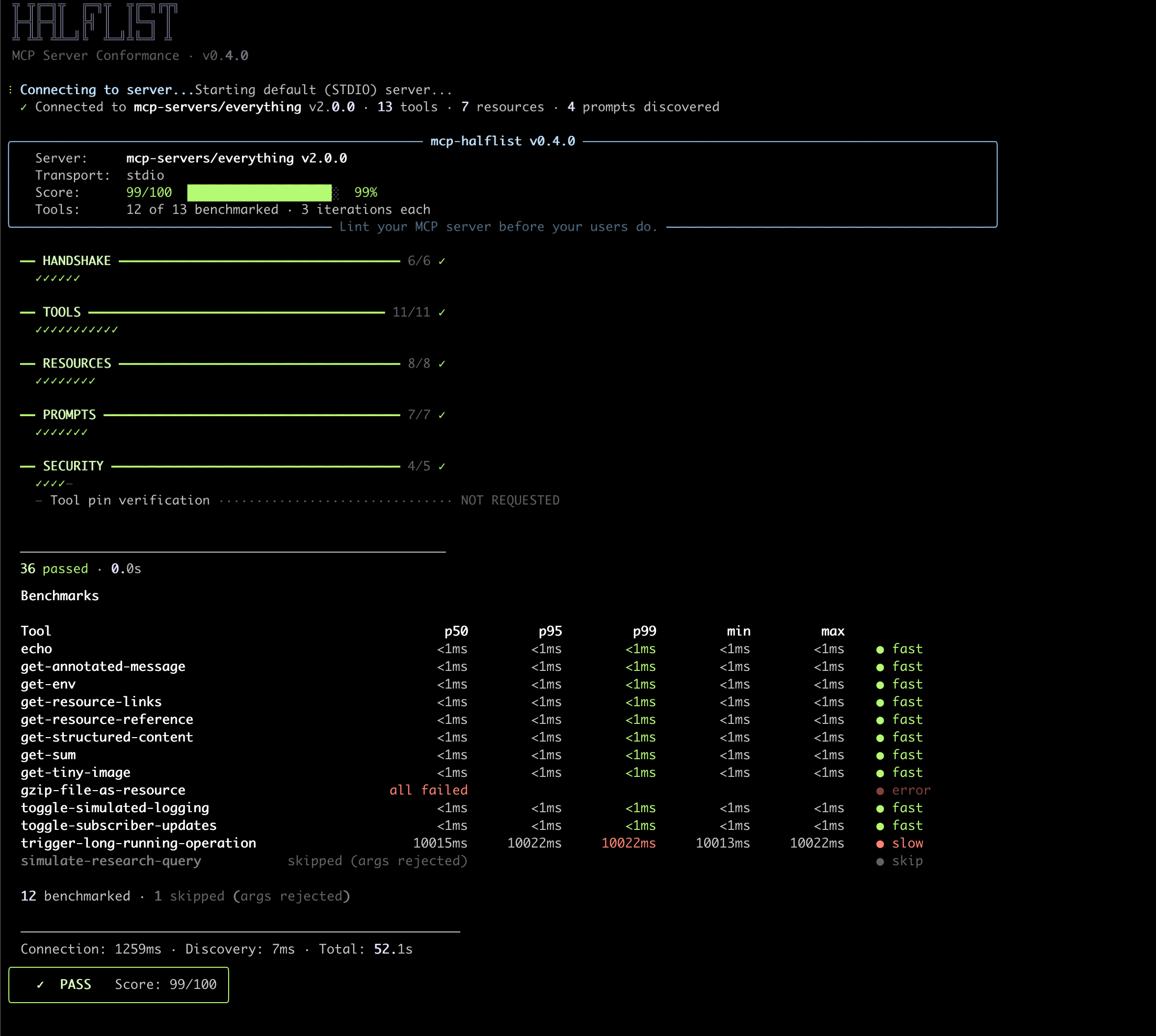
Point it at any MCP server (stdio or HTTP) and get a scored conformance report, security vulnerability scan (prompt injection, tool poisoning, data exfiltration), and per-tool latency benchmarks. Fully offline, zero API keys, CI-native. One pip install, one command, done.
See It In Action
Terminal output:
HTML reports: Check report · Bench report · Audit report
Install
pip install mcp-halflist
macOS users: use
python3instead ofpythonin server commands.
Quick Start
# Full audit of the official MCP reference server (runs instantly, no setup)
halflist audit --stdio "npx -y @modelcontextprotocol/server-everything"

# Security scan + conformance check
halflist check --stdio "npx -y @modelcontextprotocol/server-everything"

# Benchmark tool latency
halflist bench --stdio "npx -y @modelcontextprotocol/server-everything" --all

# Pin tools, then verify later for rug pull detection
halflist pin --stdio "npx -y @modelcontextprotocol/server-everything"
halflist check --stdio "npx -y @modelcontextprotocol/server-everything" --verify-pins

# Your own server
halflist audit --stdio "python3 my_server.py"

# HTTP transport (Streamable HTTP with SSE fallback)
halflist check --http http://localhost:8080/mcp
halflist audit --http http://localhost:8080/mcp

# HTTP with auth
halflist check --http https://mcp.example.com/v1 --header "Authorization: Bearer tok123"

# HTTP with OAuth2 client credentials
halflist audit --http https://mcp.example.com/v1 \
  --oauth-token-url https://auth.example.com/token \
  --oauth-client-id my-client \
  --oauth-client-secret my-secret

# OAuth2 PKCE (automatic on 401, opens browser for authorization)
halflist check --http https://mcp.example.com/v1

# OAuth2 PKCE headless mode (prints URL instead of opening browser)
halflist check --http https://mcp.example.com/v1 --no-browser

# Skip automatic OAuth PKCE
halflist check --http https://mcp.example.com/v1 --no-auth

# Custom tool arguments for tools that need specific inputs
# args.json: {"get_user": {"user_id": "abc123"}}
halflist bench --http http://localhost:8080/mcp --tool get_user --args-file args.json

# More real servers to try
halflist check --stdio "npx -y @modelcontextprotocol/server-time"
halflist check --stdio "npx -y @modelcontextprotocol/server-filesystem /tmp"
CI Integration
JUnit XML output works with GitHub Actions, GitLab CI, Jenkins, and any CI system that supports JUnit test reporters:
# Generate JUnit XML for CI test reporters
halflist check --stdio "python3 server.py" --format junit -o results.xml
halflist audit --stdio "python3 server.py" --format junit -o audit.xml
Commands
| Command | What it does |
|---|---|
halflist check |
Protocol conformance + security scanning |
halflist bench |
Per-tool latency benchmarking (p50/p95/p99) |
halflist audit |
Combined check + bench in one shot |
halflist watch |
Continuous health monitoring |
halflist report |
Generate markdown, HTML reports, or SVG badges from JSON |
halflist pin |
Save tool hashes for rug pull detection |
See the full command reference for all flags and examples.
Security Scanning
halflist scans tool descriptions for prompt injection, data exfiltration instructions, cross-tool manipulation, suspicious encoding (base64, zero-width characters), and rug pull attempts via tool pinning. All scanning runs locally: zero API calls, zero data sharing. Unlike mcp-scan which sends tool descriptions to an external API, halflist runs entirely on your machine.
See security scanning details for the full list of detection patterns.
Debug Logging
# Enable debug output
halflist check --stdio "python3 server.py" --debug

# Save debug log to file
halflist audit --http https://example.com/mcp --debug-log debug.log

# Environment variable (useful in CI)
HALFLIST_LOG_LEVEL=DEBUG halflist audit --stdio "python3 server.py"
Configuration
Create a halflist.toml in your project root:
[server]
transport = "stdio"
command = "python3 my_server.py"

[check]
timeout = 30

[bench]
iterations = 20
args_file = "args.json"
Then just run:
halflist check
halflist audit
CLI flags override config values. Use ${ENV_VAR} for secrets:
[server.oauth]
client_secret = "${MCP_CLIENT_SECRET}"
Config file discovery order: halflist.toml (cwd) > .halflist.toml (cwd) > ~/.halflist/config.toml. Or pass --config path/to/file.toml explicitly.
Output Formats
Terminal (colored, default) · JSON (--format json) · JUnit XML (--format junit) · Markdown · HTML · SVG Badge
See the output format reference for details.
How It Compares
| Tool | Approach | Needs API key | Sends data externally |
|---|---|---|---|
| MCP Inspector | Interactive browser UI | No | No |
| mcp-probe | Interactive TUI (Rust) | No | No |
| mcp-server-tester | LLM-generated tests | Yes (Anthropic) | Yes |
| mcp-scan | Security scanning | Yes (OpenAI for local) | Yes (Invariant API) |
| mcp-halflist | CI-first check + security + bench | No | No |
Development
git clone https://github.com/abhishekhsingh/mcp-halflist.git
cd mcp-halflist
pip install -e ".[dev]"
ruff check src/ tests/
ruff format --check src/ tests/
pytest -v --tb=short
License
MIT
Author
1 maintainer

Metadata
1 maintainer
Release files for mcp-halflist 1.0.0
For a detailed explanation of source distributions (sdists) and built distributions (wheels), please see the package formats documentation.
Source distribution (sdist)
| File | Size | Uploaded | |
|---|---|---|---|
| mcp_halflist-1.0.0.tar.gz | 576.8 kB | Details |
Built distribution (wheel)
| File | Interpreter | ABI | Platform | Reset |
|---|---|---|---|---|
| mcp_halflist-1.0.0-py3-none-any.whl | Python 3 | none | any | Details |
Total release size: 626.2 kB
Release files / mcp_halflist-1.0.0.tar.gz
| Download URL | mcp_halflist-1.0.0.tar.gz |
|---|---|
| Size | 576.8 kB |
| Tags | Source |
|
SHA-256 checksum How to use checksums |
7fda7f915d5307dc7dfa73fd87f465390268d7f2558cdfe9b71f844732b8dcc3
|
|
BLAKE2b-256 checksum How to use checksums |
b5818e6e3514bb5113e5b2de42c08f7763146e86b2092948b93535fd0ba91779
|
| Upload date | |
|
Uploaded using Trusted Publishing? What is trusted publishing? |
Yes |
| Uploaded via |
twine/6.1.0 CPython/3.13.12
|
Provenance
Provenance describes where a file came from. On PyPI, provenance is shared via attestations, which provide a verifiable record of the build or publishing details. View details, limitations and caveats.


PyPI Publish Attestation
PyPI verified that this artifact, at this checksum, originated from the publisher listed below.
Signed by GitHub Actions, verified by PyPI on May 29, 2026.
Transparency logRelease files / mcp_halflist-1.0.0-py3-none-any.whl
| Download URL | mcp_halflist-1.0.0-py3-none-any.whl |
|---|---|
| Size | 49.4 kB |
| Tags | Python 3 |
|
SHA-256 checksum How to use checksums |
45616cd51effe9d7be091ec295d43e863d83463c4a46210e006eb586c4afa4aa
|
|
BLAKE2b-256 checksum How to use checksums |
4d580f69d200ea192faeabc27d9aa99e6ba8ce359c4390afb7f82c8d06649695
|
| Upload date | |
|
Uploaded using Trusted Publishing? What is trusted publishing? |
Yes |
| Uploaded via |
twine/6.1.0 CPython/3.13.12
|
Provenance
Provenance describes where a file came from. On PyPI, provenance is shared via attestations, which provide a verifiable record of the build or publishing details. View details, limitations and caveats.
PyPI Publish Attestation
PyPI verified that this artifact, at this checksum, originated from the publisher listed below.
Signed by GitHub Actions, verified by PyPI on May 29, 2026.
Transparency log













