
MCP Server for YNAB
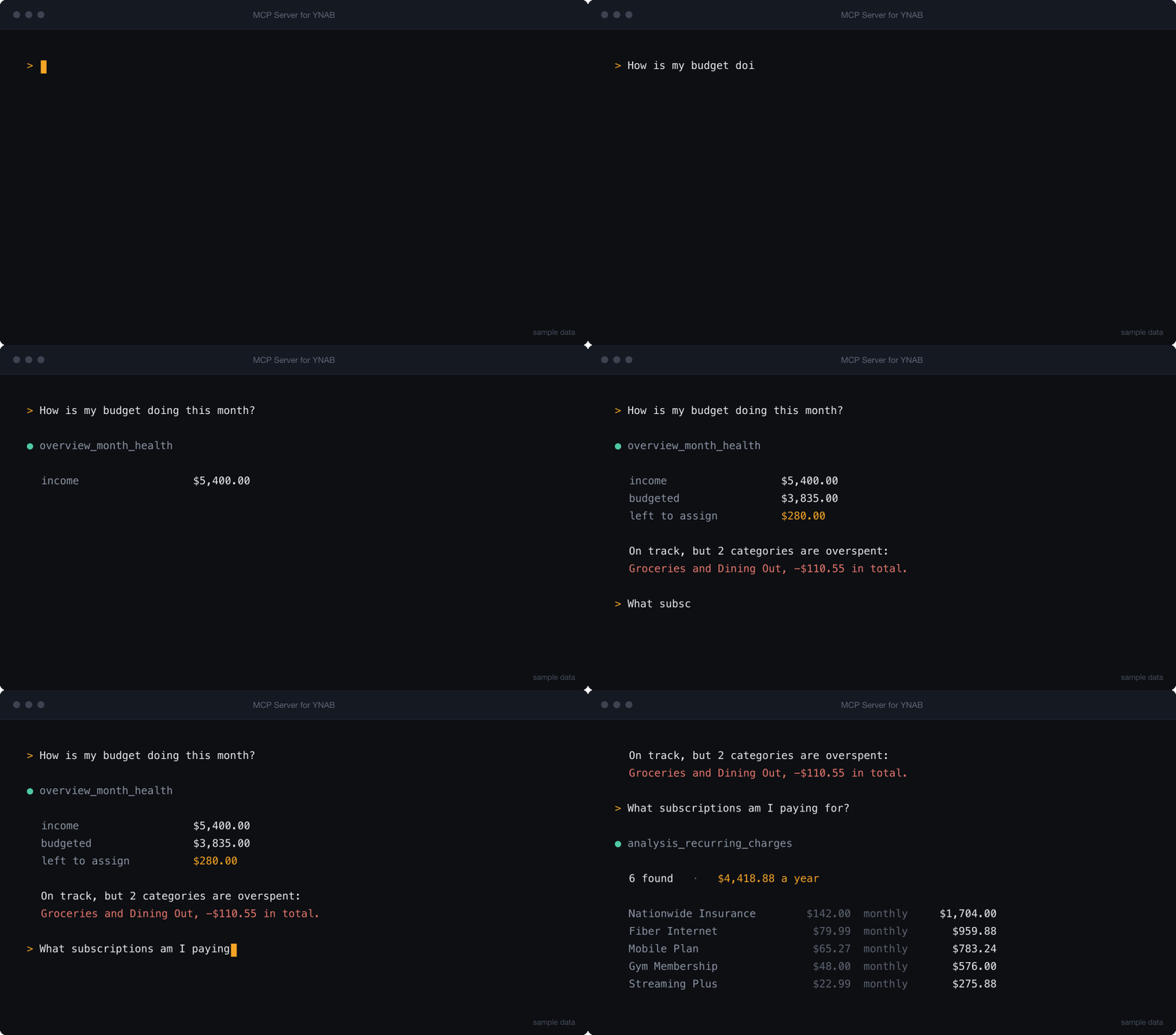
Ask your budget a question. Connect Claude, Codex, Cursor, or any MCP client to YNAB and get answers about your actual money — how the month is going, what is overspent, what your subscriptions really cost.





YNAB_API_KEY=your_token uvx mcp-server-for-ynab smoke
Read-only by default. The write tools are not registered at all unless you
set YNAB_ALLOW_WRITES=1, so they never appear to the assistant and nothing can
change your budget until you say so. When you do enable them, every write
records the state that preceded it and can be undone.
An MCP server that exposes the YNAB API as tools, then adds enriched tools answering questions the raw API cannot answer in one call — budget health, cleanup queues, spending analysis, recurring charges.
Quick Start
1. Get a YNAB token
Generate a personal access token at app.ynab.com/settings/developer.
You also need uv, which provides uvx:
curl -LsSf https://astral.sh/uv/install.sh | sh   # macOS and Linux
brew install uv                                   # macOS with Homebrew
winget install --id=astral-sh.uv -e               # Windows
Check both work. Nothing to clone — uvx fetches the package and runs it in a
throwaway environment:
YNAB_API_KEY=your_token uvx mcp-server-for-ynab smoke
smoke validates configuration and tool registration, then exits. It should
print smoke: app created, 62 tools registered.
2. Add it to your client
| Client | Setup |
|---|---|
| Claude Code | one command |
| Claude Desktop | config file |
| Cursor | one-click link |
| VS Code (GitHub Copilot) | one command |
| Codex CLI | one command |
| Gemini CLI | one command |
| Windsurf, Zed, others | generic stdio config |
| MCP Inspector | debugging |
The two most common paths:
Claude Code — install the plugin, which brings its own MCP config:
/plugin marketplace add hs737/mcp-server-for-ynab
/plugin install mcp-server-for-ynab@mcp-server-for-ynab
Or register the server directly, if you would rather not use a plugin:
claude mcp add --env YNAB_API_KEY=your_ynab_token --transport stdio --scope user \
  ynab -- uvx mcp-server-for-ynab stdio
Claude Desktop, Cursor, Windsurf, and most others — paste into the client's MCP config file:
{
  "mcpServers": {
    "ynab": {
      "command": "uvx",
      "args": ["mcp-server-for-ynab", "stdio"],
      "env": {
        "YNAB_API_KEY": "your_ynab_token",
        "YNAB_PLAN_ID": "your_plan_id"
      }
    }
  }
}
YNAB_PLAN_ID is optional but recommended — with it set, you never have to
name a budget in a request. Full per-client instructions, including where each
config file lives and how to keep the token out of it, are in
Client Setup.
Desktop hosts that accept bundles — download the .mcpb file from the
latest release
and open it. The host asks for your token in a form and stores it in your OS
keychain, so there is no config file to edit and no token sitting in plain text.
A checkbox controls whether writes are enabled.
Docker
A published image is available for linux/amd64 and linux/arm64. The server
speaks MCP over stdin and stdout, so run it attached with -i. There is no
port to publish:
docker run -i --rm -e YNAB_API_KEY=your_ynab_token \
  ghcr.io/hs737/mcp-server-for-ynab
Or build it yourself from a clone:
docker build -t mcp-server-for-ynab .
docker run -i --rm -e YNAB_API_KEY=your_ynab_token mcp-server-for-ynab
If you enable writes, mount a volume for the history — otherwise --rm discards
the record that makes a revert possible:
docker run -i --rm -e YNAB_API_KEY=your_ynab_token -e YNAB_ALLOW_WRITES=1 \
  -v ynab-mcp-history:/home/app/.mcp-server-for-ynab mcp-server-for-ynab
3. Ask it something
What's my cash position across all accounts?
If that works, you're set. If it doesn't, see
Troubleshooting — the usual cause is
that the client cannot find uvx on its PATH.
What You Can Ask
Read-only, works out of the box:
| Ask | Tool it reaches for |
|---|---|
| "How is this month's budget doing?" | overview_month_health |
| "What's my cash position across all accounts?" | overview_cash_position |
| "Which transactions still need a category?" | triage_uncategorized |
| "What's waiting for me to approve?" | triage_unapproved |
| "Which categories are overspent, and by how much?" | analysis_overspent_categories |
| "Which targets won't be funded this month?" | analysis_target_funding_gaps |
| "Are any scheduled transactions at risk?" | analysis_upcoming_scheduled_risks |
| "What have I spent at this payee over the last year?" | bookkeeping_transaction_history |
| "What subscriptions am I actually paying for?" | analysis_recurring_charges |
| "Does this account match the statement, and what's in the way?" | reconcile_preview |
| "Here's the bank CSV — what's missing on each side?" | transactions_match_statement |
| "Are there card holds sitting on my account that never posted?" | triage_pending_imports |
With YNAB_ALLOW_WRITES=1:
Categorize last week's uncategorized transactions, then show me what you changed.
The agent categorizes, and history_list shows every write with the value that
preceded it. history_revert undoes any of them.
Agents work best when they start with overview_available_tools, which returns
the current tool catalog grouped by family. See
Tool Surface for the full map.
Guided workflows
Seven prompts ship with the server, and most clients surface them as slash commands — a starting point that does not require reading the tool list first: monthly review, weekly triage, categorize and approve, subscription audit, cash position, review-and-undo, and a multi-month budget audit.
Four resources (ynab://guide/*) carry the YNAB method, the write-safety
rules, guidance on which tool to reach for, and how credit accounts behave. They are fetched on demand, so
they cost nothing until a client asks for them.
Configuration
| Variable | Required | Description |
|---|---|---|
YNAB_API_KEY |
Yes | YNAB personal access token |
YNAB_PLAN_ID |
Recommended | Default plan ID, making plan_id optional on most tools |
YNAB_ALLOW_WRITES |
No | Register write tools. Unset means read-only |
YNAB_HISTORY_PATH |
No | Write history file, default ~/.mcp-server-for-ynab/history.jsonl |
YNAB_RATE_LIMIT_PER_HOUR |
No | Client-side request budget, default 190 of YNAB's 200 |
YNAB_RATE_WARN_THRESHOLD |
No | Warn when this many requests remain, default 50 |
LOG_LEVEL |
No | Logging verbosity, default INFO |
Set these in your MCP client's env block. For local development, copy
.env.example to .env and fill it in.
Rate limits
YNAB allows 200 requests per hour per token, and a single enriched tool can spend several. The server tracks its own usage in a rolling hour and stops just below YNAB's ceiling, so the limit you hit is local and clearly reported rather than a 429 in the middle of a workflow.
Every tool response carries requests_used_this_hour and requests_remaining,
the way an HTTP API returns X-RateLimit-Remaining — an agent paces itself
against a number it can already see, where asking for it costs a call it will
not make. overview_request_budget adds the limit, the window, and when an
exhausted budget reopens; ping answers whether the server is up at all. Both
cost nothing.
The quota belongs to the access token, so your own YNAB apps spend from it too. The count here is what this server used, which can be less than what YNAB has left — every rate-limit error says so, and carries the reopening time as an absolute timestamp as well as a delay, so a scheduled retry does not come back early.
Tool Families
62 read-only tools, 84 with writes enabled, plus 7 guided prompts and 4 reference resources.
| Family | Type | Purpose |
|---|---|---|
overview |
enriched | Budget health snapshots and orientation |
triage |
enriched | Transaction cleanup queues |
bookkeeping |
enriched | Categorization suggestions, memo help, history |
analysis |
enriched | Overspending, funding gaps, scheduled risks, card funding, multi-month audits |
reconcile |
enriched | Statement comparison, bank-export matching, and finishing a reconciliation |
history |
enriched | Review and roll back writes this server made |
changes |
enriched | What moved since a given server_knowledge value |
user |
raw | YNAB user info |
plans |
raw | Plan and settings reads |
accounts |
raw | Account reads and creation |
categories |
raw | Categories and category groups |
months |
raw | Month-level budget data, multi-month ranges, batch assignment |
payees |
raw | Payee management |
payee_locations |
raw | Geographic payee metadata, niche/low-priority |
transactions |
raw | Transaction CRUD and import trigger |
scheduled_transactions |
raw | Scheduled transaction management |
money_movements |
raw | Money movement data, and moving money between categories |
Raw tools are close mirrors of YNAB endpoints — use them for exact reads and
most writes. Enriched tools combine several reads into one answer — use them
for orientation, investigation, and analysis. Every tool is labeled read or
write, and no enriched tool writes unless its name and description say so.
Reading a lot of budget without reading a lot of JSON
A single month of a real plan is around 60 KB of JSON, because YNAB returns every goal field of every category, hidden ones included. Reviewing a year that way does not fit in a context window.
months_getandcategories_listtakecompact=true, which returns six fields per category instead of thirty — about a quarter of the size.months_rangereturns a whole range as one category-by-month matrix, so a twenty-one-month review is one call rather than twenty-one.category_groups_summary_by_monthdoes the same at group level, which is where most "is this healthy" questions actually live.changes_sincereports what moved since aserver_knowledgevalue, so re-checking after the user edits their budget costs one small call.
Range tools still spend one YNAB request per month — there is no range endpoint — so each one says what it costs and the range is capped at 36 months.
More detail: Tool Surface
Write Tools
Write tools are not registered unless you opt in:
YNAB_ALLOW_WRITES=1
Without it the server is read-only, and the write tools are absent from
tools/list — an agent cannot call what it cannot see. This is deliberate: the
server holds a credential that can modify real financial records, and refusing a
call at execution time would still advertise the capability.
Every write is recorded, and most can be undone
When writes are enabled, each one records the state that existed before it. YNAB has no history endpoint, so this is the only way to get an overwritten value back.
| Tool | Purpose |
|---|---|
history_list |
Recent writes, newest first, each marked revertible or not |
history_show |
One entry in full, including the before state |
history_revert |
Undo one write |
history_revert_to |
Roll the plan back to its state at a chosen entry |
history_revert_to undoes everything after the entry you name, newest first,
because overlapping edits to the same record only compose correctly in reverse.
Reverting is itself recorded, so a revert can be reverted.
What cannot be undone. YNAB has no delete route for accounts, categories,
category groups, or payees, so creating one is permanent. Those operations are
recorded as non-revertible with the reason, and a rollback reports them under
blocked rather than skipping them silently — an incomplete rollback that
claims success is worse than one that tells you what it left behind. A
recreated transaction also gets a new id and loses any bank-import link.
Writes are checked, not assumed
Tools that change a value re-read it afterwards and report a verification
block. A 200 response is not proof: YNAB accepts budgeted on the category
update route, returns 200, and ignores it. Verification is what catches that.
Applying a plan, and moving money
YNAB's API assigns money one category-month at a time, which makes a month's plan thirty-five separate writes and thirty-five separate history entries.
months_assign_manyapplies a whole month in one call, journaled as one entry, so it can be undone as the one decision it was.money_movemoves available money between two categories — or to and from Ready to Assign — reading the current amounts and doing the arithmetic, so a carried-forward balance is not mistaken for the assigned amount.reconcile_applyfinishes a reconciliation: it marks the agreed transactions reconciled in one bulk call and posts the adjustment that closes the residual, as a single entry that undoes both together.
Both assignment tools also take adjust_by instead of a total — "add $4,500 to
this category" without your reading the current figure first, since they read it
anyway to record what a revert would restore. It is not an atomic delta: YNAB's
API has no delta and no conditional write, so the amount is read and the sum is
written, and an edit made in the app between those two calls is overwritten.
Pass expected_budgeted alongside it and the write is refused when the amount
read is not the one you expected, so a caller acting on a figure that has
already moved stops rather than overwrites. That is a check before the write,
not a precondition on it: the gap between the read and the write stays open,
because YNAB's route offers nothing to close it with.
Either way the response reports previous_budgeted, budgeted and change, so
a write can be confirmed without a re-read.
None of them is atomic, because YNAB has no transaction boundary. Each reports
what was applied and what failed, and a half-written money_move is still
journaled so the money can be put back.
One limit worth knowing before you reconcile through an agent: YNAB's API has no
route that sets an account's last_reconciled_at. The transactions really are
marked reconciled, but the app will still show the date of the last
reconciliation done there, and the tools say so rather than reporting an account
as reconciled.
Amount Convention
All YNAB monetary amounts are in milliunits: 1000 = $1.00.
- Raw tools accept and return milliunits for canonical amount fields.
- Enriched tools may include display helpers alongside canonical values.
Your Data
This server stores exactly one thing on your machine: a record of the writes it
made, used by history_revert. Nothing is sent anywhere except api.ynab.com,
and there is no telemetry.
uvx mcp-server-for-ynab history --show          # where it is, how much is there
uvx mcp-server-for-ynab history --export out.json
uvx mcp-server-for-ynab history --delete        # also removes the ability to revert
These need no credentials and no agent: getting your data back, or gone, should not require running an LLM.
For Contributors
This repo is structured so a contributor or AI agent can answer three questions quickly: where the MCP server lives, where the YNAB API wrappers and models live, and where to add new tools, tests, and docs.
flowchart LR
    A["MCP Client"] --> B["MCPServer Server"]
    B --> C["Tool Handlers"]
    C --> D["ynab_client"]
    D --> E["http_client (httpx)"]
    E --> F["YNAB API"]
    C --> G["enriched/"]
    G --> D
The code is centered on a small set of layers:
src/mcp_server_for_ynab/server/: MCPServer app, tool metadata, tool registration, error boundarysrc/mcp_server_for_ynab/ynab_client/: one async wrapper module per YNAB resource familysrc/mcp_server_for_ynab/http_client/: outboundhttpxwrapper with retries, redaction, and error normalizationsrc/mcp_server_for_ynab/models/: typed YNAB shapes, shared error model, milliunit helperssrc/mcp_server_for_ynab/enriched/: higher-level read-only workflows built on top of raw clientstests/: unit, contract, integration, and QA/Postman source assets
Run it from a clone:
git clone https://github.com/hs737/mcp-server-for-ynab
cd mcp-server-for-ynab
uv sync
cp .env.example .env    # then set YNAB_API_KEY

make smoke-stdio
make run-stdio
make run-http
Run the tests:
make test
make test-unit
make test-contract
make test-integration
make test-postman-operator
Those check that the server works. evals/ asks a different question — whether
an assistant uses it correctly, which is where this project's real failures
have been: a rate-limit lockout from a loop that should have been one call, an
account reported as reconciled that YNAB still showed as stale. Those cases are
graded by a model rather than asserted, so they run on demand with
claude plugin eval rather than in make check. See
evals/README.md.
Where to read next
If you are:
- connecting a client: Client Setup
- new to the repo: Architecture
- adding code: Contributing, Repo Structure, Agent Guidance
- adding or changing tools: Tool Surface, Agent evals
- verifying behavior: Testing
- working on auth, error handling, or logging: Security
- publishing or adding a release channel: Distribution
Full map: Docs Index. Also: Postman Notes, Legal Notice.
Current State
The current implementation uses Python 3.12, MCPServer from the official mcp
package, asyncio end to end, httpx for outbound YNAB calls, and the built-in
stdio and streamable HTTP transports.
This is a local, personal-access-token server. A hosted or public connector is not implemented — that includes ChatGPT custom connectors, which require a remote HTTPS endpoint rather than a local process. The intent is for a hosted runtime to live in its own repository, importing this package through its embed surface so OAuth and public-app concerns stay out of here.
If architecture and implementation ever diverge, the source of truth should be Architecture, updated to reflect the actual code.
License
Apache License 2.0. See LICENSE and NOTICE.md.
Disclaimer
We are not affiliated, associated, or in any way officially connected with YNAB or any of its subsidiaries or affiliates. The official YNAB website can be found at https://www.ynab.com.
The names YNAB and You Need A Budget, as well as related names, tradenames, marks, trademarks, emblems, and images are registered trademarks of YNAB.
1 maintainer

Metadata
1 maintainer
Release files for mcp-server-for-ynab 0.4.0
For a detailed explanation of source distributions (sdists) and built distributions (wheels), please see the package formats documentation.
Source distribution (sdist)
| File | Size | Uploaded | |
|---|---|---|---|
| mcp_server_for_ynab-0.4.0.tar.gz | 586.4 kB | Details |
Built distribution (wheel)
| File | Interpreter | ABI | Platform | Reset |
|---|---|---|---|---|
| mcp_server_for_ynab-0.4.0-py3-none-any.whl | Python 3 | none | any | Details |
Total release size: 751.8 kB
Release files / mcp_server_for_ynab-0.4.0.tar.gz
| Download URL | mcp_server_for_ynab-0.4.0.tar.gz |
|---|---|
| Size | 586.4 kB |
| Tags | Source |
|
SHA-256 checksum How to use checksums |
94f1b12340bd95c1825c7c0be89c38ad83334dcbbcdbf33c2fdfff2c3ecfaa19
|
|
BLAKE2b-256 checksum How to use checksums |
4e6a3f6d663b6d93befd9b5e166222ef06e2dc30539804a7d9bdf8a303be07b1
|
| Upload date | |
|
Uploaded using Trusted Publishing? What is trusted publishing? |
Yes |
| Uploaded via |
twine/7.0.0 CPython/3.13.14
|
Provenance
Provenance describes where a file came from. On PyPI, provenance is shared via attestations, which provide a verifiable record of the build or publishing details. View details, limitations and caveats.


PyPI Publish Attestation
PyPI verified that this artifact, at this checksum, originated from the publisher listed below.
Signed by GitHub Actions, verified by PyPI on Sep 6, 2026.
Transparency logRelease files / mcp_server_for_ynab-0.4.0-py3-none-any.whl
| Download URL | mcp_server_for_ynab-0.4.0-py3-none-any.whl |
|---|---|
| Size | 165.4 kB |
| Tags | Python 3 |
|
SHA-256 checksum How to use checksums |
b14f648f994867aa31cae15c3a424ae8f0dbd7b49dabe7fd95f3ec170d5fafef
|
|
BLAKE2b-256 checksum How to use checksums |
e2164a07c77e64695d359ca3478784df3dd4f3816c5aaa449529360e77b8f90a
|
| Upload date | |
|
Uploaded using Trusted Publishing? What is trusted publishing? |
Yes |
| Uploaded via |
twine/7.0.0 CPython/3.13.14
|
Provenance
Provenance describes where a file came from. On PyPI, provenance is shared via attestations, which provide a verifiable record of the build or publishing details. View details, limitations and caveats.
PyPI Publish Attestation
PyPI verified that this artifact, at this checksum, originated from the publisher listed below.
Signed by GitHub Actions, verified by PyPI on Sep 6, 2026.
Transparency log













