
mcp-token-saver

Install on your MCP gateway to reduce input-token costs at scale.
When an LLM agent connects to an MCP server exposing many tools (e.g. 200), the full tool catalog is injected into every LLM call, consuming thousands of input tokens per turn.
⚠️ Ships with AWS Bedrock defaults. Real-semantic embeddings (Titan Embed v2) and the LLM router (Claude Haiku) require AWS credentials. Using OpenAI, Vertex, HuggingFace, or a local model? Fully supported — jump to Not using Bedrock? for a 10-line BYO example.
Install
The package ships with three install profiles depending on what you want to plug in.
# Minimal
pip install mcp-token-saver

# Recommended: real semantic embeddings via AWS Bedrock (Titan Embed v2).
# TokenSaver.default() auto-picks Bedrock when AWS_ACCESS_KEY_ID (or AWS_PROFILE
# / AWS_ROLE_ARN) is set in the environment.
pip install "mcp-token-saver[bedrock]"

# Adds the FAISS-backed vector store (recommended when your catalog is huge).
pip install "mcp-token-saver[faiss]"

# Everything (Bedrock + FAISS):
pip install "mcp-token-saver[all]"
Or from GitHub directly:
pip install "mcp-token-saver[all] @ git+https://github.com/victorTAKI/mcp-token-saver.git"
Using a non-Bedrock LLM provider (OpenAI, Vertex, local models, …)?
TokenSaver.default()auto-picks Bedrock for embeddings (Titan Embed v2) and Bedrock for the LLM router (Claude Haiku). To use another provider:
- Custom LLM router (any model) — pass a
routing_strategytoTokenSaver.default(routing_strategy=...). See Custom routing strategy below.- Custom embedding provider — instantiate
TokenSaver(...)manually with your ownEmbeddingProviderimplementation. See Providers & vector stores for a full example.No fork or repackage of
mcp-token-saveris required for either path.
Library usage (5 lines)
from mcp_token_saver import TokenSaver, filter_tools

saver = TokenSaver.default()
saver.index_catalog(my_200_tools)
selected = filter_tools("What's the weather in Paris?", my_200_tools)
# selected contains ~15 relevant tools instead of 200
For async apps (FastAPI, aiohttp, Starlette middleware) use the non-blocking variants — they offload the sync routing logic to a worker thread so your event loop stays responsive:
from mcp_token_saver import TokenSaver, afilter_tools

saver = TokenSaver.default()
await saver.aindex_catalog(my_200_tools)
selected = await afilter_tools("What's the weather?", my_200_tools)
Not using Bedrock?
TokenSaver.default() is Bedrock-only, but the library core is provider-agnostic. Plug in OpenAI, Vertex, HuggingFace, a local model, or anything else — no fork, no repackaging, ~10 lines of glue code:
from mcp_token_saver import (
    TokenSaver, TokenSaverConfig, AnthropicSonnet45Tokenizer,
    EventBus, PricingRegistry,
)
from mcp_token_saver.stores.numpy_store import NumpyVectorStore
import openai

class OpenAIEmbeddingProvider:
    dimension = 1536
    def embed(self, texts: list[str]) -> list[list[float]]:
        resp = openai.embeddings.create(model="text-embedding-3-small", input=texts)
        return [d.embedding for d in resp.data]

provider = OpenAIEmbeddingProvider()
saver = TokenSaver(
    embedding_provider=provider,
    vector_store=NumpyVectorStore(dimension=provider.dimension),
    tokenizer=AnthropicSonnet45Tokenizer(),
    pricing=PricingRegistry.default(),
    event_bus=EventBus(),
    config=TokenSaverConfig(),
)
The full Protocol contract (EmbeddingProvider, VectorStore, Tokenizer) is documented in Providers & vector stores below.
Architecture
The library sits on your MCP gateway and filters tools before they reach the LLM:
Your Agent (any framework) ─► MCP Gateway [mcp-token-saver] ─► MCP Server (N tools)
                                      │
                                      └─► returns only the tools relevant to the query
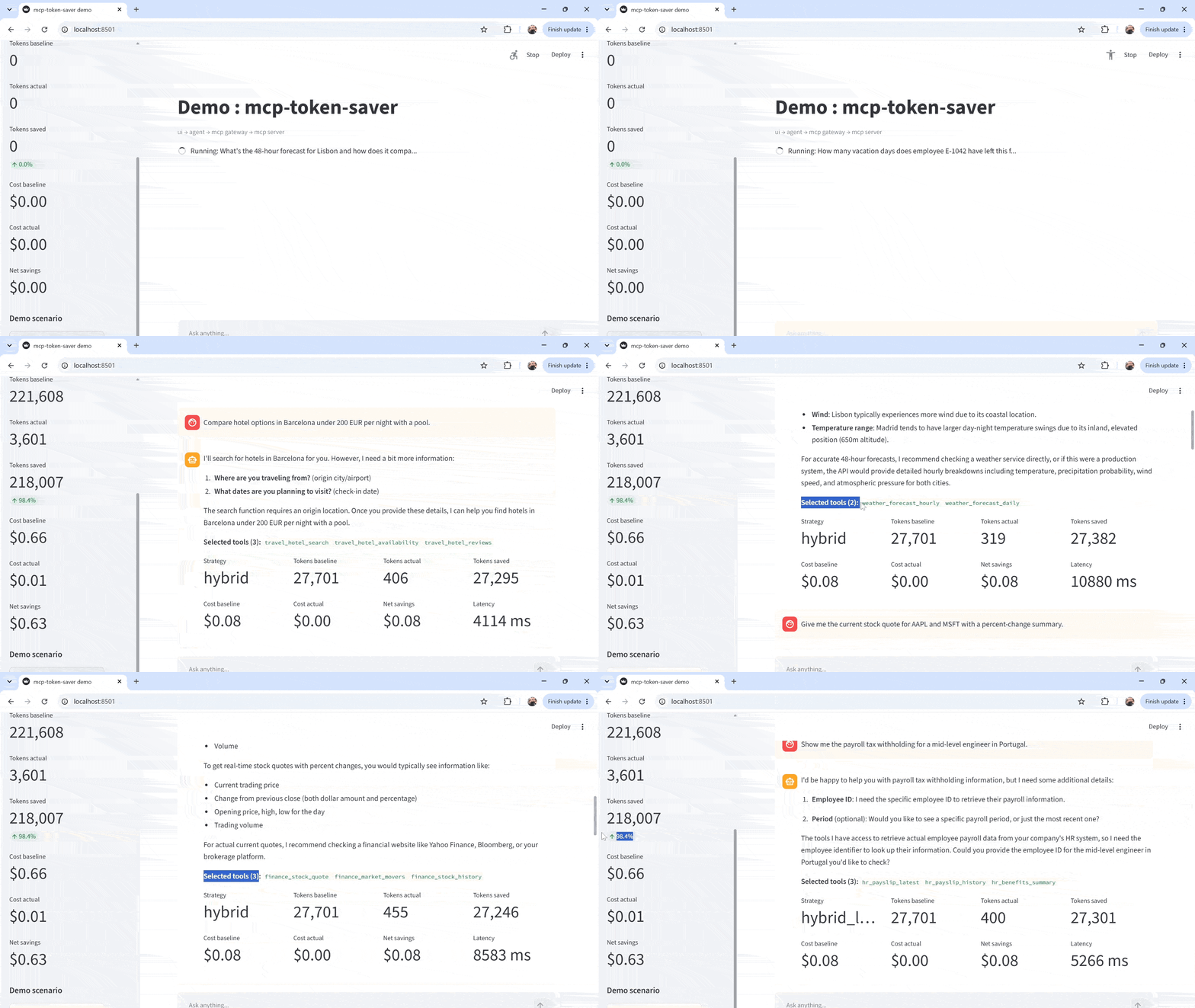
The demo in example/ shows a full end-to-end stack (Streamlit UI, Bedrock agent) but the library itself is framework-agnostic — it works anywhere you have a gateway or agent that calls tools/list.
Run the demo
The example/ folder contains a dockerized demo stack (agent, UI, MCP gateway, MCP server):
cd mcp-token-saver

# 1. Build the library wheel
pip install build
python -m build --wheel --outdir example/wheelhouse .

# 2. Configure
cp example/.env.example example/.env
# Edit example/.env → add AWS_ACCESS_KEY_ID and AWS_SECRET_ACCESS_KEY
# You can also tune the routing behaviour before starting the stack:
#   TOKEN_SAVER_STRATEGY=embeddings_topk   # embeddings_topk | llm_router | hybrid
#   TOKEN_SAVER_MAX_TOOLS=15               # max tools kept per turn (1..200)
#   TOKEN_SAVER_MIN_SIMILARITY=0.15        # low-confidence fallback threshold
#   TOKEN_SAVER_STORE=numpy                # vector store: numpy | faiss

# 3. Start everything
cd example
docker compose up -d
Then open the Streamlit UI: http://localhost:8501
First boot may take 30-90 seconds. The gateway calls the upstream MCP server, fetches the full tool catalog, and pre-embeds every tool description with Titan Embed v2 before it can serve
/mcp/tools/list. Cost: one Bedrock embedding call per tool (~1024-dim vectors, batched). This one-time cost is the reasonembeddings_topkandhybridare so cheap on the hot path — the per-query cost is a single query embedding.
- Watch the boot log for
Indexed N tools via BedrockTitanEmbeddingProvider (dim=1024) in Xms- The
llm_routerstrategy skips this step entirely (no embeddings needed) and boots in a few seconds — trade-off is that every query pays a Haiku call- Compose already sets a 30s
start-periodon the gateway healthcheck to avoid marking the container unhealthy during indexing. If your catalog is huge, bump this indocker-compose.yml
The token-saver logs every routing decision on the gateway. Watch them live with:
docker compose logs -f mcp-gateway
You'll see one INFO line per query, e.g. Routed 'What's the weather...' -> 15/200 tools (strategy=embeddings_topk top_sim=0.243 tokens_saved=27750 92.5% latency=145ms).
Project structure
mcp-token-saver/
├── src/mcp_token_saver/     ← The library (published to PyPI)
├── tests/                   ← Library tests
├── pyproject.toml           ← Package metadata
├── README.md
│
└── example/                 ← Full demo stack
    ├── docker-compose.yml
    ├── mcp_server/          ← 200 mock tools
    ├── mcp_gateway/         ← Gateway using mcp-token-saver
    ├── agent/               ← Bedrock Sonnet 4.5 agent
    ├── ui/                  ← Streamlit UI with savings dashboard
    └── scripts/             ← Demo scenario runner
How it works
Three routing strategies are available via TOKEN_SAVER_STRATEGY. They share the same input (a query + a large tool catalog) and the same output (a filtered catalog of at most TOKEN_SAVER_MAX_TOOLS), but differ in how they select.
Strategy embeddings_topk (default)
Fast, cheap, no LLM call on the hot path.
- Gateway boots → fetches 200 tools from MCP server → embeds each tool description once (Titan Embed v2)
- User asks a question → gateway embeds the query → cosine similarity top-k against the pre-indexed vectors → returns only ~15 relevant tools
- Agent sends 15 tools (not 200) to Sonnet 4.5 → ~92% fewer input tokens
- If the top similarity is below
TOKEN_SAVER_MIN_SIMILARITY(ambiguous or off-topic query) → falls back to the full catalog (safety net)
Per-query cost: 1 embedding call for the query. Latency: a few ms.
Strategy llm_router
Higher recall, uses a small LLM as the router.
- On each query, the gateway sends the query + the tool catalog (names + descriptions only) to a cheap model (Claude 3.5 Haiku by default) with a fixed prompt: "return a JSON array of the ≤N most relevant tool names"
- The gateway parses that JSON, keeps only names that actually exist in the catalog, truncates to
max_tools, and returns those descriptors - Agent sends the filtered catalog to Sonnet 4.5
Per-query cost: 1 Haiku call (input ≈ catalog summary, output ≈ list of names). More accurate for nuanced queries, but slower and more expensive per turn than embeddings. Falls back to a catalog prefix if the LLM output can't be parsed.
Strategy hybrid
Best of both — an embeddings shortlist re-ranked by the LLM.
- Same indexing step as
embeddings_topk - On each query: embeddings top-k produces a shortlist of
TOKEN_SAVER_HYBRID_CANDIDATEScandidates (default 40, ≥max_tools) - Only that shortlist is passed to the Haiku router, which re-ranks and picks the final
max_tools - Result returned to the agent
Per-query cost: 1 embedding call + 1 Haiku call, but the Haiku prompt only carries ~40 tools instead of 200, so it stays cheap. Best precision/cost trade-off when the catalog is large and queries are ambiguous.
Low-similarity behaviour. When the top embeddings score is below TOKEN_SAVER_MIN_SIMILARITY, hybrid never returns the full catalog by default — it still re-ranks the top-k shortlist with Haiku, guaranteeing token savings on every turn. This is controlled by TOKEN_SAVER_HYBRID_LOW_SIM_ACTION:
| Value | Behaviour |
|---|---|
haiku_shortlist (default) |
Keep the top-k shortlist and re-rank with Haiku. Hybrid never returns the full catalog. |
haiku_full |
Send the full catalog to Haiku. Highest recall, most expensive Haiku call. |
fallback_full |
Legacy: skip Haiku and return the full catalog. Same behaviour as pure embeddings_topk. |
Which strategy should I pick?
Short answer: start with hybrid. It's the best default for most production workloads. Then tune based on your use case.
| Your situation | Recommended strategy | Why |
|---|---|---|
| Default / not sure yet | hybrid |
Embeddings speed + LLM precision. With haiku_shortlist (default) it never falls back to the full catalog, so you save tokens on every turn, including ambiguous queries. |
| Latency-critical (<50 ms per turn) | embeddings_topk |
No LLM call on the hot path. Just a cosine similarity search. Trade recall for speed. |
| Small catalog (< 50 tools) | embeddings_topk or no filtering |
Below TOKEN_SAVER_MAX_TOOLS, the router passes the catalog through unchanged anyway. Filtering brings little value on small catalogs. |
| Highest possible recall, cost is not a concern | llm_router |
Haiku sees every tool description on every turn. Best when queries are subtle and you can absorb the extra Haiku cost per call. |
| Very large catalog (500+ tools) + ambiguous queries | hybrid (with haiku_full as an option) |
Embeddings narrow to 40, Haiku picks precisely from those. haiku_full if precision matters more than Haiku cost. |
| CI / tests / cost-free demo | embeddings_topk with HashEmbeddingProvider |
Deterministic, no Bedrock calls, no cost. Not semantic, so recall is poor — use only for smoke tests. |
Comparing the three strategies live
Every service reads its env from example/.env. To flip strategies at runtime, edit TOKEN_SAVER_STRATEGY there, then recreate the gateway (Compose sees the new env) and restart the downstreams so their httpx pools reconnect:
# 1. Edit example/.env → set one of:
#      TOKEN_SAVER_STRATEGY=embeddings_topk
#      TOKEN_SAVER_STRATEGY=llm_router
#      TOKEN_SAVER_STRATEGY=hybrid

# 2. Recreate the gateway with the new env, then bounce the callers.
cd example
docker compose up -d mcp-gateway
docker compose restart agent ui

# 3. Sanity-check the gateway picked up the value.
docker exec mcp-gateway env | grep TOKEN_SAVER
Then re-run the same question in the Streamlit UI or via scripts/run_demo.py. Watch the gateway logs in another shell:
docker compose logs -f mcp-gateway
Sample lines to expect:
embeddings_topk— one embedding call, no Haiku:Routed 'What's the weather...' -> 15/200 tools (strategy=embeddings_topk top_sim=0.243 tokens_saved=27750 92.5% latency=145ms)llm_router— no embedding, one Haiku call visible in the log:LLM router: invoking eu.anthropic.claude-haiku-4-5-20251001-v1:0 on 200 tools LLM router picked 14/200 tools in 812ms (cost=$0.00123) Routed 'What's the weather...' -> 14/200 tools (strategy=llm_router top_sim=n/a router_cost=$0.00123 tokens_saved=... latency=~1000ms)hybrid— shortlist step then Haiku re-rank:Hybrid: 40 shortlist candidates -> Haiku re-rank -> top 15 Hybrid Haiku re-rank picked 13/40 in 660ms (cost=$0.00041) Routed 'What's the weather...' -> 13/200 tools (strategy=hybrid top_sim=0.243 router_cost=$0.00041 tokens_saved=... latency=~900ms)
If the top embedding similarity drops below TOKEN_SAVER_MIN_SIMILARITY, embeddings_topk short-circuits to the full catalog (strategy=fallback_low_similarity) without calling Haiku — a safety net when no LLM rescue is available. hybrid behaves differently: it applies TOKEN_SAVER_HYBRID_LOW_SIM_ACTION (default haiku_shortlist, so the top-k shortlist still gets re-ranked by Haiku — hybrid never returns the full catalog unless you opt into fallback_full).
Cost impact
| Without mcp-token-saver | With | |
|---|---|---|
| Tools sent to LLM | 200 | 15 |
| Input tokens per call | 30,000 | 2,250 |
| Cost per conversation | $0.18 | $0.014 |
| Monthly (100k conversations) | $54,000 | $4,200 |
Providers & vector stores
mcp-token-saver is designed around three swappable interfaces defined in mcp_token_saver.protocols: EmbeddingProvider, VectorStore, and Tokenizer. Shipped implementations target Bedrock, but the interfaces are open — you never need to fork or repackage the library to plug in another provider.
Embedding providers
| Class | Extra | Semantic quality | Notes |
|---|---|---|---|
BedrockTitanEmbeddingProvider |
[bedrock] |
Real (Titan Embed v2, 1024-dim) | Auto-selected when AWS_ACCESS_KEY_ID / AWS_PROFILE / AWS_ROLE_ARN is set. Billed on AWS Bedrock. |
HashEmbeddingProvider |
none (ships in core) | Fake (hash of char-n-grams) | Zero-dependency fallback. Deterministic but not semantic — use for tests only. |
Bedrock is the only real-semantic provider we ship. To use OpenAI, Vertex, HuggingFace, a local model, or anything else, you have two options depending on how you consume the library:
- In your own Python code (library integrator) — no fork required. Implement the
EmbeddingProviderProtocol and pass an instance toTokenSaver(...)yourself. Example:
from mcp_token_saver import TokenSaver, TokenSaverConfig, AnthropicSonnet45Tokenizer, EventBus, PricingRegistry
from mcp_token_saver.stores.numpy_store import NumpyVectorStore

# 1. Bring your own embedding provider.
class MyOpenAIProvider:
    dimension = 1536

    def embed(self, texts: list[str]) -> list[list[float]]:
        # Call OpenAI here, return one vector per text.
        ...

provider = MyOpenAIProvider()

# 2. Wire everything up. No changes to mcp-token-saver required.
saver = TokenSaver(
    embedding_provider=provider,
    vector_store=NumpyVectorStore(dimension=provider.dimension),
    tokenizer=AnthropicSonnet45Tokenizer(),
    pricing=PricingRegistry.default(),
    event_bus=EventBus(),
    config=TokenSaverConfig(),
)
Only three requirements on your provider:
-
Expose a
dimension: intattribute -
Expose a
def embed(texts: list[str]) -> list[list[float]]method -
Return vectors of consistent
dimension -
In the shipped demo gateway (
example/mcp_gateway/) — the gateway callsTokenSaver.default(), which auto-picks Bedrock for embeddings and Haiku for the LLM router. If you want to swap the LLM router for a non-Bedrock model, you can now do it without modifying the library — pass a custom strategy throughTokenSaver.default(..., routing_strategy=...). Swapping the embedding provider still requires editingexample/mcp_gateway/src/mcp_gateway/app.pyto build aTokenSaver(...)manually (or extendingTokenSaver.default()in the lib), rebuilding the wheel and the image:bash example/scripts/build_wheels.sh # rebuilds mcp_token_saver wheel into example/wheelhouse/ docker compose up -d --build mcp-gateway
Vector stores
| Class | Extra | Complexity | When to use |
|---|---|---|---|
NumpyVectorStore |
none | O(n·d) per query | Default. Fine up to a few thousand tools. |
InMemoryFAISSStore |
[faiss] |
Sub-linear on very large catalogs | Recommended when you have thousands of tools. |
PurePythonStore |
none | O(n·d), no numpy either | Truly zero-dep. Slower for large d. |
Selecting a store — two ways:
-
Env var (recommended for the demo / gateway) — set
TOKEN_SAVER_STORE=numpy(default) orTOKEN_SAVER_STORE=faiss.TokenSaver.default()reads this fromTokenSaverConfig.store_kindand picks the right backend automatically. If[faiss]is not installed at runtime, it warns and falls back to numpy without crashing. -
Direct instantiation (full control) — pass any
VectorStoreimplementation toTokenSaver(...)yourself:from mcp_token_saver.stores.faiss_inmem import InMemoryFAISSStore saver = TokenSaver(embedding_provider=..., vector_store=InMemoryFAISSStore(dimension=1024), ...)
Bringing your own store (Redis, pgvector, Pinecone, …) works the same way: implement add / search / remove methods matching the VectorStore Protocol.
LLM router (llm_router / hybrid strategies)
Only Bedrock Claude 3.5 Haiku is shipped (LLMRouterStrategy in mcp_token_saver.router.llm_router). Same story as the embedding provider — swap it by implementing a callable that maps (query, catalog, max_tools) -> (selected_catalog, RoutingCosts).
Custom routing strategy (any LLM, e.g. OpenAI GPT-4o-mini)
For full control over the routing decision — including plugging a non-Bedrock LLM — implement the RoutingStrategy Protocol from mcp_token_saver.router.base and pass an instance to TokenSaver(..., routing_strategy=...). When set, this overrides the built-in embeddings_topk / llm_router / hybrid dispatch entirely.
import json
from openai import OpenAI

from mcp_token_saver import (
    TokenSaver, TokenSaverConfig, AnthropicSonnet45Tokenizer,
    EventBus, PricingRegistry, RoutingCosts,
)
from mcp_token_saver.stores.numpy_store import NumpyVectorStore
from mcp_token_saver.providers.hash_provider import HashEmbeddingProvider


class OpenAIToolRouter:
    """Custom RoutingStrategy backed by OpenAI Chat Completions."""

    name = "openai_gpt4o_mini_router"

    def __init__(self, client: OpenAI, model: str = "gpt-4o-mini") -> None:
        self.client = client
        self.model = model

    def route(self, query: str, tool_catalog, *, max_tools: int):
        # Prompt-based routing: ask the LLM to return a JSON array of tool names.
        summaries = [{"name": t["name"], "description": t.get("description", "")}
                     for t in tool_catalog]
        resp = self.client.chat.completions.create(
            model=self.model,
            response_format={"type": "json_object"},
            messages=[
                {"role": "system", "content":
                    f"Return a JSON object {{\"tools\": [...]}} listing at most "
                    f"{max_tools} tool names most relevant to the user's query."},
                {"role": "user", "content": json.dumps(
                    {"query": query, "tools": summaries})},
            ],
        )
        picked = json.loads(resp.choices[0].message.content).get("tools", [])
        by_name = {t["name"]: t for t in tool_catalog}
        selected = [by_name[n] for n in picked if n in by_name][:max_tools]
        # Optional: compute your own cost accounting here.
        return selected, RoutingCosts(embedding_cost_usd=0.0, router_cost_usd=0.0)


# Wire it in — no fork, no rebuild.
saver = TokenSaver(
    embedding_provider=HashEmbeddingProvider(dimension=256),   # unused with a custom router
    vector_store=NumpyVectorStore(dimension=256),
    tokenizer=AnthropicSonnet45Tokenizer(),
    pricing=PricingRegistry.default(),
    event_bus=EventBus(),
    config=TokenSaverConfig(),
    routing_strategy=OpenAIToolRouter(client=OpenAI()),
)

saver.index_catalog(my_200_tools)          # no-op work with a custom router
selected = saver.filter_tools("What's the weather in Paris?", my_200_tools)
Behaviour when a custom routing_strategy is set:
filter_tools()bypasses the built-in dispatch and callsrouting_strategy.route(...).- The strategy's
RoutingCosts(embedding_cost_usd,router_cost_usd) are used verbatim in the emittedRoutingEvent. - On exception, we fall back to the full catalog with
strategy="fallback_custom_strategy_error"and log a warning.
Quickstart with
TokenSaver.default(). The classmethod also accepts the injection point as a keyword-only argument, so you can keep the one-liner setup for the Bedrock defaults and just plug in your own router:saver = TokenSaver.default(routing_strategy=OpenAIToolRouter(client=OpenAI()))
Pricing (for cost accounting)
The PricingRegistry ships with defaults for the models the demo uses (Bedrock Sonnet 4.5, Haiku 4.5, Titan Embed v2) plus a curated set of common third-party models (Anthropic direct API, OpenAI GPT-4o family, OpenAI embeddings). This means the custom-router example above works out of the box: gpt-4o-mini and text-embedding-3-small prices are pre-populated.
To override prices — either because the shipped defaults are stale or because you use a model we don't know about — you have two options:
-
Runtime YAML/JSON file — set
TokenSaverConfig(pricing_path="/path/to/pricing.yaml"). The file is merged over defaults, so you only list what you want to override:models: gpt-4o-mini: input_usd_per_token: 0.00000015 output_usd_per_token: 0.00000060 my-custom-model: input_usd_per_token: 0.00000200 output_usd_per_token: 0.00000600
-
Programmatic — build a
PricingRegistryyourself and pass it toTokenSaver(pricing=..., ...):from mcp_token_saver import PricingRegistry, ModelPricing reg = PricingRegistry.default() # or PricingRegistry({}) for a blank slate # ...merge / override as needed...
When a model id is not in the registry, PricingRegistry.price(...) returns None and the emitted RoutingEvent reports cost_*_usd = None for that call (the routing itself still works — you just lose the cost line item).
Configuration
Set via environment variables (see example/.env.example):
| Variable | Default | Description |
|---|---|---|
TOKEN_SAVER_STRATEGY |
embeddings_topk |
embeddings_topk / llm_router / hybrid |
TOKEN_SAVER_MAX_TOOLS |
15 |
Max tools returned after filtering |
TOKEN_SAVER_MIN_SIMILARITY |
0.15 |
Below this score → embeddings_topk falls back to full catalog. hybrid applies TOKEN_SAVER_HYBRID_LOW_SIM_ACTION instead. |
TOKEN_SAVER_HYBRID_LOW_SIM_ACTION |
haiku_shortlist |
hybrid policy on low similarity: haiku_shortlist (re-rank shortlist with Haiku, never return full catalog) / haiku_full (send full catalog to Haiku) / fallback_full (legacy: skip Haiku, return full catalog). |
TOKEN_SAVER_STORE |
numpy |
Vector store backend: numpy or faiss (requires [faiss] extra) |
TOKEN_SAVER_ROUTER_MODEL |
eu.anthropic.claude-haiku-4-5-20251001-v1:0 |
Bedrock model id for llm_router / hybrid. Must match your account region (eu. / us. cross-region inference profile prefix). |
License
MIT
1 maintainer

Metadata
1 maintainer
Release files for mcp-token-saver 0.1.1
For a detailed explanation of source distributions (sdists) and built distributions (wheels), please see the package formats documentation.
Source distribution (sdist)
| File | Size | Uploaded | Provenance | |
|---|---|---|---|---|
| mcp_token_saver-0.1.1.tar.gz | 40.2 kB | Without provenance | Details |
Built distribution (wheel)
| File | Interpreter | ABI | Platform | Reset |
|---|---|---|---|---|
| mcp_token_saver-0.1.1-py3-none-any.whl | Python 3 | none | any | Details |
Total release size: 80.6 kB
Release files / mcp_token_saver-0.1.1.tar.gz
| Download URL | mcp_token_saver-0.1.1.tar.gz |
|---|---|
| Size | 40.2 kB |
| Tags | Source |
|
SHA-256 checksum How to use checksums |
a587894bb2952234d473629585d8f7c4a483d49d156bd675cde0f131346e3771
|
|
BLAKE2b-256 checksum How to use checksums |
499fa1f55d87adfd5f8f65b149660f1a2da12e166fc1a3f575386fca2cbbae5d
|
| Upload date | |
|
Uploaded using Trusted Publishing? What is trusted publishing? |
No |
| Uploaded via |
twine/6.2.0 CPython/3.12.13
|
Release files / mcp_token_saver-0.1.1-py3-none-any.whl
| Download URL | mcp_token_saver-0.1.1-py3-none-any.whl |
|---|---|
| Size | 40.4 kB |
| Tags | Python 3 |
|
SHA-256 checksum How to use checksums |
bd68064c093d9176ade6a01c90ac3318b942a3657080fa5566cf6f77fef87287
|
|
BLAKE2b-256 checksum How to use checksums |
39a483baca698c6b73a64d835ec2c8f6b140a42dec986f50c27a76ba3fce0b99
|
| Upload date | |
|
Uploaded using Trusted Publishing? What is trusted publishing? |
No |
| Uploaded via |
twine/6.2.0 CPython/3.12.13
|
Security for mcp-token-saver 0.1.1
Provenance
Provenance describes where a file came from. On PyPI, provenance is shared via attestations, which provide a verifiable record of the build or publishing details. View details, limitations and caveats.
No provenance found
None of the files in this release were uploaded with provenance metadata.
A note on package security
PyPI is a repository for distributing packages, not a service for auditing them. While third-party security researchers and our staff do their best to detect and remove malicious packages, PyPI cannot guarantee the quality, security or suitability of any given package.














