
A tool for running code blocks in Markdown files.

Project description
Markdown Code Runner
Markdown Code Runner is a tool designed for processing Markdown files with executable code blocks. It automatically executes these blocks and inserts the output into the Markdown file, making it ideal for note-taking and documentation purposes. This tool supports custom inputs, runtime measurement, and caching mechanisms.
Features
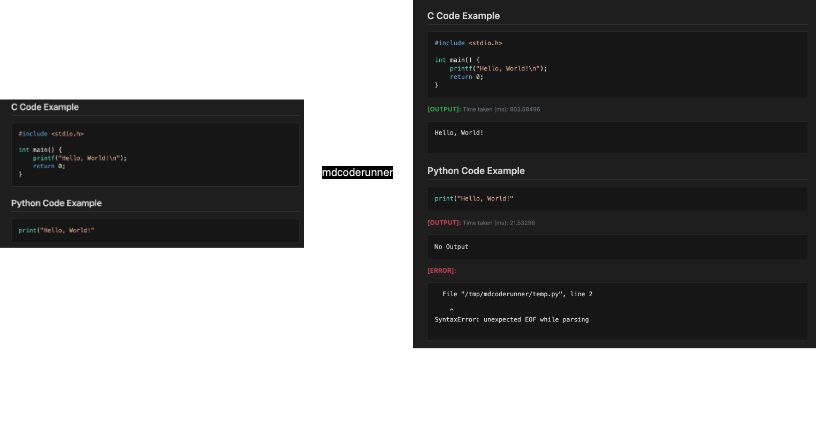
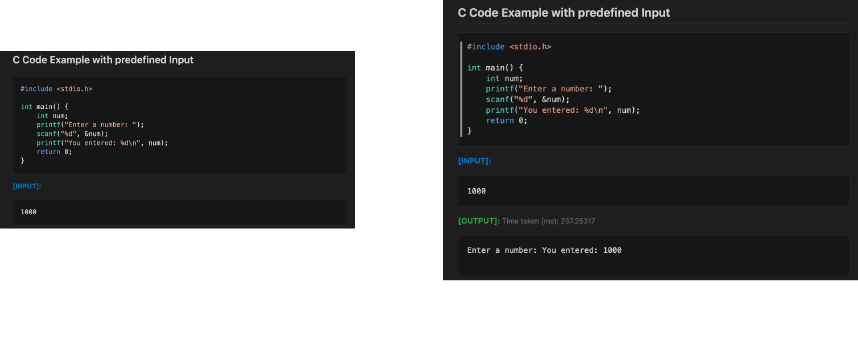
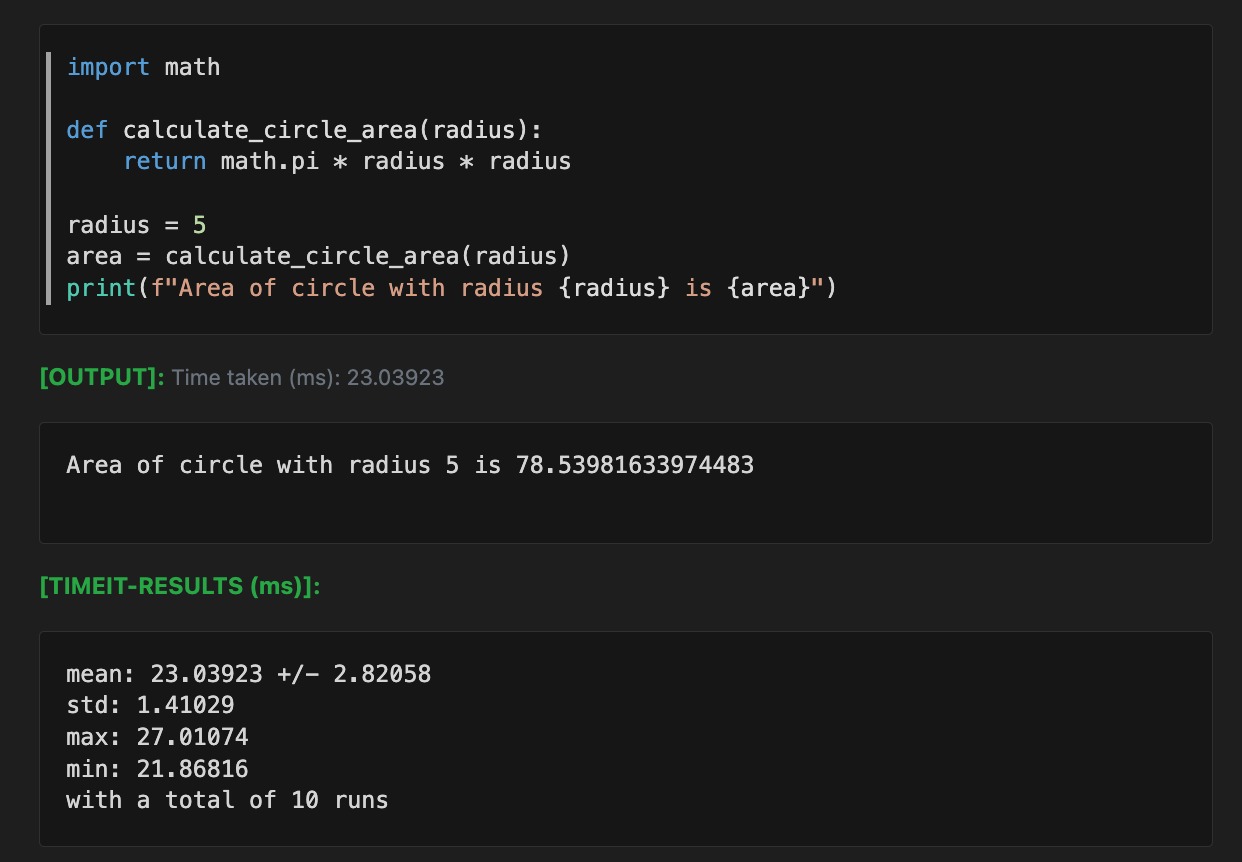
- Execute Code Blocks: Automatically runs code within Markdown files and inserts the output.
- Custom Inputs: Supports predefined inputs or inputs from standard I/O.
- Runtime Measurement: Measures and displays runtime statistics for code blocks.
- Cache Control: Allows selective caching of outputs to avoid rerunning code blocks unnecessarily.
Installation
Markdown Code Runner supports macOS, Linux, and Windows Subsystem for Linux (WSL).
1. Install Dependencies
Ensure that you have python3, pip, and g++ installed. If not, follow the instructions below for your platform:
On macOS:
-
Install Homebrew (if you don’t have it):
/bin/bash -c "$(curl -fsSL https://raw.githubusercontent.com/Homebrew/install/HEAD/install.sh)"
-
Install
python3andg++:brew install python brew install gcc
-
Install
pip(if not already installed):python3 -m ensurepip --upgrade
On Linux (Debian/Ubuntu):
-
Update package lists:
sudo apt-get update
-
Install
python3,pip, andg++:sudo apt-get install -y python3 python3-pip g++
On Windows Subsystem for Linux (WSL):
-
Update package lists:
sudo apt-get update
-
Install
python3,pip, andg++:sudo apt-get install -y python3 python3-pip g++
2. Install the Markdown Code Runner Package
After installing the dependencies, install the Markdown Code Runner package via pip:
pip install mdcoderunner
3. Configure Paths
You may need to specify the paths for python3 and g++ in the configuration:
-
Edit
config.py(located in the package directory) to specify the paths:# config.py PYTHON_LOCATION = 'python3' # Adjust this path if necessary GPP_LOCATION = 'g++' # Adjust this path if necessary
- Replace the paths with the correct locations of
python3andg++on your system. - On macOS and Linux, you can typically find the paths using
which python3andwhich g++.
- Replace the paths with the correct locations of
Definitions
Code Blocks
A code block in Markdown Code Runner consists of three components: code, input, and output.
Example Code Block
<codeStart/>

```python
a = input()
print("hello world", a)
```

```input
Siva
```

```output
hello world Siva
```

<codeEnd/>
Special Elements
<codeStart/>: Marks the beginning of a code block.<codeEnd/>: Marks the end of a code block.
Skipping Code Blocks
To skip a code block during execution, add the skip class:
<codeStart class="skip"/>
...
<codeEnd/>
Avoiding Cache
To force a code block to rerun every time without caching the output, use the nocache class:
<codeStart class="nocache"/>
...
<codeEnd/>
Runtime Measurement
To measure runtime statistics for a code block, use the timeit class in conjunction with nocache:
<codeStart class="timeit nocache"/>
...
<codeEnd/>
Usage
usage: mdcoderunner.py [-h] [--clear-outputs] [--create-code-tags] [--clear-code-tags] input_path [output_path]

Process a Markdown file with executable code blocks.

positional arguments:
  input_path          Path to the input Markdown file.
  output_path         Path to the output Markdown file (optional). If not provided, the input file will be
                      overwritten.

optional arguments:
  -h, --help          Show this help message and exit.
  --clear-outputs     Clear all code outputs in the Markdown file.
  --create-code-tags  Wrap code blocks in <codeStart/> and <codeEnd/> tags.
  --clear-code-tags   Remove <codeStart/> and <codeEnd/> tags from code blocks.
Example Usage
To process a Markdown file, run the following commands:
mdcoderunner ./assets/hello_world.md ./assets/hello_world_rendered.md
mdcoderunner ./assets/demo.md ./assets/demo_rendered.md
Inspiration
Markdown Code Runner was developed as a tool for preparing for technical interviews, particularly for learning Data Structures and Algorithms (DSA). The goal was to create a lightweight, non-interactive alternative to Jupyter notebooks, enabling seamless note-taking and code execution within Markdown files. This project was built in a single day of focused development.
License
This project is licensed under the MIT License. See the LICENSE file for details.
Release history Release notifications | RSS feed


Download files
Download the file for your platform. If you're not sure which to choose, learn more about installing packages.
Source Distribution
Built Distribution
Filter files by name, interpreter, ABI, and platform.
If you're not sure about the file name format, learn more about wheel file names.
Copy a direct link to the current filters
File details
Details for the file mdcoderunner-1.0.0.tar.gz.
File metadata
- Download URL: mdcoderunner-1.0.0.tar.gz
- Upload date:
- Size: 11.8 kB
- Tags: Source
- Uploaded using Trusted Publishing? No
- Uploaded via: twine/5.1.1 CPython/3.9.18
File hashes
| Algorithm | Hash digest | |
|---|---|---|
| SHA256 |
e3a9402f81f1ead22375e5f06aff87605d19f31bd6b0528b26dfa0dad59c9878
|
|
| MD5 |
2e57db7800e03ac4d1b85f03906c4604
|
|
| BLAKE2b-256 |
a6e3cf97aee1fe2c60a131929e2b5b902c3720e095e4f2dd58459155a292270c
|
File details
Details for the file mdcoderunner-1.0.0-py3-none-any.whl.
File metadata
- Download URL: mdcoderunner-1.0.0-py3-none-any.whl
- Upload date:
- Size: 12.0 kB
- Tags: Python 3
- Uploaded using Trusted Publishing? No
- Uploaded via: twine/5.1.1 CPython/3.9.18
File hashes
| Algorithm | Hash digest | |
|---|---|---|
| SHA256 |
60ec427fa27a3f7e02399d783d5d601a38effe8a7ea7df30142578bc2fabbf1f
|
|
| MD5 |
4a1440daae181ccbac8c1ea4f7bdf8df
|
|
| BLAKE2b-256 |
66b888349da1982c7415d359aac098a8c8184ceac18b7acf95ea8841ec698f60
|






