
Medium to Ghost 2.0
Feeling locked into Medium.com? Instantly move all your content (formatted posts + images) to an open source Ghost 2.0 blog!
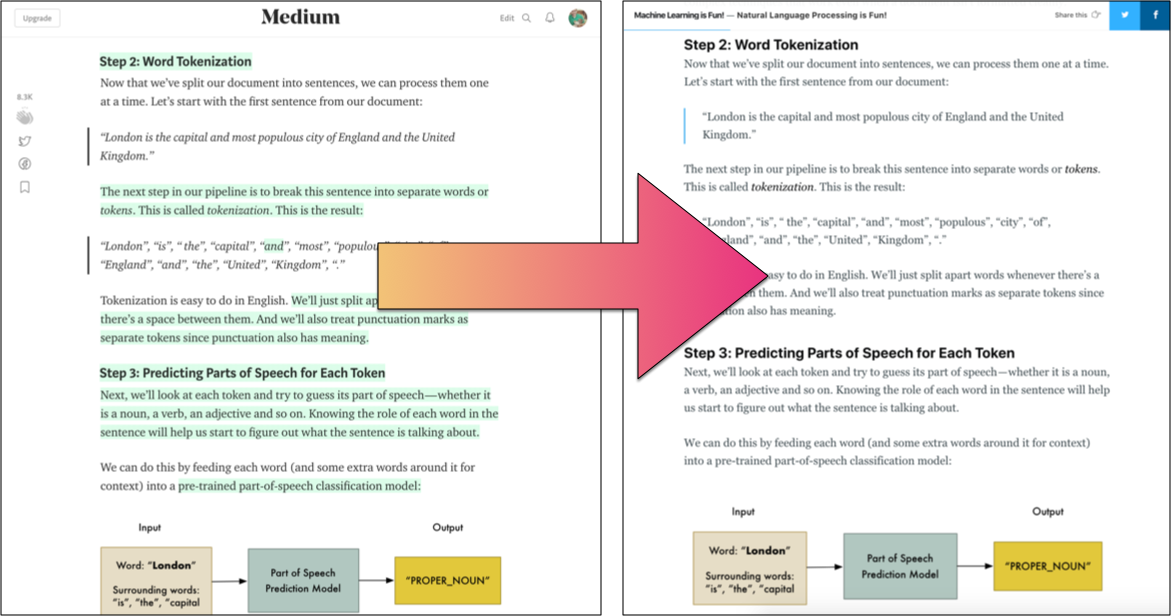
Migrate your data out of Medium to Ghost
This code converts all your Medium.com posts to a Ghost 2.0.x import file. With that, you can import all your content into a Ghost blog (hosted anywhere) in seconds. Your posts keep the same formatting and all your images are migrated over too.
Why?
Medium.com is a nice platform for creating blog posts. I use it and enjoy it.
But you should never feel like your content is locked into someone else’s privately-owned platform. This gives you the option to move your content to your own blog if you want to do it. It’s also a quick way to back up all your Medium.com content (especially your images which they don’t export) in case the site disappears someday.
I hacked this together quickly to move my blog, Machine Learning is Fun! from Medium to a self-hosted Ghost site. Hopefully it’s useful to someone else too. More options is always good, right?
Requirements
A blog running Ghost v2.0.3+ (NOT Ghost 1.x). Both Self-hosted or professionally hosted Ghost instances are both fine.
A Medium.com account where you’ve previously written content.
Python 3.6+ to run this program
Installing this program
After you’ve installed Python 3.6+, you can install this program by opening up a terminal window and running this command:
Mac / Linux
pip3 install medium_to_ghostWindows
pip install medium_to_ghostHow to use this to export your Medium content
Install Python 3.6+. Lower versions won’t work!
Install this program (See “Installing this program”)
Go to https://medium.com/me/settings and find Download your information. There’s a button to export your data and email it to you.
Wait for the email from Medium and download your zip file. This will give you a file called medium-export.zip
Run python3 -m medium_to_ghost.medium_to_ghost medium-export.zip which will produce medium_export_for_ghost.zip. This new zip file contains all your converted Medium posts and images from your posts. Make sure to put the full path to the zip file if it’s not in the current directory. This may take a few minutes if you have lots of images in your posts since they all have to be downloaded.
Go into Ghost 2.0.3+, navigate to /ghost/, click on ‘Labs’, and choose to import that zip file.
That’s it!
What gets moved over
When exporting content from Medium, the following features are supported:
Both published articles and drafts are moved over. So even if you are in the middle of writing a new post, it should be a seamless transition.
Most Medium.com content is replicated perfectly in Ghost, including text formatting, embedded Github gists, image cards with captions, Upscribe mailing list signup forms, etc.
If your Medium posts have a featured image, that will come over automatically too.
What is lost when moving over
Comments are not moved over to Ghost
Story highlights are not moved over to Ghost
I tried to make the Ghost output as similar to Medium as possible. However, there may be bugs or types of Medium content I haven’t seen before, so always check the results in Ghost carefully. I just made sure it worked for all my articles. No warranty! :)
Warnings!
Hopefully this code will work for you, but it may have bugs and cause your computer to explode. Make sure you test everything out on a test Ghost instance before you import anything into a live blog.
Starting with Ghost v2.17, you can set the canonical url of a post. This tool will attempt to automatically set up the imported Ghost posts to point back to original Medium URLs to avoid any SEO impact of switching blogging platforms. If you don’t want your posts to point back to Medium, you will need to go in and remove the Canonical URL setting for each imported post.
Ghost 2.0.3+ has a bug with image paths in import files. This tool may need to be updated when that bug is fixed in order for it to keep working, but it works for now (Checked up to Ghost 2.18.3).
1 maintainer

Metadata
1 maintainer
Release files for medium_to_ghost 0.0.4
For a detailed explanation of source distributions (sdists) and built distributions (wheels), please see the package formats documentation.
Source distribution (sdist)
| File | Size | Uploaded | Provenance | Actions |
|---|---|---|---|---|
| medium_to_ghost-0.0.4.tar.gz | 19.6 kB | Without provenance | Details for medium_to_ghost-0.0.4.tar.gz |
Built distribution (wheel)
| File | Interpreter | ABI | Platform | Actions Reset |
|---|---|---|---|---|
| medium_to_ghost-0.0.4-py3-none-any.whl | Python 3 | none | any | Details for medium_to_ghost-0.0.4-py3-none-any.whl |
Total release size: 32.7 kB
Release files / medium_to_ghost-0.0.4.tar.gz
| Download URL | medium_to_ghost-0.0.4.tar.gz |
|---|---|
| Size | 19.6 kB |
| Tags | Source |
|
SHA-256 checksum How to use checksums |
365fdf3001fd7a94808b993e09f8637e27e0240d2817a3e56546551858371400
|
|
BLAKE2b-256 checksum How to use checksums |
0828358693458a46fa1eb666ecdb111c2869999cc925c1e73a7796a8060ebe0c
|
| Upload date | |
|
Uploaded using Trusted Publishing? What is trusted publishing? |
No |
| Uploaded via |
Python-urllib/3.8
|
Release files / medium_to_ghost-0.0.4-py3-none-any.whl
| Download URL | medium_to_ghost-0.0.4-py3-none-any.whl |
|---|---|
| Size | 13.1 kB |
| Tags | Python 3 |
|
SHA-256 checksum How to use checksums |
8df14a8b9222d98f3a9276699089d5185e41a7ba03c70f0ff572a59149eecd44
|
|
BLAKE2b-256 checksum How to use checksums |
016daa2550c6cc2203460bfd5f2840bfac342814cf297a13887a0cbb2ac16077
|
| Upload date | |
|
Uploaded using Trusted Publishing? What is trusted publishing? |
No |
| Uploaded via |
Python-urllib/3.8
|
Security for medium_to_ghost 0.0.4
Provenance
Provenance describes where a file came from. On PyPI, provenance is shared via attestations, which provide a verifiable record of the build or publishing details. View details, limitations and caveats.
No provenance found
None of the files in this release were uploaded with provenance metadata.
A note on package security
PyPI is a repository for distributing packages, not a service for auditing them. While third-party security researchers and our staff do their best to detect and remove malicious packages, PyPI cannot guarantee the quality, security or suitability of any given package.
To learn more about protecting yourself from malicious actors, visit our package security documentation.














