
EdgeCortix® MERA™ - An heterogeneous deep learning compiler framework
This repository contains the source code for the frontend stack of EdgeCortix® MERA™ compiler framework, developed by EdgeCortix Inc.. If you are interested in the latest (bleeding edge) capabilities of MERA™ framework and the different Dynamic Neural Accelerator® architecture configurations, contact EdgeCortix AI Accelerator Team.
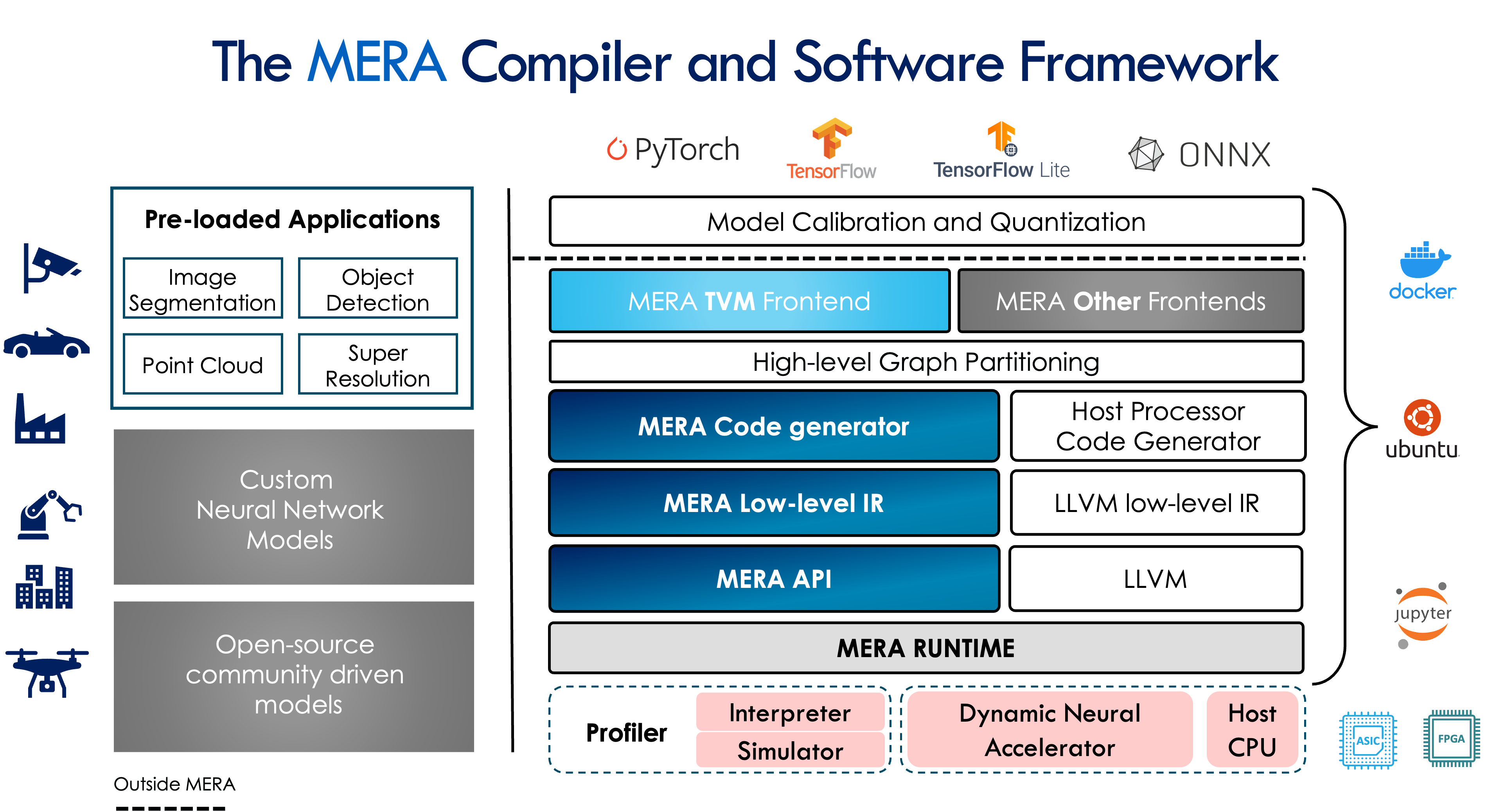
The current release of EdgeCortix® MERA™ supports the following Dynamic Neural Accelerator architectures for FPGAs and ASICs:
| Platform Identifiers | Platform | TOPS |
|---|---|---|
| DNAA600L0002 | ASIC (SAKURA) | 40 |
| DNAA400L0001 | ASIC | 26.2 |
| DNAF132S0001 | FPGA | 0.6 |
| DNAF232S0002 | FPGA | 1.2 |
| DNAF100L0003 | FPGA | 2.4 |
| DNAF632L0003 | FPGA | 3.6 |
| DNAF200L0003 | FPGA | 4.9 |
When using a platform identifier corresponding to the ASIC platforms, the recommended minimum frequency setting is 800 MHz. In the case of FPGA platforms, the minimum recommended frequency is 300 MHz. In the above table, the TOPS corresponds to these minimum frequency specifications.
Installation Guide
This document describes the steps needed to install MERA in your system.
Quick installation of MERA on Ubuntu 18.04 LTS
To install MERA and all its dependencies source the provided script:
source install-mera.sh
Manual Installation
If the install-mera.sh script is not enough for your environment, the following section describes how to install
all the dependencies manually in your system.
System Requirements
For an x86 architecture, you will need Ubuntu 18.04 as your OS, whereas for aarch64 you will need Ubuntu 20.04.
The following software packages will also need to be installed:
sudo apt update && sudo apt install python3.6 llvm-10 libgomp1 ocl-icd-libopencl1 software-properties-common \
    libgoogle-glog0v5 libboost-graph-dev virtualenv wget build-essential
sudo add-apt-repository ppa:ubuntu-toolchain-r/test
sudo apt update
sudo apt install libstdc++6
MERA Installation
The MERA environment provides 3 different modes depending on the target usage:
host-only: Meant for performing deployments only targetting simulation running on the host.runtime: Meant for running inference in HW accelerators using the DNA IP, requires extra system dependencies depending on the HW device.full: Meant for users who want the functionality of bothhost-onlyandruntimemodels
After choosing the desired mode, you can install MERA with the following command:
# Create virtual envinronment with Python 3.6
MERA_VENV=mera-env
virtualenv -p python3.6 $MERA_VENV
source $MERA_VENV/bin/activate

# Install MERA full version
pip install --upgrade pip
pip install mera[full]

# Install extra dependencies. These are needed to run our tutorials and demos
pip install torch==1.7.1 torchvision==0.8.2
pip install tensorflow==2.6.2 tflite
pip install tqdm easydict wget notebook pandas matplotlib opencv-python gdown seaborn tensorflow_datasets


# Test the installation
$ python -c "import mera;print(mera.get_versions())"
>>> Mera Environment Versions:
      * mera version x.y released on dd/mm/yyyy
      * mera-tvm version x.y
      * mera-dna version vx.y+git=<hash>
mera provides packages for installing in both x86 and aarch64 architectures.
The pip command will also install all the necessary dependencies to perform deployments with MERA. Note that some of the tutorials require some extra
dependencies to be installed. Please check the tutorial's README.md file to check which other packages might be needed.
MERA Documentation
Please follow the instructions in docs on how to generate the HTML documentation for the MERA framework.
MERA Tutorials
The tutorials folder contains a list of tutorials on how to use the MERA compiler to deploy and run inference on typical deep neural network models using both PyTorch and TFLite frameworks. Check the corresponding docs for information about the tutorial contents.
Tutorial List
- PyTorch Resnet50 on Simulator (
pytorch/resnet50_simulator.py):
Contains an example on how to deploy and run a traced resnet50 model in x86 host simulation.
Can be executed with the following command:
cd tutorials/pytorch
python3 resnet50_simulator.py
- PyTorch Resnet50 on IP (
pytorch/resnet50_ip.py):
Contains an example on how to deploy and run a traced resnet50 model in FPGA environment.
Needs to have FPGA runtime setup before running.
Can be executed with the following command:
cd tutorials/pytorch
# Needs to enable RUN_IP env in order to actually run the tutorial in HW
RUN_IP=1 python3 resnet50_ip.py
- TFLite EfficientNet on Simulator (
tflite/efficientnet_simulator.py):
Contains an example on how to deploy and run a quantized efficientnet-lite1 and efficientnet-lite4 model in x86 host simulation and run an example object classification.
Can be executed with the following command:
cd tutorials/tflite
python3 efficientnet_simulator.py
- TFLite EfficientNet on IP (
tflite/efficientnet_ip.py):
Contains an example on how to deploy and run a quantized efficientnet-lite1 and efficientnet-lite4 model in
FPGA environment and run an example object classification. Needs to have FPGA runtime setup before running.
Can be executed with the following command:
cd tutorials/tflite
# Needs to enable RUN_IP env in order to actually run the tutorial in HW
RUN_IP=1 python3 efficientnet_ip.py
License
This library is licensed under the Apache License Version 2.0.
1 maintainer

Metadata
1 maintainer
Release files for mera 1.0.post2
For a detailed explanation of source distributions (sdists) and built distributions (wheels), please see the package formats documentation.
Built distributions (wheels)
| File | Interpreter | ABI | Platform | Reset |
|---|---|---|---|---|
| mera-1.0.post2-py3-none-manylinux_2_27_x86_64.whl | Python 3 | none | Linux glibc 2.27+ x86-64 | Details |
| mera-1.0.post2-py3-none-manylinux_2_27_aarch64.whl | Python 3 | none | Linux glibc 2.27+ ARM64 | Details |
Total release size: 41.3 kB
Release files / mera-1.0.post2-py3-none-manylinux_2_27_x86_64.whl
| Download URL | mera-1.0.post2-py3-none-manylinux_2_27_x86_64.whl |
|---|---|
| Size | 20.6 kB |
| Tags | Linux glibc 2.27+ x86-64 Python 3 |
|
SHA-256 checksum How to use checksums |
123754fed01a98c65b0cc96984820b7953b3b525e42a6125e37ffbabfaaad8a4
|
|
BLAKE2b-256 checksum How to use checksums |
8fa9c772bcb275309fda3a862b4f9f714e930328cf44a0889656566966b30b04
|
| Upload date | |
|
Uploaded using Trusted Publishing? What is trusted publishing? |
No |
| Uploaded via |
twine/3.7.1 importlib_metadata/4.8.2 pkginfo/1.8.2 requests/2.26.0 requests-toolbelt/0.9.1 tqdm/4.62.3 CPython/3.8.5
|
Release files / mera-1.0.post2-py3-none-manylinux_2_27_aarch64.whl
| Download URL | mera-1.0.post2-py3-none-manylinux_2_27_aarch64.whl |
|---|---|
| Size | 20.6 kB |
| Tags | Linux glibc 2.27+ ARM64 Python 3 |
|
SHA-256 checksum How to use checksums |
298be5b10583006157ebc7bf0e464446362c3f72e8cbde3ae4c305ab065d7865
|
|
BLAKE2b-256 checksum How to use checksums |
40a01dee35cdcc68b3a9528298aeea0df8a6eaef2a6cafb27df7f337a7091194
|
| Upload date | |
|
Uploaded using Trusted Publishing? What is trusted publishing? |
No |
| Uploaded via |
twine/3.7.1 importlib_metadata/4.8.2 pkginfo/1.8.2 requests/2.26.0 requests-toolbelt/0.9.1 tqdm/4.62.3 CPython/3.8.5
|














