

I/O for mesh files.









There are various mesh formats available for representing unstructured meshes. meshio can read and write all of the following and smoothly converts between them:
- Abaqus
- ANSYS msh
- CGNS
- DOLFIN XML
- Exodus
- FLAC3D
- H5M
- Kratos/MDPA
- Medit
- MED/Salome
- Nastran (bulk data)
- Neuroglancer precomputed format
- Gmsh (versions 2 and 4)
- OBJ
- OFF
- PERMAS
- PLY
- STL
- TetGen .node/.ele
- SVG (2D only, output only)
- UGRID
- VTK
- VTU (not raw binary data)
- WKT (TIN)
- XDMF
Install with
pip3 install meshio[all] --user
and simply call
meshio-convert input.msh output.vtu
with any of the supported formats.
In Python, simply do
import meshio

mesh = meshio.read(
    filename,  # string, os.PathLike, or a buffer/open file
    file_format="stl"  # optional if filename is a path; inferred from extension
)
# mesh.points, mesh.cells, ...

# mesh.vtk.read() is also possible
to read a mesh. To write, do
points = numpy.array([
    [0.0, 0.0, 0.0],
    [0.0, 1.0, 0.0],
    [0.0, 0.0, 1.0],
    ])
cells = {
    "triangle": numpy.array([
        [0, 1, 2]
        ])
    }
meshio.write_points_cells(
    "foo.vtk",
    points,
    cells,
    # Optionally provide extra data on points, cells, etc.
    # point_data=point_data,
    # cell_data=cell_data,
    # field_data=field_data
    )
or explicitly create a mesh object for writing
mesh = meshio.Mesh(points, cells)
meshio.write(
    "foo.vtk",  # str, os.PathLike, or buffer/ open file
    mesh,
    # file_format="vtk",  # optional if first argument is a path; inferred from extension
)

# mesh.vtk.write() is also possible
For both input and output, you can optionally specify the exact file_format
(in case you would like to enforce ASCII over binary VTK, for example).
Reading and writing can also be handled directly by the Mesh object:
m = meshio.Mesh.read(filename, "vtk")  # same arguments as meshio.read
m.write("foo.vtk")  # same arguments as meshio.write, besides `mesh`
Time series
The XDMF format supports time series with a shared mesh. You can write times series data using meshio with
with meshio.xdmf.TimeSeriesWriter(filename) as writer:
    writer.write_points_cells(points, cells)
    for t in [0.0, 0.1, 0.21]:
        writer.write_data(t, point_data={"phi": data})
and read it with
with meshio.xdmf.TimeSeriesReader(filename) as reader:
    points, cells = reader.read_points_cells()
    for k in range(reader.num_steps):
        t, point_data, cell_data = reader.read_data(k)
Performance comparison
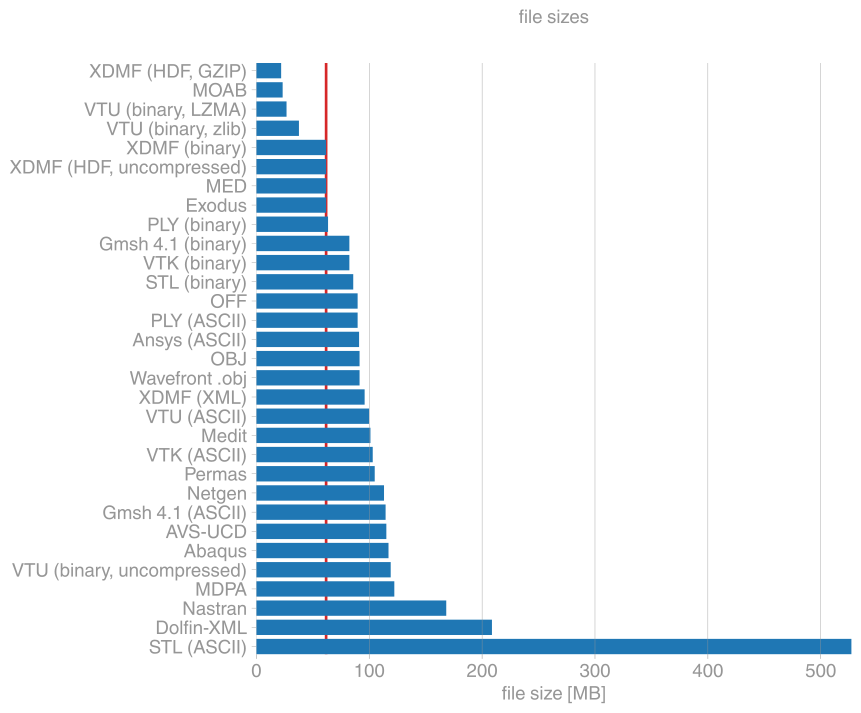
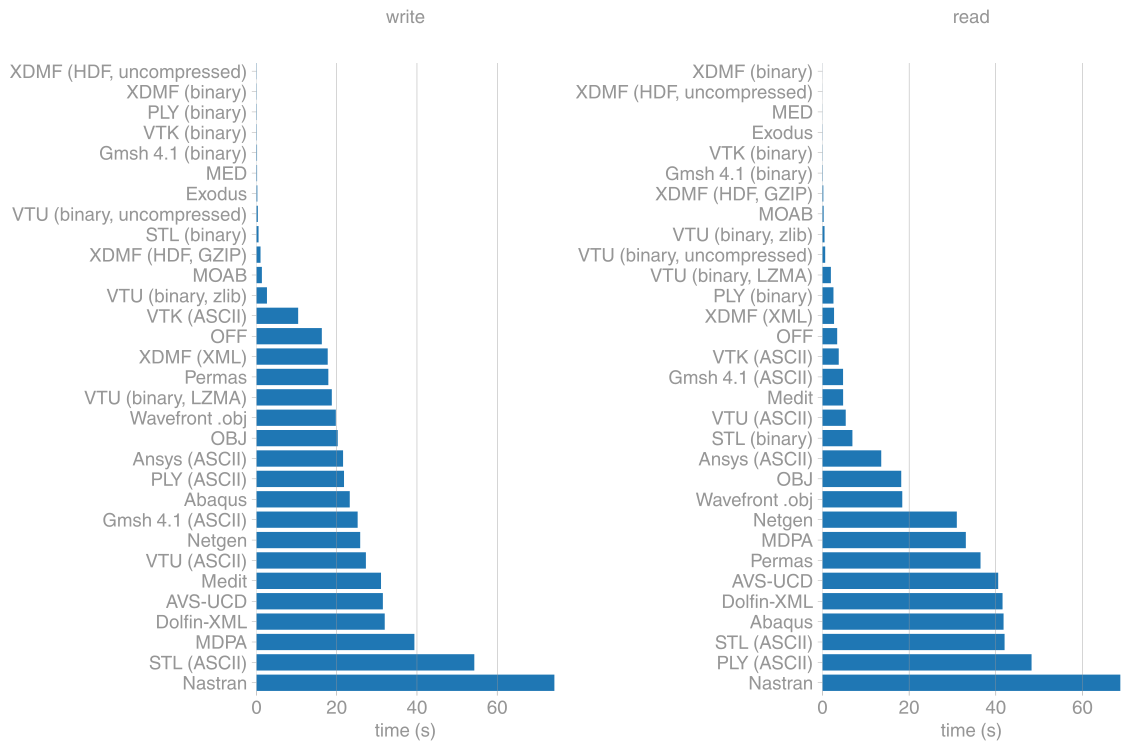
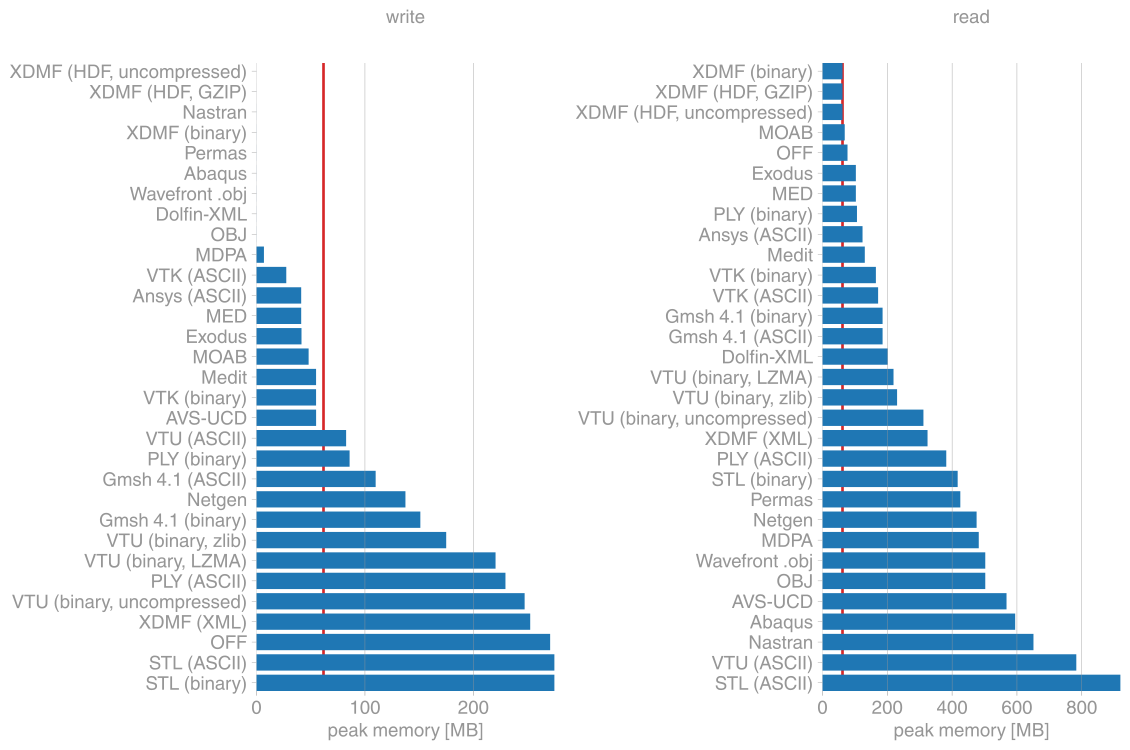
The comparisons here are for a tetrahedral mesh with about 400k points and 2M tetrahedra. The red lines mark the size of the mesh in memory.
File sizes
I/O speed
Maximum memory usage
Installation
meshio is available from the Python Package Index, so simply do
pip3 install meshio --user
to install.
Additional dependencies (netcdf4, h5py and lxml) are required for some of the
output formats and can be pulled in by
pip install meshio[all] --user
You can also install meshio from anaconda:
conda install -c conda-forge meshio
Testing
To run the meshio unit tests, check out this repository and type
pytest
License
meshio is published under the MIT license.
1 maintainer

Release files for meshio 3.3.1
For a detailed explanation of source distributions (sdists) and built distributions (wheels), please see the package formats documentation.
Source distribution (sdist)
| File | Size | Uploaded | |
|---|---|---|---|
| meshio-3.3.1.tar.gz | 86.8 kB | Details |
Built distribution (wheel)
| File | Interpreter | ABI | Platform | Reset |
|---|---|---|---|---|
| meshio-3.3.1-py3-none-any.whl | Python 3 | none | any | Details |
Total release size: 193.7 kB
Release files / meshio-3.3.1.tar.gz
| Download URL | meshio-3.3.1.tar.gz |
|---|---|
| Size | 86.8 kB |
| Tags | Source |
|
SHA-256 checksum How to use checksums |
c00371adfda84efd5557f400159aab4baaacb6abd374aac1ba2cf2d8fddc1862
|
|
BLAKE2b-256 checksum How to use checksums |
0b00738f6d4b03a65ae5864f239bdbbc0e2cfa99b1ecb36dc3c82b2593e96f0d
|
| Upload date | |
|
Uploaded using Trusted Publishing? What is trusted publishing? |
No |
| Uploaded via |
twine/3.1.1 pkginfo/1.5.0.1 requests/2.22.0 setuptools/42.0.2 requests-toolbelt/0.9.1 tqdm/4.40.2 CPython/3.7.5
|
Release files / meshio-3.3.1-py3-none-any.whl
| Download URL | meshio-3.3.1-py3-none-any.whl |
|---|---|
| Size | 106.9 kB |
| Tags | Python 3 |
|
SHA-256 checksum How to use checksums |
237305cabb1c8d72f4c4673ccf8bfd88f5495c04899fe57623339a386de3ad2f
|
|
BLAKE2b-256 checksum How to use checksums |
9f07cf58a295a06f4b672bfa9b87e7f34fc003d39f7e0f4fa6ae495f631d71dd
|
| Upload date | |
|
Uploaded using Trusted Publishing? What is trusted publishing? |
No |
| Uploaded via |
twine/3.1.1 pkginfo/1.5.0.1 requests/2.22.0 setuptools/42.0.2 requests-toolbelt/0.9.1 tqdm/4.40.2 CPython/3.7.5
|














