

Welcome to MetricFlow
See our latest updates in the Metricflow Changelog!
MetricFlow translates a simple metric definition into reusable SQL, and executes it against the SQL engine of your choice. This makes it easy to get consistent metric output broken down by attributes (dimensions) of interest.
MetricFlow is a computational framework for building and maintaining consistent metric logic. The name comes from the approach taken to generate metrics. Using the user-defined semantic model, a query is first compiled into a metric dataflow plan. The plan is then converted to an abstract SQL object model, optimized, and rendered to engine-specific SQL.
MetricFlow provides a set of abstractions that help you construct complicated logic and dynamically generate queries to handle:
- Complex metric types such as ratio, expression, and cumulative
- Multi-hop joins between fact and dimension sources
- Metric aggregation to different time granularities
- And so much more
As a developer, you can also use MetricFlow's interfaces to construct APIs for integrations to bring metrics into downstream tools in your data stack.
MetricFlow itself acts as a semantic layer, compiling the semantic information described in the MetricFlow spec to SQL that can be executed against the data warehouse and served to downstream applications. It acts as a proxy, translating metric requests in the form of “metrics by dimensions” into SQL queries that traverse the data warehouse and the underlying semantic structure to resolve every possible combination of metric and dimension.
Getting Started
Install MetricFlow
If you do not have postgres on your machine, first install Postgres:
- Postgres provides pre-built packages for download and installation
- Mac users might prefer to use Homebrew:
brew install postgresql
If you would like to visualize metric dataflow plans via CLI, install Graphviz:
- Graphviz provides pre-built packages for download and installation
- Mac users might prefer to use Homebrew:
brew install graphviz
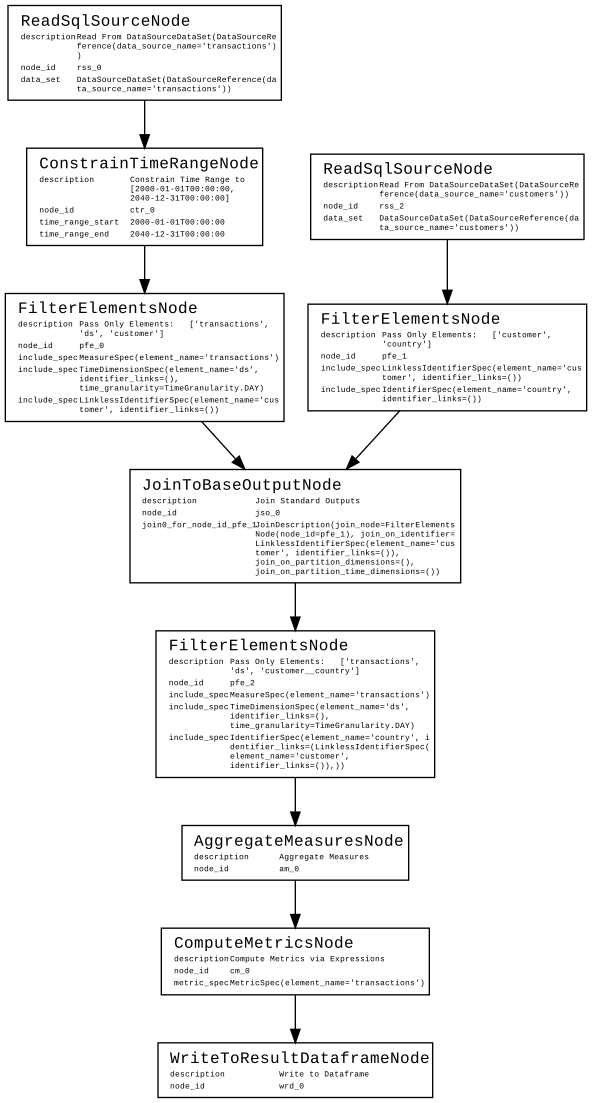
The visualizations are in an early state of development, but look similar to:
Then, proceed with the regular installation as follows:
MetricFlow can be installed from PyPi for use as a Python library with the following command:
pip install metricflow
Once installed, MetricFlow can be setup and connected to a data warehouse by following the instructions after issuing the command:
mf setup
To see what MetricFlow can do without custom configurations, start the tutorial by running:
mf tutorial
To get up and running with your own metrics, you should rely on MetricFlow’s documentation available at MetricFlow docs.
Tutorial
mf tutorial # optionally add `--skip-dw` if you have already confirmed your datawarehouse connection works
For reference, the tutorial steps are below:
🤓 Please run the following steps,

    1.  In '{$HOME}/.metricflow/config.yml', `model_path` should be '{$HOME}/.metricflow/sample_models'.
    2.  Try validating your data model: `mf validate-configs`
    3.  Check out your metrics: `mf list-metrics`
    4.  Check out dimensions for your metric `mf list-dimensions --metric-names transactions`
    5.  Query your first metric: `mf query --metrics transactions --dimensions ds --order ds`
    6.  Show the SQL MetricFlow generates: `mf query --metrics transactions --dimensions ds --order ds --explain`
    7.  Visualize the plan: `mf query --metrics transactions --dimensions ds --order ds --explain --display-plans`
        * This only works if you have graphviz installed - see README.
        * Aesthetic improvements to the visualization are TBD.
    8.  Add another dimension: `mf query --metrics transactions --dimensions ds,customer__country --order ds`
    9.  Add a higher date granularity: `mf query --metrics transactions --dimensions ds__week --order ds__week`
    10. Try a more complicated query: `mf query --metrics transactions,transaction_usd_na,transaction_usd_na_l7d --dimensions ds,is_large --order ds --start-time 2022-03-20 --end-time 2022-04-01`
        * You can also add `--explain --display-plans` to the above command.
    11. For more ways to interact with the sample models, go to ‘https://docs.transform.co/docs/metricflow/metricflow-tutorial’.
    12. Once you’re done, run `mf tutorial --skip-dw --drop-tables` to drop the sample tables.
Core Tenets
The framework relies on a set of core tenets:
- DRY (Don’t Repeat Yourself): This principle is the core objective of the underlying MetricFlow spec. Duplication of logic leads to incorrectly constructed metrics and should be avoided through thoughtfully-designed abstractions.
- SQL-centric compilation: Metric logic should never be constructed in a black-box. This SQL-centric approach to metric construction means that metric logic remains broadly accessible and introspectable.
- Maximal Flexibility: Construct any metric on any data model aggregated to any dimension. There are escape hatches, but we continually work to make them unnecessary.
Features
Key features of MetricFlow include:
- Metrics as Code: MetricFlow's metric spec allows you to define a wide-range of metrics through a clean set of abstractions that encourage DRY expression of logic in YAML and SQL.
- SQL Compilation: Generate SQL to build metrics, without the need to repeatedly express the same joins, aggregations, filters and expressions from your data warehouse in order to construct datasets for consumption.
- DW Connectors: Support for data warehouse (DW) connectors give the open-source community the power to contribute to DW-specific optimizations and support. DW connectors allow users to construct metric logic to various data warehouses.
- Command Line Interface (CLI): Pull data into a local context for testing and development workflows.
- Python Library: Pull metrics into local Python environments such as Jupyter or other analytical interfaces.
- Materializations: Define a set of metrics and a set of dimensions that you want to materialize to the data warehouse. This enables rapid construction of denormalized datasets back to the warehouse.
Contributing and Code of Conduct
This project will be a place where people can easily contribute high-quality updates in a supportive environment.
You might wish to read our code of conduct and engineering practices before diving in.
To get started on direct contributions, head on over to our contributor guide.
Resources
License
MetricFlow is open source software. The project relies on several licenses including AGPL-3.0-or-later and Apache (specified at folder level).
MetricFlow is built by Transform, the company behind the first metrics store.
2 maintainers


Metadata
2 maintainers
Release files for metricflow 0.110.1
For a detailed explanation of source distributions (sdists) and built distributions (wheels), please see the package formats documentation.
Source distribution (sdist)
| File | Size | Uploaded | Provenance | Actions |
|---|---|---|---|---|
| metricflow-0.110.1.tar.gz | 467.2 kB | Without provenance | Details for metricflow-0.110.1.tar.gz |
Built distribution (wheel)
| File | Interpreter | ABI | Platform | Actions Reset |
|---|---|---|---|---|
| metricflow-0.110.1-py3-none-any.whl | Python 3 | none | any | Details for metricflow-0.110.1-py3-none-any.whl |
Total release size: 1.4 MB
Release files / metricflow-0.110.1.tar.gz
| Download URL | metricflow-0.110.1.tar.gz |
|---|---|
| Size | 467.2 kB |
| Tags | Source |
|
SHA-256 checksum How to use checksums |
b8d0d54bcdc036b62b80306cf2cf5d50cff37089e2bf8280e17ea96123dd1536
|
|
BLAKE2b-256 checksum How to use checksums |
56e1e317f0ab445940d5dd27b0bacbff03103596522286c24395d4329bd0a636
|
| Upload date | |
|
Uploaded using Trusted Publishing? What is trusted publishing? |
No |
| Uploaded via |
poetry/1.1.14 CPython/3.8.13 Linux/5.15.0-1014-azure
|
Release files / metricflow-0.110.1-py3-none-any.whl
| Download URL | metricflow-0.110.1-py3-none-any.whl |
|---|---|
| Size | 962.8 kB |
| Tags | Python 3 |
|
SHA-256 checksum How to use checksums |
b2e29c3f6046ff84b9a0dab3461cb0ac397fba731aaa92f090bd886c44a4783a
|
|
BLAKE2b-256 checksum How to use checksums |
4cd6ee86457b0b4bcdb3e4f956efd88308ab21365f38290fa11679c7992c9c28
|
| Upload date | |
|
Uploaded using Trusted Publishing? What is trusted publishing? |
No |
| Uploaded via |
poetry/1.1.14 CPython/3.8.13 Linux/5.15.0-1014-azure
|
Security for metricflow 0.110.1
Provenance
Provenance describes where a file came from. On PyPI, provenance is shared via attestations, which provide a verifiable record of the build or publishing details. View details, limitations and caveats.
No provenance found
None of the files in this release were uploaded with provenance metadata.
A note on package security
PyPI is a repository for distributing packages, not a service for auditing them. While third-party security researchers and our staff do their best to detect and remove malicious packages, PyPI cannot guarantee the quality, security or suitability of any given package.
To learn more about protecting yourself from malicious actors, visit our package security documentation.














