






microfilm
This package is a collection of tools to display and analyze 2D and 2D time-lapse microscopy images. In particular it makes it straightforward to create figures containing multi-channel images represented in a composite color mode as done in the popular image processing software Fiji. It also allows to easily complete such figures with standard annotations like labels and scale bars. In case of time-lapse data, the figures are turned into animations which can be interactively browsed from a Jupyter notebook, saved in standard movie formats (mp4, gif etc.) and completed with time counters. Finally, figures and animations can easily be combined into larger panels. These main functionalities are provided by the microfilm.microplot and microfilm.microanim modules.
Following the model of seaborn, microfilm is entirely based on Matplotlib and tries to provide good defaults to produce good microcopy figures out-of-the-box. It however also offers complete access to the Matplotlib structures like axis and figures underlying the microfilm objects, allowing thus for the creation of arbitrarily complex plots.
Installation
You can install this package directly with pip using:
pip install microfilm
To get the latest stage of the package with yet unreleased features use:
pip install git+https://github.com/guiwitz/microfilm.git
To test the package via the Jupyter interface and the notebooks available here you can create a conda environment using the environment.yml file:
conda env create -f environment.yml
Optional installs
If you want to use the dataset submodule (see below in Additional functionalities) and need to handle multipage tiff files or nd2 files, use:
pip install "microfilm[multipage]"
or
pip install "microfilm[nd2]"
If you plan to not just use simple plotting but want to create animations, you need to install:
pip install "microfilm[animation]"
To install all options use:
pip install "microfilm[all]"
Simple plot
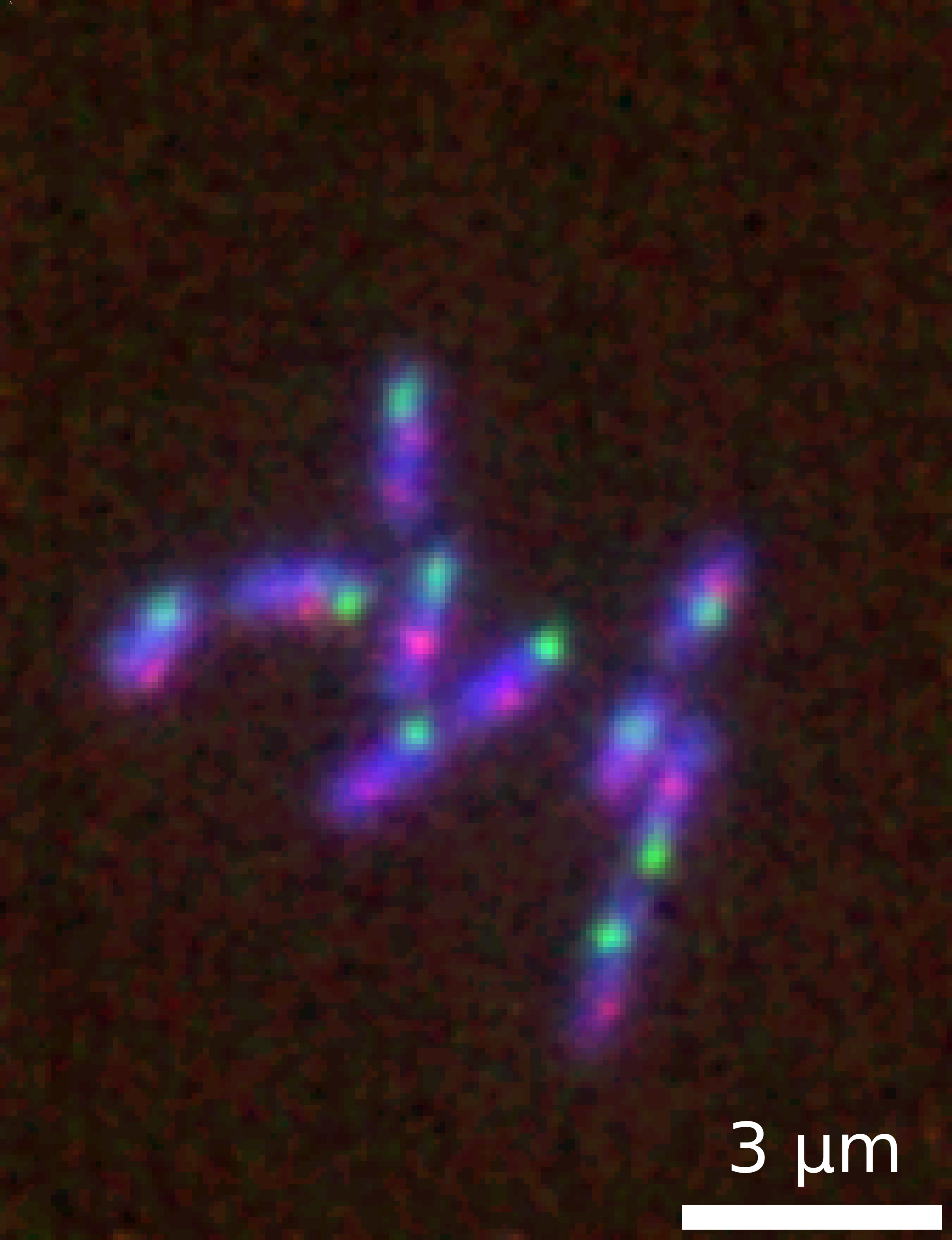
It is straightforward to create a ready-to-use plot of a multi-channel image dataset. In the following code snippet, we load a Numpy array of a multi-channel time-lapse dataset with shape CTXY (three channels). The figure below showing the time-point t=10 is generated in a single command with a few options and saved as a png:
import numpy as np
import skimage.io
from microfilm.microplot import microshow

image = skimage.io.imread('../demodata/coli_nucl_ori_ter.tif')
time = 10

microim = microshow(
    images=image[:, time, :, :], fig_scaling=5,
    cmaps=['pure_blue','pure_red', 'pure_green'],
    unit='um', scalebar_size_in_units=3, scalebar_unit_per_pix=0.065, scalebar_font_size=20,
    label_text='A', label_font_size=0.04)

microim.savefig('../illustrations/composite.png', bbox_inches = 'tight', pad_inches = 0, dpi=600)
Animation
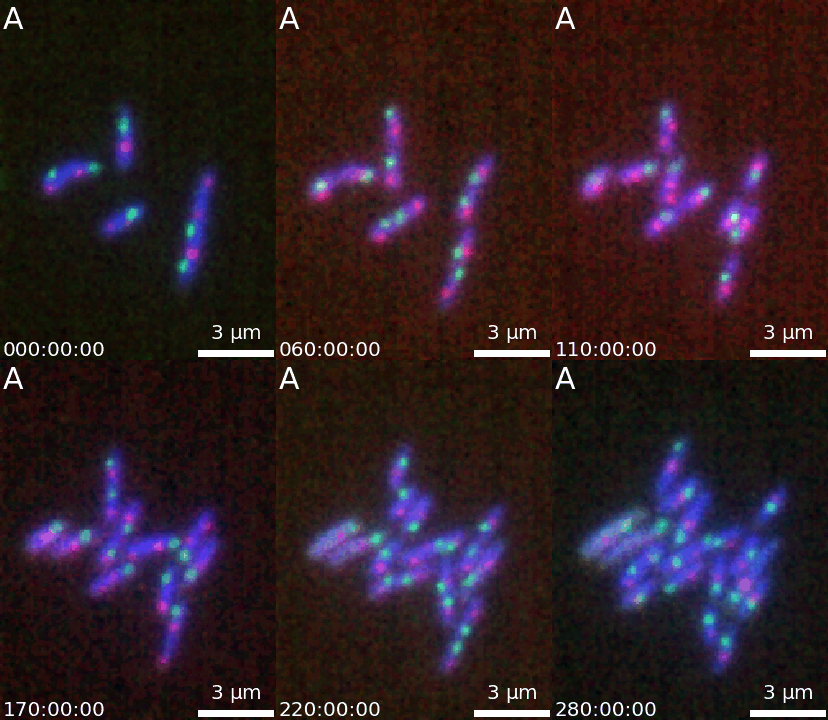
It is then easy to extend a simple figure into an animation as both objects take the same options. Additionally, a time-stamp can be added to the animation. This code generates the movie visible below:
import numpy as np
import skimage.io
from microfilm.microanim import Microanim

image = skimage.io.imread('../demodata/coli_nucl_ori_ter.tif')

microanim = Microanim(data=image, cmaps=['pure_blue','pure_red', 'pure_green'], fig_scaling=5,
                      unit='um', scalebar_size_in_units=3, scalebar_unit_per_pix=0.065,
                      scalebar_thickness=0.02, scalebar_font_size=20)

microanim.add_label('A', label_font_size=30)
microanim.add_time_stamp('T', 10, location='lower left', timestamp_size=20)

microanim.save_movie('../illustrations/composite_movie.gif', fps=15)
Panels
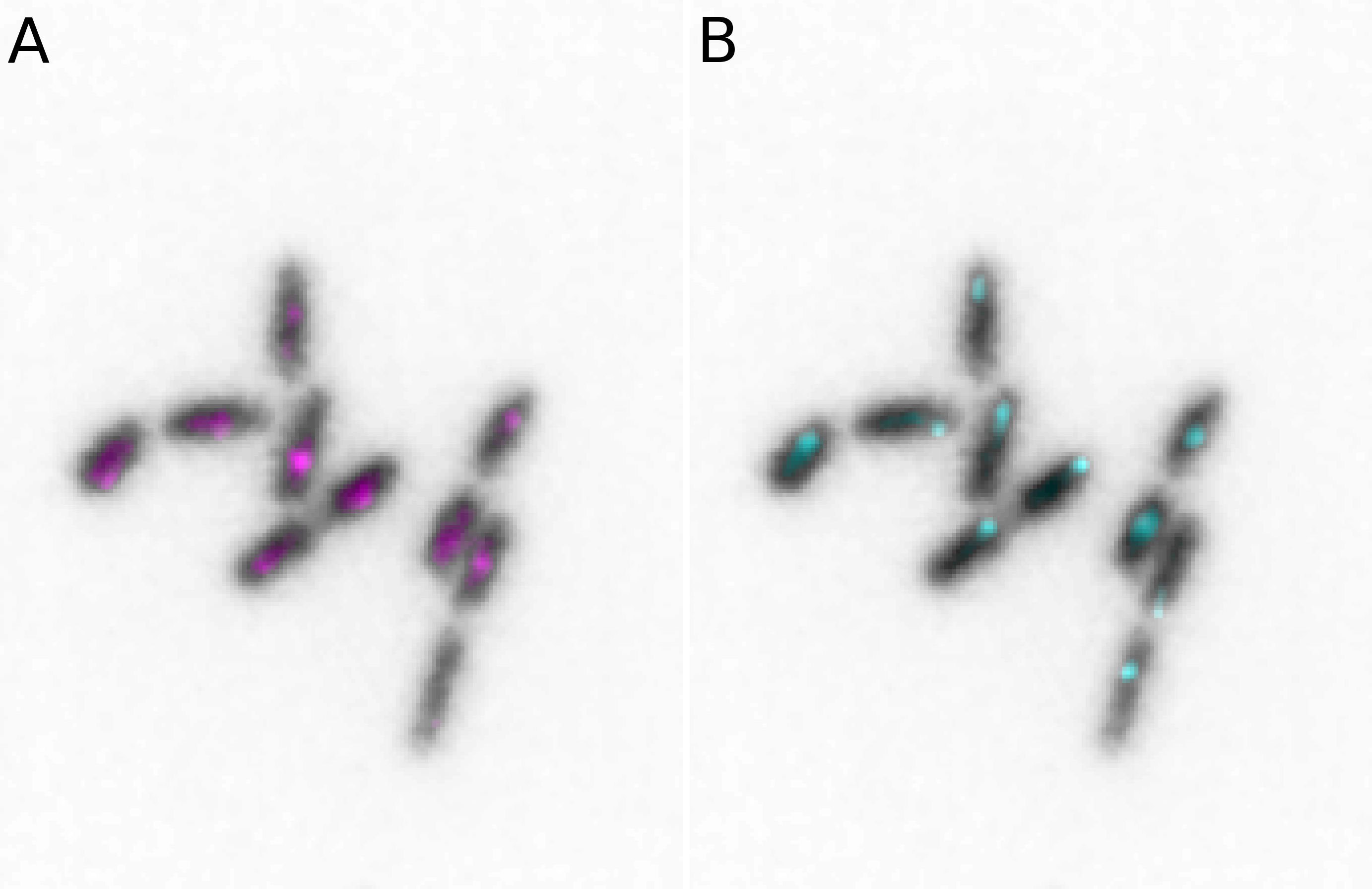
Both simple figures and animations can be combined into larger panels via the microplot.Micropanel and microanim.Microanimpanel objects. For example we can first create two figures microim1 and microim2 and then combine them into micropanel:
from microfilm import microplot
import skimage.io

image = skimage.io.imread('../demodata/coli_nucl_ori_ter.tif')

microim1 = microplot.microshow(images=[image[0, 10, :, :], image[1, 10, :, :]],
                               cmaps=['Greys', 'pure_magenta'], flip_map=[False, False],
                               label_text='A', label_color='black')
microim2 = microplot.microshow(images=[image[0, 10, :, :], image[2, 10, :, :]],
                               cmaps=['Greys', 'pure_cyan'], flip_map=[False, False],
                               label_text='B', label_color='black')

micropanel = microplot.Micropanel(rows=1, cols=2, figsize=[4,3])

micropanel.add_element(pos=[0,0], microim=microim1)
micropanel.add_element(pos=[0,1], microim=microim2)

micropanel.savefig('../illustrations/panel.png', bbox_inches = 'tight', pad_inches = 0, dpi=600)
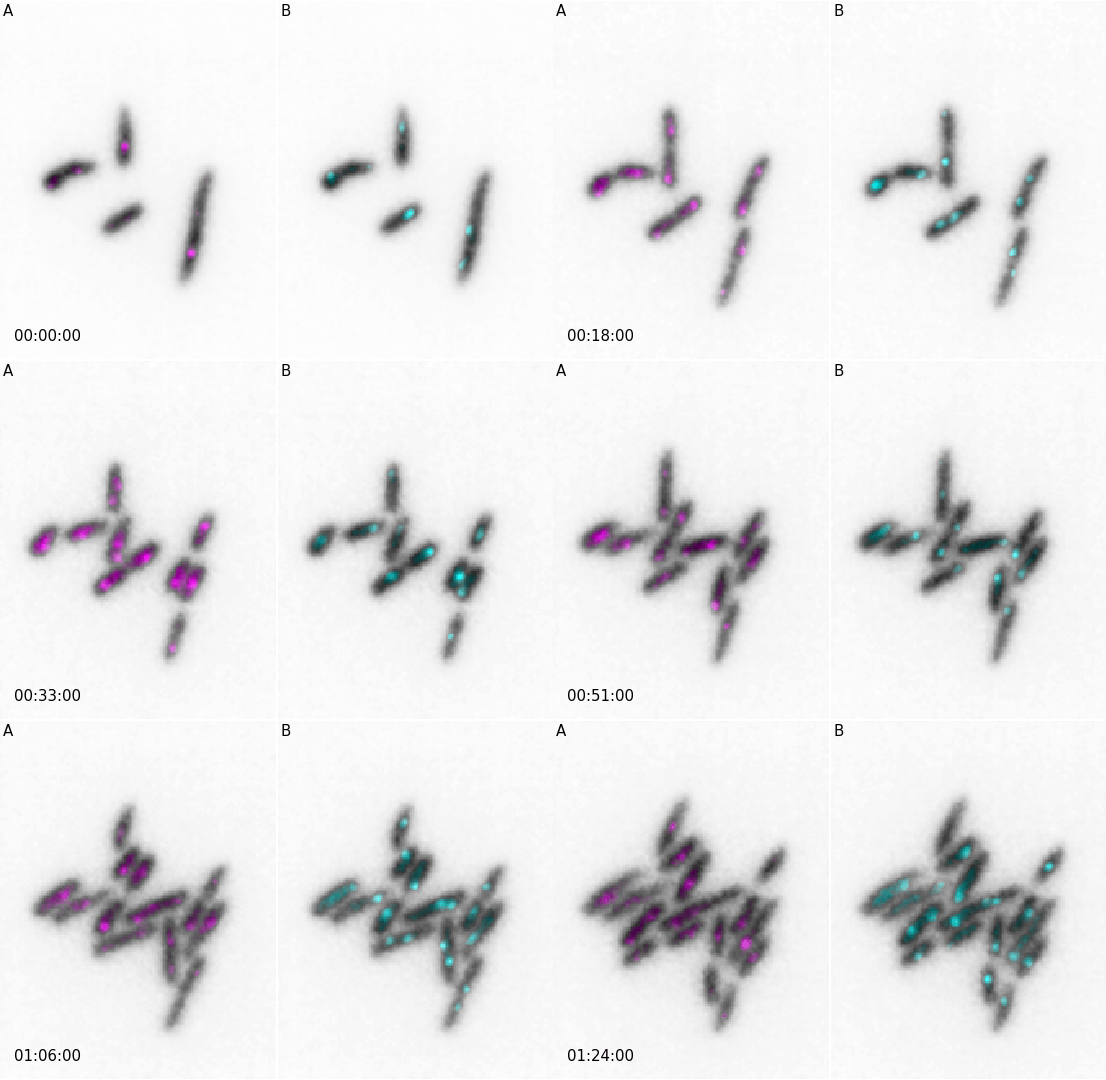
And similarly for animations:
from microfilm import microanim
import skimage.io

image = skimage.io.imread('../demodata/coli_nucl_ori_ter.tif')

microanim1 = microanim.Microanim(data=image[[0,1],::], cmaps=['Greys', 'pure_magenta'],
                                 flip_map=[False, False], label_text='A', label_color='black')
microanim2 = microanim.Microanim(data=image[[0,2],::], cmaps=['Greys', 'pure_cyan'],
                                 flip_map=[False, False], label_text='B', label_color='black')

microanim1.add_time_stamp(unit='T', unit_per_frame='3', location='lower-right', timestamp_color='black')

animpanel = microanim.Microanimpanel(rows=1, cols=2, figsize=[4,3])
animpanel.add_element(pos=[0,0], microanim=microanim1)
animpanel.add_element(pos=[0,1], microanim=microanim2)

animpanel.save_movie('../illustrations/panel.gif')
Additional functionalities
In addition to these main plotting capabilities, the packages also offers:
microfilm.colorify: a series of utility functions used by the main functions to create the composite color images. It contains functions to create colormaps, to turn 2D arrays into 3D-RGB arrays with appropriate colormaps etc.microfilm.dataset: a module offering a simple common data structure to handle multi-channel time-lapse data from multipage tiffs, series of tiff files, Nikon ND2 files, H5 and Numpy arrays. Requirement to use this module are at the moment very constrained (e.g. dimension order of Numpy arrays, name of H5 content etc.) but might evolve in the future.
Authors
This package has been created by Guillaume Witz, Microscopy Imaging Center and Science IT Support, University of Bern.
1 maintainer

Metadata
1 maintainer
Release files for microfilm 0.3.0
For a detailed explanation of source distributions (sdists) and built distributions (wheels), please see the package formats documentation.
Source distribution (sdist)
| File | Size | Uploaded | Provenance | Actions |
|---|---|---|---|---|
| microfilm-0.3.0.tar.gz | 84.0 MB | With provenance | Details for microfilm-0.3.0.tar.gz |
Built distribution (wheel)
| File | Interpreter | ABI | Platform | Actions Reset |
|---|---|---|---|---|
| microfilm-0.3.0-py3-none-any.whl | Python 3 | none | any | Details for microfilm-0.3.0-py3-none-any.whl |
Total release size: 84.0 MB
Release files / microfilm-0.3.0.tar.gz
| Download URL | microfilm-0.3.0.tar.gz |
|---|---|
| Size | 84.0 MB |
| Tags | Source |
|
SHA-256 checksum How to use checksums |
f06a458234a8bc5fec61eacf7523afbccde660e55b940deea58924a27a7b01ad
|
|
BLAKE2b-256 checksum How to use checksums |
4cd677eba72a829355717fd167a057ae86d2e815e3e8bfe59c0e05de0498cd33
|
| Upload date | |
|
Uploaded using Trusted Publishing? What is trusted publishing? |
Yes |
| Uploaded via |
twine/6.0.1 CPython/3.12.8
|
Provenance
Provenance describes where a file came from. On PyPI, provenance is shared via attestations, which provide a verifiable record of the build or publishing details. View details, limitations and caveats.


PyPI Publish Attestation
PyPI verified that this artifact, at this checksum, originated from the publisher listed below.
Signed by GitHub Actions, verified by PyPI on Dec 16, 2024.
Transparency logRelease files / microfilm-0.3.0-py3-none-any.whl
| Download URL | microfilm-0.3.0-py3-none-any.whl |
|---|---|
| Size | 25.2 kB |
| Tags | Python 3 |
|
SHA-256 checksum How to use checksums |
a7efcf3dff964fbcecfbab432d870a376dd52f40c23905cf1573e4eed90db35a
|
|
BLAKE2b-256 checksum How to use checksums |
f317504a5f77bc1998d18761008a400ef096ed66269fb87852aa2f6eb6e9d43c
|
| Upload date | |
|
Uploaded using Trusted Publishing? What is trusted publishing? |
Yes |
| Uploaded via |
twine/6.0.1 CPython/3.12.8
|
Provenance
Provenance describes where a file came from. On PyPI, provenance is shared via attestations, which provide a verifiable record of the build or publishing details. View details, limitations and caveats.
PyPI Publish Attestation
PyPI verified that this artifact, at this checksum, originated from the publisher listed below.
Signed by GitHub Actions, verified by PyPI on Dec 16, 2024.
Transparency logSecurity for microfilm 0.3.0
Provenance
Provenance describes where a file came from. On PyPI, provenance is shared via attestations, which provide a verifiable record of the build or publishing details. View details, limitations and caveats.
Full provenance
All 2 files in this release have been uploaded with provenance metadata.
Attestation for microfilm-0.3.0.tar.gz
PyPI Publish Attestation
PyPI verified that this artifact, at this checksum, originated from the publisher listed below.
Signed by GitHub Actions, verified by PyPI on Dec 16, 2024.
Transparency logA note on package security
PyPI is a repository for distributing packages, not a service for auditing them. While third-party security researchers and our staff do their best to detect and remove malicious packages, PyPI cannot guarantee the quality, security or suitability of any given package.
To learn more about protecting yourself from malicious actors, visit our package security documentation.














