
海萤物联网教程:MicroPython SDK
本文博客链接:http://blog.csdn.net/jdh99,作者:jdh,转载请注明.
欢迎前往社区交流:海萤物联网社区
简介
海萤物联网的MicroPython SDK是标准Python SDK移植到MicroPython的版本,标准版本可以查看文档:海萤物联网教程:Python SDK
MicroPython版本SDK在esp32中测试成功,esp8266资源太少不能运行。本文主要介绍MicroPython版本与标准版本的不同之处。
开源
安装
MicroPython版本的SDK已上传到pypi,包名是mciropython-tziot。此包依赖micropython-lagan,crcmodbus等若干个包。所以可以新建需求文件,然后一键全部下载。
新建文件requirements.txt,内容:
micropython-tziot
micropython-lagan
micropython-dcompy
crcmodbus
knocky
sbc
utzpy
输入命令下载包到指定目录:
pip install --target=d:/package -r requirements.txt
下载后文件如下图:
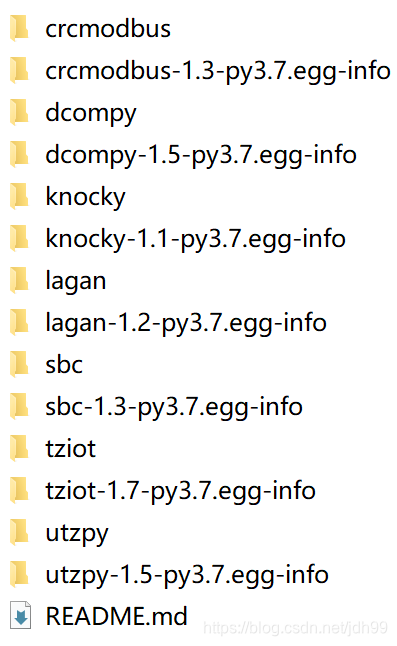
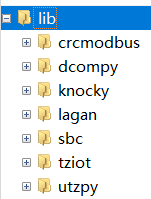
删除掉egg-info等无关文件,将所有文件夹都上传到设备的lib目录下,即可在设备中使用。
API
MicroPython版本的SDK和标准版本的API接口全部一致,新增了两个函数:
def connect_wifi(ssid: str, key=None, timeout=10) -> bool:
    """
    连接wifi
    :param ssid: wifi热点名
    :param key: wifi密码.不需要密码则填None
    :param timeout: 超时时间.单位:s
    :return: 返回True表示连接成功.False是连接失败
    """

def run(app):
    """运行应用程序.如果没有应用程序,app可填写None"""
connect_wifi:连接wifi
esp32等可通过wifi联网的设备,可调用本函数连接wifi。
run:运行用户应用程序
MicroPython在不同设备上函数嵌套深度各有不同,以esp32为例,主线程的嵌套深度为49,线程中只有10。所以将海萤物联网SDK部署在主线程,然后通过run函数开辟线程运行用户程序。所有用户代码需放在用户程序中。
示例
读取NTP时间
import tziot
import time


pipe = 0


def main():
    global pipe

    print('connect wifi')
    ok = tziot.connect_wifi('JDHOME_MASTER', 'QWERASDFZXCV')
    if ok is False:
        print('connect wifi failed')
        return
    print('connect wlan success')

    pipe = tziot.bind_pipe_net(0x2141000000010029, pwd', '0.0.0.0', 12025)
    tziot.run(app)


def app():
    global pipe

    while not tziot.is_conn():
        time.sleep(0.1)
    resp, err = tziot.call(pipe, 0x2141000000000004, 1, 2000, bytearray())
    print("err:", err, "time:", resp)


if __name__ == '__main__':
    main()
输出:
connect wifi
connect wlan success
err: 0 time: b'2021-04-06 05:23:00 +0800 CST'
对外提供灯控服务
开发板上有一个灯,通过GPIO2控制的。对外提供灯控服务,控制这个灯的亮灭。
| 服务号 | 服务 |
|---|---|
| 1 | 控制灯状态 |
- CON请求
| 字段 | 字节数 |
|---|---|
| 灯状态 | 1 |
- ACK应答:空
源码:
import tziot
import time

from machine import Pin


# 服务号
RID_LED = 1

pipe = 0
gpio = None
state = False


def main():
    global pipe, gpio

    gpio = Pin(2, Pin.OUT)
    gpio.on()

    print('connect wifi')
    ok = tziot.connect_wifi('JDHOME_MASTER', 'QWERASDFZXCV')
    if ok is False:
        print('connect wifi failed')
        return
    print('connect wlan success')

    pipe = tziot.bind_pipe_net(0x2141000000010029, pwd, '0.0.0.0', 12025)
    tziot.register(RID_LED, ledService)
    tziot.run(None)


def ledService(pipe: int, src_ia: int, req: bytearray) -> (bytearray, int):
    global state, gpio

    if len(req) != 1:
        return
    print('src ia:0x%x state:%d' % (src_ia, req[0]))

    if req[0]:
        gpio.on()
    else:
        gpio.off()

    return None, 0


if __name__ == '__main__':
    main()
用go语言编写一个测试程序控制灯灭然后3秒后亮:
pipe, _ = tziot.BindPipeNet(0x2141000000000401, pwd, "192.168.1.119", 12021)
for tziot.IsConn() == false{}

resp, err := tziot.Call(pipe, 0x2141000000010029, 1, 3000, []uint8{0})
fmt.Println("err:", err, "time:", string(resp))
time.Sleep(3 * time.Second)
resp, err = tziot.Call(pipe, 0x2141000000010029, 1, 3000, []uint8{1})
fmt.Println("err:", err, "time:", string(resp))
设备LED会灭3秒然后亮,并有打印输出:
connect wifi
connect wlan success
src ia:0x2141000000000401 state:0
src ia:0x2141000000000401 state:1
1 maintainer

Metadata
1 maintainer
Release files for micropython-tziot 1.3
For a detailed explanation of source distributions (sdists) and built distributions (wheels), please see the package formats documentation.
Source distribution (sdist)
| File | Size | Uploaded | Provenance | |
|---|---|---|---|---|
| micropython-tziot-1.3.tar.gz | 9.8 kB | Without provenance | Details |
Release files / micropython-tziot-1.3.tar.gz
| Download URL | micropython-tziot-1.3.tar.gz |
|---|---|
| Size | 9.8 kB |
| Tags | Source |
|
SHA-256 checksum How to use checksums |
37c9257c80b5f578e05dda213d6fad960705ab96e892ae0d5b54ceea3a06faef
|
|
BLAKE2b-256 checksum How to use checksums |
83e9e9343c590ed3b432b47c65ae09eb44e3ca1eddc9cfcfe75decadb3a97a98
|
| Upload date | |
|
Uploaded using Trusted Publishing? What is trusted publishing? |
No |
| Uploaded via |
twine/3.3.0 pkginfo/1.7.0 requests/2.25.1 setuptools/49.2.1 requests-toolbelt/0.9.1 tqdm/4.57.0 CPython/3.8.7
|
Security for micropython-tziot 1.3
Provenance
Provenance describes where a file came from. On PyPI, provenance is shared via attestations, which provide a verifiable record of the build or publishing details. View details, limitations and caveats.
No provenance found
None of the files in this release were uploaded with provenance metadata.
A note on package security
PyPI is a repository for distributing packages, not a service for auditing them. While third-party security researchers and our staff do their best to detect and remove malicious packages, PyPI cannot guarantee the quality, security or suitability of any given package.
To learn more about protecting yourself from malicious actors, visit our package security documentation.














