
minify-html
An HTML minifier meticulously optimised for both speed and effectiveness, available for Rust, Node.js, Python, Java, and Ruby.
- Advanced minification strategy beats other minifiers with only one pass.
- Uses zero memory allocations, SIMD searching, direct tries, and lookup tables.
- Well tested with a large test suite and extensive fuzzing.
- Natively binds to esbuild for super fast JS minification.
Performance
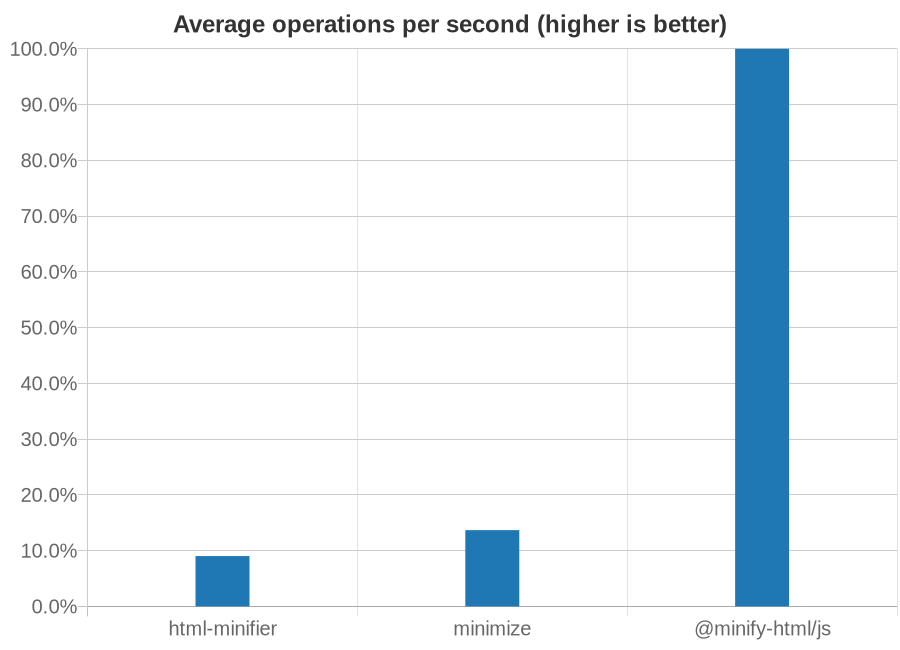
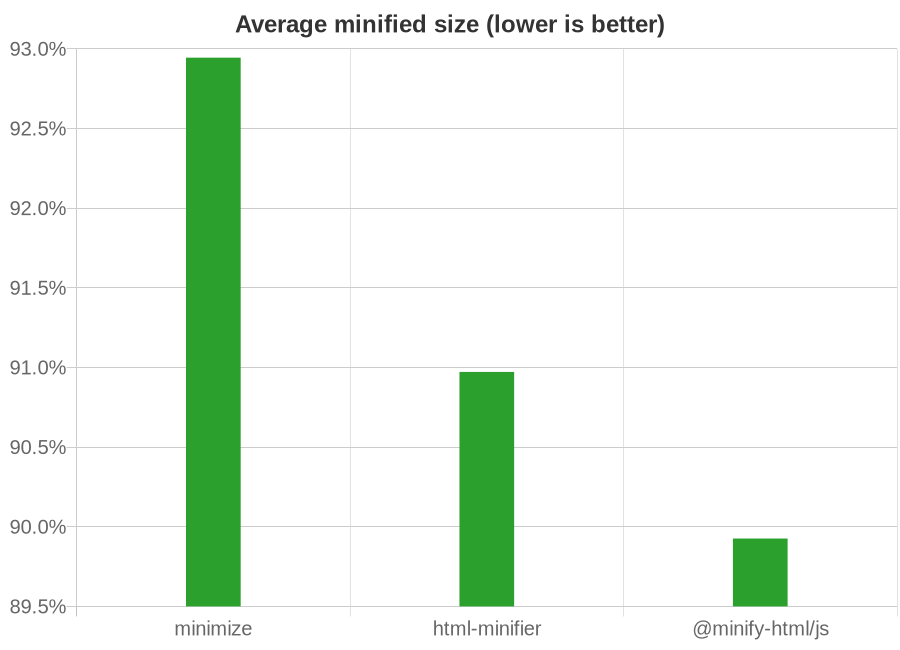
Comparison with html-minfier and minimize, run on the top web pages. See the breakdown here.
Usage
CLI
Precompiled binaries are available for x86-64 Linux, macOS, and Windows.
Get
Use
Use the --help argument for more details.
minify-html --src /path/to/src.html --out /path/to/output.min.html
API
Rust
Get
[dependencies]
minify-html = { version = "0.3.1", features = ["js-esbuild"] }
Building with the js-esbuild feature requires the Go compiler to be installed as well, to build the JS minifier.
If the js-esbuild feature is not enabled, cfg.minify_js will have no effect.
Use
use minify_html::{Cfg, Error, FriendlyError, in_place, copy, with_friendly_error, truncate};

fn main() {
    let mut code = b"<p>  Hello, world!  </p>".to_vec();
    let cfg = &Cfg {
        minify_js: false,
    };

    // Minifies a slice in-place and returns the new minified length,
    // but leaves any original code after the minified code intact.
    match in_place(&mut code, cfg) {
        Ok(minified_len) => {}
        Err(Error { error_type, position }) => {}
    };

    // Creates a vector copy containing only minified code
    // instead of minifying in-place.
    match copy(&code, cfg) {
        Ok(minified) => {}
        Err(Error { error_type, position }) => {}
    };

    // Minifies a vector in-place, and then truncates the
    // vector to the new minified length.
    match truncate(&mut code, cfg) {
        Ok(()) => {}
        Err(Error { error_type, position }) => {}
    };

    // Identical to `in_place` except with FriendlyError instead.
    // `code_context` is a string of a visual representation of the source,
    // with line numbers and position markers to aid in debugging syntax.
    match with_friendly_error(&mut code, cfg) {
        Ok(minified_len) => {}
        Err(FriendlyError { position, message, code_context }) => {
            eprintln!("Failed at character {}:", position);
            eprintln!("{}", message);
            eprintln!("{}", code_context);
        }
    };
}
Node.js
- Package: @minify-html/js
- Binding: N-API
- Platforms: Linux, macOS, Windows; Node.js 8.6.0 and higher
Get
Using npm:
npm i @minify-html/js
Using Yarn:
yarn add @minify-html/js
Use
const minifyHtml = require("@minify-html/js");

const cfg = minifyHtml.createConfiguration({ minifyJs: false });
const minified = minifyHtml.minify("<p>  Hello, world!  </p>", cfg);

// Alternatively, minify in place to avoid copying.
const source = Buffer.from("<p>  Hello, world!  </p>");
// This is a Buffer representing a slice of `source`, not newly allocated memory.
const minified = minifyHtml.minifyInPlace(source, cfg);
minify-html is also available for TypeScript:
import * as minifyHtml from "@minify-html/js";
import * as fs from "fs";

const cfg = minifyHtml.createConfiguration({ minifyJs: false });
const minified = minifyHtml.minify("<p>  Hello, world!  </p>", cfg);
// Or alternatively:
const minified = minifyHtml.minifyInPlace(fs.readFileSync("source.html"), cfg);
Java
- Package: in.wilsonl.minifyhtml
- Binding: JNI
- Platforms: Linux, macOS, Windows; Java 7 and higher
Get
Add as a Maven dependency:
<dependency>
  <groupId>in.wilsonl.minifyhtml</groupId>
  <artifactId>minify-html</artifactId>
  <version>0.3.1</version>
</dependency>
Use
import in.wilsonl.minifyhtml.MinifyHtml;

MinifyHtml.Configuration cfg = new MinifyHtml.Configuration.Builder()
    .setMinifyJs(false)
    .build();
try {
    String minified = MinifyHtml.minify("<p>  Hello, world!  </p>", cfg);
} catch (MinifyHtml.SyntaxException e) {
    System.err.println(e.getMessage());
}

// Alternatively, minify in place:
assert source instanceof ByteBuffer && source.isDirect();
MinifyHtml.minifyInPlace(source, cfg);
Python
- Package: minify-html
- Binding: PyO3
- Platforms: Linux, macOS, Windows; Python 3.5 and higher
Get
Add the PyPI project as a dependency and install it using pip or pipenv.
Use
import minify_html

try:
    minified = minify_html.minify("<p>  Hello, world!  </p>", minify_js=False)
except SyntaxError as e:
    print(e)
Ruby
- Package: minify_html
- Binding: Rutie
- Platforms: Linux, macOS; Ruby 2.5 and higher
Get
Add the library as a dependency to Gemfile or *.gemspec.
Use
require 'minify_html'

print MinifyHtml.minify("<p>  Hello, world!  </p>", { :minify_js => false })
Minification
Whitespace
minify-html has advanced context-aware whitespace minification that does things such as:
- Leave whitespace untouched in
preandcode, which are whitespace sensitive. - Trim and collapse whitespace in content tags, as whitespace is collapsed anyway when rendered.
- Remove whitespace in layout tags, which allows the use of inline layouts while keeping formatted code.
Methods
There are three whitespace minification methods. When processing text content, minify-html chooses which ones to use depending on the containing element.
Collapse whitespace
Applies to: any element except whitespace sensitive elements.
Reduce a sequence of whitespace characters in text nodes to a single space (U+0020).
| Before | After |
|---|---|
<p>↵
··The·quick·brown·fox↵
··jumps·over·the·lazy↵
··dog.↵
</p>
|
<p>·The·quick·brown·fox·jumps·over·the·lazy·dog.·</p>
|
Destroy whole whitespace
Applies to: any element except whitespace sensitive, content, content-first, and formatting elements.
Remove any text nodes between tags that only consist of whitespace characters.
| Before | After |
|---|---|
<ul>↵
··<li>A</li>↵
··<li>B</li>↵
··<li>C</li>↵
</ul>
|
<ul>↵
··<li>A</li><li>B</li><li>C</li>↵
</ul>
|
Trim whitespace
Applies to: any element except whitespace sensitive and formatting elements.
Remove any leading/trailing whitespace from any leading/trailing text nodes of a tag.
| Before | After |
|---|---|
<p>↵
··Hey,·I·<em>just</em>·found↵
··out·about·this·<strong>cool</strong>·website!↵
··<sup>[1]</sup>↵
</p>
|
<p>Hey,·I·<em>just</em>·found↵
··out·about·this·<strong>cool</strong>·website!↵
··<sup>[1]</sup></p>
|
Element types
minify-html recognises elements based on one of a few ways it assumes they are used. By making these assumptions, it can apply optimal whitespace minification strategies.
| Group | Elements | Expected children |
|---|---|---|
| Formatting | a, strong, and others |
Formatting elements, text. |
| Content | h1, p, and others |
Formatting elements, text. |
| Layout | div, ul, and others |
Layout elements, content elements. |
| Content-first | label, li, and others |
Like content but could be layout with only one child. |
Formatting elements
Whitespace is collapsed.
Formatting elements are usually inline elements that wrap around part of some text in a content element, so its whitespace isn't trimmed as they're probably part of the content.
Content elements
Whitespace is trimmed and collapsed.
Content elements usually represent a contiguous and complete unit of content such as a paragraph. As such, whitespace is significant but sequences of them are most likely due to formatting.
Before
<p>↵
··Hey,·I·<em>just</em>·found↵
··out·about·this·<strong>cool</strong>·website!↵
··<sup>[1]</sup>↵
</p>
After
<p>Hey,·I·<em>just</em>·found·out·about·this·<strong>cool</strong>·website!·<sup>[1]</sup></p>
Layout elements
Whitespace is trimmed and collapsed. Whole whitespace is removed.
These elements should only contain other elements and no text. This makes it possible to remove whole whitespace, which is useful when using display: inline-block so that whitespace between elements (e.g. indentation) does not alter layout and styling.
Before
<ul>↵
··<li>A</li>↵
··<li>B</li>↵
··<li>C</li>↵
</ul>
After
<ul><li>A</li><li>B</li><li>C</li></ul>
Content-first elements
Whitespace is trimmed and collapsed.
These elements are usually like content elements but are occasionally used like a layout element with one child. Whole whitespace is not removed as it might contain content, but this is OK for using as layout as there is only one child and whitespace is trimmed.
Before
<li>↵
··<article>↵
····<section></section>↵
····<section></section>↵
··</article>↵
</li>
After
<li><article><section></section><section></section></article></li>
Tags
Optional closing tags are removed.
Attributes
Any entities in attribute values are decoded, and then the shortest representation of the value is calculated and used:
- Double quoted, with any
"encoded. - Single quoted, with any
'encoded. - Unquoted, with
"/'first character (if applicable),>last character (if applicable), and any whitespace encoded.
class and d attributes have their whitespace (after any decoding) trimmed and collapsed.
Boolean attribute values are removed. Some other attributes are completely removed if their value is empty or the default value after any processing.
type attributes on script tags with a value equaling a JavaScript MIME type are removed.
If an attribute value is empty after any processing, everything but the name is completely removed (i.e. no =), as an empty attribute is implicitly the same as an attribute with an empty string value.
Spaces are removed between attributes if possible.
Entities
Entities are decoded if valid (see relevant parsing section) and their decoded characters as UTF-8 is shorter or equal in length.
Numeric entities that do not refer to a valid Unicode Scalar Value are replaced with the replacement character.
If an entity is unintentionally formed after decoding, the leading ampersand is encoded, e.g. &amp; becomes &amp;. This is done as & is equal to or shorter than all other entity representations of characters part of an entity ([&#a-zA-Z0-9;]), and there is no other conflicting entity name that starts with amp.
It's possible to get an unintentional entity after removing comments, e.g. &am<!-- -->p.
Left chevrons after any decoding in text are encoded to < if possible or < otherwise.
Comments
Comments are removed.
Ignored
Bangs, processing instructions, and empty elements are not removed as it is assumed there is a special reason for their declaration.
Parsing
Only UTF-8/ASCII-encoded HTML code is supported.
minify-html does no syntax checking or standards enforcement for performance and code complexity reasons.
For example, this means that it's not an error to have self-closing tags, declare multiple <body> elements, use incorrect attribute names and values, or write something like <br>alert('');</br>
However, there are some syntax requirements for speed and sanity.
Tags
Tag names are case sensitive. For example, this means that P won't be recognised as a content element, bR won't be considered as a void tag, and the contents of Script won't be parsed as JavaScript.
Tags must not be omitted. Void tags must not have a separate closing tag e.g. </input>.
Entities
Well-formed entities are decoded, including in attribute values.
They are interpreted as characters representing their decoded value. This means that 	 is considered a whitespace character and could be minified.
Malformed entities are interpreted literally as a sequence of characters.
If a named entity is an invalid reference as per the specification, it is considered malformed.
Numeric character references that do not reference a valid Unicode Scalar Value are considered malformed.
Attributes
Backticks (`) are not valid quote marks and not interpreted as such.
However, backticks are valid attribute value quotes in Internet Explorer.
Special handling of some attributes require case sensitive names and values. For example, CLASS won't be recognised as an attribute to minify, and type="Text/JavaScript" on a <script> will not be removed.
Script and style
script and style tags must be closed with </script> and </style> respectively (case sensitive).
minify-html does not handle escaped and double-escaped script content.
Issues and contributions
Pull requests and any contributions welcome!
If minify-html did something unexpected, misunderstood some syntax, or incorrectly kept/removed some code, raise an issue with some relevant code that can be used to reproduce and investigate the issue.
1 maintainer

Release files for minify-html 0.3.1
For a detailed explanation of source distributions (sdists) and built distributions (wheels), please see the package formats documentation.
Built distributions (wheels)
Total release size: 45.9 MB
Release files / minify_html-0.3.1-cp38-none-win_amd64.whl
| Download URL | minify_html-0.3.1-cp38-none-win_amd64.whl |
|---|---|
| Size | 5.0 MB |
| Tags | CPython 3.8 Windows x86-64 |
|
SHA-256 checksum How to use checksums |
0d85bb01e7c39b90902c53390c9a16149d68e2cb45ae0b7ca13590fc86592042
|
|
BLAKE2b-256 checksum How to use checksums |
f7c9dfb67d7c673576869ea85c303aa284cf124aa4b479045a04673e7b8bf406
|
| Upload date | |
|
Uploaded using Trusted Publishing? What is trusted publishing? |
No |
| Uploaded via |
twine/3.2.0 pkginfo/1.5.0.1 requests/2.24.0 setuptools/49.2.0 requests-toolbelt/0.9.1 tqdm/4.48.0 CPython/3.8.3
|
Release files / minify_html-0.3.1-cp38-cp38-manylinux1_x86_64.whl
| Download URL | minify_html-0.3.1-cp38-cp38-manylinux1_x86_64.whl |
|---|---|
| Size | 3.4 MB |
| Tags | CPython 3.8 Linux glibc 2.5+ x86-64 |
|
SHA-256 checksum How to use checksums |
0e6a1126ddb22b9f07846adcea135be3f855ff1b0b6481b054edb3669ae2659b
|
|
BLAKE2b-256 checksum How to use checksums |
3f098ccd29ff1d9ad6c3df22b3c64050f25d4f1cd8e826fc7baae8e6e81f6051
|
| Upload date | |
|
Uploaded using Trusted Publishing? What is trusted publishing? |
No |
| Uploaded via |
twine/3.2.0 pkginfo/1.5.0.1 requests/2.24.0 setuptools/49.2.0 requests-toolbelt/0.9.1 tqdm/4.48.0 CPython/3.8.3
|
Release files / minify_html-0.3.1-cp38-cp38-macosx_10_7_x86_64.whl
| Download URL | minify_html-0.3.1-cp38-cp38-macosx_10_7_x86_64.whl |
|---|---|
| Size | 3.1 MB |
| Tags | CPython 3.8 macOS 10.7+ x86-64 |
|
SHA-256 checksum How to use checksums |
bfd9e4f4cddb2b44651f49ff6b0f87b5138e1d60c616c123b355891c25bdfb93
|
|
BLAKE2b-256 checksum How to use checksums |
cc665b9027f8cf5b51574abbdc562e064fe70ee9c36d509ae08e763a7afaab9e
|
| Upload date | |
|
Uploaded using Trusted Publishing? What is trusted publishing? |
No |
| Uploaded via |
twine/3.2.0 pkginfo/1.5.0.1 requests/2.24.0 setuptools/49.2.0 requests-toolbelt/0.9.1 tqdm/4.48.0 CPython/3.8.3
|
Release files / minify_html-0.3.1-cp37-none-win_amd64.whl
| Download URL | minify_html-0.3.1-cp37-none-win_amd64.whl |
|---|---|
| Size | 5.0 MB |
| Tags | CPython 3.7 Windows x86-64 |
|
SHA-256 checksum How to use checksums |
0529a399e63a2a872d49d7f6f59099009adc19104b784a9718cdf3060d250b18
|
|
BLAKE2b-256 checksum How to use checksums |
417ae00f7c40d4f2325d1d4deaf59c68b4d3da8cc19499ae2e06e9321c1f72e6
|
| Upload date | |
|
Uploaded using Trusted Publishing? What is trusted publishing? |
No |
| Uploaded via |
twine/3.2.0 pkginfo/1.5.0.1 requests/2.24.0 setuptools/49.2.0 requests-toolbelt/0.9.1 tqdm/4.48.0 CPython/3.7.8
|
Release files / minify_html-0.3.1-cp37-cp37m-manylinux1_x86_64.whl
| Download URL | minify_html-0.3.1-cp37-cp37m-manylinux1_x86_64.whl |
|---|---|
| Size | 3.4 MB |
| Tags | CPython 3.7 CPython 3.7 pymalloc Linux glibc 2.5+ x86-64 |
|
SHA-256 checksum How to use checksums |
45fd66ae85e45f7fad16403953c8ade9df22ce92e4763c6015876c83a1852c32
|
|
BLAKE2b-256 checksum How to use checksums |
f961db5b0f4efb57b997544f8a7ce07c7e5c9cd6853c48f60f16ba70500b1ad0
|
| Upload date | |
|
Uploaded using Trusted Publishing? What is trusted publishing? |
No |
| Uploaded via |
twine/3.2.0 pkginfo/1.5.0.1 requests/2.23.0 setuptools/49.2.0 requests-toolbelt/0.9.1 tqdm/4.48.0 CPython/3.7.8
|
Release files / minify_html-0.3.1-cp37-cp37m-macosx_10_7_x86_64.whl
| Download URL | minify_html-0.3.1-cp37-cp37m-macosx_10_7_x86_64.whl |
|---|---|
| Size | 3.1 MB |
| Tags | CPython 3.7 CPython 3.7 pymalloc macOS 10.7+ x86-64 |
|
SHA-256 checksum How to use checksums |
525b704c72ab210a5817b8bc24db80288fa0499a1d8aa4ec9f01e2cb7717b970
|
|
BLAKE2b-256 checksum How to use checksums |
4ca84af5042a485c9719fb97124565ef717b84819f3901160745e7b6f30b2806
|
| Upload date | |
|
Uploaded using Trusted Publishing? What is trusted publishing? |
No |
| Uploaded via |
twine/3.2.0 pkginfo/1.5.0.1 requests/2.24.0 setuptools/49.2.0 requests-toolbelt/0.9.1 tqdm/4.48.0 CPython/3.7.8
|
Release files / minify_html-0.3.1-cp36-none-win_amd64.whl
| Download URL | minify_html-0.3.1-cp36-none-win_amd64.whl |
|---|---|
| Size | 5.0 MB |
| Tags | CPython 3.6 Windows x86-64 |
|
SHA-256 checksum How to use checksums |
bd9f62a42764d773fd6cb6bb9d33bb96753278ff39f314c0306c157699dce7e0
|
|
BLAKE2b-256 checksum How to use checksums |
3097d4335cdaf9fa93942326d97dc75b9ffa2c139f31652f59b0c878d2fd02dc
|
| Upload date | |
|
Uploaded using Trusted Publishing? What is trusted publishing? |
No |
| Uploaded via |
twine/3.2.0 pkginfo/1.5.0.1 requests/2.24.0 setuptools/49.2.0 requests-toolbelt/0.9.1 tqdm/4.48.0 CPython/3.6.8
|
Release files / minify_html-0.3.1-cp36-cp36m-manylinux1_x86_64.whl
| Download URL | minify_html-0.3.1-cp36-cp36m-manylinux1_x86_64.whl |
|---|---|
| Size | 3.4 MB |
| Tags | CPython 3.6 CPython 3.6 pymalloc Linux glibc 2.5+ x86-64 |
|
SHA-256 checksum How to use checksums |
767555dc08bb986086c6484dc6d6325123a732617b2c87668ae37c5c32c3ad5c
|
|
BLAKE2b-256 checksum How to use checksums |
805e55e4fa10c0cd4faee70a90c1ac502186559ed9c899c6f4c02e6b14b35bb2
|
| Upload date | |
|
Uploaded using Trusted Publishing? What is trusted publishing? |
No |
| Uploaded via |
twine/3.2.0 pkginfo/1.5.0.1 requests/2.24.0 setuptools/49.2.0 requests-toolbelt/0.9.1 tqdm/4.48.0 CPython/3.6.11
|
Release files / minify_html-0.3.1-cp36-cp36m-macosx_10_7_x86_64.whl
| Download URL | minify_html-0.3.1-cp36-cp36m-macosx_10_7_x86_64.whl |
|---|---|
| Size | 3.1 MB |
| Tags | CPython 3.6 CPython 3.6 pymalloc macOS 10.7+ x86-64 |
|
SHA-256 checksum How to use checksums |
a8bad4a7f1feec38b1f91972e59ba3fdf79cc4f02224bd6fb6ea672ae412b91f
|
|
BLAKE2b-256 checksum How to use checksums |
3ac897093d06072e5859715609b04fc781e74351940c771a294c96fa7487dc06
|
| Upload date | |
|
Uploaded using Trusted Publishing? What is trusted publishing? |
No |
| Uploaded via |
twine/3.2.0 pkginfo/1.5.0.1 requests/2.24.0 setuptools/49.2.0 requests-toolbelt/0.9.1 tqdm/4.48.0 CPython/3.6.11
|
Release files / minify_html-0.3.1-cp35-none-win_amd64.whl
| Download URL | minify_html-0.3.1-cp35-none-win_amd64.whl |
|---|---|
| Size | 5.0 MB |
| Tags | CPython 3.5 Windows x86-64 |
|
SHA-256 checksum How to use checksums |
de7c417d3b9a0e8ab3dd84e1d89f079cf6384635f6dc44ead1d941f2ad7233ef
|
|
BLAKE2b-256 checksum How to use checksums |
c0a713e1faa999e43c089409c2d261db1c248b59b8f0d5860606845cf850bd8a
|
| Upload date | |
|
Uploaded using Trusted Publishing? What is trusted publishing? |
No |
| Uploaded via |
twine/1.15.0 pkginfo/1.5.0.1 requests/2.24.0 setuptools/49.2.0 requests-toolbelt/0.9.1 tqdm/4.48.0 CPython/3.5.4
|
Release files / minify_html-0.3.1-cp35-cp35m-manylinux1_x86_64.whl
| Download URL | minify_html-0.3.1-cp35-cp35m-manylinux1_x86_64.whl |
|---|---|
| Size | 3.4 MB |
| Tags | CPython 3.5 CPython 3.5 pymalloc Linux glibc 2.5+ x86-64 |
|
SHA-256 checksum How to use checksums |
a5526525c1b1500853cafd66477b0aee76275184c53ba05495934351efd8b669
|
|
BLAKE2b-256 checksum How to use checksums |
9e946c4a2c490b5f20e68806bacbce0be3ff23d4e14b09371073892ad3f329c1
|
| Upload date | |
|
Uploaded using Trusted Publishing? What is trusted publishing? |
No |
| Uploaded via |
twine/1.15.0 pkginfo/1.5.0.1 requests/2.24.0 setuptools/49.2.0 requests-toolbelt/0.9.1 tqdm/4.48.0 CPython/3.5.9
|
Release files / minify_html-0.3.1-cp35-cp35m-macosx_10_7_x86_64.whl
| Download URL | minify_html-0.3.1-cp35-cp35m-macosx_10_7_x86_64.whl |
|---|---|
| Size | 3.1 MB |
| Tags | CPython 3.5 CPython 3.5 pymalloc macOS 10.7+ x86-64 |
|
SHA-256 checksum How to use checksums |
395804a61f4f8fe30d00951f733e4a538a93393d8fce7f71ebe11205eb7d20ce
|
|
BLAKE2b-256 checksum How to use checksums |
a534cef0ff3078bb2ea5bfca24916ec68beacf694007563f2756fe10bb481e38
|
| Upload date | |
|
Uploaded using Trusted Publishing? What is trusted publishing? |
No |
| Uploaded via |
twine/1.15.0 pkginfo/1.5.0.1 requests/2.24.0 setuptools/49.2.0 requests-toolbelt/0.9.1 tqdm/4.48.0 CPython/3.5.9
|














