

About
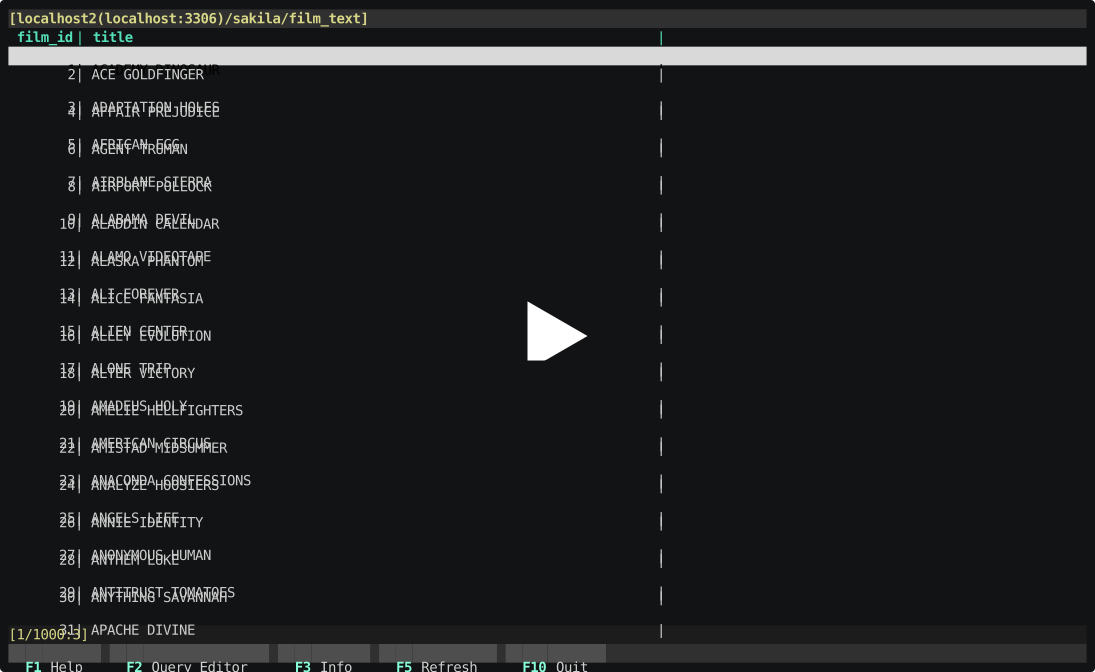
MitzaSQL is a free Python3 TUI MySQL client for Linux which aims to provide an easy-to-use console alternative to GUI clients. It is not meant to be a full-fledged GUI client, it only provides a read-only view of the database, though you can manipulate the data by using raw SQL queries. Some of the main features are:
- Manage multiple sessions
- View databases
- View list of tables, sql views & stored procedures in a database
- View rows in a table or sql view:
- Easily sort table data
- Filter table data using VIM-like commands (
:like,:gt,:lt,:in...) - SQL Query editor
- VIM style keyboard shortcuts
- VIM style commands with autocomplete support
- Macros support
MitzaSQL is heavily inspired by HeidiSQL and is licensed under MIT.
Demo
Website
https://vladbalmos.github.io/mitzasql
System requirements
- Linux
- Python3 (3.5 - 3.8)
- MySQL (5.5 - 8)
Security
By default MitzaSQL stores connection credentials in plain text files in your home directory. If security is a concern you could store the file in an encrypted partition/directory and specify the path to the session file when the program starts using the --sessions_file /path/to/sessions.ini flag. Another option would be not to persist the connection credentials when creating a new session.
Performance & known issues
Loading large datasets will slow down the rendering. By default, when opening a table screen only the first 100 records are loaded. The rest of the data is loaded automatically when scrolling down. When running queries with the SQL Query editor make sure you don't load a large number of records or else your user experience might suffer.
Columns resizing doesn't persist between sessions - will be fixed in the next version.
Dependencies
- urwid
- mysql-connector-python
- appdirs
Installation
pip3 install mitzasql
Development
Dependencies
- tox
- Docker
- docker-compose
Docker is only required for running the integration tests, testing during feature development can be done with tox alone (see below).
Run the development version
# If your currently installed Python version != 3.6 use TOXENV to specify it
tox -e dev
source .tox/dev/bin/activate
mitzasql
To run the program using a different Python version using Docker:
./run-in-docker.sh [python version] [mysql version]
# ./run-in-docker.sh 36 mysql55
tox -e dev
source .tox/dev/bin/activate
mitzasql
Tests
The testing process uses tox & Docker to automate running the tests against multiple versions of Python and MySQL servers.
During feature development Docker is not really necessary, I use it to run the test MySQL server but it that can be installed directly on the host. If that is the case, then new connection details have to be specified using environmental variables (see tests/db/connection_fixture.py for more details).
To run the tests during feature development run:
cp env.template .env # necessary if using Docker
docker-compose up # necessary if using Docker
tox
To generate code coverage:
./coverage.sh
Code coverage is generated in the htmlcov directory.
Integration testing
See test-mitzasql.sh for more info.
UI testing
See test-mitzasql-ui.sh for more info.
1 maintainer

Metadata
1 maintainer
Release files for mitzasql 1.1.0
For a detailed explanation of source distributions (sdists) and built distributions (wheels), please see the package formats documentation.
Source distribution (sdist)
| File | Size | Uploaded | Provenance | |
|---|---|---|---|---|
| mitzasql-1.1.0.tar.gz | 54.5 kB | Without provenance | Details |
Built distribution (wheel)
| File | Interpreter | ABI | Platform | Reset |
|---|---|---|---|---|
| mitzasql-1.1.0-py3-none-any.whl | Python 3 | none | any | Details |
Total release size: 170.8 kB
Release files / mitzasql-1.1.0.tar.gz
| Download URL | mitzasql-1.1.0.tar.gz |
|---|---|
| Size | 54.5 kB |
| Tags | Source |
|
SHA-256 checksum How to use checksums |
0c4d48b0f0c56213add8d7b5f13690d674a481a0f2db7baf33a208f4f3121d2f
|
|
BLAKE2b-256 checksum How to use checksums |
f42e001d6900f125238b6adc9bbd972d6e0c426d75630f9d098268f036f2c032
|
| Upload date | |
|
Uploaded using Trusted Publishing? What is trusted publishing? |
No |
| Uploaded via |
twine/1.13.0 pkginfo/1.5.0.1 requests/2.21.0 setuptools/41.0.1 requests-toolbelt/0.9.1 tqdm/4.32.1 CPython/3.6.8
|
Release files / mitzasql-1.1.0-py3-none-any.whl
| Download URL | mitzasql-1.1.0-py3-none-any.whl |
|---|---|
| Size | 116.3 kB |
| Tags | Python 3 |
|
SHA-256 checksum How to use checksums |
9cbf5bc25ef235d065b86a693065e69eee3c8b5b5b369ebada8a920890cc133d
|
|
BLAKE2b-256 checksum How to use checksums |
fa4e1b7de448f7b0ce2257b23d0d2f530dcbd29f7d8d6df6d5037c5b81cbacd7
|
| Upload date | |
|
Uploaded using Trusted Publishing? What is trusted publishing? |
No |
| Uploaded via |
twine/1.13.0 pkginfo/1.5.0.1 requests/2.21.0 setuptools/41.0.1 requests-toolbelt/0.9.1 tqdm/4.32.1 CPython/3.6.8
|
Security for mitzasql 1.1.0
Provenance
Provenance describes where a file came from. On PyPI, provenance is shared via attestations, which provide a verifiable record of the build or publishing details. View details, limitations and caveats.
No provenance found
None of the files in this release were uploaded with provenance metadata.
A note on package security
PyPI is a repository for distributing packages, not a service for auditing them. While third-party security researchers and our staff do their best to detect and remove malicious packages, PyPI cannot guarantee the quality, security or suitability of any given package.
To learn more about protecting yourself from malicious actors, visit our package security documentation.














